本章介绍 IC-7300 的频谱显示功能:SPECTRUM SCOPE 屏幕可实时显示所选波段上的信号活动及各信号的相对强度,支持 CENTER(中心)、FIX(固定)与 SCROLL(滚动)三种模式,并可开关瀑布图(Waterfall)显示。内容涵盖频谱屏幕的按键 与触摸操作(点触信号即可直接 QSY)、基准电平与扫描速度的调整、SCOPE SET 屏幕的各项设置(发射时显示、峰值保持、中 心 频 率 类 型 、 波 形 颜 色 、 瀑 布 图 尺 寸 与 固 定 边 界 等 ) , 以 及 显 示 音 频 频 谱 与 波 形 的 AUDIO SCOPE 屏 幕 。 This chapter describes the Scope function of the IC-7300: the SPECTRUM SCOPE screen displays the activity on the selected band and the relative strengths of various signals in real time, with Center, Fixed and Scroll modes and an optional Waterfall display. It covers the key and touch screen operations of the spectrum scope (touch a signal to directly QSY to it), adjusting the Reference level and the sweep speed, the SCOPE SET screen items such as the TX signal display, peak hold, center frequency type, waveform colors, Waterfall size and Fixed Edges, and the AUDIO SCOPE screen that displays the audio spectrum and waveform.
5-2 Spectrum scope screen · 频谱显示屏
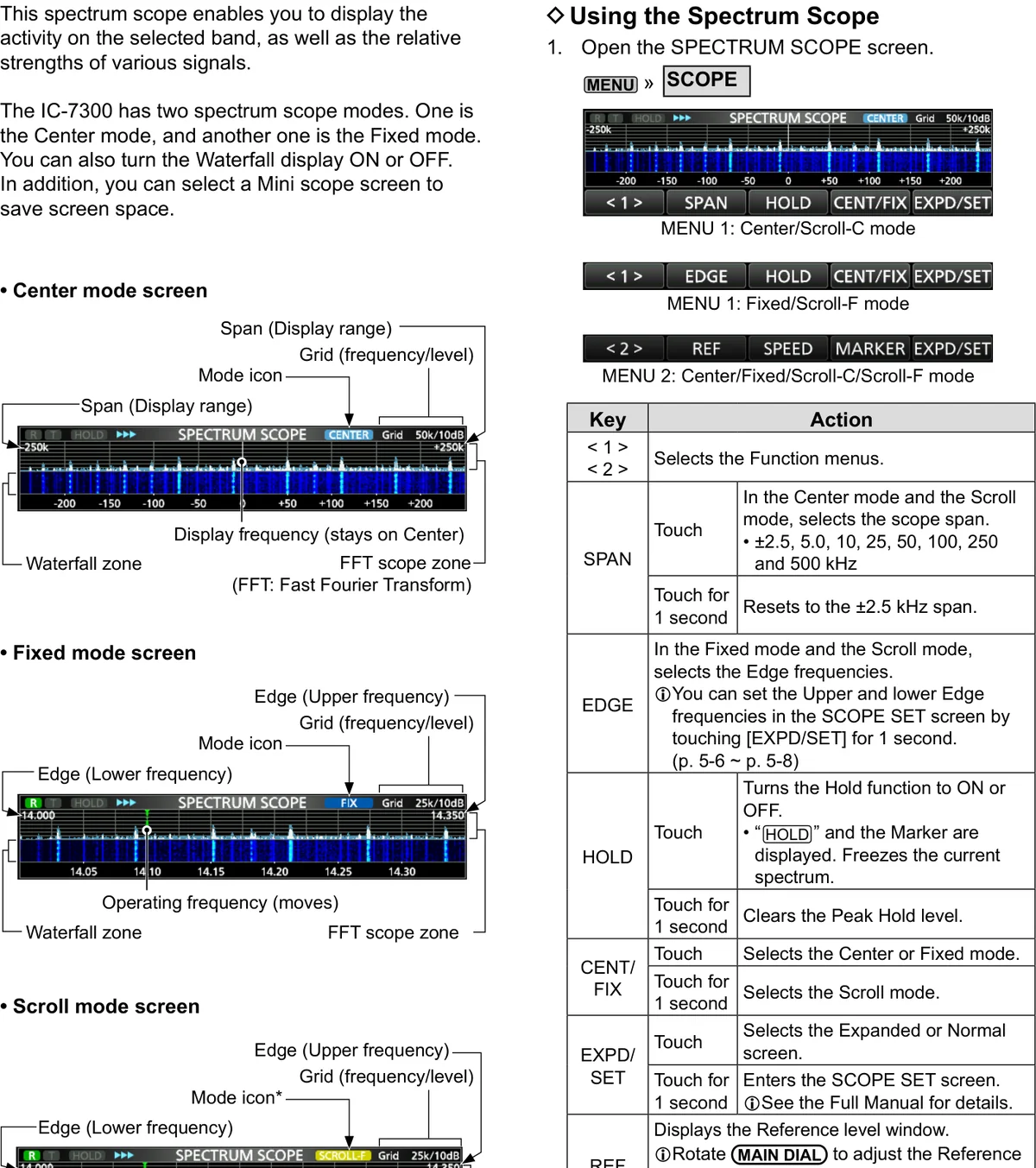
This spectrum scope enables you to display the activity on 该频谱显示可用来显示所选波段上的信号活动情况以及各 the selected band, as well as the relative strengths of 信号的相对强度。IC-7300 有两种频谱显示模式:一种是 various signals. The IC-7300 has two spectrum scope CENTER(中心)模式,另一种是 FIX(固定)模式。还可 modes. One is the Center mode, and another one is the 以开启或关闭瀑布图(Waterfall)显示。此外,还可选择 Fixed mode. You can also turn the Waterfall display ON or 迷你频谱屏(Mini scope screen)以节省屏幕空间。 OFF. In addition, you can select a Mini scope screen to save screen space.
使用频谱显示 Using the Spectrum Scope
1. 1 Open the SPECTRUM SCOPE screen. MENU » 1. 1 打开 SPECTRUM SCOPE 屏幕。MENU » SCOPE SCOPE
图 5-1 频谱显示屏:CENTER 模式屏幕、FIX 模式屏幕与 SCROLL 模式屏幕 Spectrum scope screen: Center mode, Fixed mode and Scroll mode screens
表 5-1 SPECTRUM SCOPE 屏幕的按键与触摸操作 SPECTRUM SCOPE screen key and touch operations
按键 动作 Key Action
< 1 > / < 2 选择功能菜单。
Selects the Function menus.
SPAN 触摸:在 CENTER 模式与 SCROLL 模式下,选择频谱跨度。 • ±2.5、5.0、10、25、50、100、250 和 500 kHz Touch: In the Center mode and the Scroll mode, selects the scope span. • ±2.5, 5.0, 10, 25, 50, 100, 250 and 500 kHz
触摸 1 秒:复位到 ±2.5 kHz 跨度。 Touch for 1 second: Resets to the ±2.5 kHz span.
EDGE 在 FIX 模式与 SCROLL 模式下,选择边界频率。 可在 SCOPE SET 屏幕中设置上、下边界频率:触摸 [EXPD/SET] 1 秒。(见 5-6 ~ 5-8 节) In the Fixed mode and the Scroll mode, selects the Edge frequencies. You can set the Upper and lower Edge frequencies in the SCOPE SET screen by touching [EXPD/SET] for 1 second. (p. 5-6 ~ p. 5-8)
HOLD 触摸:开启或关闭 Hold 功能。 • 显示 "HOLD" 和标记,并冻结当前频谱。 Touch: Turns the Hold function to ON or OFF. • "HOLD" and the Marker are displayed. Freezes the current spectrum.
触摸 1 秒:清除峰值保持(Peak Hold)电平。 Touch for 1 second: Clears the Peak Hold level.
CENT/ 触摸:选择 CENTER 或 FIX 模式。 FIX Touch: Selects the Center or Fixed mode.
触摸 1 秒:选择 SCROLL 模式。 Touch for 1 second: Selects the Scroll mode.
EXPD/ 触摸:选择扩展屏幕或普通屏幕。 SET Touch: Selects the Expanded or Normal screen.
触摸 1 秒:进入 SCOPE SET 屏幕。详细内容请参阅完整手册。 Touch for 1 second: Enters the SCOPE SET screen. See the Full Manual for details.
REF 显示基准电平(Reference level)窗口。 旋转 MAIN DIAL 调整基准电平。 再次触摸可关闭该窗口。 Displays the Reference level window. Rotate MAIN DIAL to adjust the Reference level. Touch again to close the window.
SPEED 选择扫描速度。 • "»»»"(FAST)、"»»"(MID)或 "»"(SLOW) Selects the sweep speed. • "»»»" (FAST), "»»" (MID), or "»" SLOW.
MARKER 选择标记。 Selects the Marker.
1. 2 To exit the SPECTRUM SCOPE screen, push EXIT . 1. 2 要 退 出 SPECTRUM SCOPE 屏 幕 , 请 按 EXIT 键。
FFT scope zone (FFT: Fast Fourier Transform) FFT 频谱区(FFT:快速傅里叶变换)
Waterfall zone 瀑布图区 Grid (frequency/level) 栅格(频率/电平)
Span (Display range) 跨度(显示范围)
Edge (Upper frequency) 上边界频率
Edge (Lower frequency) 下边界频率
Mode icon* 模式图标 *
Display frequency (stays on Center) 显示频率(保持在中心) Operating frequency (moves) 工作频率(移动)
* When in the SCROLL-C mode, "SCROLL" is displayed. * 处于 SCROLL-C 模式时,显示 "SCROLL" 图标。
MENU 1: Center/Scroll-C mode MENU 1:Center/Scroll-C 模式 MENU 1: Fixed/Scroll-F mode MENU 1:Fixed/Scroll-F 模式
MENU 2: Center/Fixed/Scroll-C/Scroll-F mode MENU 2:Center/Fixed/Scroll-C/Scroll-F 模式
5-3 Center mode · 中心模式
Displays signals around the operating frequency within the 在所选跨度范围内显示工作频率周围的信号。工作频率始 selected span. The operating frequency is always displayed 终显示在屏幕的中心。 in the center of the screen.
1. 1 Open the SPECTRUM SCOPE screen. MENU » 1. 1 打开 SPECTRUM SCOPE 屏幕。MENU » SCOPE SCOPE 2. 2 触摸 [CENT/FIX]。触摸 [CENT/FIX] 可在 Center 2. 2 Touch [CENT/FIX]. Touch [CENT/FIX] to toggle 与 Fixed 模式之间切换。 between the Center and Fixed modes. 3. 3 多次触摸 [SPAN] 选择频谱跨度。• 可选跨度: 3. 3 Touch [SPAN] several times to select the scope ±2.5、5.0、10、25、50、100、250 和 500 kHz。 span. • Selectable span: ±2.5, 5.0, 10, 25, 50, 100, 250 触摸 [SPAN] 1 秒可选择 ±2.5 kHz 跨度。 and 500 kHz. Touch [SPAN] for 1 second to select the ±2.5 kHz span.
固定模式 Fixed mode
Displays signals within a specified frequency range. The 在指定的频率范围内显示信号。使用该模式可轻松观察所 selected frequency band activity can easily be observed 选波段的活动情况。收发信机所覆盖的每个业余波段均可 using this mode. Four Fixed Edge bands can be set for each 设置 4 个固定边界(Fixed Edge)波段。设置方法详见 amateur frequency band covered by the transceiver. See 5-7 节。 page 5-7 for setting details.
1. 1 Open the SPECTRUM SCOPE screen. MENU » 1. 1 打开 SPECTRUM SCOPE 屏幕。MENU » SCOPE SCOPE 2. 2 触 摸 [CENT/FIX] 。 • 选 择 Fixed 模 式 时 显 示 2. 2 Touch [CENT/FIX]. • "FIX" is displayed when the "FIX"。触摸 [CENT/FIX] 可在 Center 与 Fixed 模式之 Fixed mode is selected. Touch [CENT/FIX] to toggle 间切换。 between the Center and Fixed modes. 3. 3 多 次 触 摸 [EDGE] , 直 到 选 中 所 需 的 固 定 边 界 3. 3 Touch [EDGE] several times until the desired Fixed (Fixed Edge)波段。当工作频率移出上边界或下边 Edge frequency band is selected. When the operating 界频率时,SPECTRUM SCOPE 屏幕上方的两侧会显 frequency moves outside the upper or lower Edge frequency, "<<" or ">>" is displayed in the upper side 示 "<<" 或 ">>"。
corners of the SPECTRUM SCOPE screen.
提示 TIP TIP "<<":频率在下边界之外。>>:频率在上边界之外。频率偏离更远时,显示 "Scope Out of Range"。 "<<": The frequency is outside the lower edge. ">>": The frequency is outside the higher edge. When the frequency goes further away, "Scope Out of Range" is displayed.
滚动模式 Scroll mode
Displays signals within a selected span. When the 在所选跨度范围内显示信号。当工作频率移出屏幕范围 operating frequency moves outside of the screen, the 时,显示的频率范围会自动滚动。 displayed frequency range is automatically scrolled.
1. 1 Display the SPECTRUM SCOPE screen. MENU » 1. 1 显示 SPECTRUM SCOPE 屏幕。MENU » SCOPE SCOPE 2. 2 触 摸 [CENT/FIX] 1 秒 选 择 Scroll 模 式 。 • 从 2. 2 Touch [CENT/FIX] for 1 second to select the Scroll Center 模式切换为 Scroll 模式时,显示 "SCROLL- mode. • When changing the Center mode to the Scroll C",可触摸 [SPAN] 改变频谱跨度。• 从 Fixed 模式切 mode, "SCROLL-C" is displayed. You can change the 换 为 Scroll 模 式 时 , 显 示 "SCROLL-F" , 可 触 摸 scope span by touching [SPAN]. • When changing the [EDGE] 改变边界频率。 Fixed mode to the Scroll mode, "SCROLL-F" is displayed. You can change the Edge frequencies by 3. 3 触摸 [CENT/FIX] 返回之前的模式。• 返回 Center touching [EDGE]. 模式时,频谱跨度不会恢复到之前的设置。• 返回
3. 3 Touch [CENT/FIX] to return to the previous mode. • Fixed 模式时,边界频率会恢复到上次选择的 "Fixed When returning to the Center mode, the scope span Edges"。如果工作频率高于上边界频率或低于下边界 does not return to the previous setting. • When 频率,SPECTRUM SCOPE 屏幕上方的两侧会显示 " returning to the Fixed mode, the Edge frequencies <<" 或 ">>"。 return to the last selected "Fixed Edges." If the operating frequency is above the upper Edge frequency, or below the lower Edge frequency, "<<" or ">>" is displayed in the upper side corners of the SPECTRUM SCOPE screen.
标记 Marker
The Marker displays the operating frequency in the 标记(Marker)用于在 SPECTRUM SCOPE 屏幕上指示 SPECTRUM SCOPE screen. 工作频率。
• About RX Marker: In the Fixed mode and the Scroll mode, • 关于 RX 标记:在 Fixed 模式与 Scroll 模式下,RX 标记 the RX Marker displays the operating frequency within a 在指定频率范围内指示工作频率,因此收发信机在频谱屏 specified frequency range. So, the transceiver always 幕中始终显示 RX 标记。在 Center 模式下,工作频率保持 displays the RX marker in the scope screen. In the Center 在屏幕中心,因此收发信机不显示 RX 标记。当 Hold 功 mode, the operating frequency stays on the Center of the 能开启时,会显示 RX 标记以指示工作频率的位置。 screen. Thus, the transceiver does not display the RX Marker. When the Hold function is ON, the RX Marker is displayed to indicate the operating frequency's location.
R: The RX marker R:RX 标记 • Marks the receive frequency. • 标记接收频率。 T: The TX marker T:TX 标记 • Marks the transmit frequency. • 标记发射频率。
5-4 Touch screen operation · 触摸屏操作
When you touch the FFT scope zone or the waterfall zone 在 SPECTRUM SCOPE 屏幕中触摸 FFT 频谱区或瀑布图 in the SPECTRUM SCOPE screen, the area will be zoomed 区时,该区域会被放大。随后在放大区域中触摸信号,即 in. Then you touch the signal in the zoomed area, you can 可把频率直接调谐到 SPECTRUM SCOPE 屏幕中的该信号 directly tune your frequency to the signal in the SPECTRUM 上。 SCOPE screen.
Holding down XFC changes the transmit frequency. 按住 XFC 可改变发射频率。
1. 1 Open the SPECTRUM SCOPE screen. MENU » 1. 1 打开 SPECTRUM SCOPE 屏幕。MENU » SCOPE SCOPE 2. 2 触摸频谱屏幕。• 所触摸区域周围的部分会被放 2. 2 Touch the Scope screen. • A section around the 大。请只触摸 FFT 频谱区或瀑布图区。 touched area is zoomed in. Touch only the FFT scope 3. 3 在放大区域中触摸信号。 zone or Waterfall zone. 4. 4 要 退 出 SPECTRUM SCOPE 屏 幕 , 请 按 EXIT 3. 3 Touch the signal in the zoomed area. 键。 4. 4 To exit the SPECTRUM SCOPE screen, push EXIT .
提示 TIP TIP • 在 Center 模式下,工作频率变为所触摸的点,该点并移动到屏幕中心。 • 在 Fixed 模式下,工作频率和标记变为所触摸的点。 • 触摸放大区域以外的位置可关闭放大窗口。 • In the Center mode, the operating frequency changes to the touched point, and the point moves to the screen center. • In the Fixed mode, the operating frequency and marker change to the touched point. • Touch out of the zoomed area to close the zoomed window.
迷你频谱屏 Mini scope screen
The Mini scope screen can be simultaneously displayed 迷你频谱屏可与其他功能显示屏(如 RTTY DECODE 屏幕 with another function displays, such as the RTTY DECODE 和 AUDIO SCOPE 屏幕)同时显示。 screen and the AUDIO SCOPE screen.
Push M.SCOPE to turn the Mini scope screen ON or OFF. 按 M.SCOPE 键可开启或关闭迷你频谱屏。
提示 TIP TIP 按住 M.SCOPE 键 1 秒可显示 SPECTRUM SCOPE 屏幕。
Hold down M.SCOPE for 1 second to display the SPECTRUM SCOPE screen.
图 5-2 触摸屏操作(左)与迷你频谱屏(右) Touch screen operation (left) and the Mini scope screen (right)
火腿经验 HAM TIP HAM TIP 在 Scope 屏幕上直接点触信号即可 QSY 过去,点住拖动可平移视图;CENTER / FIX / SCROLL 三种模式的设置位于 SET > Scope(SCOPE SET 屏幕)。 On the Scope screen, touch a signal to QSY directly to it, and touch and hold to drag and pan the view; the settings for the three CENTER / FIX / SCROLL modes are in SET > Scope (the SCOPE SET screen).
5-5 Adjusting the Reference level · 调整基准电平
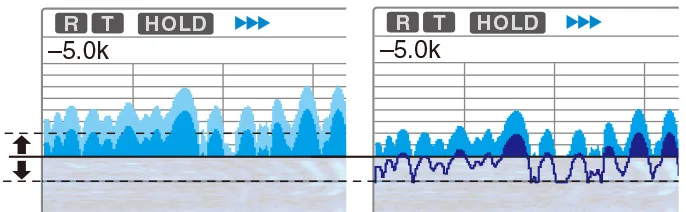
When monitoring a weak signal that is buried in the noise 当监听埋藏在噪声底中的微弱信号,或监听某一强信号而 floor, or monitoring a strong signal but some stronger 其附近还有更强的信号时,调整屏幕的基准电平 signals are nearby, adjusting the Reference level of the (Reference level)有助于看清这些信号。 screen helps to see these signals.
• Even if this setting is changed, it does not affect the • 即使更改该设置,也不会影响频谱显示的输入电平。 scope input level. • 调整基准电平时,瀑布图的信号强度看起来也会随之变 • When you adjust the Reference level, the signal strength 化。 for the waterfall also appears to change.
1. 1 Open the SPECTRUM SCOPE screen. MENU » 1. 1 打开 SPECTRUM SCOPE 屏幕。MENU » SCOPE SCOPE 2. 2 触摸 [<1>]。• 功能菜单切换为菜单 2。 2. 2 Touch [<1>]. • The function menu changes to 3. 3 触摸 [REF]。• 打开基准电平窗口。触摸 [REF] 可 Menu 2. 打开或关闭该窗口。 3. 3 Touch [REF]. • Opens the Reference level window. 4. 4 旋转 MAIN DIAL 调整电平。• 可调范围:–20.0 Touch [REF] to open or close the window. dB ~ +20.0 dB。触摸 [REF] 1 秒可选择 ±0.0 dB。 4. 4 Rotate MAIN DIAL to adjust the level. • Adjustable range: –20.0 dB ~ +20.0 dB. Touch [REF] for 5. 5 触摸 [REF]。• 关闭基准电平窗口。 1 second to select ±0.0 dB. 6. 6 要 退 出 SPECTRUM SCOPE 屏 幕 , 请 按 EXIT
5. 5 Touch [REF]. • Closes the Reference level window. 键。 6. 6 To exit the SPECTRUM SCOPE screen, push EXIT .
提示 TIP TIP 若将该设置调为正电平,所有信号的电平看起来都更强;反之,若调为负电平,所有信号的电平看起来都更弱。 If you adjust this setting to a positive level, all signal levels appear stronger. Or, if you adjust to a negative level, all signal levels appear weaker.
扫描速度 Sweep speed
Select the sweep speed to change the FFT scope refresh 选择扫描速度,可改变 FFT 频谱的刷新速度和瀑布图的速 speed and the waterfall speed. To change only the waterfall 度。若只需改变瀑布图速度,请在 Scope set 屏幕中选择 speed, select "Slow," "Mid," or "Fast" in the Scope set "Slow"、"Mid" 或 "Fast"。(见 5-7 节) screen. (p. 5-7)
1. 1 Open the SPECTRUM SCOPE screen. MENU » 1. 1 打开 SPECTRUM SCOPE 屏幕。MENU » SCOPE SCOPE 2. 2 触摸 [<1>]。• 功能菜单切换为菜单 2。 2. 2 Touch [<1>]. • The function menu changes to 3. 3 多次触摸 [SPEED],直到选中所需的扫描速度。• Menu 2. 可选速度:FAST、MID 或 SLOW。"»»»"、"»»" 或 3. 3 Touch [SPEED] several times until the desired "»" 分 别 表 示 FAST 、 MID 或 SLOW 。 SPECTRUM sweep speed is selected. • Selectable speeds: FAST, SCOPE 屏幕中央会弹出窗口,显示所选扫描速度并持 MID, or SLOW. "»»»," "»»," or "»" indicates FAST, MID, 续 1 秒。 or SLOW. A popup window appears in the center of SPECTRUM SCOPE screen and displays the selected 4. 4 要 退 出 SPECTRUM SCOPE 屏 幕 , 请 按 EXIT sweep speed for 1 second. 键。 4. 4 To exit the SPECTRUM SCOPE screen, push EXIT .
图 5-3 基准电平调整(左)与扫描速度(右) Adjusting the Reference level (left) and Sweep speed (right)
5-6 Scope set screen · SCOPE SET 屏幕
This Set screen is used to set the waveform color, Scope 该设置屏幕用于设置波形颜色、Fixed 模式的 Scope 频率 range for the Fixed mode, and so on. 范围等。
1. 1 Open the SPECTRUM SCOPE screen. MENU » 1. 1 打开 SPECTRUM SCOPE 屏幕。MENU » SCOPE SCOPE 2. 2 触摸 [EXPD/SET] 1 秒。 2. 2 Touch [EXPD/SET] for 1 second. 3. 3 选择所需的项目。 3. 3 Select the desired item. 4. 4 选择选项或设置电平。各设置项及其选项的详细说 4. 4 Select the option or set the level. See below for 明见下文。 details of the setting items and their options. 5. 5 要退出 SPECTRUM SCOPE 屏幕,请连按 EXIT 5. 5 To exit the SPECTRUM SCOPE screen, push EXIT 键数次。 several times.
提示 TIP TIP 触摸项目或其选项 1 秒会显示快捷菜单,然后触摸 "Default" 即可恢复到默认设置。 Touching the item or its option for 1 second displays the Quick menu, and then touch "Default" to reset to the default setting.
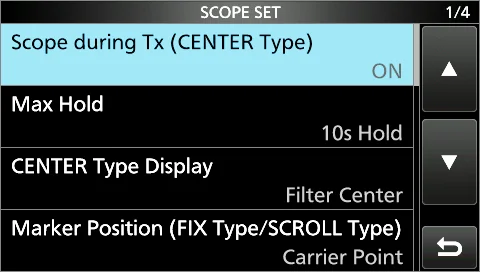
图 5-4 SCOPE SET 屏幕 SCOPE SET screen
表 5-2 SCOPE SET 屏幕设置项(一) SCOPE SET screen setting items (1)
项目 说明 Item Description
Scope during TX (CENTER 开启或关闭 TX 信号显示。 TYPE) 默认:ON Set the TX signal display to ON or OFF. (Default: ON)
Max Hold 选择峰值电平保持功能。 默认:10s Hold
• OFF:关闭峰值电平保持功能。 • 10s Hold:保持峰值频谱 10 秒。 • ON:连续保持峰值频谱。 Select the peak level holding function. (Default: 10s Hold) • OFF: Turns OFF the peak level holding function. • 10s Hold: Holds the peak spectrum for 10 seconds. • ON: Continuously holds the peak spectrum.
CENTER Type Display 选择 SPECTRUM SCOPE 屏幕的中心频率。(仅限 Center 模式) 默认:Filter Center
• Filter Center:将所选滤波器的中心频率显示在 SPECTRUM SCOPE 屏幕的中心。 • Carrier Point Center:将所选工作模式的载波点频率显示在 SPECTRUM SCOPE 屏幕的中心。 • Carrier Point Center (Abs. Freq.):除上述载波点中心设置外,实际频率还显示在屏幕底部。 Abs. Freq.:Absolute Frequency(绝对频率) Select the center frequency of the SPECTRUM SCOPE screen. (Only in the Center mode) (Default: Filter Center) • Filter Center: Displays the selected filter's center frequency at the center of the SPECTRUM SCOPE screen. • Carrier Point Center: Displays the carrier point frequency of the selected operating mode at the center of the SPECTRUM SCOPE screen. • Carrier Point Center (Abs. Freq.): In addition to the carrier point center setting above, the actual frequency is displayed at the bottom of the scope. Abs. Freq.: Absolute Frequency
Marker Position (Fix 选择 SPECTRUM SCOPE 屏幕上标记的位置。(仅限 Fixed 模式与 Scroll 模式) Type/Scroll Type) 默认:Carrier Point
• Filter Center:将标记显示在所选滤波器的中心频率上。 • Carrier Point:将标记显示在所选工作模式的载波点频率上。 Select the marker position on the SPECTRUM SCOPE screen. (Only in the Fixed mode and the Scroll mode) (Default: Carrier Point) • Filter Center: Displays the Marker on the selected filter's center frequency. • Carrier Point: Displays the Marker on the carrier point frequency of the selected operating mode.
项目 说明 Item Description
VBW 选择视频带宽(VBW)。 默认:Narrow
• Narrow:将 VBW 设为窄。 • Wide:将 VBW 设为宽。 选择 "Wide" 时,接收频谱上绘制的线会变宽,但无法绘制细小的边缘。 Select the Video Band Width (VBW). (Default: Narrow) • Narrow: Sets the VBW to narrow. • Wide: Sets the VBW to wide. When "Wide" is selected, the line drawn on the receive spectrum becomes wide. However, the small edge cannot be drawn.
Averaging 将 FFT 频谱波形平均功能设为 2~4 之间的数值或 OFF。 默认:OFF
• OFF:FFT 频谱屏幕按每次扫描时间刷新,该设置显示关键的频谱视图。 • 2、3、4:FFT 频谱屏幕对 2~4 次扫描取平均,平滑显示频谱。 Set the FFT scope waveform averaging function to between 2 and 4, or OFF. (Default: OFF) • OFF: The FFT scope screen refreshes at each sweep time. This setting displays the critical spectrum view. • 2, 3, 4: The FFT scope screen averages 2 to 4 sweeps to smoothly display the spectrum.
Waveform Type 选择 FFT 频谱屏幕的轮廓波形显示方式。 默认:Fill
• Fill:波形仅以颜色绘制。 • Fill + Line:波形以颜色绘制并带有轮廓。 Select the outline waveform display for the FFT scope screen. (Default: Fill) • Fill: The waveform is drawn only in color. • Fill + Line: The waveform is drawn in color with an outline.
5-7 Scope set screen (continued) · SCOPE SET 屏幕(续)
表 5-3 SCOPE SET 屏幕设置项(二) SCOPE SET screen setting items (2)
项目 说明 Item Description
Waterfall Size 选择扩展频谱屏幕中瀑布图的高度。 (Expand Screen) 默认:Mid
• Small:与普通频谱屏幕的高度相同,仅 FFT 频谱扩展。 • Mid:瀑布图高度按与 FFT 频谱相同的比例扩展。 • Large:仅瀑布图的高度扩展。 Select the Waterfall height in the Expand scope screen. (Default: Mid) • Small: The same height with the Normal scope screen, only the FFT scope expands. • Mid: The Waterfall height expands at the same ratio with the FFT scope. • Large: Only the Waterfall height expands.
Waterfall Peak Color 选择瀑布图显示峰值颜色的信号电平。信号电平较高时,按红、黄、绿、浅蓝、蓝和黑色的顺序显示。 Level 默认:Grid 8
• 可选:Grid 1 ~ Grid 8 Select the signal level that the Waterfall displays a peak color. Higher signal levels are Red, Yellow, Green, Light-blue, Blue and Black, in that order. (Default: Grid 8) • Selection: Grid 1 ~ Grid 8
Waterfall Marker 设置瀑布图标记自动隐藏功能的开 / 关。 Auto-hide 默认:ON
• OFF:瀑布图区中的标记保持显示。 • ON:标记在瀑布图区中停止移动 2 秒后隐藏。 Set the Waterfall Marker Auto-hide function to ON or OFF. (Default: ON) • OFF: The marker in the Waterfall zone stays ON. • ON: The marker in the Waterfall zone is hidden 2 seconds after you have stopped it in place.
Waterfall Display 为普通频谱屏幕或迷你频谱屏开启或关闭瀑布图显示。 默认:ON
在扩展频谱屏幕中,瀑布图始终显示。 • OFF:关闭瀑布图显示。 • ON:开启瀑布图显示。 Turn the Waterfall display ON or OFF for the normal scope or Mini scope screens. (Default: ON) In the Expanded scope screen, the Waterfall is always displayed. • OFF: Turns OFF the Waterfall display. • ON: Turns ON the Waterfall display.
Waterfall Speed 选择瀑布图速度。 默认:Mid
• Slow:将瀑布图速度设为 Slow。 • Mid:将瀑布图速度设为 Mid。 • Fast:将瀑布图速度设为 Fast。 Select the Waterfall speed. (Default: Mid) • Slow: Sets the waterfall speed to Slow. • Mid: Sets the waterfall speed to Mid. • Fast: Sets the waterfall speed to Fast.
项目 说明 Item Description
Waveform Color 设置当前接收信号的波形颜色。 (Current) 默认:(R) 172 (G) 191 (B) 191
触摸并选择 R(红)、G(绿)或 B(蓝)刻度,然后旋转 MULTI 将比例从 0 调整到 255。颜色显示在 RGB 刻度上方的框中。 Set the waveform color for the currently received signals. (Default: (R) 172 (G) 191 (B) 191) Touch and select the R (Red), G (Green) or B (Blue) scale, and then rotate MULTI to adjust the ratio from 0 to 255. The color is displayed in the box above the RGB scale.
Waveform Color (Line) 设置当前接收信号的波形轮廓颜色。 默认:(R) 56 (G) 24 (B) 0
触摸并选择 R(红)、G(绿)或 B(蓝)刻度,然后旋转 MULTI 将比例从 0 调整到 255。颜色显示在 RGB 刻度上方的框中。 Set the waveform outline color for the currently received signals. (Default: (R) 56 (G) 24 (B) 0) Touch and select the R (Red), G (Green) or B (Blue) scale, and then rotate MULTI to adjust the ratio from 0 to 255. The color is displayed in the box above the RGB scale.
Waveform Color (Max 设置接收信号最大电平的波形颜色。 Hold) 默认:(R) 45 (G) 86 (B) 115
触摸并选择 R(红)、G(绿)或 B(蓝)刻度,然后旋转 MULTI 将比例从 0 调整到 255。颜色显示在 RGB 刻度上方的框中。 Set the waveform color for the received signals maximum level. (Default: (R) 45 (G) 86 (B) 115) Touch and select the R (Red), G (Green) or B (Blue) scale, and then rotate MULTI to adjust the ratio from 0 to 255. The color is displayed in the box above the RGB scale.
图 5-5 SCOPE SET 屏幕(续):瀑布图与波形颜色设置项 SCOPE SET screen (continued): Waterfall and waveform color setting items
5-8 Scope set screen (continued) · SCOPE SET 屏幕(续)
固定边界 Fixed Edges
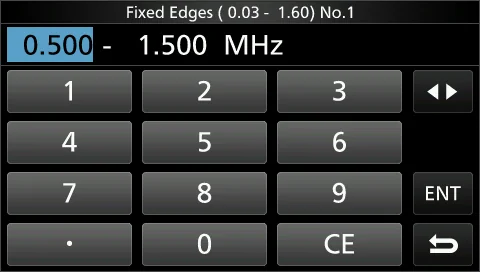
Set the Upper and Lower Edge frequencies for the Fixed 设置 Fixed 模式的上边界和下边界频率。每个波段分配 4 mode. Four edges are assigned to each band. 个边界。
Touch to select the Upper or Lower frequency, and then 触摸选择上边界或下边界频率,然后旋转 MULTI 选择频 rotate MULTI to select the frequency. 率。
You can also directly enter the edge frequency using the 也可以使用小键盘直接输入边界频率。 keypad.
提示 TIP TIP • 首先设置下边界频率。 • 上边界频率应设置在下边界频率的 1 MHz 范围以内。 • First set the lower Edge frequency. • Set the upper Edge frequency within 1 MHz of the lower frequency.
表 5-4 固定边界默认值(0.03 ~ 22.00 MHz) Fixed Edges default values (0.03 ~ 22.00 MHz)
波段 No.1 No.2 No.3 No.4 可设范围 Band No.1 No.2 No.3 No.4 Settable range
0.03 – 1.60 0.500–1.500 MHz 0.500–1.500 MHz 0.500–1.500 MHz 0.500–0.550 MHz 0.030 ~ 1.600 MHz
1.60 – 2.00 1.800–2.000 MHz 1.800–1.830 MHz 1.900–1.930 MHz 1.800–1.850 MHz 1.600 ~ 2.000 MHz
2.00 – 6.00 3.500–4.000 MHz 3.500–3.575 MHz 3.750–3.850 MHz 3.500–3.550 MHz 2.000 ~ 6.000 MHz
6.00 – 8.00 7.000–7.300 MHz 7.000–7.030 MHz 7.030–7.200 MHz 7.000–7.050 MHz 6.000 ~ 8.000 MHz
8.00 – 11.00 10.100–10.150 10.100–10.130 10.130–10.150 10.100–10.150 8.000 ~ 11.000 MHz MHz MHz MHz MHz
11.00 – 14.000–14.350 14.000–14.100 14.100–14.350 14.000–14.050 11.000 ~ 15.000 15.00 MHz MHz MHz MHz MHz
15.00 – 18.068–18.168 18.068–18.110 18.110–18.168 18.000–18.050 15.000 ~ 20.000 20.00 MHz MHz MHz MHz MHz
20.00 – 21.000–21.450 21.000–21.150 21.150–21.450 21.000–21.050 20.000 ~ 22.000 22.00 MHz MHz MHz MHz MHz
表 5-5 固定边界默认值(22.00 ~ 74.80 MHz) Fixed Edges default values (22.00 ~ 74.80 MHz)
波段 No.1 No.2 No.3 No.4 可设范围 Band No.1 No.2 No.3 No.4 Settable range
22.00 – 24.890–24.990 24.890–24.930 24.930–24.990 24.900–24.950 22.000 ~ 26.000 26.00 MHz MHz MHz MHz MHz
26.00 – 28.000–29.000 28.000–28.200 28.200–29.000 28.000–28.100 26.000 ~ 30.000 30.00 MHz MHz MHz MHz MHz
30.00 – 30.000–31.000 30.000–31.000 30.000–31.000 30.000–30.100 30.000 ~ 45.000 45.00 MHz MHz MHz MHz MHz
45.00 – 50.000–51.000 50.000–50.100 50.100–50.300 50.000–50.100 45.000 ~ 60.000 60.00 MHz MHz MHz MHz MHz
60.00 – 70.000–70.500 70.000–70.250 70.250–70.500 70.000–70.100 60.000 ~ 74.800 74.80 MHz MHz MHz MHz MHz
5-9 Audio scope screen · 音频频谱显示屏
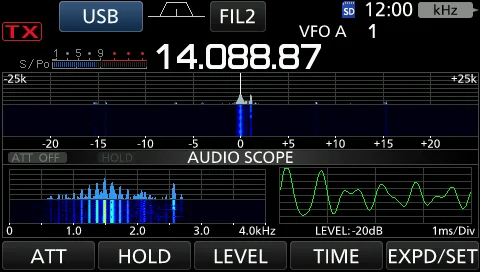
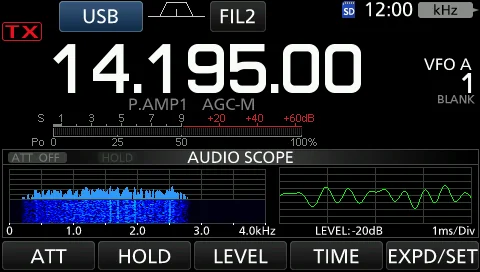
This audio scope enables you to display the received 该音频频谱显示可在 FFT 频谱上显示接收信号的频率分 signal's frequency component on the FFT scope, and its 量,并在示波器上显示其波形分量。FFT 频谱还带有瀑布 waveform components on the Oscilloscope. The FFT scope 图。 also has a waterfall.
1. 1 Open the AUDIO SCOPE screen. MENU » AUDIO 1. 1 打开 AUDIO SCOPE 屏幕。MENU » AUDIO
表 5-6 AUDIO SCOPE 屏幕的按键与触摸操作 AUDIO SCOPE screen key and touch operations
按键 动作 Key Action
ATT 触摸:选择 FFT 频谱的衰减器。 • 0(OFF)、10、20 或 30 dB Touch: Selects the attenuator for the FFT scope. • 0 (OFF), 10, 20, or 30 dB
触摸 1 秒:关闭衰减器。(0 dB) Touch for 1 second: Turns OFF the attenuator. (0 dB)
HOLD 将 Hold 功能设为 ON 或 OFF。 • 显示 "HOLD" 并冻结当前音频频谱。 Sets the Hold function to ON or OFF. • "HOLD" is displayed and freezes the current audio spectrum.
LEVEL 选择示波器电平。 • 0、–10、–20 或 –30 dB Selects the Oscilloscope level. • 0, –10, –20, or –30 dB
TIME 选择示波器扫描时间。 • 1、3、10、30、100 或 300 ms/Div(毫秒/格) Selects the Oscilloscope sweep time. • 1, 3, 10, 30, 100, or 300 ms/Div
EXPD/ 触摸:选择扩展屏幕或普通屏幕。 SET Touch: Selects the Expanded or Normal screen.
触摸 1 秒:进入 AUDIO SCOPE SET 屏幕。 Touch for 1 second: Enters the AUDIO SCOPE SET screen.
1. 2 To exit the AUDIO SCOPE screen, push EXIT . 1. 2 要退出 AUDIO SCOPE 屏幕,请按 EXIT 键。
图 5-6 AUDIO SCOPE 屏幕(左)与 AUDIO SCOPE SET 屏幕(右) AUDIO SCOPE screen (left) and AUDIO SCOPE SET screen (right)
Oscilloscope 示波器
Waterfall zone 瀑布图区 FFT Scope zone FFT 频谱区
AUDIO SCOPE SET 屏幕 Audio scope set screen
This Set mode is used to set the FFT scope waveform type, 该设置模式用于设置 FFT 频谱波形类型、颜色、瀑布图显 color, Waterfall display and oscilloscope waveform color. 示以及示波器波形颜色。
1. 1 Open the AUDIO SCOPE screen. MENU » AUDIO 1. 1 打开 AUDIO SCOPE 屏幕。MENU » AUDIO 2. 2 Touch [EXPD/SET] for 1 second. 2. 2 触摸 [EXPD/SET] 1 秒。 3. 3 Select the desired item. 3. 3 选择所需的项目。 4. 4 Rotate MULTI to select the option or set the 4. 4 旋转 MULTI 选择选项或设置电平,然后按下 level, and then push MULTI . • See below for details of MULTI 。• 各设置项及其选项的详细说明见下文。 the setting items and their options. 5. 5 要退出 AUDIO SCOPE 屏幕,请连按 EXIT 键数 5. 5 To exit the AUDIO SCOPE screen, push EXIT 次。 several times.
提示 TIP TIP 触摸项目或其选项 1 秒会显示快捷菜单,然后触摸 "Default" 即可恢复到默认设置。 Touching the item or its option for 1 second displays the Quick menu, and then touch "Default" to reset to the default setting.
表 5-7 AUDIO SCOPE SET 屏幕设置项 AUDIO SCOPE SET screen setting items
项目 说明 Item Description
FFT Scope Waveform 选择 FFT 频谱的波形类型。 Type 默认:Fill
• Fill:完整波形以颜色绘制。 • Line:仅绘制波形轮廓。 Select the type of waveform for the FFT scope. (Default: Fill) • Fill: The full waveform is drawn in color. • Line: Only the waveform outline is drawn.
FFT Scope Waveform 设置 FFT 频谱的波形颜色。 Color 默认:(R) 51 (G) 153 (B) 255
触摸并选择 R(红)、G(绿)或 B(蓝)刻度,然后旋转 MULTI 将比例从 0 调整到 255。颜色显示在 RGB 刻度上方的框中。 Set the waveform color for the FFT scope. (Default: (R) 51 (G) 153 (B) 255) Touch and select the R (Red), G (Green) or B (Blue) scale, and then rotate MULTI to adjust the ratio from 0 to 255. The color is displayed in the box above the RGB scale.
FFT Scope Waterfall 开启或关闭瀑布图显示。 Display 默认:ON
• OFF:关闭瀑布图显示。 • ON:开启瀑布图显示。 Turn the Waterfall display ON or OFF. (Default: ON) • OFF: Turns OFF the Waterfall display. • ON: Turns ON the Waterfall display.
Oscilloscope Waveform 设置示波器的波形颜色。 Color 默认:(R) 0 (G) 255 (B) 0
触摸并选择 R(红)、G(绿)或 B(蓝)刻度,然后旋转 MULTI 将比例从 0 调整到 255。颜色显示在 RGB 刻度上方的框中。 Set the waveform color for the Oscilloscope. (Default: (R) 0 (G) 255 (B) 0) Touch and select the R (Red), G (Green) or B (Blue) scale, and then rotate MULTI to adjust the ratio from 0 to 255. The color is displayed in the box above the RGB scale.
PART III
第三部分 语音录制、存储与扫描 Voice Recording, Memory & Scanning
把机器用顺手的三个功能群:SD 卡与语音录制(第 6、7、8 章)、存储与扫描(第 9、10 章)、以及天线调谐(第 11 章)。其中「第 8 章 SD 卡」是全书最该先读的功能章——它同时是固件升级、设置备份、录音存储的基础设施。
6 语音录制功能 Voice Recorder Functions
7 语音发送存储操作 Voice TX Memory Operation
8 SD 卡的使用 Using an SD Card
9 存储操作 Memory Operation
10 扫描 Scans
11 天线调谐器操作 Antenna Tuner Operation