本章列出 IC-7300 的全部选件,包括天线与天线的附属件(AH-5NV、AH-710、AH-740)、话筒(HM-219、SM-50、SM- 30)、外部扬声器(SP-33、SP-35、SP-38、SP-41)、线性放大器与天线调谐器(IC-PW2、AH-730)、安装附件(MB- 118 安装架、MB-123 提手)以及接口与软件(OPC-599 转接线、RS-BA1 遥控软件、ST-4003A/W 时钟校准软件)。本章还 给出 MB-118 安装架与 MB-123 提手的安装方法和注意事项。安装前请务必仔细阅读 PRECAUTIONS 安全注意事项,并只使用 原 厂 附 带 的 螺 栓 与 螺 钉 —— 过 长 的 螺 栓 可 能 损 坏 机 内 单 元 。 This chapter lists all of the IC-7300 options: antennas and antenna accessories (the AH-5NV, AH-710 and AH-740), microphones (the HM-219, SM-50 and SM-30), external speakers (the SP-33, SP-35, SP-38 and SP-41), a linear amplifier and an antenna tuner (the IC-PW2 and AH-730), mounting accessories (the MB-118 mounting bracket and the MB-123 carrying handle), and interface and software items (the OPC-599 adapter cable, the RS-BA1 remote control software and the ST-4003A/W time adjustment software). This chapter also describes how to mount the MB-118 and attach the MB-123, together with the related precautions. Carefully read the PRECAUTIONS before installation, and use only the supplied bolts and screws — bolts that are too long may damage the internal units.
17-2 Options · 选件一览
表 17-1 选件一览 Options list
型号 名称与说明 Model Name and description
AH-5NV nVIS 套件 与 AH-740 配合使用。 nVIS kit Use with the AH-740.
AH-710 折叠偶极天线 覆盖 2 至 30 MHz 的宽频率范围。 振子长度:24.5 m(80.4 ft) 同轴电缆(附带):30 m(98.4 ft) Folded dipole antenna Covers 2 to 30 MHz wide frequency range. Element length: 24.5 m (80.4 ft) Coaxial cable (supplied): 30 m (98.4 ft)
HM-219 话筒 与随机附带的话筒相同。 Microphone The same as supplied.
MB-118 安装架 用于将收发信机安装在车辆内部。 Mounting bracket To mount the transceiver inside a vehicle.
MB-123 提手 Carrying handle
OPC-599 转接线 将 13 针 ACC 连接器转接为 7 针 + 8 针 ACC 连接器。 Adapter cable 13-pin ACC connector adaptor to 7-pin + 8-pin ACC connectors.
SM-50 桌面话筒 带 [UP]/[DOWN] 开关的动圈话筒。 Desktop microphone Dynamic microphone with [UP]/[DOWN] switches.
SM-30 桌面话筒 带低频截止功能的桌面话筒。 Desktop microphone Desktop microphone with a low frequency cut function.
SP-41 外部扬声器 为固定台使用而设计。 External speaker Designed for base station operation.
AH-740 自动调谐天线 高性能自动高速调谐天线。 可选配 AH-5NV nVIS 套件。
型号 名称与说明 Model Name and description
Automatic tuning antenna High performance, automatic high-speed tuning antenna. The optional AH-5NV nVIS kit is available.
IC-PW2 线性放大器 HF/50 MHz 全波段 1 kW 线性放大器,内置自动天线调谐器。连接时需要选用 OPC-599。 Linear amplifier HF/50 MHz all band 1 kW linear amplifier including an automatic antenna tuner. An optional OPC-599 is required for the connection.
AH-730 自动天线调谐器 自动天线调谐器,可为固定、便携或车载的 HF/50 MHz 操作调谐长线天线。 Automatic antenna tuner Automatic antenna tuner to tune a long wire antenna for base, portable, or mobile HF/50 MHz operation.
RS-BA1 Version 2 IP 遥控软件 Version 2 IP remote control software
SP-33 外部扬声器 为固定台使用而设计。 External speaker Designed for base station operation.
SP-35 外部扬声器 为车载使用而设计。 External speaker Designed for mobile operation.
SP-38 外部扬声器 为与 IC-7300 匹配而设计。 External speaker Designed to match the IC-7300.
ST- 时钟校准软件(用于 Android 设备) 4003A Time adjustment software (For Android devices)
ST- 时钟校准软件(用于 Windows) 4003W Time adjustment software (For Windows)
火腿经验 HAM TIP HAM TIP 接 AH-730/AH-740 或 IC-PW2 时不要硬发高 SWR。天线调谐器有保护,但驻波比长期过高会伤功放;先查天馈(馈线接 头、驻波比、接地)。 Do not transmit hard into a high SWR when using the AH-730/AH-740 or the IC-PW2. The antenna tuner does offer protection, but a persistently high SWR will damage the linear amplifier. Check the antenna system first (feeder connections, SWR and grounding).
提示 NOTE NOTE 使用 RS-BA1 遥控收发信机时,务必遵守当地的法规。 To remotely control transceivers using the RS-BA1, BE SURE to comply with your local regulations.
火腿经验 HAM TIP HAM TIP CI-V 控制最大的坑是「两个虚拟 COM 端口」:USB 驱动会建两个串口,只有一个受 DTR/RTS 控制能用于 CI-V。用 RS- BA1 遥控时也一样,用设备管理器逐个试,或按第 20 章改端口号。 The biggest pitfall in CI-V control is the "two virtual COM ports": the USB driver creates two serial ports, and only one of them is controlled by DTR/RTS and can be used for CI-V. The same applies when controlling the radio with the RS-BA1 — try them one by one in the Device Manager, or change the port number as described in Chapter 20.
关于免费下载软件 About the free download software
You can download each manual and guide from the Icom 您可以从 Icom 网站下载各项手册与使用指南。 website. https://www.icomjapan.com/support/ https://www.icomjapan.com/support/ 使用之前,请阅读各项手册与使用指南,并按照其中的说 Before using, read each manual and guide, and use it 明使用。 according to the instructions.
提示 NOTE NOTE 为增加或扩展功能、提升性能,软件版本可能会升级。在更新软件版本之前,请参阅 Icom 网站上所载的说明与注意事项。 To add or expand a function, or to improve the performance, the software version may be upgraded. Before you update your software version, see the instructions and cautions described on the Icom website.
火腿经验 HAM TIP HAM TIP 升级软件(固件)前先把设置存到 SD 卡(Save Setting Data),万一升级失败可恢复;升级全程勿断市电,用稳压 13.8 V 电源,笔记本用户接满电电池。升级途中绝不能断电或拔 SD 卡,否则可能变砖;升级失败后的恢复办法见原厂固件说明。 Save your settings onto an SD card (Save Setting Data) before updating the software (firmware) so that you can recover if the update fails. Never cut the mains power during the update; use a regulated 13.8 V supply, and laptop users should connect a fully charged battery. NEVER cut the power or remove the SD card during the update, or the radio may become a "brick"; for the recovery procedure after a failed update, refer to the factory firmware instructions.
17-3 Mounting the MB-118 · 安装 MB-118
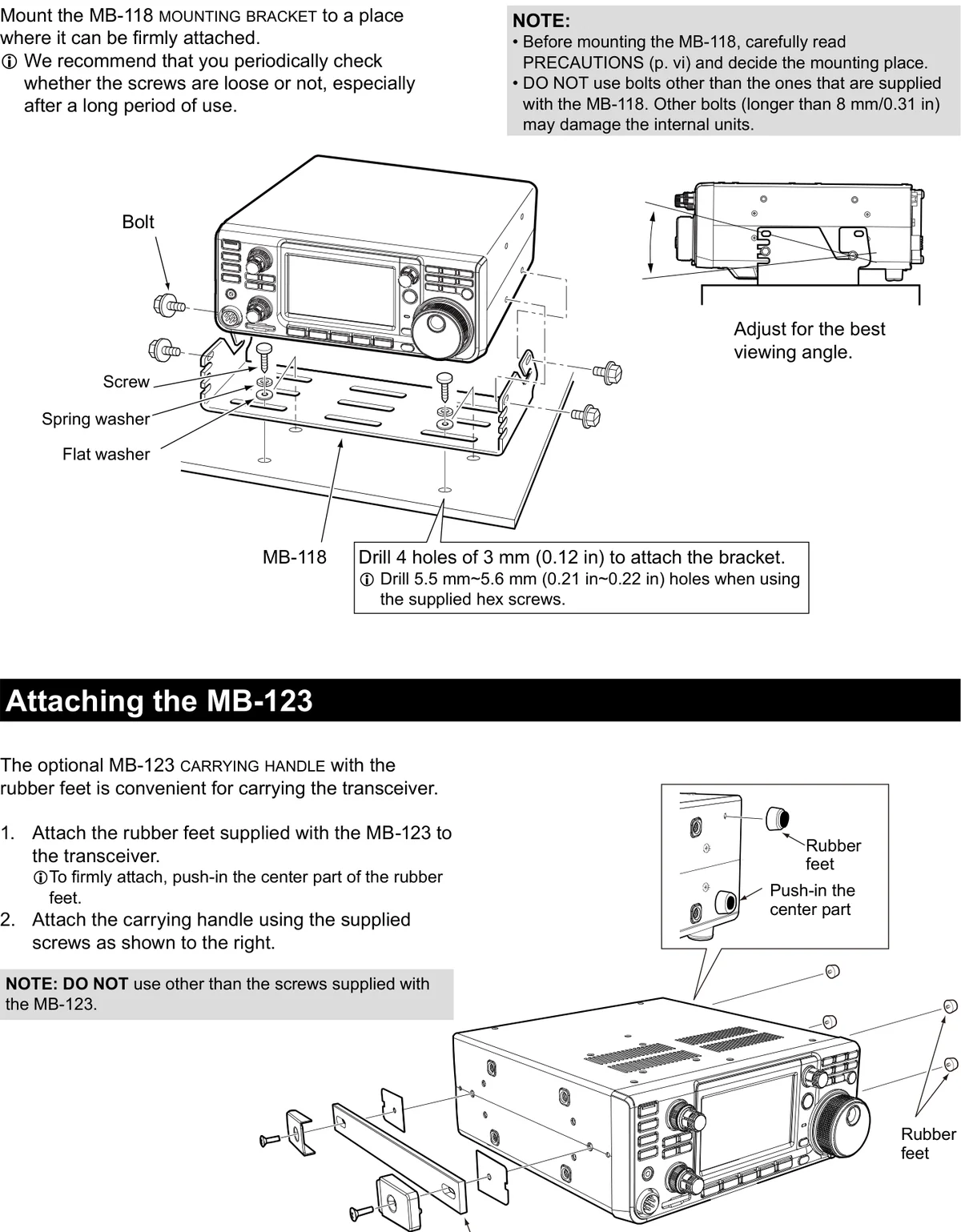
Mount the MB-118 mounting bracket to a place where it 将 MB-118 安装架安装到能够牢固固定的位置。 can be firmly attached.
提示 NOTE NOTE 建议您定期检查螺钉是否松动,尤其在长期使用之后。 We recommend that you periodically check whether the screws are loose or not, especially after a long period of use.
1. 1 Drill 4 holes of 3 mm (0.12 in) to attach the 1. 1 钻 4 个 3 mm(0.12 in)的孔以安装支架。 bracket. 2. 2 将 MB-118 安装架安装到能够牢固固定的位置。 2. 2 Mount the MB-118 mounting bracket to a place 3. 3 调整到最佳观看角度。 where it can be firmly attached. 3. 3 Adjust for the best viewing angle.
提示 NOTE NOTE 使用附带的内六角螺钉时,请钻 5.5 mm~5.6 mm(0.21 in~0.22 in)的孔。 Drill 5.5 mm~5.6 mm (0.21 in~0.22 in) holes when using the supplied hex screws.
Figure labels: MB-118, Bolt, Screw, Flat washer, Spring washer. 图 中 标 注 : MB-118 、 Bolt ( 螺 栓 ) 、 Screw ( 螺 钉 ) 、 Flat washer(平垫圈)、Spring washer(弹簧垫圈)。
图 17-1 MB-118 安装架与 MB-123 提手的安装示意图 Mounting the MB-118 and attaching the MB-123
提示 NOTE NOTE • 安装 MB-118 之前,请仔细阅读 PRECAUTIONS(安全注意事项,第 vi 页),并确定安装位置。 • 请勿使用 MB-118 随机附带以外的螺栓。其他螺栓(长于 8 mm/0.31 in)可能会损坏机内单元。 • Before mounting the MB-118, carefully read PRECAUTIONS (p. vi) and decide the mounting place. • DO NOT use bolts other than the ones that are supplied with the MB-118. Other bolts (longer than 8 mm/0.31 in) may damage the internal units.
17-3 Attaching the MB-123 · 安装 MB-123 提手
The optional MB-123 carrying handle with the rubber feet 可选的 MB-123 提手带有橡胶脚,便于搬运收发信机。 is convenient for carrying the transceiver.
1. 1 Attach the rubber feet supplied with the MB-123 1. 1 将 MB-123 随机附带的橡胶脚安装到收发信机 to the transceiver. 上。 • To firmly attach, push-in the center part of the rubber • 为牢固安装,请按入橡胶脚的中央部分。 feet. 2. 2 如右图所示,使用附带的螺钉安装提手。 2. 2 Attach the carrying handle using the supplied screws as shown to the right.
Figure labels: Carrying handle, Rubber feet, Push-in the center 图 中 标 注 : Carrying handle ( 提 手 ) 、 Rubber feet ( 橡 胶 part. 脚)、Push-in the center part(按入中央部分)。
提示 NOTE NOTE 请勿使用 MB-123 随机附带以外的螺钉。 DO NOT use other than the screws supplied with the MB-123.