本章介绍 IC-7300 的基本操作方法:首次通电与开关机、音量调节、VFO 与存储模式的运用、工作波段与工作模式的选择、频率 设置(主旋钮、调谐步进、直接输入与波段堆叠寄存器)、射频增益与静噪的调整、旋钮锁定,以及基本发射、输出功率与话筒增 益的设定,最后说明(仅美国版)5 MHz 波段的特殊操作规定。This chapter covers the basic operation of the IC-7300: applying power for the first time and turning the transceiver ON or OFF, adjusting the volume, using the VFO and Memory modes, selecting the operating band and mode, setting the frequency (MAIN DIAL, tuning steps, direct keypad entry and the Band Stacking Registers), adjusting the RF gain and SQL level, the Dial Lock function, basic transmission with the transmit output power and microphone gain settings, and the special rules for 5 MHz band operation (USA version only).
3-2 When first applying power · 首次通电
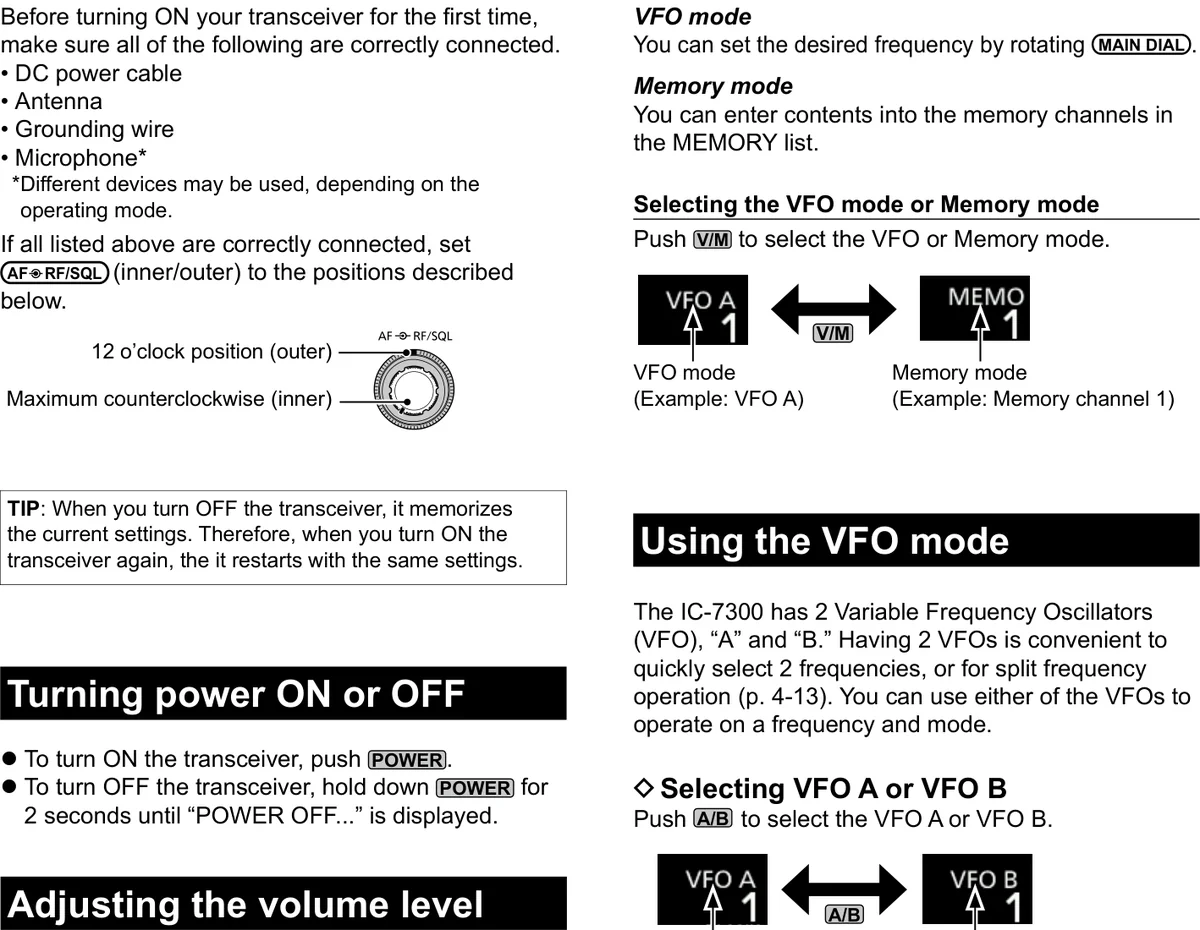
Before turning ON your transceiver for the first time, make 首次开启本收发信机之前,请确认以下各项均已正确连 sure all of the following are correctly connected. 接。
DC power cable 直流电源线 Antenna 天线 Grounding wire 接地线 Microphone* 话筒* *Different devices may be used, depending on the operating *根据工作模式的不同,可能需使用不同的设备。 mode.
If all listed above are correctly connected, set AF RF/SQL 若上述各项均已正确连接,请将 AF RF/SQL(内环/外 (inner/outer) to the positions described below. 环)设置到如下所述的位置。
图 3-1 首次通电时的旋钮位置:外环(RF/SQL)置于 12 点钟位置,内环(AF)逆时针旋到底(原书 3-2 页图示) When first applying power: 12 o'clock position (outer), Maximum counterclockwise (inner)
提示 TIP TIP 关闭收发信机时,它会记忆当前设置。因此再次开启时,将以相同的设置重新启动。 When you turn OFF the transceiver, it memorizes the current settings. Therefore, when you turn ON the transceiver again, it restarts with the same settings.
开机与关机 Turning power ON or OFF
1. 1 To turn ON the transceiver, push POWER . 1. 1 按 POWER 键开启收发信机。 2. 2 To turn OFF the transceiver, hold down POWER 2. 2 按住 POWER 键 2 秒 , 直 至 显 示 "POWER for 2 seconds until "POWER OFF…" is displayed. OFF…",即可关闭收发信机。
调节音量 Adjusting the volume level
Rotate AF RF/SQL (inner) to adjust the volume level. 旋转 AF RF/SQL(内环)调节音量。
关于 VFO 与存储模式 About the VFO and Memory modes
VFO mode VFO 模式 You can set the desired frequency by rotating MAIN DIAL . 旋转 MAIN DIAL 即可设置所需频率。
Memory mode 存储模式 You can enter contents into the memory channels in the 可在 MEMORY 列表中向各存储通道输入内容。 MEMORY list.
Selecting the VFO mode or Memory mode 选择 VFO 模式或存储模式 Push V/M to select the VFO or Memory mode. 按 V/M 键,选择 VFO 模式或存储模式。
使用 VFO 模式 Using the VFO mode
The IC-7300 has 2 Variable Frequency Oscillators (VFO), "A" IC-7300 内 置 2 个 可 变 频 率 振 荡 器 ( VFO ) : "A" 和 and "B." Having 2 VFOs is convenient to quickly select 2 "B"。拥有 2 个 VFO 便于快速选择 2 个频率,或进行异频 frequencies, or for split frequency operation (p. 4-13). You 操作(split frequency operation,见 4-13 节)。可任 can use either of the VFOs to operate on a frequency and 选其中一个 VFO,以指定的频率和模式进行操作。 mode.
选择 VFO A 或 VFO BSelecting VFO A or VFO B
Push A/B to select the VFO A or VFO B. 按 A/B 键,选择 VFO A 或 VFO B。
均衡 VFO A 与 VFO BEqualizing VFO A and VFO B
You can set the displayed VFO's frequency and mode to 可将当前显示 VFO 的频率和模式复制到未显示的那个 the VFO that is not displayed. VFO。 Hold down A/B until 2 short beeps sound. 按住 A/B 键,直至发出 2 声短提示音。
火腿经验 HAM TIP HAM TIP A/B 键长按可把当前 VFO 的频率与模式复制到另一个 VFO(均衡)。玩异频通联(SPLIT)时,可先把 B 边设为发射频率, 通话中轻按 A/B 即可互换主从频率。 Hold down A/B to copy the current VFO's frequency and mode to the other VFO (equalize). For split operation, set VFO B to your transmit frequency first, then lightly push A/B to swap them during a contact.
3-3 Selecting the operating mode · 选择工作模式
You can select between the SSB, SSB data, CW, CW reverse, 可在 SSB、SSB 数据、CW、CW 反转、RTTY、RTTY 反 RTTY, RTTY reverse, AM, AM data, FM and FM data modes. 转、AM、AM 数据、FM 和 FM 数据模式之间进行选择。
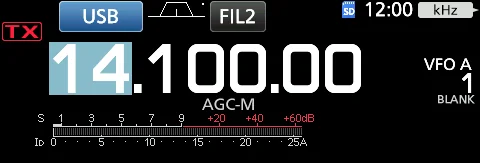
1. 1 Touch the mode icon (example: USB). 1. 1 触摸模式图标(示例:USB)。 2. 2 In the MODE screen, touch the desired mode key. 2. 2 在 MODE 屏幕中,触摸所需的模式键(示例: (Example: CW.) CW)。
图 3-2 待机屏幕上的模式图标(示例:USB) Mode icon on the standby screen (example: USB)
提示 TIP TIP 在 SSB、AM 或 FM 模式下,会显示 [DATA] 键。 In the SSB, AM or FM modes, the [DATA] key is displayed.
表 3-1 模式键与工作模式 Mode key and Operating mode
模式键 工作模式 Mode key Operating mode
[SSB] LSB USB
[CW] CW CW-R
[RTTY] RTTY RTTY-R
[AM] AM
[FM] FM
[DATA] LSB / LSB-D USB / USB-D AM / AM-D FM / FM-D
选择数据模式 Selecting the Data mode
You can operate RTTY in the data mode using AFSK (Audio 可 以 在 数 据 模 式 下 使 用 AFSK ( 音 频 频 移 键 控 ) 操 作 Frequency Shift Keying). (p. 4-31) RTTY。(见 4-31 节)
提示 TIP TIP 选择数据模式时,可以静音话筒的输入。(见 12-10 节)MENU » SET > Connectors > DATA MOD When a data mode is selected, you can mute the input from the microphone. (p. 12-10) MENU » SET > Connectors > DATA MOD
(Example: selecting the USB-D mode) (示例:选择 USB-D 模式)
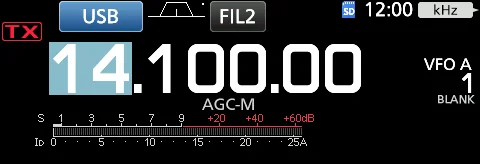
1. 1 While the USB mode is selected, touch the mode 1. 1 在选择了 USB 模式的状态下,触摸模式图标。 icon. (Opens the MODE screen.) (打开 MODE 屏幕。) 2. 2 Touch [DATA]. 2. 2 触摸 [DATA]。
图 3-3 待机屏幕:USB 模式已选中时触摸模式图标(USB-D 模式选择示例) Standby screen: touch the mode icon while the USB mode is selected (example: selecting the USB-D mode)
选择工作波段 Selecting the operating band
Do the following steps to change the operating band. 更改工作波段时,请按以下步骤操作。
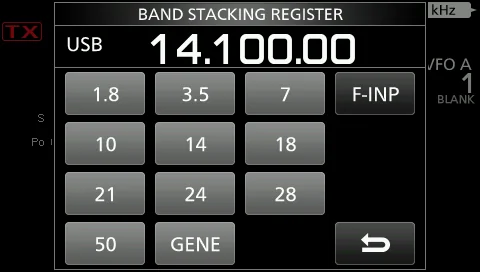
1. 1 Touch the MHz digits. (Example: 14) (Opens the 1. 1 触 摸 MHz 数 字 ( 示 例 : 14 ) 。 ( 打 开 BAND BAND STACKING REGISTER screen.) STACKING REGISTER 屏幕。) 2. 2 Touch a band key. (Example: [21]) (Displays a 21 2. 2 触摸波段键(示例:[21])。(显示 21 MHz 频 MHz frequency.) 率。)
图 3-4 BAND STACKING REGISTER 屏幕(触摸 MHz 数字打开) BAND STACKING REGISTER screen (opens by touching the MHz digits)
使用波段堆叠寄存器Using the Band Stacking Registers
The band stacking register provides 3 memories for each 波段堆叠寄存器为每个波段键提供 3 个存储,用于保存频 band key to store frequencies and operating modes. This 率和工作模式。借助该功能,可在所选波段快速调出以前 function is convenient to quickly recall previously operated 操作过的频率和模式。 frequencies and modes on the selected band.
1. 1 Touch the MHz digits for 1 second on the standby 1. 1 在待机屏幕上触摸 MHz 数字保持 1 秒。(打开 screen. (Opens the BAND STACKING REGISTER screen.) BAND STACKING REGISTER 屏幕。) 2. 2 Touch a Band key. (The operating frequency and 2. 2 触摸波段键。(工作频率和模式随即更改。) mode are changed.)
提示 TIP TIP 要在其他波段选择波段堆叠寄存器,请在待机屏幕上触摸 MHz 数字,然后触摸波段键保持 1 秒。 To select a Band Stacking Register in another band, touch the MHz digits on the standby screen, and then touch a band key for 1 second.
提示 TIP TIP 在 PRESET 菜单中,可以保存数据模式的设置组合,以便根据操作需要快速更改设置。(见 13-6 节) In the PRESET menu, you can save the combination of the settings for the data mode to quickly change the settings, depending on your operating needs. (p. 13-6)
火腿经验 HAM TIP HAM TIP 快速换波段:直接点屏幕上的 MHz 数字,弹出 BAND STACKING REGISTER,每波段可存 3 个常用频率。 To change bands quickly, touch the MHz digits on the screen to open the BAND STACKING REGISTER — each band key stores 3 commonly used frequencies.
3-4 Setting the frequency · 设置频率
关于调谐步进功能 About the Tuning Step function
You can set the MAIN DIAL 's tuning step for each 可为每个工作模式设置 MAIN DIAL 的调谐步进。以下步 operating mode. The following steps are set as default. 进为默认设置。
表 3-2 默认调谐步进 Default tuning steps
工作模式(调谐步进状态) 调谐步进 Operating mode (Tuning Step state) Tuning step
SSB/CW/RTTY (TS OFF) 10 Hz
AM (TS ON) 1 kHz
FM (TS ON) 10 kHz
Touch the kHz digits to turn the Tuning Step function ON 触摸 kHz 数字,可开启或关闭调谐步进(Tuning Step) or OFF. 功能。
提示 TIP TIP 调谐步进功能的图标 "▼" 显示在 1 kHz 数字上方。 The Tuning Step function's icon "▼" is displayed above the 1 kHz digit.
关于 1 Hz 步进细调功能 About the 1 Hz step Fine Tuning function
You can use the minimum tuning step of 1 Hz for fine 在 SSB、CW 和 RTTY 模式下,可使用 1 Hz 的最小调谐 tuning in the SSB, CW and RTTY modes. 步进进行细调。 Touch the Hz digits for 1 second to turn the Fine Tuning 触 摸 Hz 数 字 保 持 1 秒 , 可 开 启 或 关 闭 细 调 ( Fine function ON or OFF. The 1 Hz digit is displayed. Tuning)功能,此时显示 1 Hz 数字。
更改调谐步进 Changing the Tuning Step
When the Tuning Step function is ON, you can change the 调谐步进功能开启时,可更改每个工作模式的调谐步进。 tuning steps for each operating mode.
1. 1 Select the desired operating mode. (p. 3-3) 1. 1 选 择 所 需 的 工 作 模 式 ( 见 3-3 节 ) ( 示 例 : (Example: USB) USB)。 2. 2 Touch the kHz digit for 1 second. (The TS (SSB) 2. 2 触 摸 kHz 数 字 保 持 1 秒 。 ( 显 示 TS (SSB) 屏 screen is displayed.) 幕。) 3. 3 Touch the desired tuning step. (Example: 0.1 k) 3. 3 触摸所需的调谐步进(示例:0.1 k)。(步进设 (The tuning step is set and returns to the previous 置完成并返回上一屏幕。) screen.)
提示 TIP TIP 使用话筒上的 [UP]/[DN] 键时,无论细调功能开启还是关闭,频率均以 50 Hz 步进更改。 When using the [UP]/[DN] keys on the microphone, the frequency changes in 50 Hz steps with the Fine Tuning function ON or OFF.
使用主旋钮 Using the Main Dial
1. 1 Select the desired operating band. (Example: 21 1. 1 选择所需的工作波段(示例:21 MHz)。 MHz) 2. 2 旋转 MAIN DIAL 。 2. 2 Rotate MAIN DIAL .
提示 TIP TIP 若无法更改频率,请确认旋钮锁定(Dial Lock)功能已关闭。(见 3-10 节) If you cannot change the frequency, make sure the Dial Lock function is turned OFF. (p. 3-10)
提示 TIP TIP 设置业余波段频率时会显示相应图标;当频率设置在业余波段之外或所设波段边缘之外时,会显示另一图标。 An icon is displayed when you set an amateur radio frequency, and a different icon is displayed when you set a frequency outside the Ham band, or outside your set Band Edges.
3-5 Setting the frequency · 设置频率
关于 1/4 调谐功能 About the 1/4 Tuning function
Mode: SSB-D/CW/RTTY 模式:SSB-D/CW/RTTY
With the Tuning Step function OFF, turn ON the 1/4 Tuning 在调谐步进功能关闭的状态下,开启 1/4 调谐功能,可将 function to reduce the tuning speed to 1/4 of the normal 调谐速度降至正常速度的 1/4,以便更精细地调谐。 speed, for finer tuning.
1. 1 Push FUNCTION . (Opens the FUNCTION screen.) 1. 1 按 FUNCTION 键。(打开 FUNCTION 屏幕。) 2. 2 Touch [1/4]. 2. 2 触摸 [1/4]。 3. 3 Push EXIT . 3. 3 按 EXIT 键。
直接输入频率 Directly entering a frequency
You can set the frequency without rotating MAIN DIAL by 通过键盘直接输入频率,无需旋转 MAIN DIAL 。 directly entering it on the keypad.
Entering the operating frequency 输入工作频率
1. 1 Touch the MHz digits. (Example: 14) (Opens the 1. 1 触 摸 MHz 数 字 ( 示 例 : 14 ) 。 ( 打 开 BAND BAND STACKING REGISTER screen.) STACKING REGISTER 屏幕。) 2. 2 Touch [F-INP]. (Opens the F-INP screen.) 2. 2 触摸 [F-INP]。(打开 F-INP 屏幕。) 3. 3 Start entry with the MHz digits. 3. 3 从 MHz 数字开始输入。 4. 4 Touch [ENT] to set the entered frequency. (Closes 4. 4 触摸 [ENT] 设置输入的频率。(关闭 F-INP 屏 the F-INP screen.) 幕。)
提示 TIP TIP 要清除输入,请触摸 [CE]。要清除输入并返回上一屏幕,请按 EXIT 键。
To clear the entry, touch [CE]. To clear the entry and return to the previous screen, push EXIT .
提示 TIP TIP 若在未输入 100 kHz 以下数字时触摸 [ENT],空白数位将自动填入 "0"。 If you touch [ENT] when the digits under 100 kHz are not entered, "0" will be automatically entered into the digits that are blank.
表 3-3 频率输入示例 Entry examples
目标频率 按键序列 Frequency Keys
14.025 MHz [1], [4], [•(-)], [0], [2], [5], [ENT]
18.0725 MHz [1], [8], [•(-)], [0], [7], [2], [5], [ENT]
730 kHz [0], [•(-)], [7], [3], [ENT]
5.100 MHz [5], [•(-)], [1], [ENT]
7.000 MHz [7], [ENT]
Changing from 21.280 MHz to 21.245 MHz [•(-)], [2], [4], [5], [ENT]
关于自动调谐步进功能 About the Auto Tuning Step function
The tuning step automatically changes, depending on the 调谐步进会根据 MAIN DIAL 的旋转速度自动变化。 rotation speed of MAIN DIAL .
提示 TIP TIP 可在以下菜单中更改自动调谐步进功能的设置。(见 12-6 节)MENU » SET > Function > MAIN DIAL Auto TS You can change the Auto Tuning Step function settings in the following menu. (p. 12-6) MENU » SET > Function > MAIN DIAL Auto TS
3-6 Setting the frequency · 设置频率
输入异频偏移频率 Entering the Split Frequency Offset
1. 1 Touch the MHz digits. (Example: 14) (Opens the 1. 1 触 摸 MHz 数 字 ( 示 例 : 14 ) 。 ( 打 开 BAND BAND STACKING REGISTER screen.) STACKING REGISTER 屏幕。) 2. 2 Touch [F-INP]. (Opens the F-INP screen.) 2. 2 触摸 [F-INP]。(打开 F-INP 屏幕。) 3. 3 Enter the Split Frequency Offset. 3. 3 输入异频偏移频率。 4. 4 To save the entry, touch [SPLIT] or [-SPLIT]. (Closes 4. 4 要保存输入,请触摸 [SPLIT] 或 [-SPLIT]。(关闭 the F-INP screen.) F-INP 屏幕。)
提示 TIP TIP 如需负向偏移方向,请触摸 [•(-)]。偏移量可在 -9.999 MHz ~ +9.999 MHz 之间以 1 kHz 步进输入。 If you want the minus shift direction, touch [•(-)]. Enter the offset between -9.999 MHz and +9.999 MHz (1 kHz steps).
提示 TIP TIP 输入后,异频(Split)功能将自动开启。 After entering, the Split function is automatically turned ON.
表 3-4 异频偏移输入示例 Split Frequency Offset entry examples
偏移量 按键序列 Offset Keys
10 kHz [1], [0], [SPLIT]
-1.025 MHz [•(-)], [1], [0], [2], [5], [-SPLIT]
输入存储通道 Entering a Memory channel
1. 1 Touch V/M to select the Memory mode. 1. 1 触摸 V/M 选择存储模式。 2. 2 Touch the MHz digits. (Example: 14) (Opens the 2. 2 触 摸 MHz 数 字 ( 示 例 : 14 ) 。 ( 打 开 BAND BAND STACKING REGISTER screen.) STACKING REGISTER 屏幕。) 3. 3 Touch [F-INP]. (Opens the F-INP screen.) 3. 3 触摸 [F-INP]。(打开 F-INP 屏幕。) 4. 4 Enter a Memory channel number between 1 and 4. 4 输 入 1 ~ 99 之 间 的 存 储 通 道 编 号 ( 存 储 通 道 99. (Memory channel 5) 5)。 5. 5 Touch [MEMO] to select the entered channel. 5. 5 触摸 [MEMO] 选择输入的通道。(关闭 F-INP 屏 (Closes the F-INP screen.) 幕。)
提示 TIP TIP 若要设置编程通道编号(P1 或 P2),请输入 "100" 选择 P1,输入 "101" 选择 P2。 If you want to set the Program Channel number (P1 or P2), enter "100" for P1, and "101" for P2.
波段边缘提示音 Band Edge Beep
You will hear a Band Edge Beep and an icon will be 当调谐进入或离开业余波段的频率范围时,会听到波段边 displayed when you tune into or out of an amateur band's 缘提示音(Band Edge Beep),并显示相应图标。 frequency range.
提示 TIP TIP 可在以下菜单中更改波段边缘提示音的设置。MENU » SET > Function > Band Edge Beep You can change the Band Edge Beep settings in the following menu. MENU » SET > Function > Band Edge Beep
3-7 Setting the frequency · 设置频率
输入波段边缘 Entering a Band Edge
When "ON (User)" or "ON (User) & TX Limit" is selected on 在 "Band Edge Beep" 屏幕上选择 "ON (User)" 或 "ON the "Band Edge Beep" screen, you can enter a total of 30 (User) & TX Limit" 时,最多可输入 30 个波段边缘频率。 band edge frequencies.
提示 TIP TIP 出厂时所有波段边缘均已输入,因此必须先编辑或删除原有边缘,才能输入新的波段边缘。 Initially, all band edges are entered. Therefore, you must first edit or delete them to enter a new band edge.
提示 TIP TIP 不能输入重叠的频率,也不能输入超出预设发射频率范围的频率。 You cannot enter an overlapped frequency or a frequency that is out of the preset transmit frequency.
1. 1 Open the "Band Edge Beep" screen. MENU » SET > 1. 1 打开 "Band Edge Beep" 屏幕。MENU » SET > Function > Band Edge Beep Function > Band Edge Beep 2. 2 Select "ON (User)" or "ON (User) & TX Limit." 2. 2 选择 "ON (User)" 或 "ON (User) & TX Limit"。 3. 3 Select "User Band Edge." (Opens the "User Band 3. 3 选 择 "User Band Edge" 。 ( 打 开 "User Band Edge" screen.) Edge" 屏幕。)
提示 TIP TIP 若选择 "ON (User) & TX Limit",可将发射限制在所输入的频率范围内。 If you select "ON (User) & TX Limit," you can limit transmission to within the entered frequency range.
编辑波段边缘 Editing a Band Edge
You can edit a band edge entered as a default or when 可编辑默认输入的波段边缘,也可在输入新波段边缘时进 entering a new band edge. 行编辑。
1. 1 On the FUNCTION set screen, select "User Band 1. 1 在 FUNCTION set 屏 幕 上 选 择 "User Band Edge." Edge"。 2. 2 Touch the band edge you want to edit for 1 2. 2 触 摸 要 编 辑 的 波 段 边 缘 保 持 1 秒 ( 示 例 : 5: second. (Example: 5: 14.000.000 – 14.350.000 MHz) 14.000.000 – 14.350.000 MHz)。 3. 3 Edit the lower band edge frequency. (Example: 3. 3 编辑较低的波段边缘频率(示例:14.1)。 14.1) 4. 4 触摸 [ENT] 保存编辑后的较低波段边缘频率。 4. 4 Touch [ENT] to save the edited lower band edge frequency. 5. 5 编辑较高的波段边缘频率(示例:14.25)。
5. 5 Edit the upper band edge frequency. (Example: 6. 6 触 摸 [ENT] 保 存 编 辑 后 的 较 高 波 段 边 缘 频 率 。 14.25) (编辑的波段边缘保存后返回上一屏幕。) 6. 6 Touch [ENT] to save the edited upper band edge frequency. (The edited band edge is saved and returns to the previous screen.)
提示 TIP TIP 也可以通过旋转 MAIN DIAL 或 MULTI 编辑频率。各波段边缘的频率必须高于其上方的边缘;若尝试输入低于上方边缘的 频率,按 [ENT] 时该较低的边缘将被清除。
You can also edit the frequency by rotating MAIN DIAL or MULTI . Each band edge must be higher in frequency than the ones above it. If you try to enter a lower frequency than the edges above, the lower frequency edge will be cleared when you push [ENT].
表 3-5 波段边缘频率输入示例 Band edge entry examples
目标频率 按键序列 Frequency Keys
14.025 MHz [1], [4], [•], [0], [2], [5], [ENT]
18.0725 MHz [1], [8], [•], [0], [7], [2], [5], [ENT]
730 kHz [0], [•], [7], [3], [ENT]
5.100 MHz [5], [•], [1], [ENT]
7.000 MHz [7], [ENT]
Changing from 21.280 MHz to 21.245 MHz [•], [2], [4], [5], [ENT]
3-8 Setting the frequency · 设置频率
输入新的波段边缘 Entering a new Band Edge
After you delete or edit the preset band edges, you can 删除或编辑预设的波段边缘后,即可输入新的波段边缘。 enter a new band edge.
1. 1 Open the "User Band Edge" screen. 1. 1 打开 "User Band Edge" 屏幕。 2. 2 Select a blank band. (Example: 10) 2. 2 选择一个空白波段(示例:10)。 3. 3 Enter the lower band edge frequency. (Example: 3. 3 输入较低的波段边缘频率(示例:51.15)。 51.15) 4. 4 触摸 [ENT] 保存输入的较低波段边缘频率。 4. 4 Touch [ENT] to save the entered lower band edge 5. 5 输入较高的波段边缘频率(示例:.75)。 frequency. 5. 5 Enter the upper band edge frequency. (Example: 6. 6 触摸 [ENT] 保存输入的较高波段边缘频率。(输 .75) 入的波段边缘保存后返回上一屏幕。)
6. 6 Touch [ENT] to save the entered upper band edge frequency. (The entered band edge is saved and returns to the previous screen.)
删除波段边缘 Deleting a Band Edge
To enter a new band edge, first you must delete a preset 要输入新的波段边缘,必须先删除预设的波段边缘。 band edge.
提示 TIP TIP 出厂时所有波段边缘均已输入,因此必须先编辑或删除原有边缘,才能输入新的波段边缘。不能输入重叠的频率,也不能输入 超出预设发射频率范围的频率。 Initially, all band edges are entered. Therefore, you must first edit or delete them to enter a new band edge. You cannot enter an overlapped frequency or a frequency that is out of the preset transmit frequency.
1. 1 On the FUNCTION set screen, select "User Band 1. 1 在 FUNCTION set 屏 幕 上 选 择 "User Band Edge." Edge"。 2. 2 Touch the desired band edge to delete for 1 2. 2 触 摸 要 删 除 的 波 段 边 缘 保 持 1 秒 ( 示 例 : 1: second. (Example: 1: 1.800.000 – 1.999.999 MHz) 1.800.000 – 1.999.999 MHz)。 3. 3 Touch "Delete." (The selected band edge is deleted 3. 3 触摸 "Delete"。(所选波段边缘删除后返回上一 and returns to the previous screen.) 屏幕。)
3-9 Setting the frequency · 设置频率
插入波段边缘 Inserting a Band Edge
After you delete or edit the preset band edges, follow the 删除或编辑预设的波段边缘后,请按以下步骤插入波段边 steps below to insert a band edge. 缘。
提示 TIP TIP 出厂时所有波段边缘均已输入,因此必须先编辑或删除原有边缘,才能输入新的波段边缘。不能输入重叠的频率,也不能输入 超出预设发射频率范围的频率。 Initially, all band edges are entered. Therefore, you must first edit or delete them to enter a new band edge. You cannot enter an overlapped frequency or a frequency that is out of the preset transmit frequency.
1. 1 Open the "User Band Edge" screen. 1. 1 打开 "User Band Edge" 屏幕。 2. 2 Touch the band edge you want to insert a new 2. 2 触摸要在其上方插入新波段边缘的那个边缘保持 1 band edge above for 1 second. (Example: 1: 3.500.000 – 秒(示例:1: 3.500.000 – 3.999.999 MHz)。(新波 3.999.999 MHz) (The new band edge will be inserted 段边缘将插入到所选边缘的上方。) above the selected band edge.) 3. 3 触摸 "Insert"。 3. 3 Touch "Insert."
1. 4 Enter the lower band edge frequency. (Example: 1. 4 输入较低的波段边缘频率(示例:1.85)。 1.85) 2. 5 触摸 [ENT] 保存输入的较低波段边缘频率。 2. 5 Touch [ENT] to save the entered lower band edge 3. 6 输入较高的波段边缘频率(示例:.95)。 frequency. 4. 7 触摸 [ENT] 保存输入的较高波段边缘频率。(输 3. 6 Enter the upper band edge frequency. (Example: 入的波段边缘保存后返回上一屏幕。) .95) 4. 7 Touch [ENT] to save the entered upper band edge frequency. (The entered band edge is saved and returns to the previous screen.)
将所有波段边缘复位为预设值 Resetting all band edges to presets
The steps below will reset all the band edges to their initial 以下步骤将把所有波段边缘复位到初始设置,输入的所有 settings. All entered settings will be deleted. 设置将被删除。
1. 1 Open the "User Band Edge" screen. 1. 1 打开 "User Band Edge" 屏幕。 2. 2 Touch any band edge for 1 second. 2. 2 触摸任意波段边缘保持 1 秒。 3. 3 Touch "Default." (Displays "Reset All Edges?") 3. 3 触摸 "Default"。(显示 "Reset All Edges?") 4. 4 Touch [YES]. (All the band edges reset to the initial 4. 4 触摸 [YES]。(所有波段边缘复位到初始设置。) settings.)
3-10 RF gain and SQL level · 射频增益与静噪电平
Rotate AF RF/SQL (outer) to adjust the RF gain and SQL 旋转 AF RF/SQL(外环)调节射频增益与静噪电平。 level. 默认情况下,以 12 点钟位置为界:向左旋转调节射频增 By default, rotating to the left (when set to the 12 o'clock 益,向右旋转调节静噪电平,具体如下所述。 position) adjusts the RF gain, and rotating to the right adjusts the squelch level, as described below.
说明 NOTE NOTE
旋钮调节范围(原书图示标注):自 12 点钟位置顺时针一侧为 S 表静噪可调范围,最大至最大 S 表静噪;逆时针一侧为射频 增益可调范围(自 11 点钟位置起显示 "RFG"),最大至最小射频增益;噪声静噪(FM 模式)一端即静噪开启(Squelch is open)。 Knob ranges (labels from the manual's illustration): clockwise from the 12 o'clock position is the S-meter squelch adjustable range, up to the maximum S-meter squelch; counterclockwise is the RF gain adjustable range ("RFG" is displayed from the 11 o'clock position), down to the minimum RF gain; the noise squelch (FM mode) end is where the squelch is open.
射频增益RF gain
Adjust the RF gain to decrease the noise received from a 调节射频增益,可减弱来自附近强台站的噪声。逆时针旋 nearby strong station. Rotate counterclockwise to reduce 转可降低射频增益,从而降低接收灵敏度。当 AF RF/SQL the RF gain, which reduces the receive sensitivity. "RFG" 自 11 点钟位置起逆时针设置时,会显示 "RFG",表示射 appears when AF RF/SQL is set to the counterclockwise 频增益已降低。 from the 11 o'clock position. "RFG" indicates that the RF gain is reduced.
提示 TIP TIP 若接收到强信号且出现 "OVF"(Overflow,溢出),请降低射频增益,直至 "OVF" 消失。 If a strong signal is received and "OVF" (Overflow) appears, reduce the RF gain until "OVF" disappears.
静噪电平SQL level
There are 2 types of SQL levels, depending on the 根据工作模式的不同,有 2 种静噪电平。 operating mode.
Noise squelch 噪声静噪 Rotate the AF RF/SQL (outer) until the noise just 旋 转 AF RF/SQL ( 外 环 ) , 直 至 噪 声 刚 好 消 失 且 disappears and the TX/RX indicator goes OFF. TX/RX 指示灯熄灭。 S-meter squelch S 表静噪 The S-meter squelch mutes the audio output from the 当接收信号弱于指定的 S 表静噪电平时,S 表静噪将 speaker or headphones when the received signal is 静音扬声器或耳机的音频输出。自 12 点钟位置顺时针 weaker than the specified S-meter squelch level. Rotate 旋转 AF RF/SQL,可提高 S 表门限电平。 the AF RF/SQL clockwise from the 12 o'clock position to increase the S-meter threshold level.
提示 TIP TIP 可在 "RF/SQL Control" 中更改 AF RF/SQL(外环)的控制类型。(见 12-4 节)MENU » SET > Function > RF/SQL Control You can change the AF RF/SQL (outer) control type in "RF/SQL Control." (p. 12-4) MENU » SET > Function > RF/SQL Control
火腿经验 HAM TIP HAM TIP RF/SQL 是复合旋钮:内环为 AF(音量),外环为 RF/SQL——默认以 12 点钟位置为界,逆时针一侧调射频增益(RF GAIN),顺时针一侧调静噪(SQL)。新手常把「没声音」当成故障——先确认射频增益是否被关小,或静噪是否被开得过 大。 The RF/SQL control is a dual-concentric knob: the inner ring is AF (volume) and the outer ring is RF/SQL — by default, the counterclockwise side of the 12 o'clock position adjusts the RF gain, and the clockwise side adjusts the squelch. Beginners often mistake "no audio" for a fault — first check whether the RF gain has been turned down, or the squelch opened too far.
旋钮锁定功能 Dial Lock function
The Dial Lock function prevents frequency changes caused 旋钮锁定(Dial Lock)功能可防止因误转 MAIN DIAL 而 by accidentally moving MAIN DIAL . This function 改变频率。该功能以电子方式锁定旋钮。 electronically locks the dial.
Hold down SPEECH for 1 second to turn the Dial Lock 按住 SPEECH 键 1 秒,可开启或关闭旋钮锁定功能。该 function ON or OFF. The lock icon is displayed while the 功能开启时显示锁定图标。可选择旋钮锁定或面板锁定。 function is ON. You can select the Dial lock or Panel lock. ( 见 12-6 节 ) MENU » SET > Function > Lock (p. 12-6) MENU » SET > Function > Lock Function Function
基本发射 Basic transmission
Before transmitting, monitor your selected operating 发射前,请先守听所选工作频率,确保不会对同频的其他 frequency to make sure you do not cause interference to 台站造成干扰。良好的业余无线电操作习惯是:先守听; other stations on the same frequency. It is good amateur 即使未听到任何信号,也应在开始操作前先询问一两次该 practice to listen first, and then, even if nothing is heard, 频率是否有人使用。 ask if the frequency in use once or twice, before you start operating.
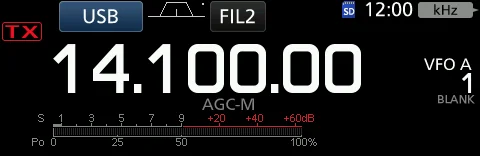
1. 1 Push TRANSMIT or [PTT] to transmit. (The TX/RX 1. 1 按 TRANSMIT 键或按住话筒上的 [PTT] 进行发 indicator lights red and the TX icon is displayed while 射。(发射期间 TX/RX 指示灯亮红灯,并显示 TX 图 transmitting.) 标。) 2. 2 Push TRANSMIT or release [PTT]. (Returns to 2. 2 按 TRANSMIT 键或松开 [PTT]。(返回接收。) receive.)
提示 TIP TIP 查看功率表电平前,请先调谐天线。若天线未正确调谐,功率表将无法真实反映功率电平。(见 11-2 节) Tune the antenna before you view the power meter level on the meter. If the antenna is not tuned properly, the meter will not reflect the power level. (p. 11-2)
调整发射输出功率 Adjusting the transmit output power
1. 1 Set the operating mode to SSB, CW, RTTY or FM. 1. 1 将工作模式设为 SSB、CW、RTTY 或 FM(见 3- (p. 3-3) (Example: USB) 3 节)(示例:USB)。 2. 2 Touch the meter to display the Po meter. (p. 3-11) 2. 2 触摸仪表以显示 Po 仪表(见 3-11 节)。 3. 3 Open the Multi-function menu. (Push MULTI .) 3. 3 打开多功能菜单。(按 MULTI 键。)
图 3-5 Po 仪表屏幕:触摸仪表显示 Po 仪表(第 2 步) Po meter screen: touch the meter to display the Po meter (step 2)
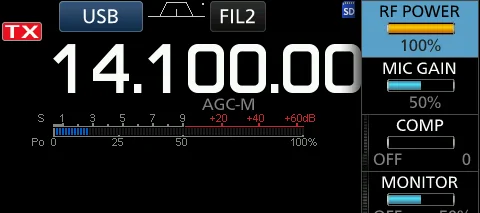
1. 4 Push TRANSMIT or hold down [PTT]. (The Po 1. 4 按 TRANSMIT 键或按住 [PTT]。(SSB 模式下, meter level changes according to your voice level in Po 仪表电平随话音电平变化。TX/RX 指示灯亮红灯, the SSB mode. The TX/RX indicator lights red and the 并显示 TX 图标。) TX icon is displayed.) 2. 5 触摸 "RF POWER"。 2. 5 Touch "RF POWER." 3. 6 在 0 ~ 100% 之 间 调 整 发 射 输 出 功 率 。 ( 旋 转 3. 6 Adjust the transmit output power to between 0 MULTI 。)(Po 仪表以百分比显示射频输出功率; and 100%. (Rotate MULTI .) (The Po meter displays 接收时作为 S 表使用。) the RF output power in a percentage. It becomes the S- meter while receiving.) 4. 7 按 TRANSMIT 键或松开 [PTT]。(返回接收。)
4. 7 Push TRANSMIT or release [PTT]. (Returns to receive.)
图 3-6 多功能菜单中的 "RF POWER" 项目(第 3~6 步) "RF POWER" in the Multi-function menu (steps 3–6)
3-11 Meter display · 仪表显示
仪表显示选择 Meter display selection
You can display one of the 6 different transmit parameters 为方便使用,可在 6 种不同的发射参数(Po、SWR、 (Po, SWR, ALC, COMP, VD and ID) for your convenience. ALC、COMP、VD 和 ID)中选择显示其一。
Touch the parameter to display one of the meters. 触摸参数即可显示相应的仪表。
多功能仪表 Multi-function meter
You can display all the parameters simultaneously. The 可同时显示所有参数。多功能仪表上还会显示功放温度 power amplifier temperature (TEMP) meter is also (TEMP)仪表。 displayed on the Multi-function meter.
Hold down the parameter for 1 second to display the 按住参数保持 1 秒,即可显示多功能仪表。 Multi-function meter.
表 3-6 仪表参数 Meter parameters
参数 说明 Parameter Description
S 显示接收信号强度电平。 Displays the receiving signal strength level.
Po 显示相对的射频输出功率。 Displays the relative RF output power.
SWR 显示工作频率下天线的驻波比。 Displays the SWR of the antenna at the operating frequency.
ALC 显示 ALC 电平。当表针摆动表明输入信号电平超出允许电平时,ALC 将限制射频功率。此时应降低话筒增益电平。 Displays the ALC level. When the meter movement shows the input signal level exceeds the allowed level, the ALC limits the RF power. In such cases, decrease the microphone gain level.
COMP 使用语音压缩器时,显示压缩电平。 Displays the compression level when the speech compressor is used.
VD 显示末级功放 MOS-FET 的漏极电压。 Displays the drain voltage of the final amplifier MOS-FETs.
ID 显示末级功放 MOS-FET 的漏极电流。 Displays the drain current of the final amplifier MOS-FETs.
TEMP 显示末级功放 MOS-FET 的温度。 Displays the temperature of the final amplifier MOS-FETs.
说明 INFORMATION 在 SSB 模式下,触摸 TX 仪表选择 ALC 仪表,并调整至表针在 ALC 刻度的 30% ~ 50% 之间摆动。话筒距嘴 5 ~ 10 cm(2 ~ 4 英寸),以正常的音量说话。在 AM 或 FM 模式下,与其他台站确认话音清晰度,或使用监听(Monitor)功能(见 4- 11 节)。 In the SSB mode, touch the TX meter to select the ALC meter and adjust until the meter reading swings between 30 to 50% of the ALC scale. Hold the microphone 5 to 10 cm (2 to 4 inches) from your mouth, then speak at your normal voice level. In the AM or FM mode, check the audio clarity with another station, or use the Monitor function (p. 4-11).
调整话筒增益 Adjusting the microphone gain
Adjust the microphone gain as described below. 请按以下方法调整话筒增益。
1. 1 Set the operating mode to SSB, AM or FM. (p. 3-3) 1. 1 将工作模式设为 SSB、AM 或 FM(见 3-3 节)。 2. 2 Push MULTI to display the Multi-function menu. 2. 2 按 MULTI 显示多功能菜单。 3. 3 Touch "MIC GAIN." 3. 3 触摸 "MIC GAIN"。 4. 4 Push TRANSMIT or hold down [PTT] on the 4. 4 按 TRANSMIT 键 或 按 住 话 筒 上 的 [PTT] 。 microphone. (The TX/RX indicator lights red and the TX (TX/RX 指示灯亮红灯,并显示 TX 图标。) icon is displayed.) 5. 5 旋转 MULTI 调整话筒增益。 5. 5 Rotate MULTI to adjust the microphone gain. 6. 6 按 TRANSMIT 键或松开 [PTT]。(返回接收。) 6. 6 Push TRANSMIT or release [PTT]. (Returns to receive.)
3-12 About the 5 MHz frequency band operation (USA version only) · 关于 5 MHz 频率波段操作(仅美国版)
Operation on the 5 MHz frequency band is allowed on 5 5 MHz 频率波段仅在 5 个离散频率上允许操作,且必须遵 discrete frequencies and you must adhere to the following: 守以下规定:
The USB, USB Data, PSK, and CW modes. USB、USB 数据、PSK 和 CW 模式。 Maximum of 100 watts ERP (Effective Radiated Power) 最大 100 W ERP(有效辐射功率) Maximum 2.8 kHz bandwidth 最大 2.8 kHz 带宽
It is your responsibility to set all controls so that 用户有责任妥善设置所有控制器,使在该频率波段上的发 transmission in this frequency band meets the stringent 射符合业余操作使用这些频率所规定的严格条件。 conditions under which amateur operations may use these frequencies.
提示 TIP TIP 建议将这些频率、模式和滤波器设置保存到存储通道中,以便快速调出。 We recommend that you save these frequencies, modes and filter settings into memory channels, for easy recall.
说明 NOTE NOTE
为帮助您在 FCC 规定的规则内操作,在上述五个频率以外的任何频率上发射均属违法。 To assist you in operating within the rules specified by the FCC, transmission is illegal on any frequencies other than the five shown in the tables below.
USB 与 USB 数据模式 For the USB and USB data modes
The FCC specifies center frequencies on the 5 MHz FCC 规定了 5 MHz 频率波段的中心频率,而收发信机显 frequency band. However, the transceiver displays carrier 示的是载波频率。因此,请将收发信机调谐到比规定 FCC frequency. Therefore, tune the transceiver to 1.5 kHz below 频道中心频率低 1.5 kHz 的频率。 the specified FCC channel center frequency.
表 3-7 USB 与 USB 数据模式的频率对照 Frequencies for the USB and USB data modes
收发信机显示频率 FCC 频道中心频率 Transceiver displayed frequency FCC channel center frequency
5.33050 MHz 5.33200 MHz
5.34650 MHz 5.34800 MHz
5.35700 MHz 5.35850 MHz
5.37150 MHz 5.37300 MHz
5.40350 MHz 5.40500 MHz
CW 模式 For the CW mode
The transceiver displays the center frequency. Therefore, 收发信机显示的是中心频率。因此,以 CW 模式操作时, tune the transceiver to the specified FCC channel frequency 请将收发信机调谐到规定的 FCC 频道频率。 when you operate in the CW mode.
表 3-8 CW 模式的频率对照 Frequencies for the CW mode
收发信机显示频率 FCC 频道中心频率 Transceiver displayed frequency FCC channel center frequency
5.33200 MHz 5.33200 MHz
5.34800 MHz 5.34800 MHz
5.35850 MHz 5.35850 MHz
5.37300 MHz 5.37300 MHz
5.40500 MHz 5.40500 MHz
火腿经验 HAM TIP HAM TIP 5 MHz 波段(60 m)部分频点有特殊协议(USB/CW/数字模式及最大带宽限制),按当地法规和电台的 5 MHz 设置来。 The 5 MHz band (60 m) has special rules on some channels (USB/CW/digital modes and maximum bandwidth limits) — follow your local regulations and the transceiver's 5 MHz settings.
PART II
第二部分 接收、发射与频谱 Receiving, Transmitting & Scope
这台机器的核心竞争力是接收链路与实时频谱。P.AMP/ATT、AGC、Twin PBT、IF 滤波、IP+、NB/NR、VOX、∂TX、 SPLIT 一共 31 个印刷小节,把射频链路上的每个旋钮、每个开关讲透。频谱显示部分(Scope)单独成章——它是 IC-7300 最好用的功能,没有之一。
4 接收与发射 Receiving and Transmitting
4·2 接收与发射(续) Receiving and Transmitting (continued)
5 频谱显示操作 Scope Operation