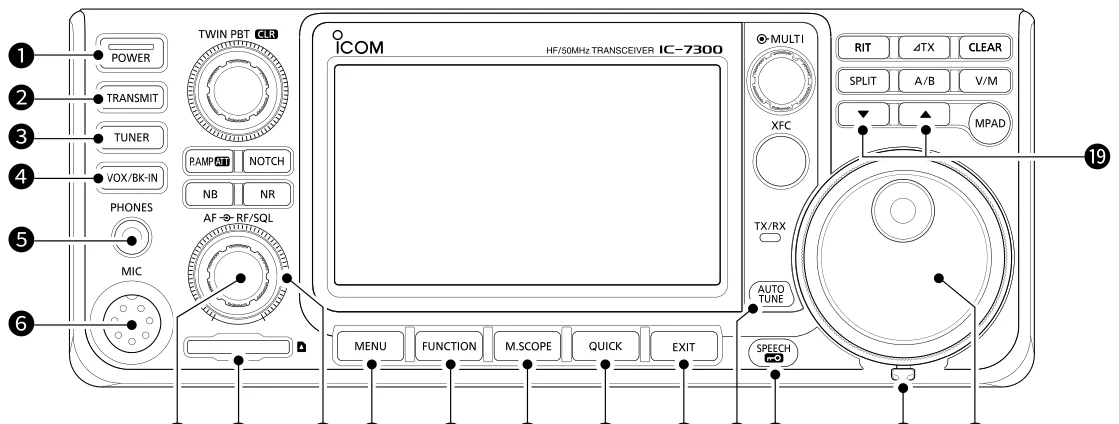
本 章 图 解 IC-7300 的 前 面 板 、 后 面 板 与 触 摸 屏 , 逐 一 介 绍 各 按 键 、 旋 钮 、 接 口 及 屏 幕 图 标 的 功 能 , 并 说 明 MENU 、 FUNCTION、QUICK MENU 屏幕、多功能菜单与屏幕键盘的输入编辑方法。This chapter describes the front panel, rear panel and touch screen of the IC-7300 — the keys, controls, dials, connectors and on-screen icons — and explains the MENU, FUNCTION and QUICK MENU screens, the Multi-function menus, and keyboard entering and editing.
1-2 Front panel · 前面板
This section describes the keys, controls and dials that you 本节介绍操作 IC-7300 所使用的按键、控制器和旋钮。各 use to operate the IC-7300. Refer to the pages posted 项的详细说明,请参阅其旁标注的页码。 beside each key, control, or dial for details.
图 1-1 前面板 Front panel
1 POWER KEY Turns the transceiver ON or OFF. POWER (p. 3-2) 开启或关闭收发信机。
2 TRANSMIT KEY Toggles between transmit and receive. TRANSMIT (p. 3- 在发射与接收之间切换。 10)
3 ANTENNA Turns the antenna tuner ON or OFF, or activates the tuner. TUNER KEY 开启或关闭天线调谐器,或启动调谐。 TUNER (p. 11-2)
4 VOX/BREAK-IN Turns the VOX function (p. 4-10) and Break-in function (p. 4-15) ON or OFF. KEY VOX/BK-IN 开启或关闭 VOX 功能(见 4-10 节)与插入功能(见 4-15 节)。
5 HEADPHONE Connects to standard stereo headphones. JACK PHONES (p. 连接标准立体声耳机。 2-2)
6 MICROPHONE Connects to the supplied or an optional microphone. CONNECTOR 连接随机话筒或选购话筒。 MIC (p. 2-2)
7 VOLUME Adjusts the audio output level. CONTROL AF 调节音频输出电平。 (p. 3-2)
8 SD CARD SLOT Accepts an SD card. SD CARD (p. 8-2) 插入 SD 卡。
9 RF GAIN Adjusts the RF gain and squelch threshold levels. CONTROL/SQUELCH 调节射频增益与静噪门限电平。 CONTROL RF/SQL (p. 3-10)
火腿经验 HAM TIP HAM TIP RF/SQL 是复合旋钮:外环调静噪(SQL),内环调射频增益(RF GAIN)。新手常把「没声音」当成故障——先确认内环 RF GAIN 是否被关小。 The RF/SQL control is a dual-concentric knob: the outer ring adjusts the squelch (SQL) and the inner ring adjusts the RF gain (RF GAIN). Beginners often mistake "no audio" for a fault — first check whether the inner RF GAIN has been turned down.
10 MENU KEY Opens the MENU screen. MENU (p. 1-7) 打开 MENU 屏幕。
11 FUNCTION Displays the FUNCTION screen. KEY FUNCTION 显示 FUNCTION 屏幕。 (p. 1-7)
12 MINI SCOPE Displays the Mini Scope or Spectrum Scope. KEY M.SCOPE (p. 显示 Mini Scope 或 Spectrum Scope(频谱)。 5-4)
13 QUICK KEY Displays the QUICK MENU. QUICK (p. 1-7) 显示 QUICK MENU。
14 EXIT KEY Exits a setting screen or returns to the previous screen. EXIT (p. 1-7) 退出设置屏幕或返回上一屏幕。
15 AUTO TUNE Automatically tunes the operating frequency to a received CW signal. KEY AUTO TUNE 将工作频率自动调谐到接收到的 CW 信号上。 (p. 4-16)
16 SPEECH/LOCK Announces the operating frequency or receiving mode (p. 13-2), or electronically locks MAIN DIAL (p. 3-10). KEY SPEECH 播报工作频率或接收模式(见 13-2 节),或以电子方式锁定 MAIN DIAL (见 3-10 节)。
17 FRICTION Adjusts the friction of MAIN DIAL . ADJUSTER (p. 13- 调节 MAIN DIAL 的阻尼。 2)
18 MAIN DIAL (p. Changes the operating frequency. 3-4) 改变工作频率。
19 MEMORY Changes the Memory channel. CHANNEL 切换存储通道。 UP/DOWN KEY ▲ / ▼ (p. 9-3)
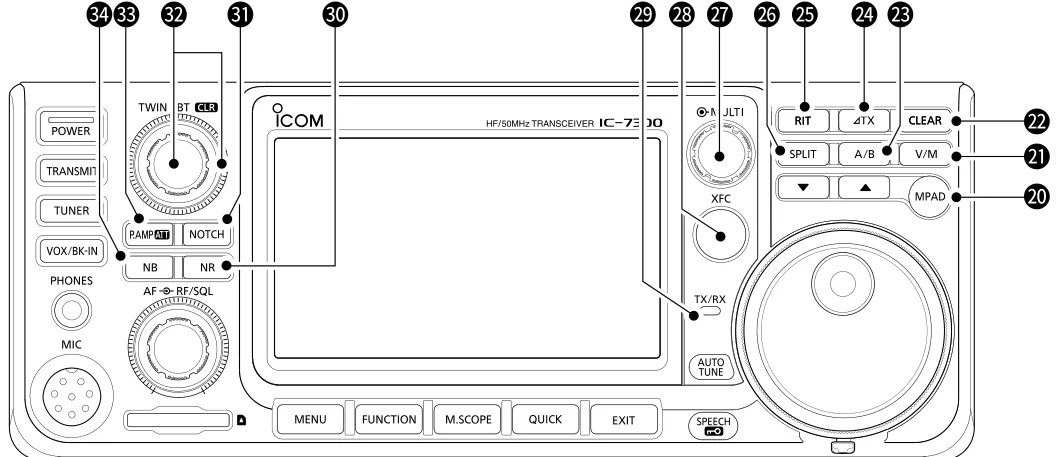
图 1-2 前面板(续) Front panel (continued)
20 MEMO PAD Sequentially calls up the contents in the Memo Pads, or saves the displayed contents into the Memo Pad. KEY MPAD (p. 9- 依次调出各备忘录中保存的内容,或将当前显示的内容保存到备忘录中。 6)
21 VFO/MEMORY Switches between the VFO and Memory mode, or copies the memory channel contents to the VFO. KEY V/M (p. 3-2) 在 VFO 与存储模式之间切换,或将存储通道的内容复制到 VFO。
22 CLEAR KEY Clears the RIT (p. 4-3) or TX shift frequency (p. 4-11). CLEAR 清除 RIT(见 4-3 节)或发射偏移频率(见 4-11 节)。
23 A/B KEY A/B Switches between VFO A and VFO B, or sets the selected VFO's frequency to the other VFO. (p. 3-2) 在 VFO A 与 VFO B 之间切换,或将当前所选 VFO 的频率设为与另一 VFO 相同。
24 TX KEY TX Turns the TX function ON or OFF. (p. 4-11) 开启或关闭 TX 功能。
25 RIT KEY RIT Turns the Receiver Incremental Tuning (RIT) function ON or OFF. (p. 4-3) 开启或关闭接收增量调谐(RIT)功能。
26 SPLIT KEY Turns the Split function ON or OFF. SPLIT (p. 4-13) 开启或关闭异频(Split)功能。
27 MULTI- Displays the Multi-function menu for various adjustments, or selects a desired item. FUNCTION 显示多功能菜单以进行各种调整,或选择所需项目。 CONTROL MULTI (p. 1-8)
28 TRANSMIT Enables you to monitor the transmit frequency while holding it down in the Split mode. FREQUENCY 在异频模式下按住该键,可监听发射频率。 CHECK KEY XFC (p. 4-13)
29 TX/RX Lights red while transmitting and lights green while receiving. INDICATOR (p. 3- 发射时亮红灯,接收时亮绿灯。 10)
30 NOISE Turns the Noise Reduction function ON or OFF. REDUCTION KEY 开启或关闭噪声抑制功能。 NR (p. 4-9)
31 NOTCH KEY Turns the Notch filter ON or OFF. NOTCH (p. 4-9) 开启或关闭陷波滤波器。
32 TWIN Adjusts the IF filter's passband width by rotating, and clears the setting by holding down for 1 second. PASSBAND 旋转可调节中频滤波器的通带宽度,按住 1 秒可清除设定。 TUNING CONTROL TWIN PBT CLR (p. 4-5)
33 PREAMP/ATTENUATOR Turns ON or OFF, and selects one of two receive RF preamplifiers or turns the Attenuator ON or OFF. KEY P.AMP/ATT 开启或关闭,可在两个接收射频前置放大器中选择其一,或开启/关闭衰减器。 (p. 4-3)
34 NOISE Turns the Noise Blanker ON or OFF. BLANKER KEY 开启或关闭噪声消除器。 NB (p. 4-8)
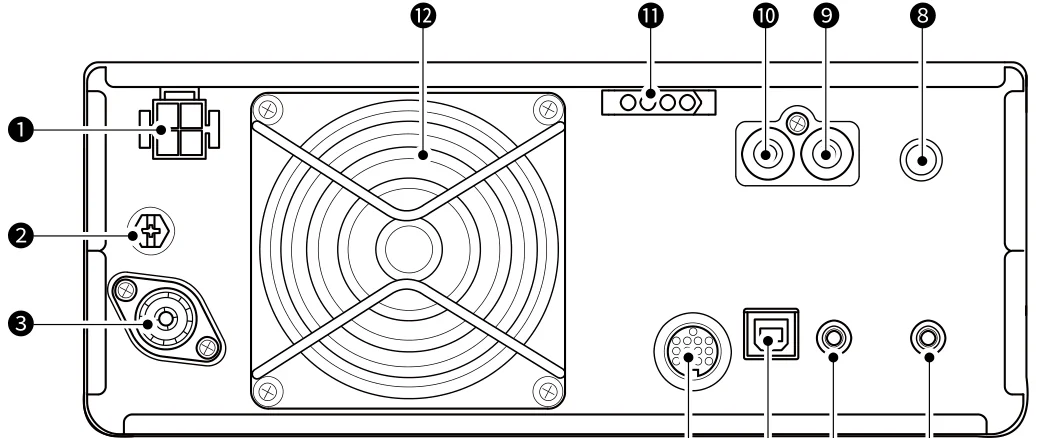
1-4 Rear panel · 后面板
图 1-3 后面板 Rear panel
1 DC POWER Accepts 13.8 V DC through the DC power cable. SOCKET 通过直流电源线接入 13.8 V 直流电。 DC 13.8 V (p. 2-3)
2 GROUND Connects to the ground to prevent electrical shocks, TVI, BCI and other problems. TERMINAL GND 接地,以防止触电、TVI(电视干扰)、BCI(广播干扰)及其他问题。 (p. 2-3)
3 ANTENNA Connects to a 50 Ω PL-259 coax connector. CONNECTOR 连接 50 Ω PL-259 同轴连接器。 ANT (p. 2-3)
4 SOCKET ACC Connects to devices to control an external unit or to control the transceiver. (p. 2-3) 连接相关设备,以控制外部单元或控制本收发信机。
5 USB PORT (B Connects to a PC. TYPE) USB (p. 2- 连接 PC。 3)
6 CI-V REMOTE Connects to a PC, Icom linear amplifier, or other transceiver for external control. CONTROL JACK 连接 PC、Icom 线性放大器或其他收发信机,用于外部控制。 REMOTE (p. 2-3)
7 EXTERNAL Accepts a 4~8 Ω external speaker. SPEAKER JACK 连接 4~8 Ω 的外接扬声器。 EXT-SP (p. 2-3)
8 KEY JACK KEY Connects to a straight key, external electronic keyer, or a paddle with 6.35 mm (1/4") stereo plug. (p. 2-3) 连接直键、外接电子电键或自动键,使用 6.35 mm(1/4 英寸)立体声插头。
9 SEND Connects to control transmit with non-Icom external units. CONTROL JACK 连接非 Icom 外部设备,用于控制发射。 SEND (p. 2-3)
10 ALC INPUT Connects to the ALC output jack of a non-Icom linear amplifier. JACK ALC (p. 2- 连接非 Icom 线性放大器的 ALC 输出插孔。 3)
11 TUNER Accepts the control cable from an optional AH-730 automatic antenna tuner or AH-740 automatic tuning CONTROL antenna.
SOCKET TUNER 连接选购的 AH-730 自动天线调谐器或 AH-740 自动调谐天线的控制线。 (p. 2-3)
12 COOLING FAN Cools the PA unit when necessary. 必要时冷却功放(PA)单元。
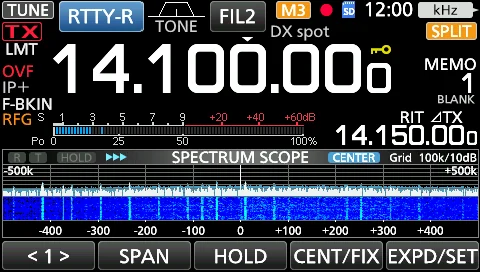
1-5 Touch screen · 触摸屏
This section describes the icons, screens, dialogs, readouts 本节介绍 IC-7300 屏幕上显示的图标、屏幕、对话框和读 and so on that are displayed on the IC-7300 screen. Refer 数等。各项的详细说明,请参阅其旁标注的页码。 to the pages posted beside each item for details.
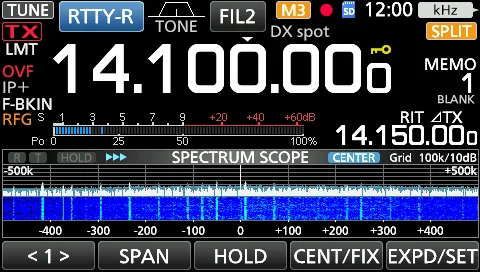
图 1-4 触摸屏 Touch screen
火腿经验 HAM TIP HAM TIP 触摸屏漂移就做校准:MENU » SET > Function > Touch Screen Calibration,用指尖或触控笔慢慢点十字中心。 If the touch screen drifts, calibrate it: MENU » SET > Function > Touch Screen Calibration — slowly touch the center of each cross with your fingertip or a stylus.
1 TUNE ICON (p. Appears while tuning the antenna. 11-2) 调谐天线时显示。
2 MODE Displays the selected operating mode. INDICATOR (p. 3- 显示所选的工作模式。 3)
3 PASSBAND Graphically displays the passband width for twin PBT operation and the center frequency for IF shift operation. WIDTH 以图形方式显示双 PBT(twin PBT)操作的通带宽度,以及 IF shift 操作的中心频率。 INDICATOR (p. 4- 5)
4 TONE Displays the selected tone type in the tone operation mode. INDICATOR (p. 4- 在亚音操作模式下显示所选的亚音类型。 29)
5 IF FILTER Displays the selected IF filter. INDICATOR (p. 4- 显示所选的中频滤波器。 6)
6 QUICK TUNING Appears when the Quick Tuning Step function is ON. ICON (p. 3-4) 快速调谐步进(Quick Tuning Step)功能开启时显示。
7 M1~M8/T1~T8 Displays "M1"~"M8" while "External Keypad" on the CONNECTORS screen is set to ON and using the Memory ICON Keyer function (p. 4-18). Displays "T1"~"T8" while using the Voice TX memory. (p. 7-4) 当 CONNECTORS 屏幕上的 "External Keypad" 设为 ON 且正在使用 Memory Keyer 功能(见 4-18 节)时,显示 "M1"~"M8";正在使用 Voice TX 存储(见 7-4 节)时,显示 "T1"~"T8"。
8 MEMORY Displays the memory name if entered (p. 9-5), or displays the "AUTOTUNE" icon when the Auto Tuning function NAME is ON (p. 4-16).
READOUT/AUTO 若已输入存储名称(见 9-5 节)则显示该名称;自动调谐功能开启时显示 "AUTOTUNE" 图标(见 4-16 TUNE ICON 节)。
9 VOICE Appears while recording. RECORDER ICON 录制时显示。 (p. 6-2)
10 SD CARD Appears when an SD card is inserted, or blinks while accessing the SD card. ICON (p. 8-2) 插入 SD 卡时显示,访问 SD 卡时闪烁。
11 CLOCK Displays the current local time. Touch the readout to display both the current local time and UTC time. READOUT (p. 12- 显示当前本地时间。触摸该读数,可同时显示本地时间与 UTC 时间。 13)
12 FUNCTION Displays the function that is assigned to MULTI . INDICATOR FOR 显示指派给 MULTI 的功能。 MULTI- FUNCTION CONTROL (p. 1-8)
13 SPLIT ICON (p. Appears when the Split function is ON. 4-13) 异频(Split)功能开启时显示。
14 VFO/MEMORY "VFO A" or "VFO B" appears when the VFO mode is selected, and "MEMO" appears when the Memory mode is ICON (p. 3-2) selected. 选择 VFO 模式时显示 "VFO A" 或 "VFO B";选择存储模式时显示 "MEMO"。
15 MEMORY Displays the selected memory channel number. CHANNEL 显示所选的存储通道编号。 READOUT (p. 3-2)
1-6 Touch screen · 触摸屏
图 1-5 触摸屏(续) Touch screen (continued)
16 LOCK ICON (p. Appears while the Lock Function is ON. An icon appears while the 1/4 Tuning function is ON. (p. 3-5) 3-10) 锁定(Lock)功能开启时显示;1/4 调谐功能开启时显示相应图标。(见 3-5 节)
17 RIT ICON (p. 4- Appears while the RIT function is ON. 3) RIT 功能开启时显示。
18 TX ICON (p. 4- Appears while the TX function is ON. 11) TX 功能开启时显示。
19 SHIFT Displays the shift offset of the RIT (p. 4-3) or TX (p. 4-11) functions, while the functions are ON. FREQUENCY 功能开启时,显示 RIT(见 4-3 节)或TX(见 4-11 节)的偏移频率。 READOUT
20 SPECTRUM Displayed while using the Spectrum Scope. SCOPE SCREEN 使用 Spectrum Scope(频谱)时显示。 (p. 5-2)
21 FUNCTION Displays the operating parameters, modes, frequencies and indicators, depending on your selections. DISPLAY 根据您的选择,显示工作参数、模式、频率和指示。
22 MULTI- Displays various strengths and levels, depending on the function you select. FUNCTION 根据选择的功能,显示各种信号强度与电平。 METER (p. 3-11)
23 RF GAIN ICON Appears when RF/SQL (outer) is rotated counterclockwise from the 11 o'clock position. The icon indicates (p. 3-10) that the RF gain is reduced. 当 RF/SQL 外环从 11 点钟位置逆时针旋转时显示。该图标表示射频增益已降低。
24 BK-IN/F- Appears while the Semi Break-in, Full Break-in or VOX function is ON. BKIN/VOX 半插入(Semi Break-in)、全插入(Full Break-in)或 VOX 功能开启时显示。 INDICATOR (p. 4- 15)
25 IP PLUS ICON Appears when the IP Plus function is ON. (p. 4-7) IP Plus 功能开启时显示。
26 OVF ICON (p. Appears when an excessively strong signal is received. 3-10) 接收到过强的信号时显示。
27 FREQUENCY Displays the operating frequency. READOUT (p. 3-4) 显示工作频率。
28 LMT/INH LMT appears if the power amplifier temperature becomes extremely high and the Protection function is ICON (p. 13-4) activated after transmitting continuously for long periods of time. INH appears when the Transmitter Lockout function is activated. 长时间连续发射后功放温度过高、保护功能被激活时,显示 LMT;发射机锁定(Transmitter Lockout) 功能激活时,显示 INH。
29 TX STATUS Displays the transmit status of the displayed frequency. An icon appears while transmitting. An icon appears INDICATOR (p. 3- when the selected frequency is outside of the amateur band frequency range. TX appears while the transmitter
10) is inhibited (p. 3-4). 显示所显示频率的发射状态:发射时显示图标;所选频率超出业余波段频率范围时显示图标;发射机被 禁止(inhibited)时显示 TX。(见 3-4 节)
1-7 MENU, FUNCTION and QUICK MENU screens · MENU、FUNCTION 与 QUICK MENU 屏幕
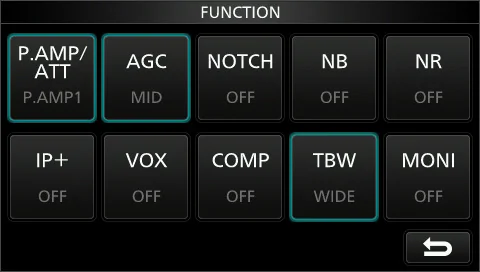
FUNCTION 屏幕 FUNCTION screen
Open the FUNCTION screen by pushing FUNCTION .
按 FUNCTION 键打开 FUNCTION 屏幕。
提示 TIP TIP 按 EXIT 键关闭 FUNCTION 屏幕。
To close the FUNCTION screen, push EXIT .
图 1-6 FUNCTION 屏幕(功能名称 Function name / 所选值 Selected value / 使用时亮蓝色或橙色 Lights blue or orange when used) FUNCTION screen (Function name / Selected value / Lights blue or orange when used)
QUICK MENU QUICK MENU
Open the QUICK MENU by pushing QUICK . 按 QUICK 键打开 QUICK MENU。
火腿经验 HAM TIP HAM TIP QUICK MENU(从屏幕顶部下滑或按相应区域)能快速更改 Meter Type、启动录制,比翻 SET 菜单快。 The QUICK MENU (swipe down from the top of the screen, or touch the corresponding area) gives quick access to Meter Type and recording — faster than digging through the SET menu.
MENU 屏幕 MENU screen
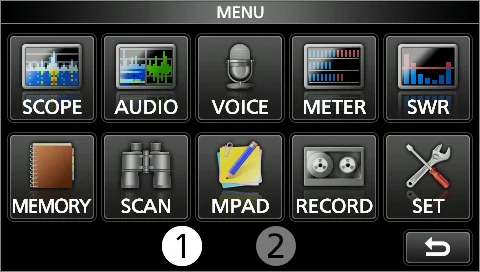
Open the MENU screen by pushing MENU . 按 MENU 键打开 MENU 屏幕。
提示 TIP TIP 按 EXIT 键关闭 MENU 屏幕。
To close the MENU screen, push EXIT .
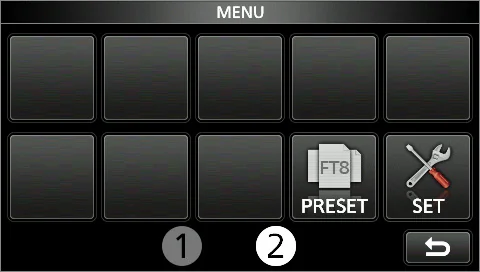
提示 TIP TIP 触摸屏幕底部的 [1] 或 [2],可选择 MENU 屏幕 1 或 2。 Touching [1] or [2] at the bottom of the screen selects MENU screen 1 or 2.
图 1-7 MENU 屏幕(第 1 页) MENU screen (page 1)
图 1-8 MENU 屏幕(第 2 页) MENU screen (page 2)
1-8 Multi-function menus · 多功能菜单
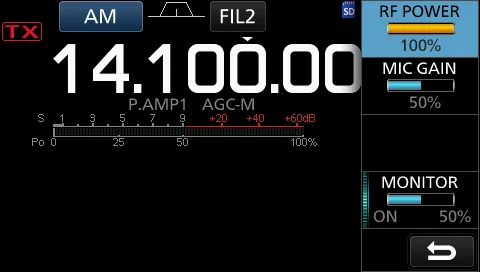
Open the Multi-function menu by pushing MULTI (Multi- 按 MULTI (多功能控制键)打开多功能菜单。 function control). 按住 VOX/BK-IN 、 NB 、 NR 或 NOTCH 1 秒,可打 Open different types of menus by holding down 开不同类型的菜单。 VOX/BK-IN , NB , NR , or NOTCH for 1 second. 多功能菜单打开时,触摸所需项目并旋转 MULTI ,即可 While the Multi-function menu is opened, touch the 设定所需数值。 desired item and rotate MULTI to set the desired value.
图 1-9 触摸屏上的多功能菜单:可旋转(Rotate)或按下(Push)多功能旋钮(Multi-function dial),或触摸项目边缘(Touch the edge to turn ON and OFF) Multi-function menu on the Touch screen: Rotate or Push the Multi-function dial, or Touch the edge to turn ON and OFF
表 1-1 各模式的多功能菜单项目 Multi-function menu items for each mode
SSB SSB-D CW RTTY
RF POWER*2 RF POWER*2 RF POWER*2 RF POWER*2
MIC GAIN*2 MIC GAIN*2 KEY SPEED*2 TPF*1
COMP*1,2 CW PITCH*2
MONITOR*1,2 MONITOR*1,2 MONITOR*1,2
FM AM NB NR
RF POWER*2 RF POWER*2 LEVEL*2 LEVEL*2
MIC GAIN*2 MIC GAIN*2 DEPTH*2
WIDTH*2
MONITOR*1,2 MONITOR*1,2
NOTCH VOX BK-IN
POSITION*2 GAIN*2 DELAY*2
WIDTH*1 ANTI VOX*2
DELAY*2
VOICE DELAY SHORT*1
*1 触摸项目边缘,可打开/关闭该功能或进行调整。*1 Touch the edge to turn the function ON or OFF, or adjust.
*2 触摸项目 1 秒,即使多功能菜单处于关闭状态,也可通过旋转 MULTI 进行调整。*2 Touch the item for 1 second to adjust by rotating MULTI, even when the Multi-function menu is closed.
多功能旋钮 Multi-function dial
When the Multi-function menu is closed, MULTI can be 多功能菜单关闭时,在多功能菜单中按住或在项目上触摸 enabled to adjust functions by pushing or touching the 1 秒,即可启用 MULTI 调节相应功能。该功能显示在屏 item for 1 second on the Multi-function menus. The 幕的右上角。 function is displayed in the upper right corner of the screen.
Function indicator for MULTI MULTI 功能指示
On the Multi-function menus, touch the item for 1 second 在多功能菜单中触摸项目 1 秒,可将该功能指派给 to assign the function to MULTI . To cancel the function MULTI 。 要 取 消 已 指 派 给 MULTI 的功能,请触摸 assigned to MULTI , touch the Function indicator for MULTI 功能指示,或按住 MULTI 1 秒。 Multi-function control, or hold down MULTI for 1 second.
表 1-2 多功能菜单项目 Multi-function menu items
指示 操作 Indicator Action
RIT 旋转:调整 RIT 频率。 按住:清除 RIT 频率。 Rotate: Adjusts the RIT frequency. Hold down: Clears the RIT frequency.
∂TX 旋转:调整 ∂TX 频率。 按住:清除 ∂TX 频率。 Rotate: Adjusts the ∂TX frequency. Hold down: Clears the ∂TX frequency.
RIT 旋转:调整 RIT ∂TX 频率。 ∂TX 按住:清除 RIT ∂TX 频率。 Rotate: Adjusts the RIT ∂TX frequency. Hold down: Clears the RIT ∂TX frequency.
kHz 以 kHz 步进改变工作频率。(仅 VFO 模式)快速旋转 MULTI 会自动提高调谐速度。 Changes the operating frequency in kHz steps. (VFO mode only) Rapidly rotating MULTI automatically increases the tuning speed.
M-CH 在存储模式下,选择存储通道。 In the Memory mode, selects Memory channels.
RF 调整发射输出功率。 PWR* Adjusts the transmit output power.
MIC G* 调整话筒增益。 Adjusts the microphone gain.
COMP* 调整语音压缩器电平。 Adjusts the Speech Compressor level.
MONI* 调整监听(Monitor)功能的音频电平。 Adjusts the audio level for the Monitor function.
SPEED* 调整电键速度。 Adjusts the Keying speed.
PITCH* 调整 CW 音调。 Adjusts the CW pitch.
NB 调整噪声消除器电平。 LEV* Adjusts the Noise Blanker level.
NB 调整 DEPTH(噪声衰减电平)。 DEP* Adjusts the DEPTH (Noise attenuation level).
NB 调整 WIDTH(消隐持续时间)。 WID* Adjusts the WIDTH (Blanking duration time).
NR 调整噪声抑制电平。 LEV* Adjusts the Noise Reduction level.
NOTCH* 调整陷波滤波器频率。 Adjusts the Notch filter frequency.
VOX G* 调整 VOX 增益。
指示 操作 Indicator Action
Adjusts the VOX gain.
A-VOX* 调整 ANTI VOX 电平。 Adjusts the ANTI VOX level.
VOX D* 调整 VOX 延迟时间。 Adjusts the VOX delay time.
BKIN 调整插入(Break-in)延迟时间。 D* Adjusts the Break-in delay time.
1-9 Keyboard entering and editing · 键盘输入与编辑
输入与编辑字符 Entering and editing characters
You can enter and edit the items in the following table. 您可以输入和编辑下表中的项目。
表 1-3 可输入与编辑的项目 Items that can be entered and edited
字符总数 类别 屏幕 可选字符 说明 Total Category Screen Selectable characters Information characters
MENU MY CALL A to Z, 0 to 9, (space), / @ – . 10
MEMORY MEMORY A to Z, a to z, 0 to 9, (space), @ % & # + – = [ ] / ( ) : ; ^ ! ? 10 NAME .,
FUNCTION KEYER A to Z, 0 to 9, (space), / ? ^ . , @ 70 "*" ( 星 号 ) 有 专 门 用 MEMORY 途。 "*" (asterisk) has its unique use.
FUNCTION RTTY A to Z, 0 to 9, (space), ! $ & ? " ' – / . , : ; ( ) ↵ 70 MEMORY
VOICE TX RECORD A to Z, a to z, 0 to 9, (space), ! " # $ % & ' ( ) * + , – . / : ; < 16 =>?@[]^_`{|}~
SD Card FILE NAME A to Z, a to z, 0 to 9, (space), ! " # $ % & ' ( ) * + , – . / : ; < 15 非法字符:/ : ; * < > =>?@[]^_`{|}~ Illegal characters: / : ; * <
PRESET PRESET A to Z, a to z, 0 to 9, (space), @ % & # + – = [ ] / ( ) : ; ^ ! ? 16 NAME .,
键盘类型 Keyboard types
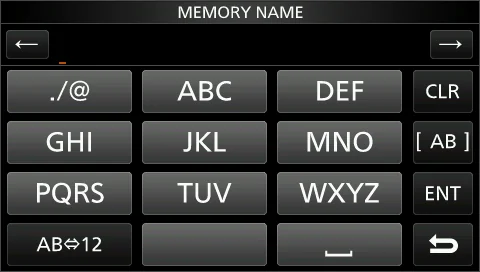
You can select the Full Keyboard or Ten-key in "Keyboard 可在 FUNCTION 屏幕的 "Keyboard Type"(键盘类型) Type" on the FUNCTION screen. (p. 12-9) 中选择 Full Keyboard(全键盘)或 Ten-key(十键)。 MENU » SET > Function > Keyboard Type (见 12-9 节)
MENU » SET > Function > Keyboard Type
提示 TIP TIP 也可以按 QUICK 键,在 QUICK MENU 中临时切换。
You can also temporarily switch in the QUICK MENU by pushing QUICK .
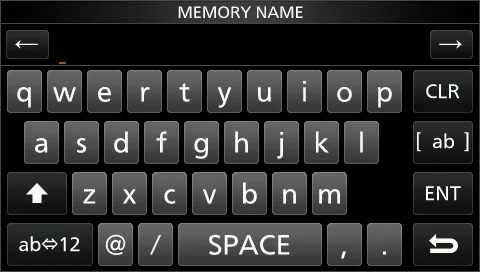
图 1-10 全键盘(Full Keyboard) 图 1-11 十键键盘(Ten-key) Full Keyboard Ten-key
输入与编辑 Entering and editing
表 1-4 屏幕键盘按键功能 On-screen keyboard key functions
按键 功能 Key Function
CLR 清除已输入的字符 Clears the entered character
⇄ ab 12 选择字母模式或数字模式 Selects alphabet mode or number mode
SPACE 输入空格 Enters a space
[ ab ] 选择字符类型 Selects the character type
ENT 保存输入内容 Saves the entry
↩ 取消输入并返回上一屏幕 Cancels entry and returns to the previous screen
↑ 输入大写字母 Enters an uppercase letter
← 光标后退 Moves the cursor backward
→ 光标前进 Moves the cursor forward
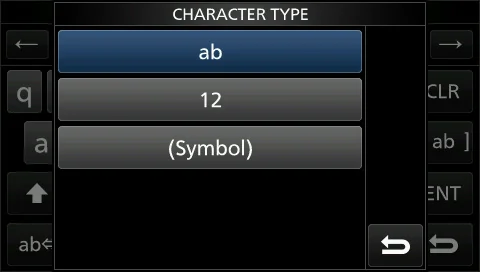
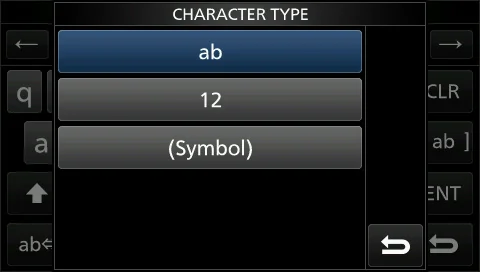
图 1-12 CHARACTER TYPE 屏幕:字母模式(Alphabet mode)、数字模式(Number mode)与符号模式(Symbol mode) CHARACTER TYPE screen: Alphabet mode, Number mode and Symbol mode
提示 TIP TIP 可在 FUNCTION 屏幕的 "Screen Full Keyboard Layout" 中选择全键盘布局。(见 12-9 节) You can select the full keyboard layout in "Screen Full Keyboard Layout" on the FUNCTION screen. (p. 12-9)
MENU » SET > Function > Screen Full Keyboard Layout MENU » SET > Function > Screen Full Keyboard Layout
1-10 Keyboard entering and editing · 键盘输入与编辑
输入与编辑示例 Entering and editing example
Entering "DX spot 1" in the Memory channel 2 在存储通道 2 中输入 "DX spot 1"
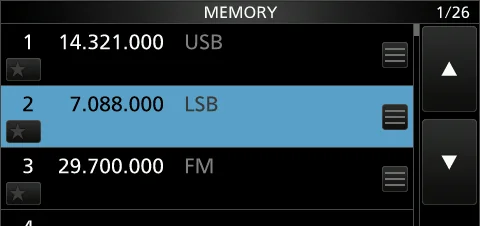
1. 1 Open the MEMORY screen. MENU » MEMORY 1. 1 打开 MEMORY 屏幕。MENU » MEMORY 2. 2 Touch the memory channel 2 for 1 second. 2. 2 触摸存储通道 2 保持 1 秒。(触摸该键也可打开 (Touching this key also opens the QUICK MENU.) QUICK MENU。) 3. 3 Select "Edit Name." (Rotate or push MULTI .) 3. 3 选择 "Edit Name"(旋转或按下 MULTI )。打开 Opens the MEMORY NAME screen. MEMORY NAME 屏幕。
图 1-13 MEMORY 屏幕(示例第 1~2 步) MEMORY screen (example steps 1–2)
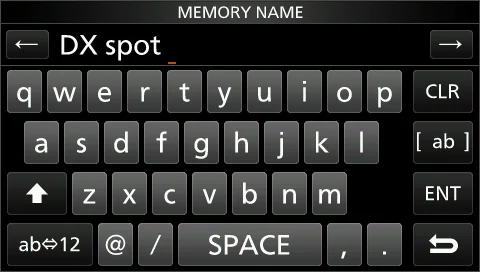
1. 4 Touch ↑ , and then touch D . 1. 4 触摸 ↑ ,然后触摸 D 。 2. 5 Touch ↑ again, and then touch X . 2. 5 再次触摸 ↑ ,然后触摸 X 。 3. 6 Touch SPACE . (Enters a space.) 3. 6 触摸 SPACE 。(输入空格。) 4. 7 Touch s , p , o , and then t . 4. 7 触摸 s 、 p 、 o ,然后触摸 t 。 5. 8 Touch SPACE . (Enters a space.) 5. 8 触摸 SPACE 。(输入空格。)
图 1-14 输入 "DX spot" 后的 MEMORY NAME 屏幕(示例第 4~8 步) MEMORY NAME screen after entering "DX spot" (example steps 4–8)
1. 9 Touch ab . (Opens the entry CHARACTER TYPE 1. 9 触摸 ab 。 ( 打 开 CHARACTER TYPE 输 入 屏 screen.) 幕。) 2. 10 Touch 12 . 2. 10 触摸 12 。 3. 11 Touch 1 . 3. 11 触摸 1 。 4. 12 Touch ENT to save the entry. (Returns to the 4. 12 触摸 ENT 保存输入内容。(返回上一屏幕。) previous screen.)
图 1-15 CHARACTER TYPE 屏幕(示例第 9~10 步) CHARACTER TYPE screen (example steps 9–10)