固件升级Firmware Updating
本章分两部分。第一部分介绍第 15 章「固件升级」:如何检查固件版本、如何在 Icom 网站下载并解压固件文件、如何用 SD 卡执行升级,以及升级过程中的确认与注意事项。升级前务必先在 SD 卡上保存设置数据,升级过程中绝不能断电或拔出 SD 卡。第二部分为原厂《固件版本信息》(FirmUpInfo),逐版本列出 IC-7300 自 Version 1.30、1.40/1.41 到 1.42 的新增(Added)与变更(Changed)内容,涵盖 Scope 操作、多功能旋钮、MENU 第二页与 PRESET 菜单、按键自定义、CI-V 指令等,是核对本机功能与查阅老教程差异的权威依据。
This chapter has two parts. The first part describes how to check the firmware version, download and unzip the firmware file from the Icom website, and update the firmware using an SD card, together with the confirmations and precautions required during the updating. Be sure to save your settings data onto an SD card before updating, and never turn off the power or remove the SD card while updating. The second part is the factory Firmware Version Information (FirmUpInfo), listing, version by version, everything that was Added or Changed in the IC-7300 from Version 1.30 and 1.40/1.41 up to 1.42, including Scope operation, the Multi-function dial, the second MENU page and the PRESET menu, key customize functions and the CI-V commands. It is the authoritative reference for checking what functions your radio has and for resolving differences with older tutorials.
15-2关于固件升级About updating the firmware
您可以使用 SD 卡升级 IC-7300 的固件。升级固件可增加新功能并改善性能参数。
You can update the IC-7300's firmware using an SD card. Updating the firmware adds new functions and improves performance parameters.
您可以从 Icom 网站下载最新固件。
You can download the latest firmware from the Icom website.
https://www.icomjapan.com/support/
https://www.icomjapan.com/support/
检查固件版本Checking the firmware version
您可以在 SET 模式下查看固件版本。
You can check the firmware version in the Set mode.
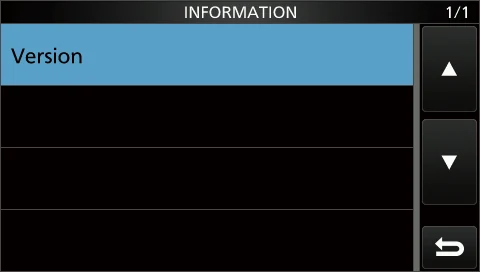
1打开 INFORMATION 屏幕。
MENU » SET > Others > Information
1Open the INFORMATION screen.
MENU » SET > Others > Information
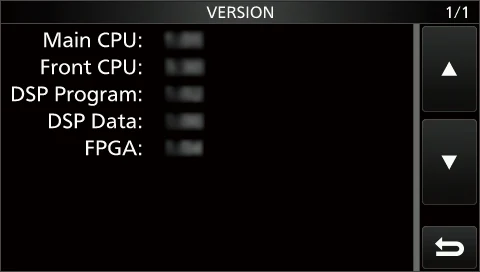
2触摸 "Version"。
• 此时显示固件版本。
2Touch "Version."
• The firmware version is displayed.
提示 TIPTIP
您也可以在开启收发信机时的开机画面上查看固件版本。
You also can check the firmware version in the Opening screen when you turn ON the transceiver.
旋转 MAIN DIAL,然后按 POWER。此时显示固件版本。
Rotate MAIN DIAL, then push POWER. The firmware version is displayed.

15-3升级前的准备Preparation
访问以下 URL 并下载固件文件。
Access the following URL and download the firmware file.
https://www.icomjapan.com/support/
https://www.icomjapan.com/support/
说明 NOTENOTE
以下操作说明基于 Microsoft® Windows® 10。
These instructions are based on Microsoft® Windows® 10.
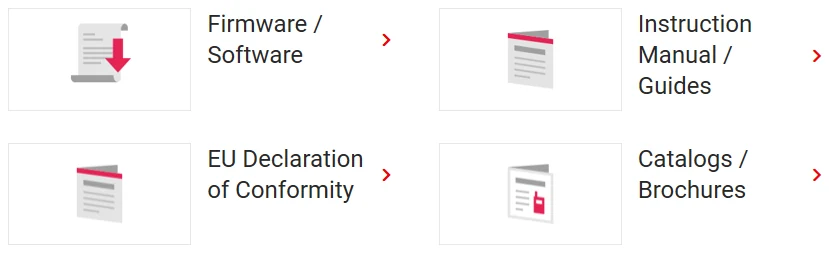
1点击 "Firmware Updates/Software" 链接。
1Click the "Firmware Updates/Software" link.
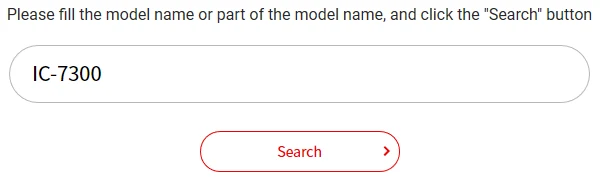
2在 Search 输入框中输入 "IC-7300",然后点击 [Search]。
2Enter "IC-7300" into the Search box, and then click [Search].
3点击所需的固件文件链接。
3Click the desired firmware file link.
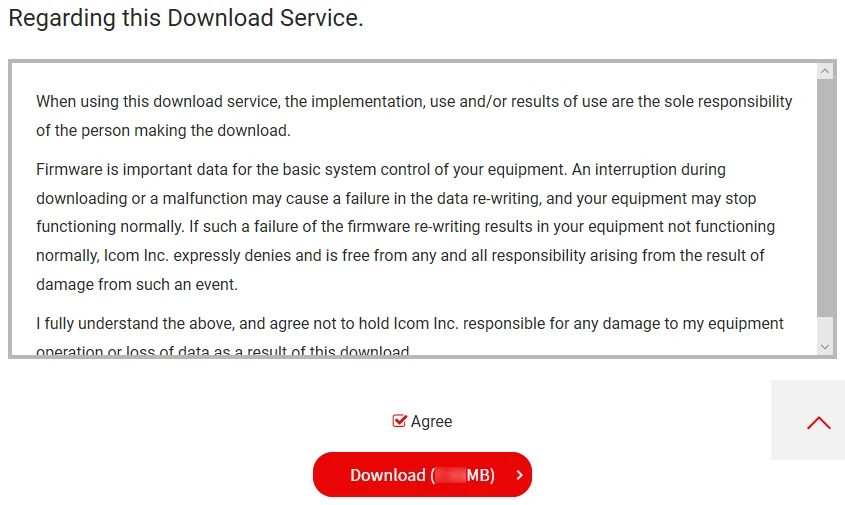
4仔细阅读 "Regarding this Download Service"。点击 "Agree",然后点击 [Download]。
4Read "Regarding this Download Service" carefully. Click "Agree," and then click [Download].
5在弹出的 File Download 对话框中点击 "Save as"。
5Click "Save as" in the displayed File Download dialog.
6选择您要保存固件的位置,然后在弹出的 File Download 对话框中点击 [Save]。
• 文件开始下载。
• 固件与固件工具被压缩在一个 "zip" 格式的文件夹中。使用前请先解压。
6Select the location where you want to save the firmware, and then click [Save] in the displayed File Download dialog.
• The file starts downloading.
• The firmware and the firm utility are compressed in a "zip" format folder. Unzip it before use.
火腿经验 HAM TIPHAM TIP
升级前先把电台设置存到 SD 卡:MENU » SET > Others > Save Setting Data(Save Setting Data to the SD card)。万一升级失败可据此恢复。升级全程勿断市电,用稳压 13.8 V 电源;笔记本用户请接满电电池,不要指望 USB 供电撑住整个升级过程。
Save your transceiver settings to an SD card before updating: MENU » SET > Others > Save Setting Data. This lets you recover the settings if the update fails. Never cut the mains power during the update; use a regulated 13.8 V supply. If you power the radio from a laptop, make sure the battery is fully charged rather than relying on USB power for the whole update.
15-4解压固件文件夹Unzipping the firmware folder
1在下载的固件文件夹(zip 格式)上单击鼠标右键。
• 此时显示右键菜单。
1Right-click the downloaded firmware folder (zip format).
• Right-click menu is displayed.
2点击 "Extract All..."。
• 解压后,会在下载文件夹的同一位置生成一个文件夹。
2Click "Extract All..."
• After unzipping, a folder is created in the same location as the downloaded folder.
说明 NOTENOTE
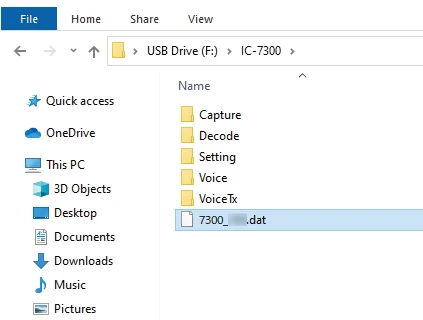
在 "7300_*" 文件夹中会生成 "7300_*.dat" 文件。
* 代表版本发布号(release number)。
In the "7300_*" folder, "7300_*.dat" is created. * represents the release number.
15-5升级固件Updating the firmware
重要 IMPORTANTIMPORTANT
升级固件前,请先使用 IC-7300 格式化 SD 卡。(见 8-3 节)然后将下载的固件数据从电脑复制到 SD 卡。(见 8-4 节)
To update the firmware, first format your SD card using the IC-7300. (p. 8-3) Then copy the downloaded firmware data from your PC to the SD card. (p. 8-4)
警告 CAUTIONCAUTION
升级固件期间,绝不可关闭收发信机电源。
如果在升级过程中关闭了收发信机电源或发生停电,收发信机的固件将受损,您必须把收发信机送回最近的 Icom 经销商处修理。即使收发信机仍在保修期内,此种修理也不在保修范围之内。
CAUTION: NEVER turn OFF the transceiver while updating the firmware.
If you turn OFF the transceiver, or if a power failure occurs while updating, the transceiver firmware will be damaged and you will have to send the transceiver back to the nearest Icom distributor for repair. This type of repair is out of warranty, even if the transceiver warranty period is still valid.
提示 TIPTIP
务必解压下载的文件。详情请参阅「解压固件文件夹」(见 15-4 节)。
TIP: BE SURE to unzip the downloaded file. See "Unzipping the firmware file" (p. 15-4) for details.
1将下载的固件数据复制到 SD 卡上的 IC-7300 文件夹中。
1Copy the downloaded firmware data into the IC-7300 folder on an SD card.
2将 SD 卡插入收发信机的 [SD CARD] 卡槽。
2Insert the SD card into the transceiver's [SD CARD] slot.
3在 SET 模式菜单屏幕上显示 SD CARD 屏幕。
MENU » SET > SD card
3On the Set mode menu screen, display the SD CARD screen.
MENU » SET > SD card
4选择 "Firmware Update"。
• 此时显示固件升级同意屏幕。
4Select "Firmware Update."
• The firmware update agreement screen is displayed.
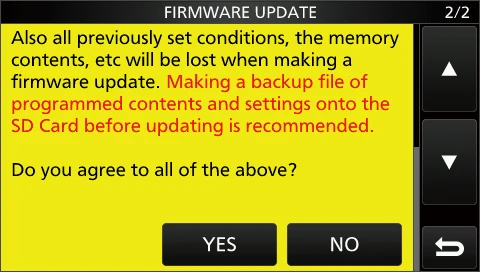
5触摸 [▲] 或 [▼] 键滚动屏幕。
注意:请仔细阅读屏幕上显示的所有注意事项。
5Touch the [▲] or [▼] key to scroll the screen.
NOTE: Carefully read all the displayed precautions.
6阅读并同意所有注意事项后,触摸 [YES]。
• 此时显示确认对话框。触摸 [YES] 后,会先在 SD 卡上制作备份文件,然后显示 Firmware 选择屏幕。
注意:如果要取消升级,请触摸 [NO]。
6After you read and agree with all the precautions, touch [YES].
• The confirmation dialog is displayed. When you touch [YES], the backup file is made on the SD card, and then the Firmware selection screen is displayed.
NOTE: When you want to cancel the updating, touch [NO].
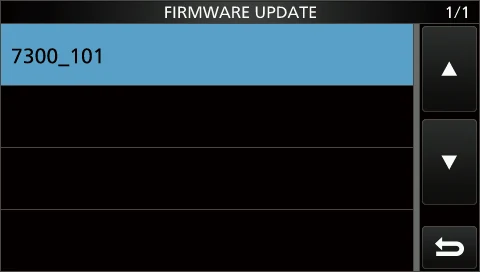
7触摸固件文件(示例:7300_101)。
• 此时显示最终确认屏幕。
注意:请仔细阅读屏幕上显示的所有注意事项。
7Touch the Firmware (Example: 7300_101).
• The final confirmation screen is displayed.
NOTE: Carefully read all the displayed precautions.
8阅读并同意所有注意事项后,长按 [YES] 1 秒。
• 升级开始。
注意:如果要取消升级,请触摸 [NO]。
8After you read and agree with all the precautions, touch [YES] for 1 second.
• The updating starts.
NOTE: If you want to cancel the updating, touch [NO].
15-6升级固件(续)Updating the firmware (continued)
升级过程中屏幕按下图所示发生变化。
The screen changes as shown below during the updating.
注意:IC-7300 会从 SD 卡读取固件文件,并将其写入主 CPU 以及 DSP/FPGA。
注意:下载与写入的进度会显示在对话框中。
NOTE: The IC-7300 reads the firmware file from the SD card and writes it to the main CPU and DSP/FPGA.
NOTE: Downloading and loading status are displayed in the dialogs.
9对话框中显示 "Firmware updating has completed."。
• IC-7300 将自动重新启动。
注意:升级结束后显示操作屏幕。
9"Firmware updating has completed." is displayed in the dialog.
• The IC-7300 will automatically restart.
NOTE: After the updating finishes, the operating screen is displayed.
提示 TIPTIP
要查看升级后的固件版本,请参阅「检查固件版本」(见 15-2 节)。
To check the firmware version after the updating, see "Checking the firmware version" (p. 15-2) for details.
火腿经验 HAM TIPHAM TIP
升级途中绝不能断电、也不能拔出 SD 卡,否则可能变砖;万一升级失败后的恢复办法见原厂固件说明。另外,SD 卡务必在电台内用 MENU » SET > SD Card > Format 格式化,容量支持到 32 GB(SDHC),SDXC 大容量卡不兼容。
Never switch off the power or pull out the SD card while the firmware is updating, otherwise the radio may become unusable; if an update does fail, refer to the factory firmware information for the recovery procedure. Also, always format the SD card inside the radio with MENU » SET > SD Card > Format. Capacity is supported up to 32 GB (SDHC); large SDXC cards are not compatible.
15-7固件版本历史Firmware Version History
说明 NOTENOTE
本节译文出自原厂《固件版本信息》(FirmUpInfo)。其中标注的页码(如 p. 4-4、p. 8-2、p. 8-6、p. 9)为 FirmUpInfo 自身的页码或原厂手册的页码,本书按实际章节编号给出链接。文中 "Added" 表示新增功能或菜单,"Changed" 表示对已有功能、操作、项目或选项做了变更。
This section is translated from the factory Firmware Version Information (FirmUpInfo). Page references such as p. 4-4, p. 8-2, p. 8-6 and p. 9 are the page numbers used by FirmUpInfo or by the full manual; in this book they are linked to the corresponding section numbers. "Added" means new functions and/or menus have been added. "Changed" means some operations, items, and/or options that already exist have been changed.
IC-7300 Version 1.42IC-7300 Version 1.42
IC-7300 新增了以下功能。
The following features are now added to the IC-7300.
V1.42
Added:新增了新的功能和/或菜单。
Changed:对已有的部分操作、项目和/或选项做了变更。
V1.42
Added: New functions and/or menus have been added.
Changed: Some operations, items, and/or options that already exist have been changed.
变更:CI-V 指令Changed: CI-V commands
以下指令被添加到常规 Command 指令表中。
The following command is added to the conventional Command table.
| 指令Cmd. | 子指令Sub cmd. | 数据Data | 说明Description |
|---|---|---|---|
| 16* | 66 | 00/01 | 发送/读取 TX Inhibit 功能 (00=OFF,01=ON)Send/read the TX Inhibit function (00=OFF, 01=ON) |
说明 NOTENOTE
*(星号)表示可发送/读取数据。
*(Asterisk) Send/read data
新增:与 IC-PW2 的联动手动调谐Added: Linked manual tuning with the IC-PW2
当收发信机用作 IC-PW2 的激励器(exciter)时,在 IC-PW2 上长按 TUNER 1 秒,收发信机将自动开始发射,以执行联动手动调谐。
When the transceiver is used as an exciter for the IC-PW2, and you hold down TUNER on the IC-PW2 for 1 second, the transceiver automatically starts transmitting to perform the linked manual tuning.
注意:联动手动调谐期间,可以更改收发信机的仪表读数。
NOTE: During the linked manual tuning, the meter readout of the transceiver can be changed.
注意:要取消联动手动调谐,请按收发信机上的 TUNER。取消联动手动调谐后,TUNER 上的指示灯熄灭。
NOTE: To cancel the linked manual tuning, push TUNER on the transceiver. When the linked manual tuning is canceled, the indicator on TUNER goes out.
新增:Transmitter Lockout(发射禁止)功能Added: Transmitter Lockout function
当两台支持 Transmitter Lockout 功能的 Icom 激励器(其中包括 IC-7300)连接到 IC-PW2 进行 Single Operator Two Radios(SO2R)操作时,该功能可防止两台激励器同时发射。
When 2 Icom exciters that support the Transmitter Lockout function, including the IC-7300, are connected to the IC-PW2 to Single Operator Two Radios (SO2R) operation, the function prevents the simultaneous transmission from the exciters.
注意:当 TX inhibit 指令(16 66)被发送到连接在 IC-PW2 射频输入端、且该输入端设定为 RX 侧(INPUT 指示灯绿色点亮)或 OFF(INPUT 指示灯熄灭)的激励器时,该激励器的屏幕上会显示 "INH" 图标。当该激励器尝试发射时,会显示 "TX Inhibit" 并且无法发射。
NOTE: When the TX inhibit command (16 66) is sent to the exciter connected to the IC-PW2's RF input connector set to the RX side (INPUT indicator lights green) or OFF (INPUT indicator is OFF), the "INH" icon is displayed on the exciter's screen. When the exciter tries to transmit, "TX Inhibit" is displayed and cannot transmit.
说明 NOTENOTE
译注:原厂 FirmUpInfo 在此处给出两幅示意图,其说明文字分别为 "INH icon"(INH 图标)与 ""TX Inhibit" is displayed"(显示 "TX Inhibit")。因本书未收录该两幅插图,此处以文字说明代替。
Translator's note: the original FirmUpInfo illustrates this item with two figures captioned "INH icon" and ""TX Inhibit" is displayed." As those figures are not included in this book, the description is given in text.
IC-7300 Version 1.40/1.41IC-7300 Version 1.40/1.41
IC-7300 的以下功能发生了变更或新增。
The following features are now changed in, or added to, the IC-7300.
V1.40/1.41
Added:新增了新的功能和/或菜单。
Changed:对已有的部分操作、项目和/或选项做了变更。
V1.40/1.41
Added: New functions and/or menus have been added.
Changed: Some operations, items, and/or options that already exist have been changed.
| 类别Type | 条目Item | 原文页码Page |
|---|---|---|
| Changed | Scope operation | 1 |
| Added | A second page of the MENU screen | 2 |
| Added | PRESET menu | 2 |
| Changed | Multi-function dial | 3 |
| Changed | Touch screen display | 3 |
| Added | Band stacking register | 3 |
| Added | Front Key Customize function | 4 |
| Added | MIC Key Customize function | 5 |
| Changed | Tone Control settings in the Data mode | 6 |
| Changed | REF Adjust | 6 |
| Changed | CI-V USB Port | 6 |
| Changed | Firmware Update screen | 6 |
| Changed | Keyboard entry | 6 |
| Changed | Default tuning step in the CW mode | 6 |
| Added | PTT Port Function (Added in the firmware version 1.41) | 6 |
| Changed | CI-V commands | 7 |
变更:Scope 操作Changed: Scope operation
• 新增了 Scroll(滚动)模式。
• 当 Scope 的 span 或 Edge 频率发生变化时(例如触摸 [SPAN] 或 [EDGE]),所选 Scope span 或所选 Edge 频率的显示会被放大。
• 在 SCOPE SET 菜单中,"Marker Position (FIX Type)" 更名为 "Marker Position (FIX Type/SCROLL Type)"。
• 每个波段的 Fixed Edge 最大数量由 3 个增加到 4 个。
• 每个波段都会各自记忆基准电平(Reference level)。
• Scope 屏幕打开时,长按 [M.SCOPE] 1 秒可关闭该屏幕。
• The Scroll mode is added.
• When the scope span or Edge frequency is changed, such as by touching [SPAN] or [EDGE], the selected scope span or the selected Edge frequency display is enlarged.
• In the SCOPE SET menu, "Marker Position (FIX Type)" is renamed to "Marker Position (FIX Type/SCROLL Type)."
• The maximum number of Fixed Edges for each band is increased from 3 to 4.
• Each band memorizes the Reference level.
• When the Scope screen is open, holding down [M.SCOPE] for 1 second closes the screen.
Scroll(滚动)模式
显示所选 span 范围内的信号。当工作频率移出屏幕范围时,显示的频率范围会自动滚动。
Scroll mode
Displays signals within a selected span. When the operating frequency moves outside of the screen, the displayed frequency range is automatically scrolled.
1显示 SPECTRUM SCOPE 屏幕。
MENU » SCOPE
1Display the SPECTRUM SCOPE screen.
MENU » SCOPE
2长按 [CENT/FIX] 1 秒选择 Scroll 模式。
• 由 Center 模式切换到 Scroll 模式时,显示 "SCROLL-C"。
此时可通过触摸 [SPAN] 更改 Scope span。
• 由 Fixed 模式切换到 Scroll 模式时,显示 "SCROLL-F"。
此时可通过触摸 [EDGE] 更改 Edge 频率。
2Touch [CENT/FIX] for 1 second to select the Scroll mode.
• When changing the Center mode to the Scroll mode, "SCROLL-C" is displayed. You can change the scope span by touching [SPAN].
• When changing the Fixed mode to the Scroll mode, "SCROLL-F" is displayed. You can change the Edge frequencies by touching [EDGE].
3触摸 [CENT/FIX] 返回原来的模式。
• 返回 Center 模式时,Scope span 不会回到先前的设定值。
• 返回 Fixed 模式时,Edge 频率会回到上次选定的 "Fixed Edges"。
3Touch [CENT/FIX] to return to the previous mode.
• When returning to the Center mode, the scope span does not return to the previous setting.
• When returning to the Fixed mode, the Edge frequencies return to the last selected "Fixed Edges."
当工作频率高于上限 Edge 频率或低于下限 Edge 频率时,SPECTRUM SCOPE 屏幕上方的两个角上会显示 "<<" 或 ">>"。
If the operating frequency is above the upper Edge frequency, or below the lower Edge frequency, "<<" or ">>" is displayed in the upper side corners of the SPECTRUM SCOPE screen.
说明 NOTENOTE
译注:原厂 FirmUpInfo 此处附有 SPECTRUM SCOPE 屏幕的标注图,图注为 "Edge (Lower frequency)"、"Grid (frequency/level)"、"Edge (Upper frequency)"、"Operating frequency (moves)",并说明在 SCROLL-C 模式下会显示相应的指示符号。因本书未收录该图,此处仅保留文字说明。
Translator's note: the original FirmUpInfo shows an annotated SPECTRUM SCOPE screen captioned "Edge (Lower frequency)," "Grid (frequency/level)," "Edge (Upper frequency)" and "Operating frequency (moves)," and notes which indicators are displayed in the SCROLL-C mode. As that figure is not included in this book, only the text is retained.
新增:MENU 屏幕的第二页Added: A second page of the MENU screen
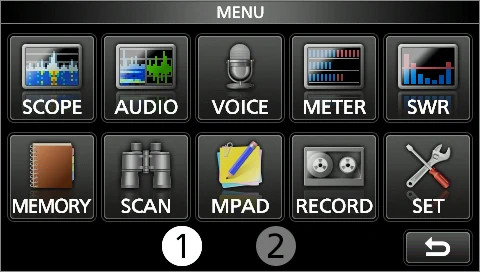
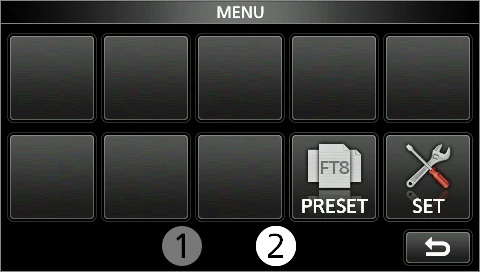
MENU 屏幕新增了第二页。通过触摸页码即可在 MENU 1 与 MENU 2 之间切换。
A second page of the MENU screen is added. You can change between the MENU 1 and 2 by touching the page number.
新增:PRESET 菜单Added: PRESET menu
MENU 屏幕的第二页新增了 [PRESET]。
[PRESET] is added to the second page of the MENU screen.
您可以把下列针对数据模式(DATA 模式)的设置组合保存起来,以便根据操作需要快速切换设置。
You can save the combination of the following settings for the data mode to quickly change the settings, depending on your operating needs.
注意:收发信机共有 5 个存储。
NOTE: The transceiver has a total of 5 memories.
| 项目Item |
|---|
| SSB TBW |
| Mode |
| SSB TX Bandwidth |
| Filter |
| USB SEND |
| Filter BW |
| USB Keying (CW) |
| Filter Type (HF) |
| USB Keying (RTTY) |
| Filter Type (50M - ) |
| Inhibit Timer at USB Connection |
| ACC/USB Output Select |
| ACC/USB AF Output Level |
| CI-V Baud Rate |
| ACC/USB AF SQL |
| CI-V Address |
| ACC/USB IF Output Level |
| CI-V Transceive |
| USB MOD Level |
| USB Serial Function |
| DATA MOD |
| CI-V USB Port |
| SSB-D TX Bandwidth |
| CI-V USB Baud Rate |
| DATA OFF MOD |
| CI-V USB Echo Back |
| COMP |
- 1按 MENU。
- 2触摸屏幕底部中央的 2。
- 3触摸 [PRESET]。
- 4触摸要加载的 preset 存储。
- 5触摸 [YES]。
• 所选的 preset 存储被加载,PRESET 屏幕上显示 "In Use"。如果此后您更改了收发信机的设置,使其与 preset 存储的内容不一致,"In Use" 就会消失。
- 1Push MENU.
- 2Touch 2 at the center bottom of the screen.
- 3Touch [PRESET].
- 4Touch the preset memory to load.
- 5Touch [YES].
• The selected preset memory is loaded, and "In Use" is displayed on the PRESET screen. If you change the transceiver settings, and they do not match the contents of the preset memory, "In Use" disappears.
注意:触摸 [UNLOAD] 会把收发信机的设置恢复为加载 preset 存储之前的状态。
NOTE: Touching [UNLOAD] returns the transceiver settings to those set before loading the preset memory.
说明 NOTENOTE
• 在存储模式下选择了空白存储通道时,无法加载 preset 存储的内容。
• 无法加载显示为 "(BLANK)" 的 preset 存储。
• You cannot load the preset memory content when you select a blank memory channel in the Memory mode.
• You cannot load a preset memory that is displayed as "(BLANK)."
注意:无法编辑正在使用中的 preset 存储。要编辑它,请先触摸 [UNLOAD],然后再编辑该存储。
- 1在 PRESET 屏幕上长按要编辑的 preset 存储 1 秒。
• 此时打开 QUICK MENU 屏幕。 - 2触摸 "Edit the Preset Memory"。
注意:触摸 "Save to the Preset Memory" 时,所有内容都会被设为编辑前的当前设置。 - 3触摸复选框,选择是否加载该项目。
• 在被加载项目的左侧显示 "✓"。 - 4触摸项目名称,然后触摸要设置的选项。
注意:preset 名称最多可设置 16 个字符。 - 5重复步骤 3 和 4 以编辑 preset 存储。
- 6触摸 "<<Write>>"。
- 7触摸 [YES]。
NOTE: You cannot edit the preset memory that is in use. To edit it, first touch [UNLOAD], and then edit the memory.
- 1On the PRESET screen, touch a preset memory to edit for 1 second.
• Opens the QUICK MENU screen. - 2Touch "Edit the Preset Memory."
NOTE: When touching "Save to the Preset Memory," all of the contents are set to the current settings before editing. - 3Touch the check box to select whether or not to load the item.
• "✓" is displayed on the left side of the loading item. - 4Touch the item name, and then touch the option to set.
NOTE: You can set the preset name of up to 16 characters. - 5Repeat steps 3 and 4 to edit the preset memory.
- 6Touch "<<Write>>."
- 7Touch [YES].
提示 TIPTIP
根据您所使用的软件,可能需要更改 "CI-V Address" 设置。
例如,您使用的软件与 IC-7300 不兼容时,可以把 "CI-V Address" 设置为另一台收发信机的地址,从而可能使用该软件。
Depending on your software, you may need to change the "CI-V Address" setting. For example, you use a software that is not compatible with the IC-7300. In that case, you may be able to use the software by setting "CI-V Address" to another transceiver's address.
变更:多功能旋钮Changed: Multi-function dial
多功能旋钮(MULTI)的功能得到了增强。
The function of the Multi-function dial (MULTI) is enhanced.
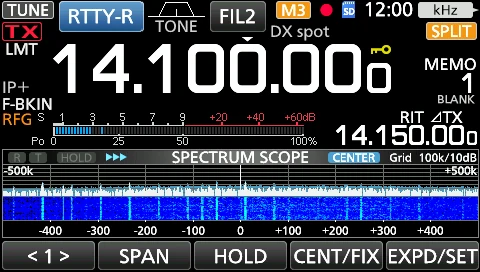
在多功能菜单关闭的状态下,可在多功能菜单上长按或长触某个项目 1 秒来启用 MULTI 以调整相应功能。所选功能显示在屏幕右上角。
When the Multi-function menu is closed, MULTI can be enabled to adjust functions by pushing or touching the item for 1 second on the Multi-function menus. The function is displayed in the upper right corner of the screen.
注意:在多功能菜单上长按某个项目 1 秒,即可把该功能指派给 MULTI。要取消指派给 MULTI 的功能,请触摸多功能控制的功能指示器,或长按 MULTI 1 秒。
NOTE: On the Multi-function menus, touch the item for 1 second to assign the function to MULTI. To cancel the function assigned to MULTI, touch the Function indicator for Multi-function control, or hold down MULTI for 1 second.
| 指示符Indicator | 操作Action | 说明Description |
|---|---|---|
| RIT | Rotate | 调整 RIT 频率。Adjusts the RIT frequency. |
| RIT | Hold down | 清除 RIT 频率。Clears the RIT frequency. |
| ∂TX | Rotate | 调整 ∂TX 频率。Adjusts the ∂TX frequency. |
| ∂TX | Hold down | 清除 ∂TX 频率。Clears the ∂TX frequency. |
| RIT ∂TX | Rotate | 调整 RIT ∂TX 频率。Adjusts the RIT ∂TX frequency. |
| RIT ∂TX | Hold down | 清除 RIT ∂TX 频率。Clears the RIT ∂TX frequency. |
| kHz | Rotate | 以 kHz 步进改变工作频率。 (仅限 VFO 模式) 快速旋转 MULTI 时,调谐速度会自动加快。Changes the operating frequency in kHz steps. (VFO mode only) NOTE: Rapidly rotating MULTI automatically increases the tuning speed. |
| M-CH | Rotate | 在存储模式下选择存储通道。In the Memory mode, selects Memory channels. |
| RF PWR* | Rotate | 调整发射输出功率。Adjusts the transmit output power. |
| MIC G* | Rotate | 调整话筒增益。Adjusts the microphone gain. |
| COMP* | Rotate | 调整语音压缩器电平。Adjusts the Speech Compressor level. |
| MONI* | Rotate | 调整监听功能的音频电平。Adjusts the audio level for the Monitor function. |
| SPEED* | Rotate | 调整键控速度。Adjusts the keying speed. |
| PITCH* | Rotate | 调整 CW 音调。Adjusts the CW pitch. |
| NB LEV* | Rotate | 调整噪声消除器电平。Adjusts the Noise Blanker level. |
| NB DEP* | Rotate | 调整 DEPTH(噪声衰减电平)。Adjusts the DEPTH (Noise attenuation level). |
| NB WID* | Rotate | 调整 WIDTH(脉冲消隐时长)。Adjusts the WIDTH (Blanking duration time). |
| NR LEV* | Rotate | 调整噪声抑制电平。Adjusts the Noise Reduction level. |
| NOTCH* | Rotate | 调整陷波滤波器频率。Adjusts the Notch filter frequency. |
| VOX G* | Rotate | 调整 VOX 增益。Adjusts the VOX gain. |
| A-VOX* | Rotate | 调整 ANTI VOX 电平。Adjusts the ANTI VOX level. |
| VOX D* | Rotate | 调整 VOX 延迟时间。Adjusts the VOX delay time. |
| BKIN D* | Rotate | 调整插入(Break-in)延迟时间。Adjusts the Break-in delay time. |
火腿经验 HAM TIPHAM TIP
v1.40/1.41 起多功能旋钮功能有变:MULTI 现在可以在菜单关闭状态下通过长按(旋钮)或长触(屏幕)某个项目 1 秒来启用,所选功能显示在屏幕右上角。老教程里的旋钮操作可能对不上,以新版为准。
The Multi-function dial changed in v1.40/1.41: with the Multi-function menu closed, MULTI can now be enabled by pushing the dial (or touching an item on screen) for 1 second, and the selected function is shown in the upper right corner of the screen. Knob procedures in older tutorials may no longer match; follow the new version.
变更:触摸屏显示Changed: Touch screen display
随着多功能旋钮(MULTI)功能的增强,屏幕上下列指示符的外观或位置发生了变更。
The appearance or location of the following indicators on the screen are changed, according to the Multi-function dial (MULTI) function enhancement.
1M1~M8/T1~T8 图标
"IP+" 与 "OVF" 图标的位置移至 ⑥。"M1"~"M8" 和 "T1"~"T8" 图标仍留在此处。
1M1~M8/T1~T8 icons
The location of "IP+" and "OVF" icons is moved to 6. "M1"~"M8," and "T1"~"T8" icons are stayed here.
2语音录制图标
图标的外观有所变更。
• [图标]:录制中
• [图标]:暂停
2Voice recorder icons
The appearance of the icons is changed.
• [icon]: Recording
• [icon]: Paused
3SD 卡图标
图标的位置已移动。
3SD card icon
The location of the icon is moved.
4时钟读数
读数的位置由 ⑤ 移至此处。触摸该读数可同时显示当前本地时间与 UTC 时间。
4Clock readout
The location of the readout is moved from 5. Touch the readout to display both the current local time and UTC time.
5多功能控制的功能指示器
新增该指示器。显示指派给 MULTI 的功能。
5Function indicator for Multi-function control
The indicator is added. Displays the function that is assigned to MULTI.
6IP Plus/OVF 图标
图标的位置由 ① 移至此处。
6IP Plus/OVF icons
The location of the icons is moved from 1.
说明 NOTENOTE
译注:原文中语音录制图标以图形(实心圆与方块)表示,在 PDF 文本抽取时丢失,故中文栏以「[图标]」标示(原文分别为 "Recording" 与 "Paused")。
Translator's note: the voice recorder icons are shown graphically (a filled circle and a pair of blocks) in the original and were lost during PDF text extraction, so they are indicated as "[icon]" here (the original labels are "Recording" and "Paused").
新增:波段堆叠寄存器Added: Band stacking register
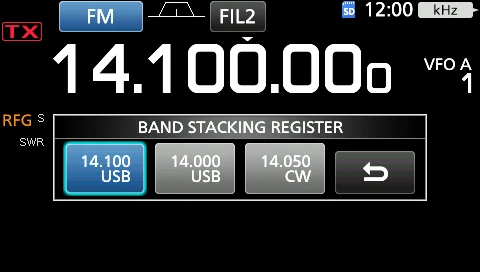
新增了 BAND STACKING REGISTER 窗口。您可以选择并调用其中一项波段堆叠寄存器的内容。
The Band Stacking Register window is added. You can select and restore one of the Band Stacking Register contents.
显示波段堆叠寄存器内容的方法:
To display the Band Stacking Register contents:
• 在待机屏幕上长按 MHz 数字 1 秒。
• 在待机屏幕上触摸 MHz 数字,然后长按某个波段键 1 秒。
• Touch the MHz digits for 1 second on the standby screen.
• Touch the MHz digits on the standby screen, and then touch a band key for 1 second.
新增:前面板按键自定义功能Added: Front Key Customize function
您可以更改 VOX/BK-IN、AUTO TUNE、▲ 和 ▼ 各键的功能。
You can change the VOX/BK-IN, AUTO TUNE, ▲, and ▼ keys function.
MENU » SET > Function > Front Key Customize
MENU » SET > Function > Front Key Customize
●:默认设置,○:可指派,N/A:不可指派
●: Default setting, ○: Assignable, N/A: Not assignable
| 功能Function | 说明Description | [VOX/BK-IN][VOX/BK-IN] | [AUTOTUNE][AUTOTUNE] | [▲][▲] | [▼][▼] |
|---|---|---|---|---|---|
| VOX/BK-IN | • 按下可开启或关闭语音模式下的 VOX 功能以及 CW 模式下的插入(Break-in)功能。 • 长按 1 秒可打开其功能菜单。• Push to turn the VOX function in the Voice operation modes and the Break-in function in the CW mode ON or OFF. • Hold down for 1 second to open its function menu. | ● | N/A | N/A | N/A |
| AUTOTUNE | 在 CW 模式下 按下可自动将工作频率调谐到附近的 CW 信号。In the CW mode Push to automatically tune the operating frequency to a close-by CW signal. | N/A | ● | N/A | N/A |
| M-CH UP | 按下可向上滚动存储通道。Push to scroll Memory CH up. | N/A | N/A | ● | ○ |
| M-CH DOWN | 按下可向下滚动存储通道。Push to scroll Memory CH down. | N/A | N/A | ○ | ● |
| PRESET | 按下可打开 PRESET 屏幕。Push to open the PRESET screen. | ○ | ○ | ○ | ○ |
| Voice/Keyer/ RTTY Memory 1 | 在 SSB、AM 或 FM 模式下 • 按下可发射一次录制在 SD 卡上的语音。 • 长按 1 秒可重复发射该语音。 注意:如果语音未保存在 Voice TX 存储(T1 ~ T4)中,则该功能被禁用。 在 CW 模式下 • 按下可发射一次电键存储内容。 • 长按 1 秒可重复发射该存储内容。 注意:如果未输入电键存储内容(M1 ~ M4),则该功能被禁用。 在 RTTY 模式下 按下可发射一次 RTTY 存储内容。 注意:如果未输入 RTTY 存储内容(RT1 ~ RT4),则该功能被禁用。In the SSB, AM, or FM mode • Push to transmit the voice audio recorded on the SD card once. • Hold down for 1 second to repeatedly transmit the voice audio. NOTE: If the voice audio is not saved in the Voice TX memory (T1 ~ T4), this function is disabled. In the CW mode • Push to transmit the Keyer memory content once. • Hold down for 1 second to repeatedly transmit the memory content. NOTE: If the Keyer memory content (M1 ~ M4) is not entered, this function is disabled. In the RTTY mode Push to transmit the RTTY memory content once. NOTE: If the RTTY memory content (RT1 ~ RT4) is not entered, this function is disabled. | ○ | ○ | ○ | ○ |
| Voice/Keyer/ RTTY Memory 2 | 同 Voice/Keyer/RTTY Memory 1。Same as Voice/Keyer/RTTY Memory 1. | ○ | ○ | ○ | ○ |
| Voice/Keyer/ RTTY Memory 3 | 同 Voice/Keyer/RTTY Memory 1。Same as Voice/Keyer/RTTY Memory 1. | ○ | ○ | ○ | ○ |
| Voice/Keyer/ RTTY Memory 4 | 同 Voice/Keyer/RTTY Memory 1。Same as Voice/Keyer/RTTY Memory 1. | ○ | ○ | ○ | ○ |
新增:MIC 按键自定义功能Added: MIC Key Customize function
您可以更改话筒 [UP]/[DOWN] 键的功能。
You can change the microphone's [UP]/[DOWN] keys function.
MENU » SET > Function > MIC Key Customize
MENU » SET > Function > MIC Key Customize
[UP]默认:UP (VFO: kHz)
[DN]默认:DOWN (VFO: kHz)
[UP] (Default: UP (VFO: kHz))
[DN] (Default: DOWN (VFO: kHz))
| 功能Function | 说明Description |
|---|---|
| --- | 无功能No function |
| UP | 按下可提高频率(以 50 Hz 为步进*)或存储通道号。 * 当 Tuning Step 功能为 ON 时,按所选的 Tuning Step 步进提高频率。Push to increase the frequency (in 50 Hz steps*), or Memory channel. * When the Tuning Step function is ON, increases the frequency in the selected Tuning Step. |
| DOWN | 按下可降低频率(以 50 Hz 为步进*)或存储通道号。 * 当 Tuning Step 功能为 ON 时,按所选的 Tuning Step 步进提高频率。Push to decrease the frequency (in 50 Hz steps*), or Memory channel. * When the Tuning Step function is ON, increases the frequency in the selected Tuning Step. |
| UP (VFO: kHz) | 按下可提高频率(以 1 kHz 为步进*)或存储通道号。 * 当 Tuning Step 功能为 ON 时,按所选的 Tuning Step 步进提高频率。Push to increase the frequency (in 1 kHz steps*), or Memory channel. * When the Tuning Step function is ON, increases the frequency in the selected Tuning Step. |
| DOWN (VFO: kHz) | 按下可降低频率(以 1 kHz 为步进*)或存储通道号。 * 当 Tuning Step 功能为 ON 时,按所选的 Tuning Step 步进提高频率。Push to decrease the frequency (in 1 kHz steps*), or Memory channel. * When the Tuning Step function is ON, increases the frequency in the selected Tuning Step. |
| XFC | 按住该键期间,收发信机监听信号。While holding down the key, the transceiver monitors signals. |
| VFO/MEMO | • 按下可选择 VFO 模式与存储模式。 • 长按 1 秒可把存储通道的内容复制到 VFO。• Push to select the VFO mode and the Memory mode. • Hold down for 1 second to copy a Memory channel contents to the VFO. |
| BAND UP | 在 VFO 模式下 • 按下可提高一个工作波段。 • 长按 1 秒可调用波段堆叠寄存器的内容。In the VFO mode • Push to increase an operating band. • Hold down for 1 second to recall the Band Stacking Register contents. |
| BAND DOWN | 在 VFO 模式下 • 按下可降低一个工作波段。 • 长按 1 秒可调用波段堆叠寄存器的内容。In the VFO mode • Push to decrease an operating band. • Hold down for 1 second to recall the Band Stacking Register contents. |
| SPEECH | 按下可播报 S 表电平、频率或工作模式。 注意:在 VFO 模式或存储模式下,会播报频率与工作模式。 注意:仅当 S-level SPEECH 功能为 ON 时才播报 S 表电平。Push to announce the S-meter level, frequency, or operating mode. NOTE: In the VFO or Memory mode, the frequency and the operating mode are announced. NOTE: S-meter level is announced only when the S-level SPEECH function is ON. |
| MODE | • 按下可选择工作模式。 • 长按可在 USB 与 LSB、CW 与 CW-R、RTTY 与 RTTY-R 之间切换。• Push to select the operating mode. • Hold down to toggle USB and LSB, CW and CW-R, or RTTY and RTTY-R. |
| Voice/Keyer/ RTTY Memory 1 | 在 SSB、AM 或 FM 模式下 • 按下可发射一次录制在 SD 卡上的语音。 • 长按 1 秒可重复发射该语音。 注意:如果语音未保存在 Voice TX 存储(T1 ~ T4)中,则该功能被禁用。 在 CW 模式下 • 按下可发射一次电键存储内容。 • 长按 1 秒可重复发射该存储内容。 注意:如果未输入电键存储内容(M1 ~ M4),则该功能被禁用。 在 RTTY 模式下 按下可发射一次 RTTY 存储内容。 注意:如果未输入 RTTY 存储内容(RT1 ~ RT4),则该功能被禁用。In the SSB, AM, or FM mode • Push to transmit the voice audio recorded on the SD card once. • Hold down for 1 second to repeatedly transmit the voice audio. NOTE: If the voice audio is not saved in the Voice TX memory (T1 ~ T4), this function is disabled. In the CW mode • Push to transmit the Keyer memory content once. • Hold down for 1 second to repeatedly transmit the memory content. NOTE: If the Keyer memory content (M1 ~ M4) is not entered, this function is disabled. In the RTTY mode Push to transmit the RTTY memory content once. NOTE: If the RTTY memory content (RT1 ~ RT4) is not entered, this function is disabled. |
| Voice/Keyer/ RTTY Memory 2 | 同 Voice/Keyer/RTTY Memory 1。Same as Voice/Keyer/RTTY Memory 1. |
| Voice/Keyer/ RTTY Memory 3 | 同 Voice/Keyer/RTTY Memory 1。Same as Voice/Keyer/RTTY Memory 1. |
| Voice/Keyer/ RTTY Memory 4 | 同 Voice/Keyer/RTTY Memory 1。Same as Voice/Keyer/RTTY Memory 1. |
| TS | • 按下可开启或关闭 Tuning Step 功能。 • 长按 1 秒可打开 TS 屏幕。• Push to turn the Tuning Step function ON or OFF. • Hold down for 1 second to open the TS screen. |
| MPAD | • 按下可依次调用 Memo Pad 中的内容。 • 长按 1 秒可把当前显示的内容存入 Memo Pad。• Push to sequentially call up the contents in the Memo Pads. • Hold down for 1 second to save the displayed contents into the Memo Pad. |
| SPLIT | • 按下可开启或关闭 Split 功能。 • 长按 1 秒可开启 Quick Split 功能。• Push to turn the Split function ON or OFF. • Hold down 1 second to turn ON the Quick Split function. |
| A/B | • 按下可选择 VFO A 或 VFO B。 • 长按 1 秒可把当前显示的 VFO 频率设置到未显示的那个 VFO 上。• Push to select the VFO A or VFO B. • Hold down for 1 second to set the displayed VFO's frequency to the VFO that is not displayed. |
| TUNER | • 按下可开启或关闭天线调谐器。 • 当显示 "TUNE" 时,长按 1 秒可开始手动调谐。• Push to turn the antenna tuner ON or OFF. • While "TUNE" is displayed, hold down for 1 second to start manual tuning. |
说明 NOTENOTE
译注:原厂 FirmUpInfo 中 DOWN 与 DOWN (VFO: kHz) 两项的脚注原文同为 "increases the frequency in the selected Tuning Step"(按所选的 Tuning Step 步进提高频率),按语义应为「降低」(decreases)。本片段按原文译出,请以实际操作为准。
Translator's note: in the original FirmUpInfo, the footnotes of both DOWN and DOWN (VFO: kHz) read "increases the frequency in the selected Tuning Step," although by sense they should be "decreases." The source text is translated as-is; please follow actual operation.
变更:数据模式下的音色控制设置Changed: Tone Control settings in the Data mode
在数据(DATA)模式下,音色控制(Tone Control)设置被自动禁用。
In the Data mode, the Tone Control settings are automatically disabled.
MENU » SET > Tone Control/TBW > RX
MENU » SET > Tone Control/TBW > RX
• RX HPF/LPF默认:– – – – – – – – –
• RX Bass默认:0
• RX Treble默认:0
• RX HPF/LPF (Default: – – – – – – – – –)
• RX Bass (Default: 0)
• RX Treble (Default: 0)
变更:REF AdjustChanged: REF Adjust
SET 模式中的 "REF Adjust" 改为显示到小数点后一位。
"REF Adjust" in the Set mode are displayed to the tenths place digit.
MENU » SET > Function > REF Adjust
MENU » SET > Function > REF Adjust
变更:CI-V USB PortChanged: CI-V USB Port
CI-V USB Port 的默认设定由 "Link to [REMOTE]" 变更为 "Unlink from [REMOTE]"。
The default setting of the CI-V USB Port is changed from "Link to [REMOTE]" to "Unlink from [REMOTE]."
MENU » SET > Connectors > CI-V > CI-V USB Port
MENU » SET > Connectors > CI-V > CI-V USB Port
变更:Firmware Update 屏幕Changed: Firmware Update screen
升级固件之前,会显示一个建议备份当前设置的对话框。
A dialog that recommends making a backup of the current setting is displayed before updating the firmware.
MENU » SET > SD Card > Firmware Update
MENU » SET > SD Card > Firmware Update
变更:键盘输入Changed: Keyboard entry
在 Full Keyboard(完整键盘)屏幕上,即使在字母模式与数字模式之间来回切换,Capital Lock(大写锁定)功能也不会被取消。
On the Full Keyboard screen, the Capital Lock function is not canceled, even if you toggle between the alphabet and numeric modes.
变更:CW 模式的默认调谐步进Changed: Default tuning step in the CW mode
CW 模式的默认调谐步进由 1 kHz 变更为 100 Hz。
The default tuning step in the CW mode is changed from 1 kHz to 100 Hz.
新增(固件版本 1.41):PTT Port 功能Added in the firmware version 1.41: PTT Port Function
您可以设置 [MIC] 接口上 PTT 引脚的行为。
You can set the behavior of the PTT pin on the [MIC] connector.
MENU » SET > Connectors > PTT Port Function
MENU » SET > Connectors > PTT Port Function
• PTT Input:
在发射过程中,收发信机不从 PTT 引脚输出 SEND 信号(TX 状态),但会检测话筒上的 PTT 输入(PTT 操作)。
注意:如果您希望通过按话筒上的 [PTT] 取消已录制语音的发射,请使用此选项。
• PTT Input:
While transmitting, the transceiver does not output the SEND signal (TX status) from the PTT pin, but does detect the PTT input (PTT operation) on the microphone.
NOTE: Use this option if you want to cancel transmitting the recorded audio by pushing [PTT] on the microphone.
• PTT Input + SEND Output:
在使用非本机话筒发射时,由于 PTT 引脚会输出 SEND 信号,收发信机不会检测话筒上的 PTT 输入(PTT 操作)。
• PTT Input + SEND Output:
While transmitting using other than the operating microphone, the transceiver does not detect the PTT input (PTT operation) of the microphone, due to the output SEND signal from the PTT pin.
变更:CI-V 指令Changed: CI-V commands
以下指令在常规 Command 指令表中发生了变更或被新增。
The following commands are changed in, or added to, the conventional Command table.
| 指令Cmd. | 子指令Sub cmd. | 数据Data | 说明Description |
|---|---|---|---|
| 1A* | 05 0198 | 见右侧。发送/读取前面板按键自定义 [VOX/BK-IN] 设置See the right. Send/read the Front key customize [VOX/BK-IN] setting | |
| 0199 | 见右侧。发送/读取前面板按键自定义 [AUTOTUNE] 设置See the right. Send/read the Front key customize [AUTOTUNE] setting | ||
| 0200 | 见右侧。发送/读取前面板按键自定义 [▲] 设置See the right. Send/read the Front key customize [▲] setting | ||
| 0201 | 见右侧。发送/读取前面板按键自定义 [▼] 设置See the right. Send/read the Front key customize [▼] setting | ||
| 0202 | 见下页。发送/读取 MIC 按键自定义 [UP] 设置See the next page. Send/read the MIC key customize [UP] setting | ||
| 0203 | 见下页。发送/读取 MIC 按键自定义 [DOWN] 设置See the next page. Send/read the MIC key customize [DOWN] setting | ||
| 0204 | 见下页。发送/读取 0.03 - 1.60 MHz 的 Scope edge 4 频率See the next page. Send/read scope edge 4 frequencies for 0.03 - 1.60 MHz | ||
| 0205 | 见下页。发送/读取 1.60 - 2.00 MHz 的 Scope edge 4 频率See the next page. Send/read scope edge 4 frequencies for 1.60 - 2.00 MHz | ||
| 0206 | 见下页。发送/读取 2.00 - 6.00 MHz 的 Scope edge 4 频率See the next page. Send/read scope edge 4 frequencies for 2.00 - 6.00 MHz | ||
| 0207 | 见下页。发送/读取 6.00 - 8.00 MHz 的 Scope edge 4 频率See the next page. Send/read scope edge 4 frequencies for 6.00 - 8.00 MHz | ||
| 0208 | 见下页。发送/读取 8.00 - 11.00 MHz 的 Scope edge 4 频率See the next page. Send/read scope edge 4 frequencies for 8.00 - 11.00 MHz | ||
| 0209 | 见下页。发送/读取 11.00 - 15.00 MHz 的 Scope edge 4 频率See the next page. Send/read scope edge 4 frequencies for 11.00 - 15.00 MHz | ||
| 0210 | 见下页。发送/读取 15.00 - 20.00 MHz 的 Scope edge 4 频率See the next page. Send/read scope edge 4 frequencies for 15.00 - 20.00 MHz | ||
| 0211 | 见下页。发送/读取 20.00 - 22.00 MHz 的 Scope edge 4 频率See the next page. Send/read scope edge 4 frequencies for 20.00 - 22.00 MHz | ||
| 0212 | 见下页。发送/读取 22.00 - 26.00 MHz 的 Scope edge 4 频率See the next page. Send/read scope edge 4 frequencies for 22.00 - 26.00 MHz | ||
| 0213 | 见下页。发送/读取 26.00 - 30.00 MHz 的 Scope edge 4 频率See the next page. Send/read scope edge 4 frequencies for 26.00 - 30.00 MHz | ||
| 0214 | 见下页。发送/读取 30.00 - 45.00 MHz 的 Scope edge 4 频率See the next page. Send/read scope edge 4 frequencies for 30.00 - 45.00 MHz | ||
| 0215 | 见下页。发送/读取 45.00 - 60.00 MHz 的 Scope edge 4 频率See the next page. Send/read scope edge 4 frequencies for 45.00 - 60.00 MHz | ||
| 0216 | 见下页。发送/读取 60.00 - 74.80 MHz 的 Scope edge 4 频率See the next page. Send/read scope edge 4 frequencies for 60.00 - 74.80 MHz | ||
| 0217 | 00/01 (Added in the firmware version 1.41) | 发送/读取 PTT Port Function 设置 00=PTT Input 01=PTT Input + SEND OutputSend/read PTT Port Function setting 00=PTT Input 01=PTT Input + SEND Output |
| 指令Cmd. | 子指令Sub cmd. | 数据Data | 说明Description |
|---|---|---|---|
| 27* | 00 | 见 FirmUpInfo 第 9 页。读取 Scope 波形数据 • 仅当 "Scope ON/OFF status"(指令:27 10)与 "Scope data output"(指令:27 11)均设为 "ON" 时,才向控制器输出波形数据。See p. 9. Read the Scope waveform data • Only when "Scope ON/OFF status" (Command: 27 10) and "Scope data output" (Command: 27 11) are set to "ON," outputs the waveform data to the controller. | |
| 14 | 见 FirmUpInfo 第 9 页。发送/读取 Scope 的 Center 模式、Fixed 模式、SCROLL-C 模式或 SCROLL-F 模式设置See p. 9. Send/read the Scope Center mode, Fixed mode, SCROLL-C mode, or SCROLL-F mode setting | ||
| 15 | 见 FirmUpInfo 第 9 页。发送/读取 Center 模式或 SCROLL-C 模式 Scope 的 Span 设置See p. 9. Send/read the Span setting in the Center mode or SCROLL-C mode Scope | ||
| 16 | 见 FirmUpInfo 第 9 页。发送/读取 Fixed 模式或 SCROLL-F 模式 Scope 的 Edge number 设置See p. 9. Send/read the Edge number setting in the Fixed mode or SCROLL-F mode Scope | ||
| 20 | 00 or 01 | 发送/读取 Marker Position (FIX Type/SCROLL Type) 设置 (00=Filter Center,01=Carrier Point)Send/read the Marker Position (FIX Type/SCROLL Type) setting (00=Filter Center, 01=Carrier Point) |
说明 NOTENOTE
*(星号)表示可发送/读取数据。
*(Asterisk) Send/read data
指令格式(Command formats)
Command formats
• [VOX/BK-IN] 设置
指令:1A 050198
• [VOX/BK-IN] setting
Command: 1A 050198
| 数据Data | 说明Description |
|---|---|
| 00 | VOX/BK-IN |
| 01 | PRESET |
| 02 | Voice/Keyer/RTTY Memory 1 |
| 03 | Voice/Keyer/RTTY Memory 2 |
| 04 | Voice/Keyer/RTTY Memory 3 |
| 05 | Voice/Keyer/RTTY Memory 4 |
• [AUTOTUNE] 设置
指令:1A 050199
• [AUTOTUNE] setting
Command: 1A 050199
| 数据Data | 说明Description |
|---|---|
| 00 | AUTOTUNE |
| 01 | PRESET |
| 02 | Voice/Keyer/RTTY Memory 1 |
| 03 | Voice/Keyer/RTTY Memory 2 |
| 04 | Voice/Keyer/RTTY Memory 3 |
| 05 | Voice/Keyer/RTTY Memory 4 |
• [▲]/[▼] 设置
指令:1A 050200, 050201
• [▲]/[▼] setting
Command: 1A 050200, 050201
| 数据Data | 说明Description |
|---|---|
| 00 | M-CH UP |
| 01 | M-CH DOWN |
| 02 | PRESET |
| 03 | Voice/Keyer/RTTY Memory 1 |
| 04 | Voice/Keyer/RTTY Memory 2 |
| 05 | Voice/Keyer/RTTY Memory 3 |
| 06 | Voice/Keyer/RTTY Memory 4 |
• MIC 按键自定义设置
指令:1A 050202, 050203
• MIC Key Customize setting
Command: 1A 050202, 050203
| 数据Data | 说明Description |
|---|---|
| 00 | No function |
| 01 | UP |
| 02 | DOWN |
| 03 | UP (VFO: kHz) |
| 04 | DOWN (VFO: kHz) |
| 05 | XFC |
| 06 | VFO/MEMO |
| 07 | BAND UP |
| 08 | BAND DOWN |
| 09 | SPEECH |
| 10 | MODE |
| 11 | Voice/Keyer/RTTY Memory 1 |
| 12 | Voice/Keyer/RTTY Memory 2 |
| 13 | Voice/Keyer/RTTY Memory 3 |
| 14 | Voice/Keyer/RTTY Memory 4 |
| 15 | TS |
| 16 | MPAD |
| 17 | SPLIT |
| 18 | A/B |
| 19 | TUNER |
• 波段示波器(bandscope)边界频率设置
指令:1A 050112 ~ 1A 050150,1A 050204 ~ 1A 050216
• Bandscope edge frequency settings
Command: 1A 050112 ~ 1A 050150, 1A 050204 ~ 1A 050216
| 下限频率位Lower edge | 上限频率位Higher edge |
|---|---|
| 1 kHz: 0 ~ 9 | 1 kHz: 0 ~ 9 |
| 100 Hz: 0 (Fixed) | 100 Hz: 0 (Fixed) |
| 100 kHz: 0 ~ 9 | 100 kHz: 0 ~ 9 |
| 10 kHz: 0 ~ 9 | 10 kHz: 0 ~ 9 |
| 10 MHz: 0 ~ 7 | 10 MHz: 0 ~ 7 |
| 1 MHz: 0 ~ 9 | 1 MHz: 0 ~ 9 |
说明 NOTENOTE
译注:原厂 FirmUpInfo 以位图形式给出该指令的数据排列(自左至右依次为 1、10 MHz、1 MHz、100 kHz、10 kHz、1 kHz、100 Hz 等字段,共 6 组字节,编号 1 ~ 6)。上表按原文列出各频率位的取值范围;字节排列可参见本书第 19 章 CI-V 指令的「Bandscope edge frequency settings」。
Translator's note: the original FirmUpInfo presents the data layout of this command as a bit diagram (fields 1 to 6, from left to right covering the 1 MHz, 100 kHz, 10 kHz, 1 kHz and 100 Hz digits). The table above lists the value range of each digit as printed; for the byte arrangement see "Bandscope edge frequency settings" in the CI-V command chapter of this book.
• Scope 波形数据
指令:27 00
向控制器输出波形数据。
• Scope waveform data
Command: 27 00
Outputs the waveform data to the controller.
| 字段Field | 内容Content |
|---|---|
| 1 | 00(固定)00 (Fixed) |
| 2 | 除分数据的顺序(当前):01~11Order of division data (Current): 01~11 |
| 3 | 除分数(最大):11(USB) 注意:通过 USB 端口发送时,数据被 11 等分并按顺序发送。 注意:第 1 次发送的数据仅含波形信息(1 ~ 6),不含波形数据(7)。第 2 次及以后发送的数据含最少的波形信息(1 ~ 3)以及波形数据(7)。Division number (Maximum): 11(USB) NOTE: When sent through the USB port, the data is divided by 11 and sent in sequential order. NOTE: The 1st data sends only the wave information (1 ~ 6) without the waveform data (7). The 2nd or later data sends the minimum wave information (1 ~ 3) with waveform data (7). |
| 4 | 频谱示波器模式数据: • 00 = Center mode scope • 01 = Fixed mode scope • 02 = SCROLL-C mode scope • 03 = SCROLL-F mode scopeSpectrum scope mode data: • 00 = Center mode scope • 01 = Fixed mode scope • 02 = SCROLL-C mode scope • 03 = SCROLL-F mode scope |
| 5 | 波形信息:波形信息依频谱示波器模式而异。 • 在 Center 模式下:发送中心频率与 span。 工作频率数据请参见 IC-7300 完整手册第 19-9 页,Scope span 设置见右侧 (2) ~ (6)。 • 在 Fixed、SCROLL-C 与 SCROLL-F 模式下:发送下限频率与上限频率。Waveform information: The waveform information differs, depending on the Spectrum scope mode. • In the Center mode: Center frequency and span are sent. See page 19-9 of the IC-7300 FULL MANUAL for Operating frequency data, and the Scope span settings (2 ~ 6) to the right. • In the Fixed, SCROLL-C, and SCROLL-F modes: Lower edge and higher edge frequencies are sent. |
| 6 | 超出范围信息: • 00 = 在范围内(In range) • 01 = 超出范围(Out of range) 注意:如果 Scope 数据超出范围,则省略波形数据 (7)。Out of range information: • 00 = In range • 01 = Out of range NOTE: If the scope data is out of range, the waveform data (7) is omitted. |
| 7 | 波形数据:收发信机输出所绘制的波形数据。波形数据的取值范围或数据长度由控制器判定。(数据范围基本上与控制器上 Scope 的显示尺寸相同。) • 数据范围:0 ~ 160 • 数据长度:475Waveform data: The transceiver outputs the drawn waveform data. The data range or data length of the waveform data is judged by the controller. (The data range is basically the same as the display size of the scope on the controller.) • Data range: 0 ~ 160 • Data length: 475 |
Center 模式下的工作频率位定义(用于 Scope span 设置)
10 Hz 位:0–9 / 1 Hz 位:0–9 / 1 kHz 位:0–9 / 100 Hz 位:0–9 / 100 kHz 位:0–9 / 10 kHz 位:0–9 / 10 MHz 位:0–6 / 1 MHz 位:0–9 / 1 GHz 位:0, F* / 100 MHz 位:0(固定)
*「F」表示下限频率为负值。
Center mode: operating frequency digits (for the Scope span settings)
10 Hz digit: 0–9 / 1 Hz digit: 0–9 / 1 kHz digit: 0–9 / 100 Hz digit: 0–9 / 100 kHz digit: 0–9 / 10 kHz digit: 0–9 / 10 MHz digit: 0–6 / 1 MHz digit: 0–9 / 1 GHz digit: 0, F* / 100 MHz digit: 0 (Fixed)
* "F" means that the Lower edge frequency is a negative value.
Fixed / SCROLL-C / SCROLL-F 模式下的边界频率位定义
下限频率:10 Hz 位:0–9 / 1 Hz 位:0–9 / 1 kHz 位:0–9 / 100 Hz 位:0–9 / 100 kHz 位:0–9 / 10 kHz 位:0–9 / 10 MHz 位:0–6 / 1 MHz 位:0–9 / 1 GHz 位:0(固定)/ 100 MHz 位:0(固定)
上限频率:10 Hz 位:0–9 / 1 Hz 位:0–9 / 1 kHz 位:0–9 / 100 Hz 位:0–9 / 100 kHz 位:0–9 / 10 kHz 位:0–6 / 10 MHz 位:0–9 / 1 MHz 位:0–9 / 1 GHz 位:0(固定)/ 100 MHz 位:0(固定)
Boundary frequency digits in Fixed / SCROLL-C / SCROLL-F modes
Lower edge: 10 Hz digit: 0–9 / 1 Hz digit: 0–9 / 1 kHz digit: 0–9 / 100 Hz digit: 0–9 / 100 kHz digit: 0–9 / 10 kHz digit: 0–9 / 10 MHz digit: 0–6 / 1 MHz digit: 0–9 / 1 GHz digit: 0 (Fixed) / 100 MHz digit: 0 (Fixed)
Higher edge: 10 Hz digit: 0–9 / 1 Hz digit: 0–9 / 1 kHz digit: 0–9 / 100 Hz digit: 0–9 / 100 kHz digit: 0–9 / 10 kHz digit: 0–6 / 10 MHz digit: 0–9 / 1 MHz digit: 0–9 / 1 GHz digit: 0 (Fixed) / 100 MHz digit: 0 (Fixed)
• 频谱示波器模式设置
指令:27 14
00=Center 模式 / 01=Fixed 模式 / 02=SCROLL-C 模式 / 03=SCROLL-F 模式
(前两个字节为 0 与 0,即固定值。)
• Spectrum scope mode settings
Command: 27 14
00=Center mode / 01=Fixed mode / 02=SCROLL-C mode / 03=SCROLL-F mode
(The first two bytes are 0 and 0, i.e. fixed.)
• Scope span 设置(Center 模式与 SCROLL-C 模式 Scope)
指令:27 15
1 kHz 位:0, 2, 5 / 100 Hz 位:0, 5 / 100 kHz 位:0, 1, 2, 5 / 10 kHz 位:0, 1, 2, 5 / 10 Hz 位:0(固定)/ 1 Hz 位:0(固定)/ 10 MHz 位:0(固定)/ 1 MHz 位:0(固定)/ 1 GHz 位:0(固定)/ 100 MHz 位:0(固定)
• Scope span settings (in the Center mode and SCROLL-C mode Scope)
Command: 27 15
1 kHz digit: 0, 2, 5 / 100 Hz digit: 0, 5 / 100 kHz digit: 0, 1, 2, 5 / 10 kHz digit: 0, 1, 2, 5 / 10 Hz digit: 0 (Fixed) / 1 Hz digit: 0 (Fixed) / 10 MHz digit: 0 (Fixed) / 1 MHz digit: 0 (Fixed) / 1 GHz digit: 0 (Fixed) / 100 MHz digit: 0 (Fixed)
| Span(kHz)Span (kHz) | 数据Data |
|---|---|
| 2500 | 2.5 |
| 5000 | 5 |
| 10000 | 10 |
| 25000 | 25 |
| 50000 | 50 |
| 100000 | 100 |
| 250000 | 250 |
| 500000 | 500 |
• Scope Edge number 设置(Fixed 模式与 SCROLL-F 模式 Scope)
指令:27 16
01=Edge 1 / 02=Edge 2 / 03=Edge 3 / 04=Edge 4
(前两个字节为 0 与 0,即固定值。)
• Scope Edge number settings (in the Fixed mode and SCROLL-F mode Scope)
Command: 27 16
01=Edge 1 / 02=Edge 2 / 03=Edge 3 / 04=Edge 4
(The first two bytes are 0 and 0, i.e. fixed.)
指令格式(续)
Command formats (continued)
• Scope Fixed 边界频率设置
指令:27 1E
Edge number:01–04
注意:小于 1 kHz 位的输入被忽略。
• Scope Fixed edge frequency settings
Command: 27 1E
Edge number: 01–04
NOTE: Entry of less than 1 kHz digits is ignored.
| 位Digit | 下限频率Lower edge | 上限频率Higher edge |
|---|---|---|
| 1 | 10 Hz digit: 0–9 | 10 Hz digit: 0–9 |
| 2 | 1 Hz digit: 0–9 | 1 Hz digit: 0–9 |
| 3 | 1 kHz digit: 0–9 | 1 kHz digit: 0–9 |
| 4 | 100 Hz digit: 0–9 | 100 Hz digit: 0–9 |
| 5 | 100 kHz digit: 0–9 | 100 kHz digit: 0–9 |
| 6 | 10 kHz digit: 0–9 | 10 kHz digit: 0–9 |
| 10 MHz digit: 0–6 | 10 MHz digit: 0–6 | |
| 1 MHz digit: 0–9 | 1 MHz digit: 0–9 | |
| 1 GHz digit: 0 (Fixed) | 1 GHz digit: 0 (Fixed) | |
| 100 MHz digit: 0 (Fixed) | 100 MHz digit: 0 (Fixed) |
| 数据Data | 频率范围(MHz)Frequency range (MHz) |
|---|---|
| 01 | 0.03 ~ 1.60 |
| 02 | 1.60 ~ 2.00 |
| 03 | 2.00 ~ 6.00 |
| 04 | 6.00 ~ 8.00 |
| 05 | 8.00 ~ 11.00 |
| 06 | 11.00 ~ 15.00 |
| 07 | 15.00 ~ 20.00 |
| 08 | 20.00 ~ 22.00 |
| 09 | 22.00 ~ 26.00 |
| 10 | 26.00 ~ 30.00 |
| 11 | 30.00 ~ 45.00 |
| 12 | 45.00 ~ 60.00 |
| 13 | 60.00 ~ 74.80 |
说明 NOTENOTE
可选的 Edge number:01=1,02=2,03=3,04=4。
Selectable Edge number: 01=1, 02=2, 03=3, 04=4
IC-7300 Version 1.30IC-7300 Version 1.30
IC-7300 的以下功能发生了变更或新增。
The following features are now changed in, or added to, the IC-7300.
V1.30
Added:新增了新的功能和/或菜单。
Changed:对已有的部分操作、项目和/或选项做了变更。
V1.30
Added: New functions and/or menus have been added.
Changed: Some operations, items, and/or options that already exist have been changed.
变更:选择 IF 滤波器Changed: Selecting the IF filter (p. 4-4)
SSB-D 模式(FIL1 ~ FIL3)的默认设定发生了变化。变化后的数值在下表中以粗体显示。
The default settings of the SSB-D mode (FIL1 ~ FIL3) are changed. The changed values are shown in bold below.
| 模式Mode | IF 滤波器IF filter | 可选范围(步进)Selectable range (steps) |
|---|---|---|
| SSB-D | FIL 1 (3.0 kHz) | 50 Hz to 500 Hz (50 Hz)/ 600 Hz to 3.6 kHz (100 Hz) |
| FIL 1 (1.2 kHz) | 50 Hz to 500 Hz (50 Hz)/ 600 Hz to 3.6 kHz (100 Hz) | |
| FIL 1 (500 Hz) | 50 Hz to 500 Hz (50 Hz)/ 600 Hz to 3.6 kHz (100 Hz) |
说明 NOTENOTE
译注:原厂 FirmUpInfo 声明「变化后的数值以粗体显示」,但粗体格式在 PDF 文本抽取时丢失,故上表三行均按原文列出可选取值范围,未能标示哪一项为变更后新增的范围。
Translator's note: the original FirmUpInfo states that "the changed values are shown in bold," but the bold formatting was lost during PDF text extraction. All three rows above are therefore listed with the selectable ranges exactly as printed, and the newly added range cannot be marked.
变更:SET 模式Changed: Set mode
音色控制/发射通带宽度(原手册 p. 8-2)
分类 "Tone Control" 更名为 "Tone Control/TBW"。
Tone Control/TBW (p. 8-2)
The category "Tone Control" is renamed to "Tone Control/TBW."
MENU » SET > Tone Control/TBW
MENU » SET > Tone Control/TBW
注意:阅读手册时请将 "Tone Control" 分类理解为 "Tone Control/TBW"。(见 12-3 节)
NOTE: Read the "Tone Control" category in the manual as "Tone Control/TBW."
SSB-D 模式的 TBW(原手册 p. 8-2)
TONE CONTROL/TBW 屏幕新增了 SSB-D 模式的通带宽度设置。
TBW for the SSB-D mode (p. 8-2)
A passband width setting for the SSB-D mode is added to the TONE CONTROL/TBW screen.
MENU » SET > Tone Control/TBW > TX > SSB-D
MENU » SET > Tone Control/TBW > TX > SSB-D
TBW默认:300 – 2700
通过更改下限与上限截止频率来设置发射通带宽度。
TBW (Default: 300 – 2700)
Sets the transmission passband width by changing the lower and higher cut-off frequencies.
接口(Connectors,原手册 p. 8-6)
新增了 "USB SEND/KEYING" 屏幕。
Connectors (p. 8-6)
The "USB SEND/KEYING" screen is added.
MENU » SET > Connectors > USB SEND/Keying
MENU » SET > Connectors > USB SEND/Keying
TBW默认:300 – 2700
"USB SEND"、"USB Keying (CW)" 与 "USB Keying (RTTY)" 被移到该屏幕上。
TBW (Default: 300 – 2700)
The "USB SEND," "USB Keying (CW)," and "USB Keying (RTTY)" are moved onto it.
USB SEND/KEYING 屏幕上新增了 USB 连接的禁止定时器(inhibit timer)。
An inhibit timer for the USB connection is added on the USB SEND/KEYING screen.
| 层级Level | 菜单项Menu item |
|---|---|
| SET | Connectors |
| USB SEND/Keying | |
| USB SEND | |
| USB Keying (CW) | |
| USB Keying (RTTY) | |
| Inhibit Timer at USB Connection |
Inhibit Timer at USB Connection默认:ON
开启或关闭 SEND 信号或键控信号发送的定时器。
Inhibit Timer at USB Connection (Default: ON)
Turns the timer for SEND or Keying signal transmission ON or OFF.
当在装有旧版 USB 驱动的电脑上通过 USB 电缆连接 IC-7300 时,开启该定时器可防止在下列情况下意外发出 SEND 信号或键控信号:
• 连接 PC 与 IC-7300 之间的 USB 电缆时。
• 虚拟串口通信建立时。
• 在 PC 已连接 IC-7300 的状态下启动 PC 时。
• 在 IC-7300 已连接 PC 的状态下,向 PC 连接或断开其他 USB 设备时。
When using a PC with an old USB driver installed, and an IC-7300 through a USB cable, turning ON the timer prevents an unintentional sending of the SEND or Keying signal when:
• Connecting a USB cable to the PC and IC-7300.
• A virtual serial port communication is established.
• Starting up the PC while it is connected to the IC-7300.
• Connecting or disconnecting another USB device to or from the PC, while the IC-7300 is connected to the PC.
OFF:立即发出 SEND 信号或键控信号。
ON:在发出信号前暂停数秒。
OFF: Sends the SEND or Keying signal immediately.
ON: Pauses for a few seconds before sending the signal.
注意:如果您要把该设定改为 "OFF",请先更新收发信机的 USB 驱动,并确认不会意外发出 SEND 信号或键控信号。
NOTE: If you change this setting to "OFF," first update the transceiver's USB driver and make sure the SEND or Keying signal will not be unintentionally sent.
新增:新的 CI-V 指令Added: New CI-V commands
以下指令被添加到常规 Command 指令表中。
The following commands are added to the conventional Command table.
| 指令Cmd. | 子指令Sub cmd. | 数据Data | 说明Description |
|---|---|---|---|
| 1A* | 05 0196 | 见下方。发送/读取 SSB-D 发射通带宽度See below. Send/read SSB-D TX bandwidth | |
| 0197 | 00/01 | USB 连接的禁止定时器 (00=OFF,01=ON)Inhibit Timer at USB connection (00=OFF, 01=ON) |
说明 NOTENOTE
* 表示可发送/读取数据。
* Send/read data
指令格式
• SSB-D 发射通带宽度设置
指令:1A 050196
Command formats
• SSB-D transmission passband width settings
Command: 1A 050196
| 边界Edge | 取值Value |
|---|---|
| Higher edge | 0 = 2500 Hz 1 = 2700 Hz 2 = 2800 Hz 3 = 2900 Hz |
| Lower edge | 0 = 100 Hz 1 = 200 Hz 2 = 300 Hz 3 = 500 Hz |