安装与连接Installation and Connections
本章介绍 IC-7300 的安装位置选择、散热与接地要求,以及前面板与后面板各接口的连接方法。外接直流电源须为 DC 13.8 V、电流容量至少 21 A,本章同时说明 AH-730 天线调谐器、FSK/AFSK 数字模式接口电路,以及线性放大器的连接与注意事项。
This chapter explains how to choose a location for the IC-7300, with heat dissipation and grounding requirements, and how to make the front and rear panel connections. The external DC supply must provide DC 13.8 V with a current capacity of at least 21 A; the AH-730 antenna tuner, the FSK and AFSK interface circuits, and linear amplifier connections are also described.
2-2选择安装位置Selecting a location
选择收发信机的安装位置时,应保证空气流通充分,并避开极热、极冷、振动以及其他电磁干扰源。
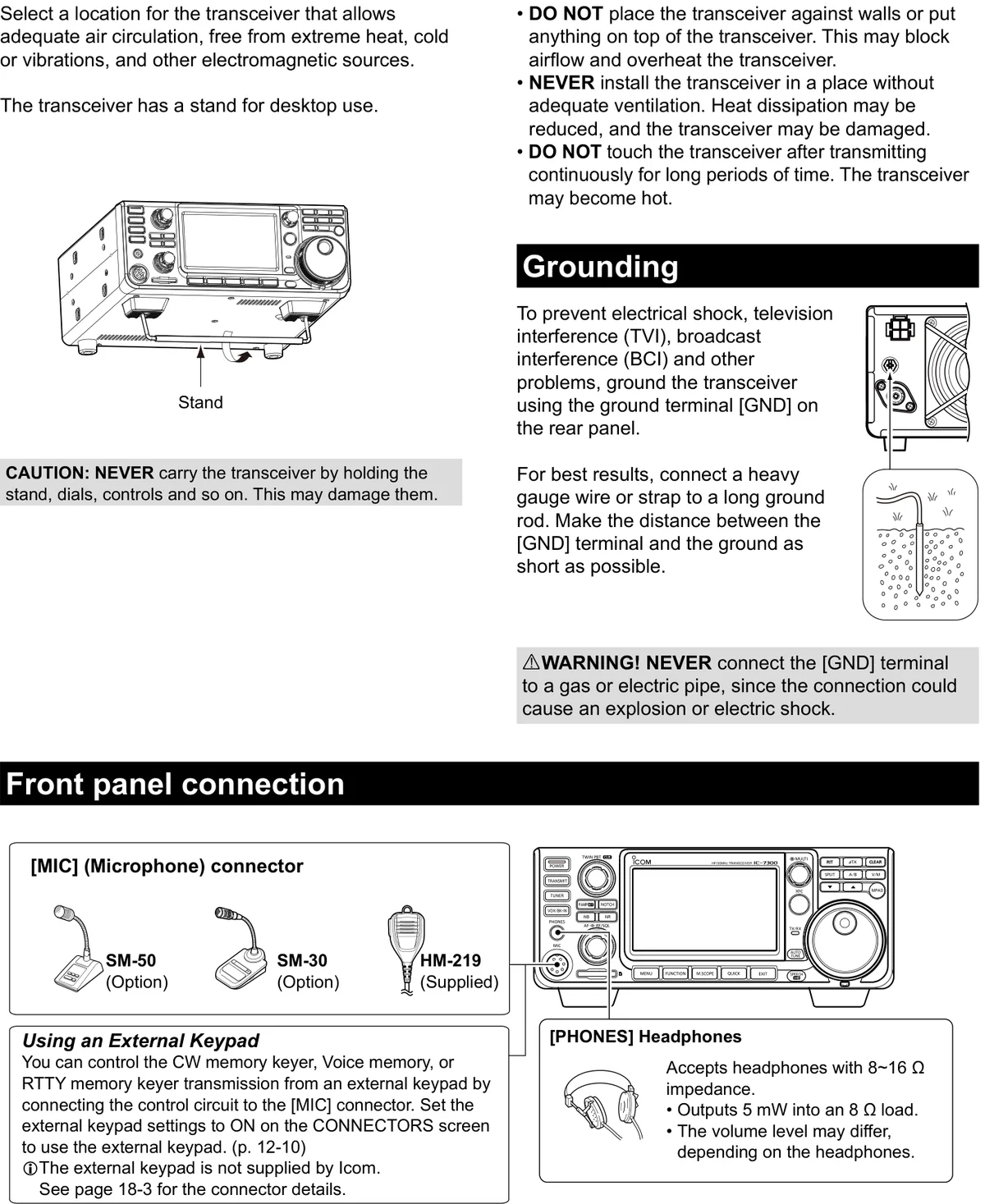
Select a location for the transceiver that allows adequate air circulation, free from extreme heat, cold or vibrations, and other electromagnetic sources.
本机带有桌面放置用的支架。
The transceiver has a stand for desktop use.
警告 CAUTIONCAUTION
切勿抓着支架、旋钮、控制器等部位搬运收发信机,否则可能造成损坏。
NEVER carry the transceiver by holding the stand, dials, controls and so on. This may damage them.
散热Heat dissipation
• 切勿将收发信机紧贴墙壁放置,或在机器顶部堆放物品,以免阻挡气流、导致机器过热。
• 切勿将收发信机安装在通风不良的地方,否则散热效果会下降,机器可能损坏。
• 长时间连续发射后,切勿触碰收发信机,此时机器可能很烫。
• DO NOT place the transceiver against walls or put anything on top of the transceiver. This may block airflow and overheat the transceiver.
• NEVER install the transceiver in a place without adequate ventilation. Heat dissipation may be reduced, and the transceiver may be damaged.
• DO NOT touch the transceiver after transmitting continuously for long periods of time. The transceiver may become hot.
接地Grounding
为防止触电、电视干扰(TVI)、广播干扰(BCI)及其他问题,请使用后面板上的接地端子 [GND] 为收发信机接地。
To prevent electrical shock, television interference (TVI), broadcast interference (BCI) and other problems, ground the transceiver using the ground terminal [GND] on the rear panel.
为获得最佳效果,请用粗线径的导线或接地带连接到长的接地棒,并尽量缩短 [GND] 端子与大地之间的距离。
For best results, connect a heavy gauge wire or strap to a long ground rod. Make the distance between the [GND] terminal and the ground as short as possible.
警告 WARNINGWARNING
切勿将 [GND] 端子连接到燃气管道或电线管上,否则可能引起爆炸或触电。
NEVER connect the [GND] terminal to a gas or electric pipe, since the connection could cause an explosion or electric shock.
前面板连接Front panel connection
[MIC](话筒)连接器:可连接随机附带的 HM-219,或选购的 SM-50、SM-30 话筒。
[MIC] (Microphone) connector: HM-219 (Supplied), SM-50 (Option), SM-30 (Option).
提示 TIPTIP
将控制电路连接到 [MIC] 连接器后,即可通过外接键盘控制 CW 存储电键、语音存储或 RTTY 存储电键的发送。使用外接键盘时,请在 CONNECTORS 屏幕上将外接键盘的设置设为 ON。(见 12-10 节)外接键盘非 Icom 提供,连接器的详细说明见 18-3 节。
You can control the CW memory keyer, Voice memory, or RTTY memory keyer transmission from an external keypad by connecting the control circuit to the [MIC] connector. Set the external keypad settings to ON on the CONNECTORS screen to use the external keypad. (p. 12-10) The external keypad is not supplied by Icom. See page 18-3 for the connector details.
[PHONES] 耳机:可连接阻抗为 8~16 Ω 的耳机;8 Ω 负载下输出 5 mW;音量大小可能因耳机而异。
[PHONES] Headphones: Accepts headphones with 8~16 Ω impedance. Outputs 5 mW into an 8 Ω load. The volume level may differ, depending on the headphones.
2-3后面板连接Rear panel connection
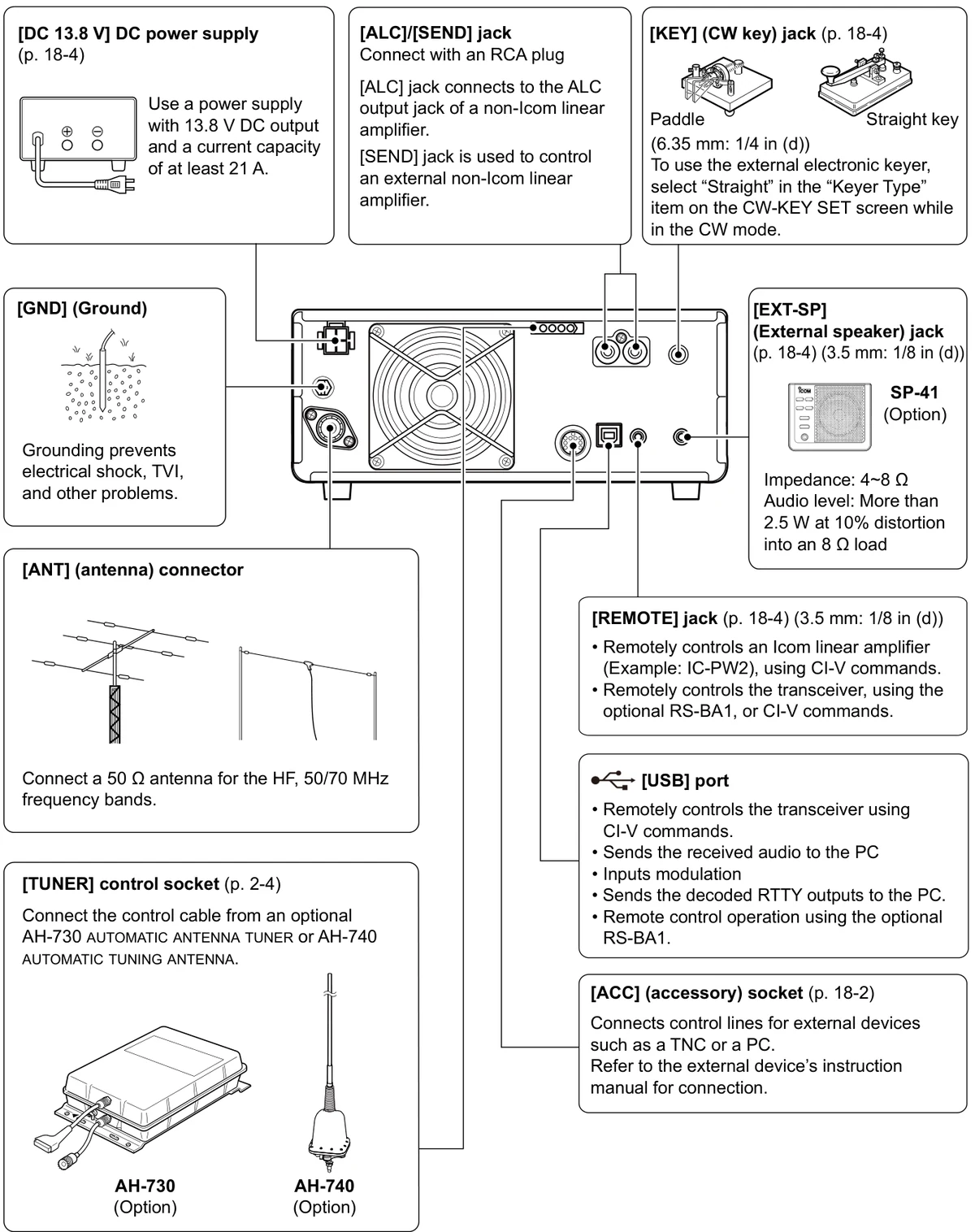
后面板设有下图所示的各连接器。
The rear panel has the connectors shown below.
| 连接器Connector | 说明Description |
|---|---|
| [DC 13.8 V] DC power supply | 请使用输出电压 DC 13.8 V、电流容量至少 21 A 的电源。(见 18-4 节)Use a power supply with 13.8 V DC output and a current capacity of at least 21 A. (p. 18-4) |
| [ALC]/[SEND] jack | 使用 RCA 插头连接。[ALC] 插孔连接到非 Icom 线性放大器的 ALC 输出插孔;[SEND] 插孔用于控制外接的非 Icom 线性放大器。Connect with an RCA plug. The [ALC] jack connects to the ALC output jack of a non-Icom linear amplifier. The [SEND] jack is used to control an external non-Icom linear amplifier. |
| [KEY] (CW key) jack | 连接 CW 电键:桨式拍发器(Paddle)或直键(Straight key),插孔规格 6.35 mm(1/4 in (d))。使用外接电子电键时,请在 CW 模式下将 CW-KEY SET 屏幕上的 "Keyer Type" 项目设为 "Straight"。(见 18-4 节)Connect a paddle or a straight key (6.35 mm: 1/4 in (d)). To use the external electronic keyer, select "Straight" in the "Keyer Type" item on the CW-KEY SET screen while in the CW mode. (p. 18-4) |
| [GND] (Ground) | 接地可防止触电、TVI 及其他问题。Grounding prevents electrical shock, TVI, and other problems. |
| [ANT] (antenna) connector | 连接适用于 HF、50/70 MHz 频段的 50 Ω 天线。Connect a 50 Ω antenna for the HF, 50/70 MHz frequency bands. |
| [TUNER] control socket | 连接选购的 AH-730 自动天线调谐器或 AH-740 自动调谐天线的控制电缆。(见 2-4 节)Connect the control cable from an optional AH-730 automatic antenna tuner or AH-740 automatic tuning antenna. (p. 2-4) |
| [EXT-SP] (External speaker) jack | 连接选购的 SP-41 外接扬声器。插孔规格 3.5 mm(1/8 in (d));阻抗 4~8 Ω;音频电平:8 Ω 负载、10% 失真下大于 2.5 W。(见 18-4 节)Connect the optional SP-41 external speaker (3.5 mm: 1/8 in (d)). Impedance: 4~8 Ω. Audio level: More than 2.5 W at 10% distortion into an 8 Ω load. (p. 18-4) |
| [REMOTE] jack | 插孔规格 3.5 mm(1/8 in (d))。使用 CI-V 指令远控 Icom 线性放大器(例如 IC-PW2);或使用选购的 RS-BA1 或 CI-V 指令远控本收发信机。(见 18-4 节)3.5 mm: 1/8 in (d). Remotely controls an Icom linear amplifier (Example: IC-PW2), using CI-V commands. Remotely controls the transceiver, using the optional RS-BA1, or CI-V commands. (p. 18-4) |
| [USB] port | 使用 CI-V 指令远控本收发信机;将接收到的音频发送到 PC;输入调制信号;将解码后的 RTTY 输出发送到 PC;使用选购的 RS-BA1 进行远控操作。Remotely controls the transceiver using CI-V commands. Sends the received audio to the PC. Inputs modulation. Sends the decoded RTTY outputs to the PC. Remote control operation using the optional RS-BA1. |
| [ACC] (accessory) socket | 连接 TNC 或 PC 等外部设备的控制线。连接方法请参阅相应外部设备的使用说明书。(见 18-2 节)Connects control lines for external devices such as a TNC or a PC. Refer to the external device's instruction manual for connection. (p. 18-2) |
2-4连接外接直流电源Connecting an external DC power supply
连接直流电源线之前,请确认收发信机处于关机状态。
Confirm that the transceiver is OFF before connecting the DC power cable.
提示 TIPTIP
连接非 Icom 直流电源线时,本机要求:DC 13.8 V(容量:至少 21 A);具备过流保护电路且电压波动或纹波小的电源。
When connecting a non-Icom DC power cable, the transceiver needs: DC 13.8 V (Capacity: At least 21 Amps); a power supply with an over current protective line and low voltage fluctuation or ripple.
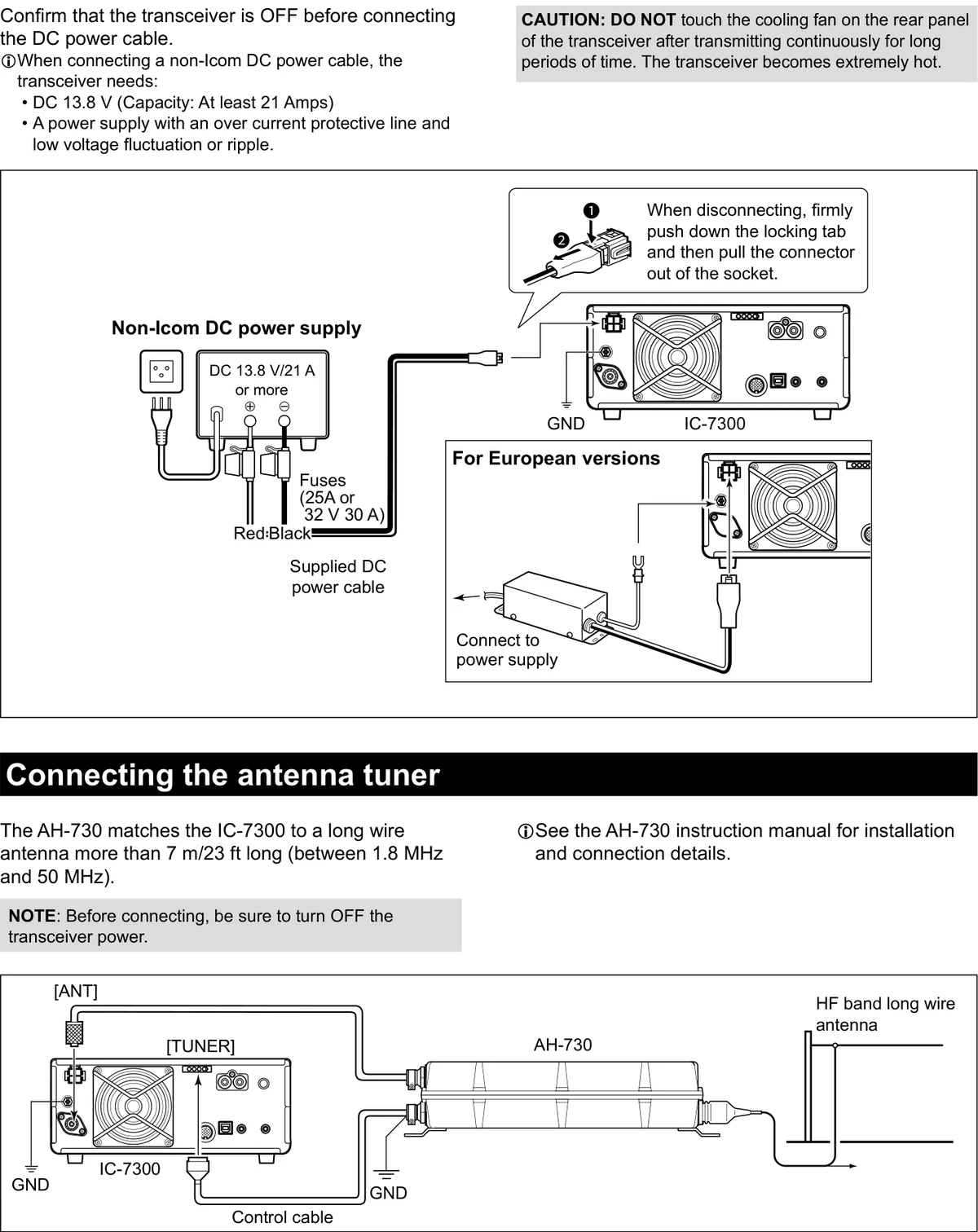
1将随机附带的直流电源线连接到后面板上的 [DC 13.8 V] 连接器,红线接正极(+),黑线接负极(-)。
1Connect the supplied DC power cable to the [DC 13.8 V] connector on the rear panel, with the Red wire to the positive (+) terminal and the Black wire to the negative (-) terminal.
2欧洲版本:请连接 DC 13.8 V/21 A 或以上的电源。
2For European versions, connect to a power supply of DC 13.8 V/21 A or more.
3断开连接时,请用力按下锁定扣,然后将连接器从插座中拔出。
3When disconnecting, firmly push down the locking tab, and then pull the connector out of the socket.
说明 NOTENOTE
译注:直流电源线红色线芯为正极(+)、黑色线芯为负极(-);电源线上的保险丝规格为 25 A 或 32 V 30 A。
Translator's note: the DC power cable Red wire is positive (+) and the Black wire is negative (-); the fuses in the cable are rated 25 A or 32 V 30 A.
警告 CAUTIONCAUTION
长时间连续发射后,切勿触碰收发信机后面板上的散热风扇,此时机器会非常烫。
DO NOT touch the cooling fan on the rear panel of the transceiver after transmitting continuously for long periods of time. The transceiver becomes extremely hot.
火腿经验 HAM TIPHAM TIP
给 IC-7300 供电,社区经验是用稳压 13.8 V 电源:电压稳、纹波小、容量足(原厂要求至少 21 A)。升级固件时更要注意——全程勿断市电,用稳压 13.8 V 电源;笔记本用户接满电电池。
Power the IC-7300 from a regulated 13.8 V supply: stable voltage, low ripple and ample current (Icom requires at least 21 A). When updating firmware, never interrupt the mains during the process — use a regulated 13.8 V supply, and laptop users should run on a fully charged battery.
连接天线调谐器Connecting the antenna tuner
AH-730 可使 IC-7300 与 7 m/23 ft 以上(1.8~50 MHz)的长线天线实现匹配。
The AH-730 matches the IC-7300 to a long wire antenna more than 7 m/23 ft long (between 1.8 MHz and 50 MHz).
提示 TIPTIP
注意:连接之前,请务必关闭收发信机的电源。
NOTE: Before connecting, be sure to turn OFF the transceiver power.
1如图所示,将 [ANT] 连接器连接到 AH-730,并用控制电缆将 [TUNER] 控制插座连接到 AH-730。
1As shown in the illustration, connect the [ANT] connector to the AH-730, and the [TUNER] control socket to the AH-730 using the control cable.
2将 HF 波段长线天线连接到 AH-730,并为收发信机和 AH-730 接地。
2Connect the HF band long wire antenna to the AH-730, and ground both the transceiver and the AH-730.
提示 TIPTIP
有关安装与连接的详细说明,请参阅 AH-730 的使用说明书。
See the AH-730 instruction manual for installation and connection details.
火腿经验 HAM TIPHAM TIP
高 SWR 别硬发射:天线调谐器有保护,但驻波比长期过高会伤功放;先查天馈。
Do not transmit into a high SWR: the antenna tuner has protection, but a persistently high standing wave ratio can damage the power amplifier — check the antenna and feed line first.
2-5FSK 与 AFSK 连接FSK and AFSK connections
本机设有 RTTY 模式键。使用 USB 电缆连接 PC 及应用软件,即可进行 SSTV、RTTY、AFSK、PSK31、JT65 或 FT8 操作。若要操作 RTTY 或其他数字模式,也可通过接口单元使用后面板上的 ACC 插座。有关设置的详细说明,请参阅应用软件的说明书。
The transceiver has a mode key for RTTY. You can use a PC and an application software to operate SSTV, RTTY, AFSK, PSK31, JT65, or FT8 using a USB cable. However, if you want to operate RTTY or other digital modes, you can use the ACC socket on the rear panel through an interface unit. Refer to the software application's instruction manual for setup details.
提示 TIPTIP
Icom 不保证应用软件、PC、网络设备或网络设置的性能。
Icom does not guarantee the performance of the application software, PC, network device, or network settings.
(1)使用 USB 端口时(1) When using the USB port
使用用户自备的 USB 电缆,将本机的 [USB] 端口(B 型)连接到 PC 的 USB 端口,并在 PC 上安装 RTTY 应用软件。
Connect the [USB] port (Type B) on the transceiver to a USB port on the PC, using a USB cable (user supplied), and install the RTTY application software on the PC.
提示 TIPTIP
• 若将 "USB Serial Function" 项目设为 "RTTY Decode",解码后的 RTTY 信号将从 USB 端口输出。MENU » SET > Connectors > USB Serial Function
• USB 驱动程序与安装指南可从 Icom 网站下载:https://www.icomjapan.com/support/
• If you set the "USB Serial Function" item to "RTTY Decode," the decoded RTTY signals are output from the USB port. MENU » SET > Connectors > USB Serial Function
• You can download the USB driver and the installation guide from the Icom website. https://www.icomjapan.com/support/
(2)使用 ACC 插座或话筒连接器时(2) When using the ACC socket or the microphone connector
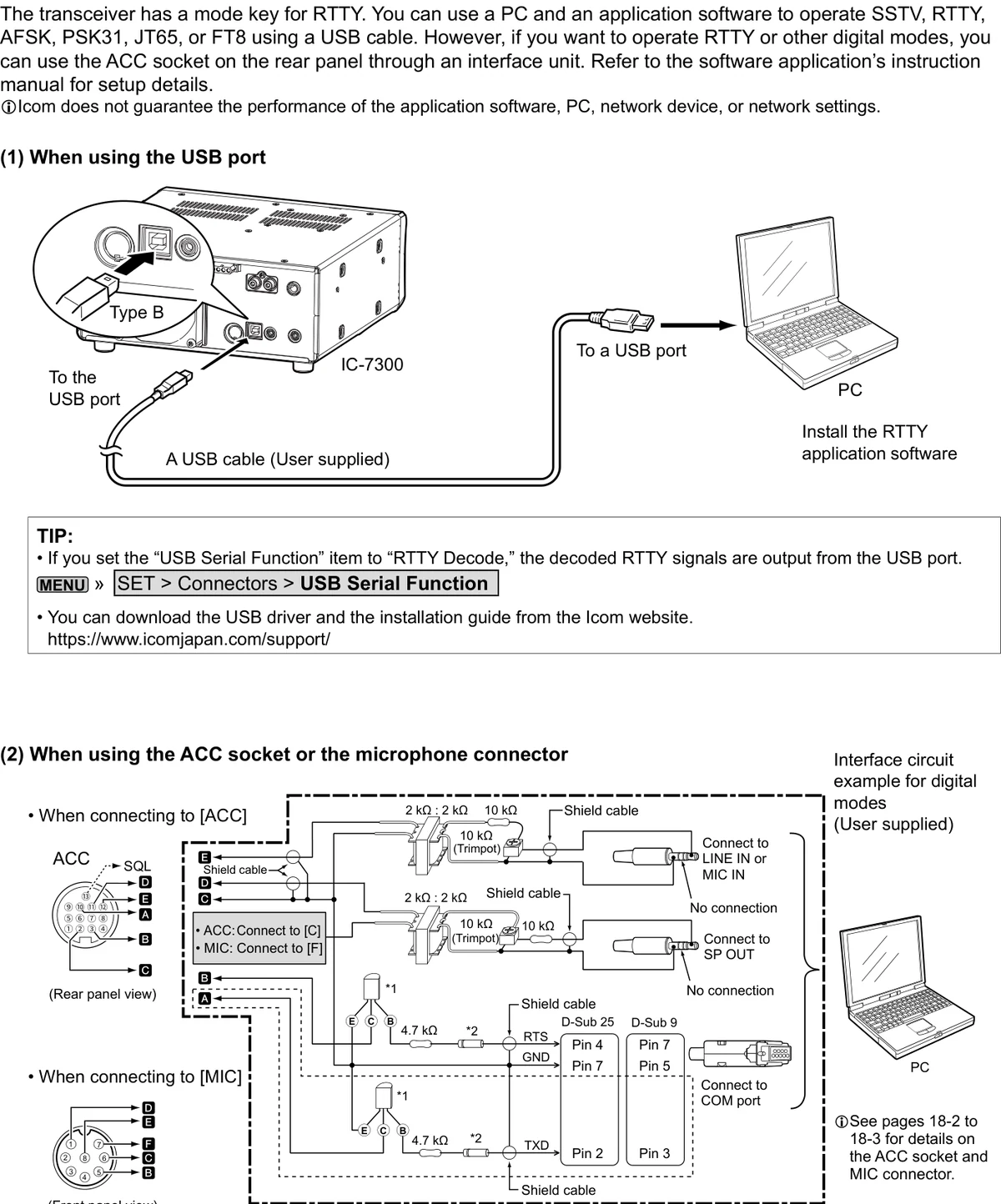
下图给出了数字模式的接口电路示例(用户自备)。将该电路连接到 [ACC] 插座或 [MIC] 连接器。
The illustration shows an interface circuit example for digital modes (user supplied). Connect the circuit to the [ACC] socket or the [MIC] connector.
| 项目Item | 连接Connection |
|---|---|
| 电台侧连接 | ACC(后面板视图):连接至 [C];MIC(前面板视图):连接至 [F]。ACC (rear panel view): Connect to [C]. MIC (front panel view): Connect to [F]. |
| 调制输入 | 经 2 kΩ : 2 kΩ 变压器与 10 kΩ 微调电位器(Trimpot),连接到 PC 的 LINE IN 或 MIC IN。Through a 2 kΩ : 2 kΩ transformer and a 10 kΩ trimpot, connect to LINE IN or MIC IN on the PC. |
| 音频输出 | 经 2 kΩ : 2 kΩ 变压器与 10 kΩ 微调电位器(Trimpot),连接到 PC 的 SP OUT。Through a 2 kΩ : 2 kΩ transformer and a 10 kΩ trimpot, connect to SP OUT on the PC. |
| FSK 键控 | FSK 键控电路由 4.7 kΩ 电阻、NPN 晶体管(2SC1815)与开关二极管(1S1588)组成,通过 PC 串口的 RTS 与 TXD 信号进行键控。The FSK keying circuit consists of a 4.7 kΩ resistor, an NPN transistor (2SC1815) and a switching diode (1S1588), keyed by the RTS and TXD signals of the PC serial port. |
| PC 串口连接 | D-Sub 25:RTS = Pin 4、GND = Pin 7、TXD = Pin 2;D-Sub 9:RTS = Pin 7、GND = Pin 5、TXD = Pin 3;连接到 PC 的 COM 端口。D-Sub 25: RTS = Pin 4, GND = Pin 7, TXD = Pin 2. D-Sub 9: RTS = Pin 7, GND = Pin 5, TXD = Pin 3. Connect to a COM port on the PC. |
接口电路中标注 "No connection" 的接点不连接。
The "No connection" points in the interface circuit are not connected.
提示 TIPTIP
注意:将电路连接到话筒连接器时,只能进行 AFSK RTTY 操作。
NOTE: You can operate ONLY AFSK RTTY when you connect the circuit to the microphone connector.
提示 TIPTIP
图中以短虚线框出的部分,仅在 FSK(RTTY)模式下使用 Baudot RTTY 时才需要(SSTV、PSK 等其他数字模式不需要)。
The sections shown in short dashes are required only when Baudot RTTY is used in the FSK (RTTY) mode. (Not required for other digital modes such as SSTV or PSK)
提示 TIPTIP
有关 ACC 插座与 MIC 连接器的详细说明,请见 18-2 节至 18-3 节。
See pages 18-2 to 18-3 for details on the ACC socket and MIC connector.
2-6线性放大器连接Linear amplifier connections
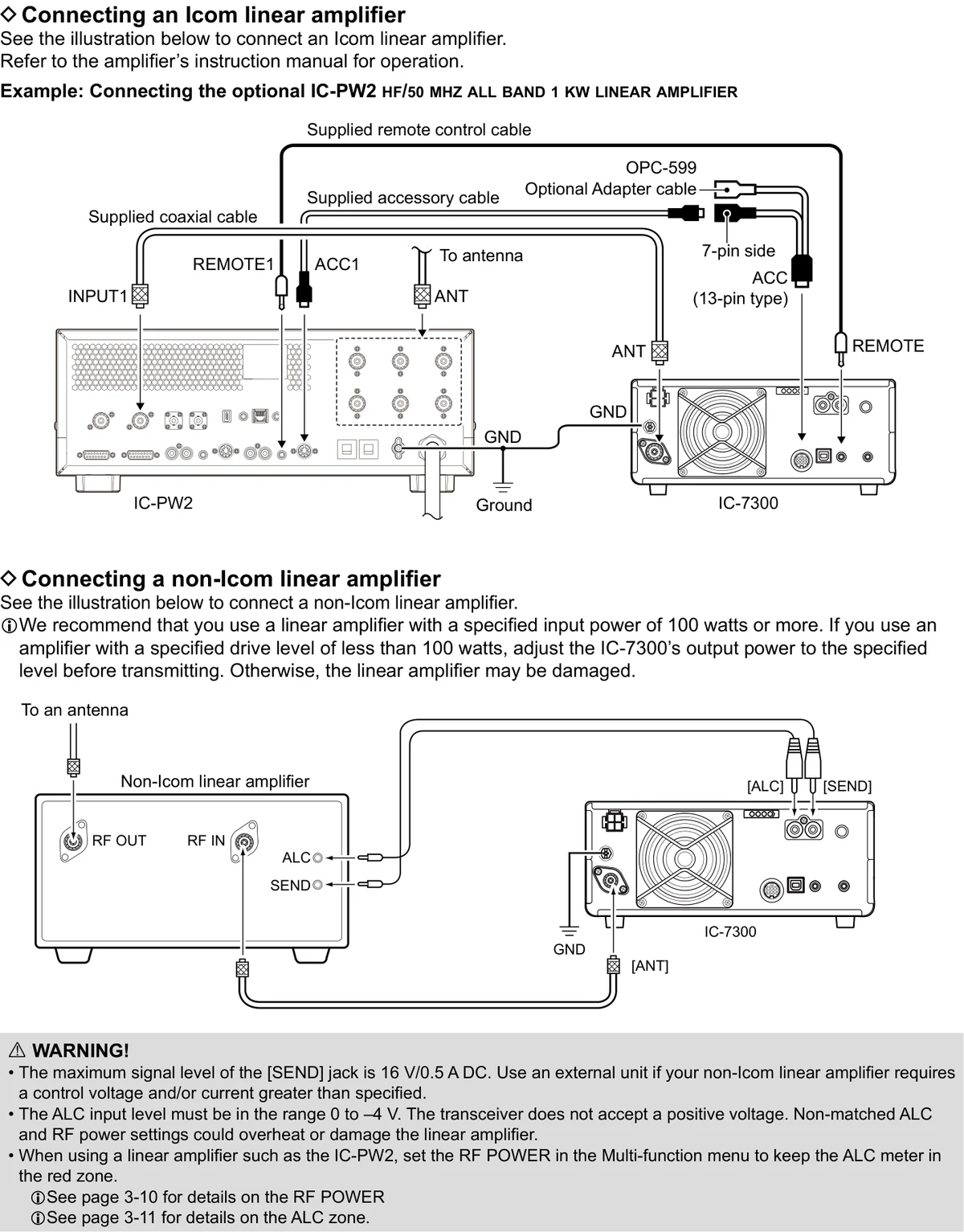
连接 Icom 线性放大器Connecting an Icom linear amplifier
连接 Icom 线性放大器时请参见图 2-5,操作方法请参阅放大器的使用说明书。
See the illustration below to connect an Icom linear amplifier. Refer to the amplifier's instruction manual for operation.
示例:连接选购的 IC-PW2 HF/50 MHz 全波段 1 kW 线性放大器。
Example: Connecting the optional IC-PW2 HF/50 MHz all band 1 kW linear amplifier.
1用随机附带的远控电缆与 OPC-599 选购适配电缆,将 IC-PW2 的 REMOTE1 插孔连接到 IC-7300 的 [REMOTE] 插孔。
1Connect the IC-PW2's REMOTE1 jack to the IC-7300's [REMOTE] jack, using the supplied remote control cable and the OPC-599 optional adapter cable.
2用随机附带的附件电缆(ACC 13 针型、7 针侧),将 IC-PW2 的 ACC1 插孔连接到 IC-7300 的 [ACC] 插座。
2Connect the IC-PW2's ACC1 jack to the IC-7300's [ACC] socket, using the supplied accessory cable (ACC 13-pin type, 7-pin side).
3用随机附带的同轴电缆,将 IC-PW2 的 INPUT1 插孔连接到 IC-7300 的 [ANT] 连接器,并将 IC-PW2 的 ANT 插孔连接到天线。
3Connect the IC-PW2's INPUT1 jack to the IC-7300's [ANT] connector, using the supplied coaxial cable, and connect the IC-PW2's ANT jack to the antenna.
4将两侧的 GND 端子接地。
4Connect both GND terminals to ground.
连接非 Icom 线性放大器Connecting a non-Icom linear amplifier
连接非 Icom 线性放大器时请参见图 2-5。
See the illustration below to connect a non-Icom linear amplifier.
提示 TIPTIP
建议使用额定输入功率 100 W 以上的线性放大器。若使用额定驱动电平低于 100 W 的放大器,发射前请将 IC-7300 的输出功率调整到该规定电平,否则线性放大器可能损坏。
We recommend that you use a linear amplifier with a specified input power of 100 watts or more. If you use an amplifier with a specified drive level of less than 100 watts, adjust the IC-7300's output power to the specified level before transmitting. Otherwise, the linear amplifier may be damaged.
1将 IC-7300 的 [ANT] 连接器连接到线性放大器的 RF IN 插孔,并将放大器的 RF OUT 插孔连接到天线。
1Connect the IC-7300's [ANT] connector to the linear amplifier's RF IN jack, and the amplifier's RF OUT jack to the antenna.
2将 [ALC] 与 [SEND] 插孔连接到放大器的 ALC 与 SEND 插孔。
2Connect the [ALC] and [SEND] jacks to the amplifier's ALC and SEND jacks.
3将两侧的 GND 端子接地。
3Connect both GND terminals to ground.
警告 WARNINGWARNING
• [SEND] 插孔的最大信号电平为 DC 16 V/0.5 A。若所用非 Icom 线性放大器需要高于该规格的控制电压和/或电流,请使用外部单元。
• ALC 输入电平必须在 0 至 -4 V 的范围内,本机不接受正电压。ALC 与射频功率设置不匹配,可能导致线性放大器过热或损坏。
• 使用 IC-PW2 等线性放大器时,请在多功能菜单中设置 RF POWER,使 ALC 表指针保持在红色区域。
• The maximum signal level of the [SEND] jack is 16 V/0.5 A DC. Use an external unit if your non-Icom linear amplifier requires a control voltage and/or current greater than specified.
• The ALC input level must be in the range 0 to -4 V. The transceiver does not accept a positive voltage. Non-matched ALC and RF power settings could overheat or damage the linear amplifier.
• When using a linear amplifier such as the IC-PW2, set the RF POWER in the Multi-function menu to keep the ALC meter in the red zone.
提示 TIPTIP
有关 RF POWER 的详细说明见 3-10 节;有关 ALC 区域的详细说明见 3-11 节。
See page 3-10 for details on the RF POWER. See page 3-11 for details on the ALC zone.