本章介绍 IC-7300 的存储操作:存储通道的构成与选择(使用 ▲/▼ 键、键盘或 MEMORY 屏幕)、从 VFO 模式或 Memory 模式写入存储通道内容、清除与复制存储通道、输入存储名称,以及备忘录(Memo Pad)的保存、调出与列表管理。This chapter describes the IC-7300's memory operation: the structure of memory channels and how to select them (with the up and down keys, the keypad, or in the MEMORY screen), entering memory channel contents from the VFO mode or the Memory mode, clearing and copying memory channels, entering a memory name, and saving, calling up and managing the Memo Pads.
9-2 Memory channels · 存储通道
The transceiver has 101 memory channels. The Memory 本收发信机共有 101 个存储通道。使用 Memory 模式可 mode enables you to quickly select often-used frequencies. 快速选择常用频率。
You can temporarily tune all 101 memory channel 旋转 MAIN DIAL (主调谐旋钮),可临时调谐全部 101 frequencies by rotating MAIN DIAL . 个存储通道的频率。
表 9-1 存储通道的构成 Memory channel structure
可转移至 通道编号 可清 存储通道 容量 VFO 可覆写 Memory channel 除 Memory channel Capability Transfer to Overwriting number Clear VFO
Regular memory 1 to 99 每个存储通道可存入 1 个频率和 1 种工作模式。 是 是 是 channels 1 frequency and 1 mode in each memory channel. Yes Yes Yes
Scan Edge memory P1 and P2 每个存储通道可存入 1 个频率和 1 种工作模式,用作 是 是 否 channels 编程扫描的边缘频率。 Yes Yes No 1 frequency and 1 mode in each memory channel as scan edges for programmed scans.
选择存储通道 Selecting a memory channel
使用上和下键选择Selecting with the up and down keys
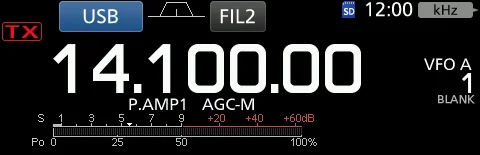
1. 1 Push V/M to select the Memory mode. 1. 1 按 V/M 选择 Memory 模式。 2. 2 Push ▲ or ▼ to select the desired memory 2. 2 按 ▲ 或 ▼ 选择所需存储通道。也可以使用话 channel. You can also select the memory channel with 筒上的 [UP] 和 [DN] 键选择存储通道。 the microphone [UP] and [DN] keys. 3. 3 要返回 VFO 模式,请再次按 V/M 。 3. 3 To return to the VFO mode, push V/M again.
图 9-1 Memory 模式显示(示例:存储通道 1) Memory mode display (Example: Memory channel 1)
使用键盘选择Selecting using the keypad
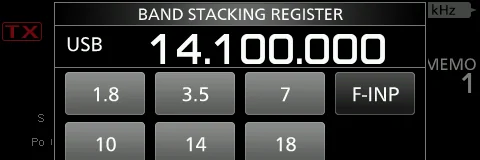
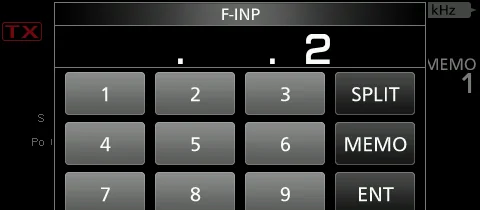
1. 1 Push V/M to select the Memory mode. 1. 1 按 V/M 选择 Memory 模式。 2. 2 Touch the MHz digit on the operating frequency. 2. 2 触 摸 工 作 频 率 上 的 MHz 数 字 。 显 示 BAND The BAND STACKING REGISTER screen is displayed. STACKING REGISTER 屏幕。 3. 3 Touch [F-INP]. The F-INP screen is displayed. 3. 3 触摸 [F-INP]。显示 F-INP 屏幕。 4. 4 Enter the desired memory channel number. 4. 4 输入所需存储通道编号。(示例:存储通道 2) (Example: memory channel 2) 5. 5 触摸 [MEMO] 设定所输入的通道。已选择存储通 5. 5 Touch [MEMO] to set the entered memory channel. 道 2。 Memory channel 2 is selected.
图 9-3 在 F-INP 屏幕中输入存储通道编号(示例:2) Enter the desired memory channel number in the F-INP screen (Example: 2)
图 9-2 触摸 MHz 数字后显示 BAND STACKING REGISTER 屏幕 The BAND STACKING REGISTER screen is displayed after touching the MHz digit
9-3 Selecting in the MEMORY screen · 在 MEMORY 屏幕中选择
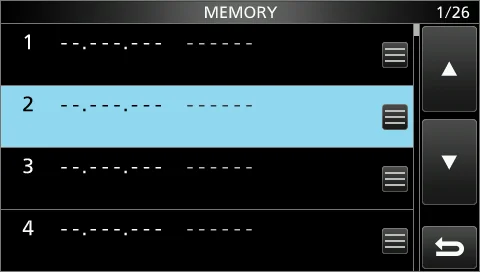
1. 1 Open the MEMORY screen. MENU » MEMORY 1. 1 打开 MEMORY 屏幕。MENU » MEMORY 2. 2 Select the desired memory channel by rotating and 2. 2 旋转后按下 MULTI (多功能旋钮),选择所需存 then pushing MULTI . (Example: memory channel 2) 储通道。(示例:存储通道 2)已选择存储通道 2。 Memory channel 2 is selected.
图 9-4 MEMORY 屏幕(旋转 MULTI 选择通道,按下 MULTI 确定;示例:存储通道 2) The MEMORY screen (rotate MULTI to select a channel, then push MULTI to set it; Example: memory channel 2)
写入存储通道内容 Entering memory channel contents
You can enter memory channel contents in either the VFO 在 VFO 模式或 Memory 模式下,均可写入存储通道内 mode or the Memory mode. 容。
在 VFO 模式中写入Entering in the VFO mode
[Example: Entering 7.088 MHz, LSB, into memory channel [示例:将 7.088 MHz、LSB 写入存储通道 2] 2]
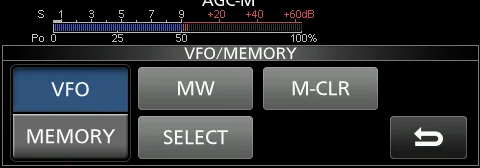
1. 1 Push V/M to select the VFO mode. "VFO A" or 1. 1 按 V/M 选 择 VFO 模 式 。 显 示 「 VFO A 」 或 "VFO B" is displayed. 「VFO B」。 2. 2 Set the frequency, operating mode and filter. 2. 2 设置频率、工作模式和滤波器。 3. 3 Push ▲ or ▼ to select the channel to enter. 3. 3 按 ▲ 或 ▼ 选择要写入的通道。若所选通道没 "BLANK" is displayed if the selected channel has no 有内容,显示「BLANK」。若所选通道原先已写入内 contents. If the selected channel was previously 容,原内容将被覆写。 entered, the contents will be overwritten. 4. 4 触摸通道编号。显示 Mini scope 屏幕或扩展屏幕 4. 4 Touch the channel number. You cannot touch the 时,无法触摸通道编号。显示 VFO/MEMORY 屏幕。 channel number when the Mini scope screen or expanded screen is displayed. The VFO/MEMORY 5. 5 触摸 [MW] 1 秒,把输入的内容保存到所选通道。 screen is displayed. 「BLANK」消失,或所选通道的原内容被覆写。 5. 5 Touch [MW] for 1 second to save the entered contents into the selected channel. "BLANK" disappears or the selected channel's contents are overwritten.
图 9-5 触摸通道编号后显示 VFO/MEMORY 屏幕(触摸 [MW] 1 秒即可写入) The VFO/MEMORY screen is displayed after touching the channel number (touch [MW] for 1 second to save)
在 Memory 模式中写入Entering in the Memory mode
[Example: Entering 21.280 MHz, USB, into memory channel [示例:将 21.280 MHz、USB 写入存储通道 3] 3]
1. 1 Push V/M to select the Memory mode. 1. 1 按 V/M 选择 Memory 模式。 2. 2 Push ▲ or ▼ to select the channel to enter. 2. 2 按 ▲ 或 ▼ 选择要写入的通道。若所选存储通 "BLANK" is displayed if the selected memory channel 道没有内容,显示「BLANK」。若所选通道原先已写 has no contents. If the selected channel is previously 入内容,原内容将被覆写。 entered, the contents will be overwritten. 3. 3 设 置 所 需 频 率 、 工 作 模 式 和 滤 波 器 。 ( 见 3-3 3. 3 Set the desired frequency, operating mode, and 节) filter. (p. 3-3) 4. 4 触摸通道编号。显示 VFO/MEMORY 屏幕。 4. 4 Touch the channel number. The VFO/MEMORY screen is displayed. 5. 5 触摸 [MW] 1 秒,把输入的内容保存到所选通道。
5. 5 Touch [MW] for 1 second to save the entered 「BLANK」消失,或所选通道的原内容被覆写。
contents into the selected channel. "BLANK" disappears or the selected channel's contents are overwritten.
9-4 Clearing a memory channel · 清除存储通道
You can clear any no-longer-used memory channel and set 可以清除不再使用的存储通道,并将其设为空白通道。 it as a blank channel.
[Example: Clearing Memory channel 3] [示例:清除存储通道 3]
1. 1 Push V/M to select the Memory mode. 1. 1 按 V/M 选择 Memory 模式。 2. 2 Push ▲ or ▼ to select the channel to clear. 2. 2 按 ▲ 或 ▼ 选择要清除的通道。 3. 3 Touch the channel number. The VFO/MEMORY 3. 3 触摸通道编号。显示 VFO/MEMORY 屏幕。 screen is displayed. 4. 4 触 摸 [M-CLR] 1 秒 清 除 该 存 储 通 道 。 显 示 4. 4 Touch [M-CLR] for 1 second to clear the memory 「BLANK」。 channel. "BLANK" is displayed.
复制存储通道内容 Copying the Memory channel contents
You can copy a Memory channel contents to the VFO or 可以把某个存储通道的内容复制到 VFO 或另一个存储通 another memory channel. 道。
复制到其他存储通道Copying to the other memory channel
You can copy the Memory contents to another memory 可以把存储通道的内容复制到另一个存储通道。 channel.
[Example: Copying the contents of Memory channel 1 to [示例:把存储通道 1 的内容复制到存储通道 2] the Memory channel 2]
1. 1 Push V/M to select the Memory mode. 1. 1 按 V/M 选择 Memory 模式。 2. 2 Push ▲ or ▼ to select the channel to be 2. 2 按 ▲ 或 ▼ 选择要复制的通道。(示例:存储 copied. (Example: memory channel 1) 通道 1) 3. 3 Open the MEMORY screen. MENU » MEMORY 3. 3 打开 MEMORY 屏幕。MENU » MEMORY 4. 4 Select the desired memory channel to be 4. 4 选择要覆写的目标存储通道(示例:存储通道 overwritten (Example: memory channel 2), and then 2 ) , 然 后 触 摸 其 Memory menu 图 标 。 显 示 touch the Memory menu icon. The MEMORY MENU is MEMORY MENU。 displayed. 5. 5 选择「Memory Write」。屏幕显示存储通道 1 的 5. 5 Select "Memory Write." The contents of Memory channel 1 are displayed. 内容。
6. 6 Touch [Yes]. A beep sounds and the selected 6. 6 触摸 [Yes]。发出提示音,所选存储通道的内容被 memory contents are copied. Returns to the MEMORY 复制。随后返回 MEMORY 屏幕。 screen.
复制到 VFOCopying to the VFO
You can copy the Memory contents to the VFO. 可以把存储通道的内容复制到 VFO。
[Example: Copying the contents of Memory channel 1 to [示例:把存储通道 1 的内容复制到 VFO] the VFO]
1. 1 Push V/M to select the Memory mode. 1. 1 按 V/M 选择 Memory 模式。 2. 2 Push ▲ or ▼ to select the channel to be 2. 2 按 ▲ 或 ▼ 选择要复制的通道。(示例:存储 copied. (Example: memory channel 1) 通道 1) 3. 3 Hold down V/M for 1 second. A beep sounds 3. 3 按住 V/M 1 秒。发出提示音,所选存储通道的 and the selected memory contents are copied to the 内容被复制到 VFO。 VFO.
9-5 Entering a memory name · 输入存储名称
You can assign a name of up to 10 characters to all 可以给所有存储通道(包括扫描边缘通道)命名,名称最 memory channels, including scan edges. You can use upper 长 10 个字符。可以使用大写字母、小写字母、数字、部 case letters, lower case letters, numbers, some symbols and 分符号和空格。输入的名称将随存储通道的内容一起显 spaces. The names you enter will be displayed along with 示。 the memory channel contents.
[Example: Entering "Icom 01" in Memory channel 2] [示例:在存储通道 2 中输入「Icom 01」]
1. 1 Open the MEMORY screen. MENU » MEMORY 1. 1 打开 MEMORY 屏幕。MENU » MEMORY 2. 2 Select the desired memory channel to enter a 2. 2 选择要输入名称的存储通道。只能选择已存有内容 name. You can only select a channel with memory 的通道。 contents. 3. 3 在选中存储通道 2 的状态下,按 QUICK 。显示 3. 3 While Memory channel 2 is selected, touch QUICK MENU 屏幕。 QUICK . The QUICK MENU screen is displayed. 4. 4 选择「Edit Name」。显示「MEMORY NAME」 4. 4 Select "Edit Name." The "MEMORY NAME" editing 编辑屏幕。 screen is displayed. 5. 5 Enter a name of up to 10 characters. See 5. 5 输 入 最 长 10 个 字 符 的 名 称 。 详 见 「 Keyboard
"Keyboard entering and editing" (p. 1-9) for details. entering and editing」(见 1-9 节)。
6. 6 Touch [ENT] to save the entered name. The 6. 6 触摸 [ENT] 保存输入的名称。MEMORY NAME MEMORY NAME screen closes and returns to the 屏幕关闭并返回 MEMORY 屏幕。显示输入的名称。 MEMORY screen. The entered name is displayed.
提示 NOTE NOTE 存储名称也会显示在待机屏幕上。 The memory name is also displayed on the Standby mode screen.
关于 MEMORY 屏幕 About the MEMORY screen
表 9-2 MEMORY 屏幕项目 MEMORY screen items
编 项目 说明 号 Item Description No.
1 Frequency 显示已输入的频率。 Displays the entered frequency.
2 Operating mode 显示所选工作模式。 Displays the selected operating mode.
3 Memory menu 触摸可显示 MEMORY MENU。 注:可在「Edit Name」「Memory Write」和「Memory Clear」中选择。 Touch to display the MEMORY MENU. NOTE: You can select between "Edit Name," "Memory Write" and "Memory Clear" is selectable.
4 Memory name 显示存储名称(如已输入)。 注:详见「输入存储名称」一节。 Displays the memory name, if entered. NOTE: See "Entering a memory name" for details.
5 Select memory 触摸此图标可设置选择编号「1」「2」「3」或 OFF。 icon 注:也可以触摸此图标 1 秒显示 SELECT ALL CLEAR 屏幕,然后选择所需项目以重置选择编号。 Touch this icon to set the select number "1," "2," "3" or OFF. NOTE: You can also touch the icon for 1 second to display the SELECT ALL CLEAR screen, and then select the desired item to reset the select number.
6 Memory channel 显示存储通道编号。 number 注:扫描边缘存储通道显示「P1」或「P2」。 Displays the memory channel number. NOTE: "P1" or "P2" is displayed for the Scan Edge memory channels.
9-6 Memo Pad · 备忘录
Memo Pads are convenient when you want to temporarily 当您想临时记下一个频率和工作模式时,备忘录非常方 memorize a frequency and operating mode, such as when 便。例如:在 DX 电台的 pile-up(众多电台争相呼叫) you find a DX station in a pile-up, or when the desired 中刚刚抄到一个频率;或者对方电台长时间被占用,您想 station is busy for a long time and you want to temporarily 临时搜一搜其他电台。 search for other stations.
You can use the Memo Pads in both the VFO and Memory 在 VFO 和 Memory 模式下都可以使用备忘录。与其依赖 modes. Use Memo Pads instead of relying on hastily 随手涂写、容易放丢的纸条,不如改用备忘录。 scribbled notes that are easily misplaced.
There are 5 Memo Pads as the default to save frequencies 默认有 5 个备忘录,用于保存频率和工作模式,便于快速 and operating modes for easy write and recall. You can 写入和调出。可在「Memopad Numbers」中把备忘录数 increase the Memo Pads to 10 in "Memopad Numbers" (p. 量增加到 10(见 12-6 节)。MENU » SET > Function 12-6). MENU » SET > Function > Memo Pad Quantity
Memo Pad Quantity
提示 NOTE NOTE 备忘录与存储通道相互独立。 The Memo Pads are separate from memory channels.
将显示内容保存到备忘录 Saving the displayed contents into a Memo Pad
Save the displayed content by touching MPAD for 1 按住 MPAD 1 秒,即可保存当前显示的内容。当保存第 second. When you save the 6th Memo Pad, the oldest 6 个备忘录时,最旧的备忘录会自动清除,为新的备忘录 Memo Pad is automatically cleared to make room for the 腾出位置。 new Memo Pad.
提示 NOTE NOTE 每个备忘录必须保存各不相同的内容,内容相同的备忘录无法保存。 Each Memo Pad must have its own unique contents. The Memo Pads with identical content cannot be saved.
调出备忘录 Calling up the Memo Pads
You can call up the saved Memo Pads. Push MPAD 可以调出已保存的备忘录。反复按 MPAD ,直到显示所 several times until the desired Pad is displayed. The calling 需的 Pad。调出从最近保存的内容开始。 up starts with the most recently saved contents.
提示 TIP TIP 调出某个备忘录时,原先显示的内容会自动存入一个临时暂存器(temporary Pad)。反复按 MPAD 直到显示所需的 Pad, 即可调出该临时暂存器。 • 您可能会以为有 6 个备忘录,因为可以调出 6 个不同的频率。但其中 5 个在备忘录中,1 个在临时暂存器中。 When you call up a Memo Pad, the contents that were previously displayed is automatically saved in a temporary pad. You can recall the temporary pad by pushing MPAD several times until the desired Pad is displayed. • You may think there are 6 Memo Pads because 6 different frequencies are called up. However, 5 are in Memo Pads and 1 is in a temporary pad).
使用 MEMO PAD 列表 Using the Memo Pad list
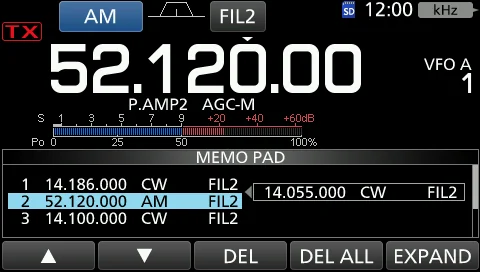
1. 1 Open the MEMO PAD list screen. MENU » MPAD 1. 1 打开 MEMO PAD 列表屏幕。MENU » MPAD 2. 2 Touch [▲] or [▼] to select the desired Memo Pad. 2. 2 触摸 [▲] 或 [▼] 选择所需的备忘录。触摸 [DEL] Touch [DEL] for 1 second to delete the selected Memo 1 秒可删除所选备忘录。触摸 [DEL ALL] 1 秒可删除全 Pad. Touch [DEL ALL] for 1 second to delete all the 部备忘录。 Memo Pads. 3. 3 按 EXIT 关闭 MEMO PAD 列表屏幕。 3. 3 Touch EXIT to close the MEMO PAD list screen.
提示 TIP TIP 如果更改了从备忘录调出的频率或工作模式,更改后的内容会自动存入临时暂存器。 If you change the frequency or operating mode called up from Memo Pads, the contents are automatically updated in a temporary Pad.
图 9-6 MEMO PAD 列表屏幕(MENU » MPAD) The MEMO PAD list screen (MENU » MPAD)
火腿经验 HAM TIP HAM TIP 设置备份三件套,建议尽早做好:① 把设置数据存到 SD 卡(MENU » SET > SD Card > Save Setting)——存储通道与电 台设置会一并保存,换机或误操作后可直接还原;② 把关键设置屏幕截图存证,方便日后对照恢复;③ 在笔记本上记下 CI-V 地址(默认 94 / E0),重装控制软件联机时用得着。 Set up your three-part backup routine early: (1) save the setting data to an SD card (MENU » SET > SD Card > Save Setting), which stores the memory channels together with the transceiver's settings so you can restore them after swapping rigs or a misstep; (2) keep screen captures of key setups as evidence for later reference; (3) write down the CI-V address (default 94 / E0) in a notebook — you will need it when reconnecting the control software.