Scans
本章介绍 IC-7300 的扫描功能:扫描类型总览(Programmed scan、Memory scan、Select Memory scan、∂F scan), Scan Set 模式中的扫描速度与扫描恢复设置,静噪状态对扫描行为的影响,各类扫描的操作步骤,选择存储通道的设置与取消, 以及在 FM 模式下识别中继所需亚音的 Tone scan 操作。This chapter describes the IC-7300's scan functions: an overview of the scan types (Programmed scan, Memory scan, Select Memory scan and ∂F scan), the Scan speed and Scan Resume settings in the Scan Set mode, how the squelch status affects scanning, the operating procedures for each scan type, setting and canceling Select Memory channels, and the Tone scan operation that identifies the tone frequency needed to access a repeater in the FM mode.
10-2 Scan types · 扫描类型
The IC-7300 has several scan types as listed below. IC-7300 具有以下几种扫描类型,如下表所列。
表 10-1 扫描类型 Scan types
扫描类型 操作 Scan type Operation
Programmed scan (p. 10- 在 2 个扫描边缘频率(扫描边缘存储通道 P1 和 P2)之间反复扫描。扫描从较低的边缘频率开始。 3) Repeatedly scans between 2 Scan Edge frequencies (Scan Edge memory channels P1 and P2). The scan starts from the lower edge frequency.
Memory scan (p. 10-4) 反复扫描所有已存入内容的存储通道。 Repeatedly scans all entered Memory channels.
Select Memory scan (p. 反复扫描 3 个选择存储通道中的全部或其中一个。 10-4) Repeatedly scans all or one of 3 select Memory channels.
∂F scan (p. 10-6) 在 ∂F span 区域内反复扫描。扫描从中心频率开始。 Repeatedly scans within the ∂F span area. The scan starts from the center frequency.
Scan Set 模式 Scan Set mode
You can set the Scan speed and the Scan Resume function 可以在 Scan Set 模式中设置扫描速度(Scan speed)和 in the Scan Set mode. 扫描恢复功能(Scan Resume)。
1. 1 Open the SCAN screen. MENU » SCAN 1. 1 打开 SCAN 屏幕。MENU » SCAN 2. 2 Touch [SET]. • Opens the SCAN SET screen. 2. 2 触摸 [SET]。• 打开 SCAN SET 屏幕。 3. 3 Select the desired item by rotating or pushing 3. 3 旋转或按下 MULTI (多功能旋钮),选择所需项 MULTI . 目。 4. 4 Select the desired option. • See below for details of 4. 4 选择所需选项。• 各设置项目及其选项详见下表。 the setting items and their options. 5. 5 要关闭 SCAN 屏幕,请反复按 EXIT 。 5. 5 To close the SCAN screen, push EXIT several times.
表 10-2 SCAN SET 屏幕项目 SCAN SET screen items
项目 说明 Item Description
SCAN Speed 将所需的扫描速度设置为慢或快。 默认:Fast • Slow:扫描速度慢。 • Fast:扫描速度快。 Set the desired scan speed to slow or fast. • Slow: Scan speed is slow. • Fast: Scan speed is fast.
SCAN 将扫描恢复功能设置为 ON 或 OFF。 Resume • OFF:检测到信号时取消扫描。 默认:ON • ON:检测到信号时扫描暂停 10 秒,然后恢复。信号消失 2 秒后,扫描恢复。 Set the scan resume function to ON or OFF. • OFF: When a signal is detected, cancels the scan. • ON: When a signal is detected, scan pauses for 10 seconds, then resumes. Two seconds after the signal disappears, the scan resumes.
提示 TIP TIP 如何恢复默认设置:触摸项目或其选项 1 秒会显示 Quick menu,然后触摸「Default」即可恢复为默认设置。 How to reset to the default setting: Touching the item or its option for 1 second displays the Quick menu, and then touch "Default" to reset to the default setting.
准备 Preparation
静噪状态Squelch status
Scans work with the squelch status. Be sure to adjust the 扫描功能与静噪状态联动。请务必根据您的操作环境调整 squelch level according to your operating conditions. 静噪电平。
提示 NOTE NOTE 当 AF / RF/SQL 旋钮仅作为射频增益控制工作时,无法调整静噪电平。
When AF RF/SQL operates as only an RF gain control, you cannot adjust the squelch level.
提示 NOTE NOTE 通常,将 AF / RF/SQL 旋钮调到噪声消失、且 TX/RX 指示灯熄灭的位置。
Normally, set AF RF/SQL to the point where noise disappears, and the TX/RX indicator goes off.
When the scan starts with the squelch open: 扫描在静噪打开的状态下开始时:
• For a Programmed scan: When the tuning step is 1 kHz or • 对于编程扫描:当调谐步进为 1 kHz 或以下时,扫描将 less, the scan continues until it is manually stopped — it 持续进行,直到手动停止——即使检测到信号也不会暂停 does not pause* even if signals are detected. *。
*The scan pauses when the squelch is closed and then *当静噪关闭后又打开时,扫描暂停。Scan Resume 功能 opened. The scan resumes after 10 seconds has passed 为 ON 时,扫描暂停 10 秒后恢复;该功能为 OFF 时,扫 when the Scan Resume function is ON. It is cancelled when 描取消。 the function is OFF.
When the tuning step is 5 kHz or more, the scan pauses on 当调谐步进为 5 kHz 或以上时,Scan Resume 功能为 each step when the Scan Resume function is ON. It does ON 时扫描在每个步进点暂停;该功能为 OFF 时扫描不暂 not pause when the function is OFF. 停。
• For a memory scan: The scan pauses on each channel • 对于存储扫描:Scan Resume 功能为 ON 时扫描在每个 when the Scan Resume function is ON. The scan does not 通道暂停;该功能为 OFF 时扫描不暂停。 pause when the function is OFF.
When the scan starts with the squelch closed: The scan 扫描在静噪关闭的状态下开始时:检测到信号时扫描停 stops when a signal is detected. 止。
• When the Scan Resume function is ON, the scan pauses • Scan Resume 功能为 ON 时,检测到信号后扫描暂停 for 10 seconds after detecting a signal, then resumes 2 10 秒,然后在信号消失 2 秒后恢复扫描。 seconds after the signal disappears.
火腿经验 HAM TIP HAM TIP RF/SQL 是复合旋钮:内环为 AF 音量,外环为 RF 增益/静噪(RF/SQL);外环以 12 点位置为界——逆时针一侧调射频增益 (RF GAIN),顺时针一侧调静噪门限(SQL)。新手常把「没声音」当成故障——先确认外环 RF GAIN 是否被关小、或内 环音量是否太小。本章要求按操作环境调整静噪电平;如果发现静噪调不了,先确认电台是否处于 RF/SQL 仅作射频增益工作 的状态(见上文说明)。 The RF/SQL control is a dual-concentric knob: the inner ring is AF volume and the outer ring is RF gain/squelch (RF/SQL). The outer ring splits at the 12 o'clock position — counterclockwise adjusts RF GAIN, clockwise adjusts the squelch threshold. Beginners often mistake "no audio" for a fault — first check whether the outer ring's RF GAIN has been turned down, or the inner volume is too low. This chapter tells you to set the squelch for your operating conditions; if you cannot adjust the squelch at all, check whether the rig is in a state where RF/SQL works only as an RF gain control (see the note above).
10-3 Programmed scan and Fine Programmed scan (VFO mode) · 编程扫描与细编程扫描(VFO 模式)
Repeatedly scans between two Scan Edge frequencies. The 在两个扫描边缘频率之间反复扫描。边缘频率默认预设在 edge frequencies are preset in P1 and P2 as the default. P1: P1 和 P2 中:P1 为 0.500000 MHz,P2 为 29.999999 0.500000 MHz P2: 29.999999 MHz. The scan sweeps from MHz。扫描从一个扫描边缘频率(P1 或 P2)扫到另一个 one Scan edge (P1 or P2) to the other (P2 or P1), and then (P2 或 P1),然后跳回(Jump)起点,如此反复。 jumps back to the start.
提示 NOTE NOTE 要更改 P1 和 P2 扫描边缘存储通道,详见「Entering memory channel contents」(见 9-3 节)。 To change the P1 and P2 Scan Edge Memory channels, see "Entering memory channel contents" (p. 9-3) for details.
提示 NOTE NOTE 如果在 P1 和 P2 中输入相同的频率,编程扫描不会启动。 If the same frequencies are entered into P1 and P2, the Programmed scan does not start.
提示 NOTE NOTE 在细编程扫描中,静噪打开时扫描速度降低,但收发信机继续扫描。静噪打开时,扫描调谐步进变为 10 Hz。 In the Fine Programmed scan, the scan speed decreases when the squelch opens, but the transceiver keeps scanning. The scan tuning step changes to 10 Hz when the squelch opens.
编程扫描操作 Programmed scan operation
1. 1 Push V/M to select the VFO mode. 1. 1 按 V/M 选择 VFO 模式。 2. 2 Select the operating mode in the MODE screen. 2. 2 在 MODE 屏幕中选择工作模式。 3. 3 Select the desired tuning step in the TS screen. 3. 3 在 TS 屏幕中选择所需的调谐步进。 4. 4 Open the SCAN screen. MENU » SCAN 4. 4 打开 SCAN 屏幕。MENU » SCAN 5. 5 Touch [PROG] to start the Programmed scan. 5. 5 触摸 [PROG] 开始编程扫描。 6. 6 Touch [PROG] to cancel the scan. 6. 6 触摸 [PROG] 取消扫描。 7. 7 To close the SCAN screen, push EXIT . 7. 7 要关闭 SCAN 屏幕,请按 EXIT 。
提示 NOTE NOTE 可以在扫描过程中更改工作模式。 You can change the operating mode while scanning.
提示 NOTE NOTE 可以在扫描过程中更改调谐步进。 You can change the tuning step while scanning.
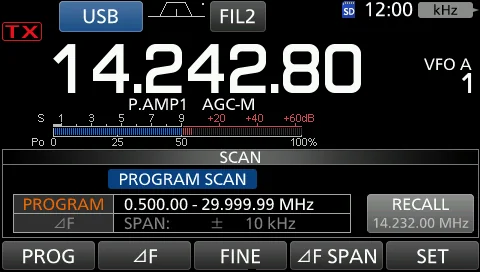
提示 NOTE NOTE 扫描时「PROGRAM SCAN」和小数点闪烁。 "PROGRAM SCAN" and the decimal points blink while scanning.
图 10-1 编程扫描中的 SCAN 屏幕(「PROGRAM SCAN」闪烁) The SCAN screen while Programmed scanning ("PROGRAM SCAN" blinks)
细编程扫描操作 Fine Programmed scan operation
1. 1 Start the Programmed scan. • See steps 1 ~ 5 in 1. 1 开 始 编 程 扫 描 。 • 详 见 「 Programmed scan "Programmed scan operation" for details. operation」小节的步骤 1 ~ 5。 2. 2 While Programmed scanning, touch [FINE] to 2. 2 在编程扫描过程中,触摸 [FINE] 切换到细编程扫 switch to the Fine Programmed scan. 描。 3. 3 Touch [PROG] to cancel the scan. 3. 3 触摸 [PROG] 取消扫描。 4. 4 To close the SCAN screen, push EXIT . 4. 4 要关闭 SCAN 屏幕,请按 EXIT 。
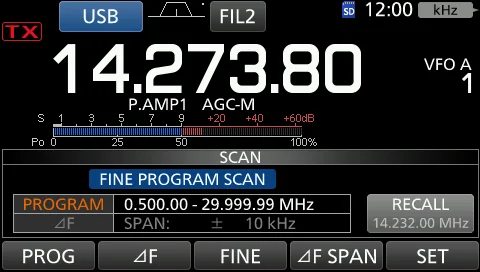
提示 NOTE NOTE 细编程扫描过程中,闪烁显示「FINE PROGRAM SCAN」而不是「PROGRAM SCAN」。 While Fine Programmed scanning, "FINE PROGRAM SCAN" blinks instead of "PROGRAM SCAN."
提示 NOTE NOTE 每触摸一次 [FINE],即在编程扫描与细编程扫描之间切换。 Each time you touch [FINE], the Programmed scan and the Fine Programmed scan are switched.
图 10-2 细编程扫描中的 SCAN 屏幕(「FINE PROGRAM SCAN」闪烁) The SCAN screen while Fine Programmed scanning ("FINE PROGRAM SCAN" blinks)
10-4 Memory scan and Select Memory scan (Memory mode) · 存储扫描与选择存储扫描(Memory 模式)
存储扫描 Memory scan
表 10-3 存储扫描示意图中的各存储通道(按通道编号排列) Memory channels in the Memory scan illustration (listed by channel number)
存储通道 选择存储标记 Memory channel Select memory mark
Ch 1 #1
Ch 2 #2
Ch 3 #1
Ch 4 —
Ch 5 #1
Ch 6 #3
Ch 7 #1
Ch 99 #1
Blank channel —
*"#1," "#2" and "#3" show that the channel is specified as a *「#1」「#2」「#3」表示该通道被指定为选择存储通 select memory. 道。
Repeatedly scans all entered Memory channels. Blank (not 反复扫描所有已存入内容的存储通道。空白(未存入内 entered) Memory channels are skipped. 容)的存储通道会被跳过。
提示 NOTE NOTE 如果有两个或两个以上的存储通道未存入内容,存储扫描不会启动。 If two or more Memory channels are not entered, the Memory scan does not start.
选择存储扫描 Select Memory scan
Repeatedly scans all or one of 3 Select Memory channels 反复扫描 3 个选择存储通道(★1、★2、★3)中的全部或 ★ ★2, ★3), as shown in the illustration above. ( 1, 其中一个,如上方表 10-3 所示。
提示 NOTE NOTE 如果有两个或两个以上存储通道未被指定为选择存储通道,选择存储扫描不会启动。 If two or more Memory channels are not designated as a Select Memory channels, the Select Memory scan does not start.
存储扫描操作 Memory scan operation
1. 1 Push V/M to select the Memory mode. 1. 1 按 V/M 选择 Memory 模式。 2. 2 Open the SCAN screen. MENU » SCAN 2. 2 打开 SCAN 屏幕。MENU » SCAN 3. 3 Touch [MEMO] to start the Memory scan. • [SEL 3. 3 触摸 [MEMO] 开始存储扫描。• 以 [SEL No.] 代 No.] is displayed instead of [∂F SPAN]. 替 [∂F SPAN] 显示。 4. 4 Touch [MEMO] to cancel the scan. 4. 4 触摸 [MEMO] 取消扫描。 5. 5 To close the SCAN screen, push EXIT . 5. 5 要关闭 SCAN 屏幕,请按 EXIT 。
提示 NOTE NOTE 扫描时「MEMO SCAN」和小数点闪烁。 "MEMO SCAN" and decimal points blink while scanning.
提示 NOTE NOTE 扫描时以 [SEL No.] 代替 [∂F] 显示。 [SEL No.] is displayed instead of [∂F] while scanning.
10-5 Select Memory scan operation · 选择存储扫描操作
1. 1 Start the Memory scan. • See steps 1 ~ 3 in 1. 1 开 始 存 储 扫 描 。 • 详 见 「 Memory scan "Memory scan operation" (p. 10-4) for details. operation」(见 10-4 节)的步骤 1 ~ 3。 2. 2 While scanning, touch [SEL No.] to select the Select 2. 2 在扫描过程中,触摸 [SEL No.] 选择选择扫描编 scan number. 号。 3. 3 While scanning, touch [SELECT] to switch to the 3. 3 在扫描过程中,触摸 [SELECT] 切换到选择存储扫 Select Memory scan. 描。 4. 4 Touch [MEMO] to cancel the scan. 4. 4 触摸 [MEMO] 取消扫描。 5. 5 To close the SCAN screen, push EXIT . 5. 5 要关闭 SCAN 屏幕,请按 EXIT 。
提示 NOTE NOTE 每触摸一次 [SEL No.],将交替显示「★1」「★2」「★3」和「★1,2,3」。 • ★1:扫描指定为 ★1 的通道。 • ★2:扫描指定为 ★2 的通道。 • ★3:扫描指定为 ★3 的通道。 • ★1,2,3:扫描指定为 ★1、★2 或 ★3 的通道。 ★ ★ ★ Each time you touch [SEL No.], " 1," " 2," " 3," and " ★1,2,3" are alternately displayed. • ★1: Channels specified as ★1 are scanned. • ★2: Channels specified as ★2 are scanned. • ★3: Channels specified as ★3 are scanned. • ★1,2,3: Channels specified as ★1, ★2, or ★3 are scanned.
提示 NOTE NOTE 选择存储扫描过程中,闪烁显示「SELECT MEMORY SCAN」而不是「MEMORY SCAN」。 While Select Memory scanning, "SELECT MEMORY SCAN" blinks instead of "MEMORY SCAN."
提示 NOTE NOTE 每触摸一次 [SELECT],即在存储扫描与选择存储扫描之间切换。 Each time you touch [SELECT], the Memory scan and the Select Memory scan are switched.
设置选择存储通道 Setting Select Memory channel
1. 1 Open the SCAN screen. • See steps 1 ~ 2 in 1. 1 打 开 SCAN 屏 幕 。 • 详 见 「 Memory scan "Memory scan operation" (p. 10-4) for details. operation」(见 10-4 节)的步骤 1 ~ 2。 2. 2 Push ▲ or ▼ to select the desired Memory 2. 2 按 ▲ 或 ▼ 选择要设为选择存储通道的存储通 channel to be set as the Select Memory channel. 道。 3. 3 Touch [SELECT] to set the Select scan number. 3. 3 触摸 [SELECT] 设置选择扫描编号。 4. 4 To close the SCAN screen, push EXIT . 4. 4 要关闭 SCAN 屏幕,请按 EXIT 。
提示 NOTE NOTE 每触摸一次 [SELECT],将交替显示「★1」「★2」「★3」和「(无图标)」。 ★ ★ ★ Each time you touch [SELECT], " 1," " 2," " 3," and "(no icon)" are alternately displayed.
取消全部选择存储通道设置 Canceling all Select Memory channel settings
1. 1 Open the SCAN screen. • See steps 1 ~ 2 in 1. 1 打 开 SCAN 屏 幕 。 • 详 见 「 Memory scan "Memory scan operation" (p. 10-4) for details. operation」(见 10-4 节)的步骤 1 ~ 2。 2. 2 Touch [SELECT] for 1 second. • Opens the SELECT 2. 2 触摸 [SELECT] 1 秒。• 打开 SELECT ALL CLEAR ALL CLEAR screen. 屏幕。 3. 3 Touch the desired option to clear all Select 3. 3 触摸所需选项,清除全部选择存储通道设置。 memory channel settings. 4. 4 触摸 [YES] 取消选择设置。 4. 4 Touch [YES] to cancel the Select setting. 5. 5 要关闭 SCAN 屏幕,请按 EXIT 。 5. 5 To close the SCAN screen, push EXIT .
10-6 ∂F scan and Fine ∂F scan (VFO and Memory modes) · ∂F 扫描与细 ∂F 扫描(VFO 与 Memory 模式)
Repeatedly scans within the ∂F span area. The scan starts 在 ∂F span 区域内反复扫描。扫描从中心频率开始,扫至 from the center frequency, sweeps to the +∂F frequency, +∂F 频率,再跳至 -∂F 频率扫回,如此反复。 jumps to the -∂F frequency, and then sweeps back.
提示 NOTE NOTE 在细扫描(编程扫描或 ∂F 扫描)中,静噪打开时扫描速度降低,但收发信机继续扫描。静噪打开时,扫描调谐步进变为 10 Hz。 In fine scan (programmed or ∂F), the scan speed decreases when the squelch opens, but the transceiver keeps scanning. The scan tuning step changes to 10 Hz when the squelch opens.
∂F 扫描操作 ∂F scan operation
1. 1 Push V/M to select the VFO or Memory mode. 1. 1 按 V/M 选择 VFO 或 Memory 模式。 2. 2 Open the SCAN screen. MENU » SCAN 2. 2 打开 SCAN 屏幕。MENU » SCAN 3. 3 Touch [∂F SPAN] several times until the desired 3. 3 反复触摸 [∂F SPAN],直到选择所需的 span。• span is selected. • Options: ±5 kHz, ±10 kHz, ±20 kHz, 选 项 : ±5 kHz 、 ±10 kHz 、 ±20 kHz 、 ±50 kHz 、 ±50 kHz, ±100 kHz, ±500 kHz, or ±1 MHz ±100 kHz、±500 kHz 或 ±1 MHz 4. 4 Set the center frequency. • In the VFO mode: 4. 4 设 置 中 心 频 率 。 • 在 VFO 模 式 下 : 旋 转 Rotate MAIN DIAL . • In the Memory mode: Push ▲ MAIN DIAL 。• 在 Memory 模式下:按 ▲ 或 ▼ or ▼ to select the desired Memory channel. 选择所需的存储通道。 5. 5 Touch [∂F] to start the ∂F scan. 5. 5 触摸 [∂F] 开始 ∂F 扫描。 6. 6 Touch [∂F] to cancel the scan. 6. 6 触摸 [∂F] 取消扫描。 7. 7 To close the SCAN screen, push EXIT . 7. 7 要关闭 SCAN 屏幕,请按 EXIT 。
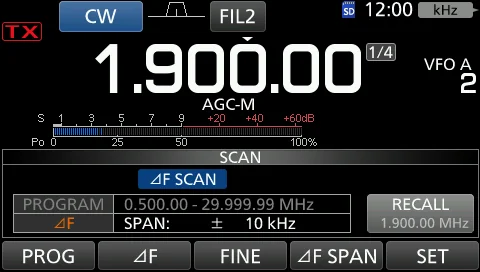
提示 NOTE NOTE 扫描时「∂F SCAN」和小数点闪烁。 "∂F SCAN" and decimal points blink while scanning.
图 10-3 ∂F 扫描中的 SCAN 屏幕(「∂F SCAN」闪烁) The SCAN screen while ∂F scanning ("∂F SCAN" blinks)
细 ∂F 扫描操作 Fine ∂F scan operation
1. 1 Start the ∂F scan. • See steps 1 ~ 5 in "∂F scan 1. 1 开始 ∂F 扫描。• 详见「∂F scan operation」小节 operation" for details. 的步骤 1 ~ 5。 2. 2 While ∂F scanning, touch [FINE] to switch to the 2. 2 在 ∂F 扫描过程中,触摸 [FINE] 切换到细 ∂F 扫 Fine ∂F scan. 描。 3. 3 Touch [∂F] to cancel the scan. 3. 3 触摸 [∂F] 取消扫描。 4. 4 To close the SCAN screen, push EXIT . 4. 4 要关闭 SCAN 屏幕,请按 EXIT 。
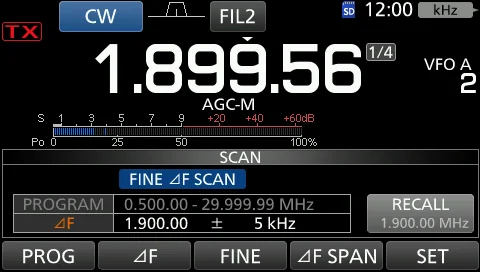
提示 NOTE NOTE 细 ∂F 扫描过程中,闪烁显示「FINE ∂F SCAN」而不是「∂F SCAN」。 While Fine ∂F scanning, "FINE ∂F SCAN" blinks instead of "∂F SCAN."
提示 NOTE NOTE 每触摸一次 [FINE],即在 ∂F 扫描与细 ∂F 扫描之间切换。 Each time you touch [FINE], the ∂F scan and the Fine ∂F scan are switched.
图 10-4 细 ∂F 扫描中的 SCAN 屏幕(「FINE ∂F SCAN」闪烁) The SCAN screen while Fine ∂F scanning ("FINE ∂F SCAN" blinks)
10-7 Tone scan operation · 亚音扫描操作
By monitoring a signal on an HF/6 m repeater input 通过监测 HF/6 m 波段中继输入频率上的信号,收发信机 frequency, the transceiver can determine the tone 可以确定接入该中继所需的亚音频率。 frequency required to access the repeater.
1. 1 While receiving a signal in the FM mode, push 1. 1 在 FM 模式下接收信号时,按 FUNCTION 打开 FUNCTION to open the FUNCTION screen. FUNCTION 屏幕。 2. 2 Touch [TONE] for 1 second. • Opens the TONE 2. 2 触摸 [TONE] 1 秒。• 打开 TONE FREQUENCY 屏 FREQUENCY screen. 幕。 3. 3 Touch [REPEATER TONE] or [T-SQL TONE]. • Checks 3. 3 触摸 [REPEATER TONE](中继亚音)或 [T-SQL the repeater tone frequency or tone squelch frequency. TONE](T-SQL 亚音)。• 检查中继亚音频率或亚音静 4. 4 Touch [T-SCAN] to start the Tone scan. 噪频率。 5. 5 When the tone frequency is detected, the tone 4. 4 触摸 [T-SCAN] 开始亚音扫描。 scan pauses. • The tone frequency is temporarily set in the Tone memory. 5. 5 检测到亚音频率时,亚音扫描暂停。• 该亚音频率 被临时存入 Tone memory。 6. 6 Touch [T-SCAN] to cancel the scan. 7. 7 To close the TONE FREQUENCY screen, push 6. 6 触摸 [T-SCAN] 取消扫描。 EXIT . 7. 7 要关闭 TONE FREQUENCY 屏幕,请按 EXIT 。
Information: • The selected tone frequencies are scanned, 相关信息:• 对所选亚音频率进行扫描,频率读数下方闪 and "SCAN" blinks under the frequency readout. 烁显示「SCAN」。
• The audio is muted. • The scan speed is slow when the • 音频被静音。• 静噪打开时扫描速度慢;静噪关闭时扫描 squelch is open. And the speed is fast when the squelch is 速度快。 closed.
火腿经验 HAM TIP HAM TIP 玩 FM 中继先用 Tone Scan 找亚音:收到中继后启动 Tone Scan,电台会自动识别 88.5 Hz 等亚音频率并写入 TSQL,省去 逐个试听的麻烦。 For FM repeater work, run Tone Scan first to find the tone: after you receive the repeater, start Tone Scan and the rig automatically identifies the tone frequency (e.g., 88.5 Hz) and writes it into TSQL, saving you the trouble of trying each tone by ear.