SET 模式用于设置不常更改的数值或功能选项,是全书最长的参数章。本册涵盖第 12 章上半部分(印刷节 12-2 ~ 12-8):先 说明 SET 模式的树状结构与进入方法,再以参数表形式逐项给出 Tone Control/TBW(音色控制/发射通带宽度)与 Function (功能)两组设置项的中英对照说明及默认值,最后列出前面板键与话筒键的可分配功能。The Set mode is used to set infrequently changed values or function settings, and is the longest parameter chapter of this book. This volume covers the first half of Chapter 12 (printed sections 12-2 to 12-8): it explains the tree structure of the Set mode and how to enter it, gives bilingual descriptions and the default value of every item in the Tone Control/TBW and Function groups in parameter tables, and finally lists the assignable functions of the front panel keys and the microphone keys.
12-2 Set mode description · SET 模式说明
You can use the Set mode to set infrequently changed SET 模式用于设置不常更改的数值或功能选项。 values or function settings.
提示 TIP TIP SET 模式采用树状层级结构。根据所选项目的不同,您可以进入下一层级,也可以返回上一层级。 The Set mode is constructed in a tree structure. You may go to the next tree level, or go back a level, depending on the selected item.
进入 SET 模式 Entering the Set mode
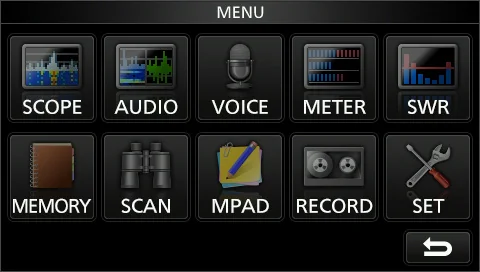
1. 1 Push MENU . 1. 1 按 MENU 。 • Opens the MENU screen. • 打开 MENU 屏幕。 2. 2 Touch [SET]. 2. 2 触摸 [SET]。 • Opens the SET screen. • 打开 SET 屏幕。 3. 3 Rotate MULTI to select the desired item. 3. 3 旋转 MULTI 选择所需项目。 • You can also select the item by touching [▲] or [▼] in • 也可以触摸屏幕上的 [▲] 或 [▼] 选择项目。 the screen. 4. 4 按 MULTI 进入下一层级。 4. 4 Push MULTI to go to the next tree level. • 也可以直接触摸屏幕上的所需项目进入下一层级。 • You can also go to the next tree level by directly touching the desired item in the screen. 5. 5 重复步骤 3 和 4,打开所需项目的设置屏幕。 5. 5 Repeat steps 3 and 4 to open the desired item's • 要返回上一层级,请按 EXIT 。 setting screen. • To go back the previous tree level, push EXIT .
图 12-1 MENU 屏幕(触摸 [SET]) MENU screen (touch [SET])
1. 6 Rotate MULTI to select the desired option, and 1. 6 旋转 MULTI 选择所需选项,然后按 MULTI 完成 then push MULTI to set it. 设置。
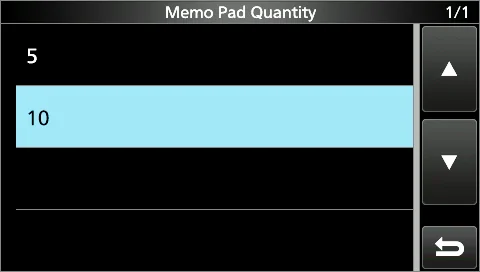
图 12-2 SET 屏幕(示例:Memo Pad Quantity 设置屏幕) SET screen (example: Memo Pad Quantity setting screen)
说明 INFORMATION • 也可以直接触摸屏幕上的选项,或触摸 [▲]、[▼] 选择选项。 • 要在同一层级继续设置其他项目时,请重复步骤 6。 • 要在其他层级继续设置其他项目时,请按 EXIT 返回上一层级。
• You can also select the option by directly touching the option or [▲] or [▼] in the screen. • When you continuously set other items in the same tree level, repeat step 6. • When you continuously set other item in the different tree level, push EXIT to go back the previous tree level.
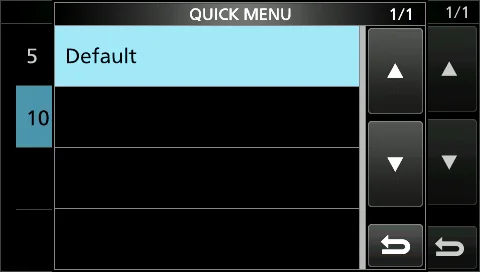
提示 TIP:如何恢复默认设置 TIP: How to reset to the default setting 触摸设置项或其选项 1 秒,会显示 Quick 菜单,然后触摸「Default」即可恢复默认设置。 Touching the item or its option for 1 second displays the Quick menu, and then touch "Default" to reset to the default setting.
图 12-3 QUICK MENU 屏幕(触摸「Default」恢复默认设置) QUICK MENU screen (touch "Default" to reset to the default setting)
提示 NOTE NOTE 要关闭 Quick 菜单,请按 EXIT 。
To close the Quick menu, push EXIT .
1. 7 To close the SET screen, push EXIT several times. 1. 7 要关闭 SET 屏幕,请按 EXIT 数次。
火腿经验 HAM TIP HAM TIP QUICK MENU(从屏幕顶部下滑或按相应区域)能快速更改 Meter Type、启动录制,比逐层翻 SET 菜单快得多。 The QUICK MENU (swipe down from the top of the screen, or touch the corresponding area) lets you quickly change the Meter Type or start recording, much faster than digging through the SET menu layer by layer.
12-3 Tone Control/TBW · 音色控制/发射通带宽度
表 12-1 Tone Control/TBW 设置项 Tone Control/TBW setting items
项目 说明 Item Description
SSB RX 以 100 Hz 步进设置接收音频高通滤波器与低通滤波器的截止频率。可选范围:• HPF:100 ~ 2000 Hz • LPF:500 ~ HPF/LPF 2400 Hz 如果设置了该项目,「SSB RX Bass」和「SSB RX Treble」项目将自动设为「0」。 默认:– – – – – – – – – Sets the receive audio high-pass filter and low-pass filter cutoff frequencies in 100 Hz steps. Selectable ranges: • HPF: 100 ~ 2000 Hz • LPF: 500 ~ 2400 Hz If this item is set, the "SSB RX Bass" and "SSB RX Treble" items are automatically set to "0." (Default: – – – – – – – – –)
SSB RX 设置接收音频的低音或高音电平。• 范围:–5 ~ +5 Bass 默认:0 Sets the bass or treble level of the receive audio. • Range: –5 ~ +5 (Default: 0)
SSB RX 设置接收音频的低音或高音电平。• 范围:–5 ~ +5 Treble 默认:0 Sets the bass or treble level of the receive audio. • Range: –5 ~ +5 (Default: 0)
AM RX 以 100 Hz 步进设置接收音频高通滤波器与低通滤波器的截止频率。可选范围:• HPF:100 ~ 2000 Hz • LPF:500 ~ HPF/LPF 2400 Hz 如果设置了该项目,「AM RX Bass」和「AM RX Treble」项目将自动设为「0」。 默认:– – – – – – – – – Sets the receive audio high-pass filter or low-pass filter cutoff frequencies in 100 Hz steps. Selectable ranges: • HPF: 100 ~ 2000 Hz • LPF: 500 ~ 2400 Hz If this item is set, the "AM RX Bass" and "AM RX Treble" items are automatically set to "0." (Default: – – – – – – – – –)
AM RX Bass 设置接收音频的低音或高音电平。• 范围:–5 ~ +5 默认:0 Sets the bass or treble level of the receive audio. • Range: –5 ~ +5 (Default: 0)
AM RX 设置接收音频的低音或高音电平。• 范围:–5 ~ +5 Treble 默认:0 Sets the bass or treble level of the receive audio. • Range: –5 ~ +5 (Default: 0)
FM RX 以 100 Hz 步进设置接收音频高通滤波器与低通滤波器的截止频率。可选范围:• HPF:100 ~ 2000 Hz • LPF:500 ~ HPF/LPF 2400 Hz 如果设置了该项目,「FM RX Bass」和「FM RX Treble」项目将自动设为「0」。 默认:– – – – – – – – – Sets the receive audio high-pass filter or low-pass filter cutoff frequencies in 100 Hz steps. Selectable ranges: • HPF: 100 ~ 2000 Hz • LPF: 500 ~ 2400 Hz If this item is set, the "FM RX Bass" and "FM RX Treble" items are automatically set to "0." (Default: – – – – – – – – –)
FM RX Bass 设置接收音频的低音或高音电平。• 范围:–5 ~ +5 默认:0 Sets the bass or treble level of the receive audio. • Range: –5 ~ +5 (Default: 0)
FM RX 设置接收音频的低音或高音电平。• 范围:–5 ~ +5 Treble 默认:0 Sets the bass or treble level of the receive audio. • Range: –5 ~ +5 (Default: 0)
CW RX 以 100 Hz 步进设置接收音频高通滤波器或低通滤波器的截止频率。可选范围:• HPF:100 ~ 2000 Hz • LPF:500 ~ HPF/LPF 2400 Hz 默认:– – – – – – – – – Sets the receive audio high-pass filter or low-pass filter cutoff frequencies in 100 Hz steps. Selectable ranges: • HPF: 100 ~ 2000 Hz • LPF: 500 ~ 2400 Hz (Default: – – – – – – – – –)
项目 说明 Item Description
RTTY RX 以 100 Hz 步进设置接收音频高通滤波器或低通滤波器的截止频率。可选范围:• HPF:100 ~ 2000 Hz • LPF:500 ~ HPF/LPF 2400 Hz 默认:– – – – – – – – – Sets the receive audio high-pass filter or low-pass filter cutoff frequencies in 100 Hz steps. Selectable ranges: • HPF: 100 ~ 2000 Hz • LPF: 500 ~ 2400 Hz (Default: – – – – – – – – –)
SSB TX 设置接收音频的低音或高音电平。• 范围:–5 ~ +5 Bass 默认:0 Sets the bass or treble level of the receive audio. • Range: –5 ~ +5 (Default: 0)
SSB TX 设置接收音频的低音或高音电平。• 范围:–5 ~ +5 Treble 默认:0 Sets the bass or treble level of the receive audio. • Range: –5 ~ +5 (Default: 0)
SSB TBW 通过更改下限与上限截止频率,设置宽(WIDE)、中(MID)或窄(NAR)的发射通带宽度。• 下限频率:100、 (WIDE) 200、300 和 500 Hz • 上限频率:2500、2700、2800 和 2900 Hz 默认:100 – 2900 Sets the transmission passband width of wide, mid, or narrow, by changing the lower and higher cutoff frequencies. • Lower frequency: 100, 200, 300 and 500 Hz • Higher frequency: 2500, 2700, 2800 and 2900 Hz (Default: 100 – 2900)
SSB TBW 通过更改下限与上限截止频率,设置宽(WIDE)、中(MID)或窄(NAR)的发射通带宽度。• 下限频率:100、 (MID) 200、300 和 500 Hz • 上限频率:2500、2700、2800 和 2900 Hz 默认:300 – 2700 Sets the transmission passband width of wide, mid, or narrow, by changing the lower and higher cutoff frequencies. • Lower frequency: 100, 200, 300 and 500 Hz • Higher frequency: 2500, 2700, 2800 and 2900 Hz (Default: 300 – 2700)
SSB TBW 通过更改下限与上限截止频率,设置宽(WIDE)、中(MID)或窄(NAR)的发射通带宽度。• 下限频率:100、 (NAR) 200、300 和 500 Hz • 上限频率:2500、2700、2800 和 2900 Hz 默认:500 – 2500 Sets the transmission passband width of wide, mid, or narrow, by changing the lower and higher cutoff frequencies. • Lower frequency: 100, 200, 300 and 500 Hz • Higher frequency: 2500, 2700, 2800 and 2900 Hz (Default: 500 – 2500)
SSB-D TBW 通过更改下限与上限截止频率,设置 SSB-D 模式的发射通带宽度。• 下限频率:100、200、300 和 500 Hz • 上限频 率:2500、2700、2800 和 2900 Hz 默认:300 – 2700 Sets the transmission passband width for the SSB-D mode by changing the lower and higher cut-off frequencies. • Lower frequency: 100, 200, 300 and 500 Hz • Higher frequency: 2500, 2700, 2800 and 2900 Hz (Default: 300 – 2700)
AM TX Bass 设置接收音频的低音或高音电平。• 范围:–5 ~ +5 默认:0 Sets the bass or treble level of the receive audio. • Range: –5 ~ +5 (Default: 0)
AM TX 设置接收音频的低音或高音电平。• 范围:–5 ~ +5 Treble 默认:0 Sets the bass or treble level of the receive audio. • Range: –5 ~ +5 (Default: 0)
FM TX Bass 设置接收音频的低音或高音电平。• 范围:–5 ~ +5 默认:0 Sets the bass or treble level of the receive audio. • Range: –5 ~ +5 (Default: 0)
FM TX 设置接收音频的低音或高音电平。• 范围:–5 ~ +5 Treble 默认:0 Sets the bass or treble level of the receive audio. • Range: –5 ~ +5 (Default: 0)
说明 NOTE NOTE
译注:原厂手册在 SSB/AM/FM 的 TX Bass 与 TX Treble 条目中,英文说明均为 "Sets the bass or treble level of the receive audio"(设置接收音频的低音或高音电平);按其功能应为发射音频(transmit audio)。本片段按原文译出,特此 说明。 Translator's note: in the original manual, the descriptions of the SSB/AM/FM TX Bass and TX Treble items all read "Sets the bass or treble level of the receive audio," although by function they should refer to the transmit audio. This fragment translates the source text as-is.
MENU » SET > Tone Control/TBW MENU » SET > Tone Control/TBW
12-4 Function · 功能
表 12-2 Function 设置项(提示音与射频/静噪控制) Function setting items (Beep and RF/SQL control)
项目 说明 Item Description
Beep Level 设置提示音输出电平。• 范围:0 ~ 100% 如果「Beep (Confirmation)」项目设为「OFF」,则不会发出提示音。 默认:50% Sets the beep output level. • Range: 0 ~ 100% If the "Beep (Confirmation)" item is set to "OFF," no beep sounds. (Default: 50%)
Beep Level 选择是否将音量限制在规定电平以内。• OFF:不限制音量电平。• ON:限制音量电平,继续旋转 AF RF/SQL(内 Limit 环)也不会再提高电平。 默认:ON Selects whether or not to limit the volume up to the specified level. • OFF: Does not limit the volume level. • ON: Limits the volume level. Further rotation of AF RF/SQL (inner) does not increase the level. (Default: ON)
Beep 开启或关闭确认提示音。• OFF:不发出提示音。• ON:按键时发出提示音。• 如果「Beep Level」项目设为 (Confirmation) 「0%」,则不会发出提示音。 默认:ON Turns the Confirmation beep ON or OFF. • OFF: Does not sound the beep. • ON: Sounds the beep when a key is pushed. • If the "Beep Level" item is set to "0%," no beep sounds. (Default: ON)
Band Edge Beep 开启或关闭 Band Edge 提示音。• OFF:不发出 Band Edge 提示音。• ON(Default):在波段边缘发出 Band Edge 提 示 音 。 • ON(User) : 发 出 User Band Edge 屏 幕 中 所 选 的 提 示 音 。 ( 见 3-7 节 ) • ON(User) & TX Limit:发出 User Band Edge 屏幕中所选的提示音,且发射限制在上下波段边缘之间的范围内。(见 3-7 节) 默认:ON (Default) Turns the Band Edge beep ON or OFF. • OFF: Does not sound the Band Edge beep. • ON(Default): The Band Edge beep sounds on the band edge. • ON(User): The beep, which is selected in the User Band Edge screen, sounds. (p. 3-7) • ON(User) & TX Limit: The beep, which is selected in the User Band Edge screen, sounds. Transmit is limited to the range between the upper and lower band edges. (p. 3-7) (Default: ON (Default))
RF/SQL Control 设置 AF RF/SQL(外环)旋钮的操作方式。• Auto:在 AM 或 FM 模式下仅作为静噪控制;在 SSB、CW 或 RTTY 模式下仅作为射频增益控制。• SQL:仅作为静噪控制,射频增益固定为最高灵敏度。• RF+SQL:作为射频增益控 制,并作为噪声静噪*或 S 表静噪控制。* 仅限 FM 模式。 默认:RF+SQL Set the AF RF/SQL (outer) control operation. • Auto: While in the AM or FM mode, operates as only a squelch control. While in the SSB, CW or RTTY mode, operates as only an RF gain control. • SQL: Operates as only a squelch control. RF gain is fixed at maximum sensitivity. • RF+SQL: Operates as an RF gain control, and a noise squelch* or S-meter squelch. *Only in the FM mode. (Default: RF+SQL)
MF Band ATT 开启或关闭 MF Band ATT 功能。该功能增加约 16 dB 的衰减,防止接收到非常强的 MF 波段信号时所需信号出现 失真。当频率设置在 0.03000 ~ 1.59999 MHz 之间时,该功能可用,且仅用于接收。• 在 MF 波段接收弱信号 时,请选择「OFF」。• 这 16 dB 的 MF 波段衰减会叠加到您已设置的其他衰减值上。 默认:ON Turns the MF Band Attenuator function ON or OFF. This function adds approximately 16 dB of attenuation to prevent a desired signal from becoming distorted when very strong MF band signals are received. This function is usable when the frequency is set to between 0.03000 and 1.59999 MHz, for only receiving. • When you receive a weak signal on the MF band, select "OFF." • The 16 dB of the MF band attenuation is added to any other attenuation value that you have set. (Default: ON)
说明 INFORMATION • 如果「Beep Level」项目设为「0%」,则不会发出提示音。 • 当调谐进入业余波段的频率范围时,发出 Band Edge 高音提示音。 • 当调谐离开业余波段的频率范围时,发出 Band Edge 低音提示音。 • If the "Beep Level" item is set to "0%," no beep sounds. • When you tune into an amateur band's frequency range, the Band Edge high beep sounds. • When you tune out of an amateur band's frequency range, the Band Edge low beep sounds.
When using as an RF gain/squelch control: 作为射频增益/静噪控制使用时: • Noise squelch (FM mode) • 噪声静噪(FM 模式) • S-meter squelch adjustable range • S 表静噪可调范围 • Maximum RF gain • 最大射频增益 • Maximum S-meter squelch • 最大 S 表静噪 • Minimum RF gain • 最小射频增益 • RF gain adjustable range • 射频增益可调范围 • Squelch is open • … is displayed • 静噪开启 • ……显示 When using as an RF gain control (Squelch is fixed open: SSB, CW, RTTY only): 作为射频增益控制使用时(静噪固定开启:仅限 SSB、 • Maximum RF gain range CW、RTTY): • Minimum RF gain • 最大射频增益范围 • RF gain adjustable range • 最小射频增益 • Maximum RF gain • 射频增益可调范围 • … is displayed • 最大射频增益 When using as a squelch control (RF gain is fixed at • ……显示 maximum.): 作为静噪控制使用时(射频增益固定为最大): • Noise squelch (FM mode) • 噪声静噪(FM 模式) • Noise squelch threshold • 噪声静噪门限 • S-meter squelch threshold • S-meter squelch adjustable range • S 表静噪门限 • Maximum S-meter squelch • S 表静噪可调范围 • Squelch is open • 最大 S 表静噪 • 静噪开启
说明 NOTE NOTE
译注:原厂手册在 RF/SQL Control 条目旁附有三种控制方式的示意图,以上为该图的标注文字。原图中的符号在 PDF 文本抽 取时丢失,故以「……」标示(原文为 "… is displayed")。 Translator's note: the original manual shows three diagrams beside the RF/SQL Control item, and the text above reproduces the labels of those diagrams. The symbols marked in the original diagrams were lost during PDF text extraction and are represented here by "…" (the source text reads "… is displayed").
火腿经验 HAM TIP HAM TIP RF/SQL 是复合旋钮(以手册为准):内环 = AF 音量,外环 = RF 增益/静噪(RF/SQL);外环以 12 点位置为界——逆时针 侧调射频增益(RF GAIN),顺时针侧调静噪门限(SQL)。新手常把「没声音」当成故障——先确认外环 RF GAIN 是否被 关小、或内环音量是否太小。 The RF/SQL control is a dual-concentric knob (see the manual): the inner ring is the AF volume, and the outer ring is the RF gain/squelch (RF/SQL). The outer ring is divided at the 12 o'clock position — the counterclockwise side adjusts the RF GAIN, and the clockwise side adjusts the SQL threshold. Beginners often mistake "no audio" for a fault: first check whether the outer ring's RF GAIN has been turned down, or the inner ring's volume is too low.
MENU » SET > Function MENU » SET > Function
12-5 Function (continued) · 功能(续)
表 12-3 Function 设置项(发射延时、异频、调谐与 RTTY) Function setting items (TX delay, Split, Tuner and RTTY)
项目 说明 Item Description
TX Delay HF 设置 HF、50 或 70 MHz 波段上的发射延时时间。• 选项:OFF、10ms、15ms、20ms、25ms 或 30ms 默认:OFF Sets the TX delay time on the HF, 50 or 70 MHz band. • Options: OFF, 10ms, 15ms, 20ms, 25ms, or 30ms (Default: OFF)
TX Delay 50M 设置 HF、50 或 70 MHz 波段上的发射延时时间。• 选项:OFF、10ms、15ms、20ms、25ms 或 30ms 默认:OFF Sets the TX delay time on the HF, 50 or 70 MHz band. • Options: OFF, 10ms, 15ms, 20ms, 25ms, or 30ms (Default: OFF)
TX Delay 70M* 设置 HF、50 或 70 MHz 波段上的发射延时时间。• 选项:OFF、10ms、15ms、20ms、25ms 或 30ms * 取决于 收发信机的版本,该项目可能不显示。 默认:OFF Sets the TX delay time on the HF, 50 or 70 MHz band. • Options: OFF, 10ms, 15ms, 20ms, 25ms, or 30ms *Depending on the transceiver's version, this item may not be displayed. (Default: OFF)
Time-Out Timer 设置 CI-V 操作的发射超时定时器。该设置仅对由 CI-V 指令或按 TRANSMIT 发起的发射有效。• 选项:OFF、3、 (CI-V) 5、10、20 或 30 分钟,无时间限制时请选择「OFF」。 默认:OFF Sets the Time-out Timer for CI-V operation. This setting is valid only transmitting initiated by a CI-V command or pushing TRANSMIT. • Options: OFF, 3, 5, 10, 20 or 30 minutes Select "OFF" for no time limit. (Default: OFF)
Quick SPLIT 开启或关闭 Quick Split 功能。• OFF:关闭该功能。• ON:开启该功能。 默认:ON Turns the Quick Split function ON or OFF. • OFF: Turns OFF the function. • ON: Turns ON the function. (Default: ON)
FM SPLIT 设置 FM 模式下 HF 或 50 MHz 波段上 Split 功能的频率偏移量。• 范围:–9.999 ~ +9.999 MHz Offset (HF) 默认:–0.100 MHz Sets the frequency offset for the Split function in the FM mode on the HF or 50 MHz band. • Range: –9.999 ~ +9.999 MHz (Default: –0.100 MHz)
FM SPLIT 设置 FM 模式下 HF 或 50 MHz 波段上 Split 功能的频率偏移量。• 范围:–9.999 ~ +9.999 MHz Offset (50M) 默认:–0.500 MHz Sets the frequency offset for the Split function in the FM mode on the HF or 50 MHz band. • Range: –9.999 ~ +9.999 MHz (Default: –0.500 MHz)
SPLIT LOCK 开启或关闭 Split Lock 功能。• OFF:关闭该功能。• ON:开启该功能。即使 Dial Lock 功能处于开启状态,也可 以在按住 XFC 的同时用 MAIN DIAL 调整发射频率。 默认:OFF Turns the Split Lock function ON or OFF. • OFF: Turns OFF the function. • ON: Turns ON the function. You can use MAIN DIAL to adjust the transmit frequency while holding down XFC, even while the Dial Lock function is ON. (Default: OFF)
[TUNER] Switch 选择在每个波段按 TUNER 后,是否保存内置天线调谐器的状态。• Manual:内置天线调谐器的状态在所有波段保 存。• Auto:内置天线调谐器的状态按每个波段分别保存。 默认:Auto Selects whether or not to save the internal antenna tuner's status after pushing TUNER on each band. • Manual: The internal antenna tuner's status is saved on all bands. • Auto: The internal antenna tuner's status is saved on each band. (Default: Auto)
项目 说明 Item Description
PTT Start 开启或关闭 PTT 启动调谐(PTT Start Tuning)功能。• OFF:仅当 TUNER 开启时才启动调谐。• ON:当 TUNER 开启且工作频率偏移超过 1% 时,按 PTT 即启动调谐。 默认:OFF Turns the PTT Start Tuning function ON or OFF. • OFF: Starts to tune only when TUNER is ON. • ON: When TUNER is ON and the operating frequency is shifted more than 1%, starts to tune when you push PTT. (Default: OFF)
<<Preset 清除内置天线调谐器的全部预置点。 Memory Clear>> Clears the all of the internal antenna tuner preset points.
RTTY Mark 选择 RTTY 标志频率(mark frequency)。• 选项:1275、1615 或 2125(Hz)使用内置 RTTY 解码器时,自动 Frequency 选择 2125 Hz。 默认:2125 Selects the RTTY mark frequency. • Options: 1275, 1615, or 2125 (Hz) When the internal RTTY decoder is used, 2125 Hz is automatically selected. (Default: 2125)
RTTY Shift 选择 RTTY 频移宽度(shift width)。• 选项:170、200 或 425(Hz)使用内置 RTTY 解码器时,自动选择 170 Width Hz。 默认:170 Selects the RTTY shift width. • Options: 170, 200, or 425 (Hz) When the internal RTTY decoder is used, 170 Hz is automatically selected. (Default: 170)
RTTY Keying 选择 RTTY 键控极性。• Normal:电键开/关 = Mark/Space • Reverse:电键开/关 = Space/Mark Polarity 默认:Normal Selects the RTTY keying polarity. • Normal: Key open/close = Mark/Space • Reverse: Key open/close = Space/Mark (Default: Normal)
SPEECH 选择语音播报语言。• English:英语播报。• Japanese:日语播报。 Language 默认:English Selects the speech language. • English: Speech in English. • Japanese: Speech in Japanese. (Default: English)
SPEECH Speed 选择语音播报速度。• Slow:慢速播报。• Fast:快速播报。 默认:Fast Selects the speech speed. • Slow: Speech speed is slow. • Fast: Speech speed is fast. (Default: Fast)
S-Level SPEECH 开启或关闭 S 表电平播报。• OFF:不播报 S 表电平。• ON:播报 S 表电平和频率。 默认:ON Turns the S-meter level announcement ON or OFF. • OFF: The S-meter level is not announced. • ON: The S-meter level and frequency are announced. (Default: ON)
MODE SPEECH 开启或关闭工作模式播报。• OFF:不播报工作模式。• ON:切换模式时播报工作模式。 默认:OFF Turns the operating mode announcement ON or OFF. • OFF: The operating mode is not announced. • ON: The operating mode is announced when the mode is changed. (Default: OFF)
提示 NOTE NOTE 如果外部设备的上升时间比 IC-7300 慢,会产生反射波并可能损坏 IC-7300。为防止这种情况,请设置适当的延时时间,确保 不产生反射波。如无需考虑上升速度,请选择「OFF」。 If an external equipment's rise time is slower than that of the IC-7300, a reflected wave is produced and it may damage the IC-7300. To prevent this, set the appropriate delay time so that no reflected wave is produced. Select "OFF" for no rise speed.
火腿经验 HAM TIP HAM TIP TUNER 键用法(以手册为准):首次通联先长按 TUNER 1 秒启动手动调谐(TUNE 闪红,2~3 秒内把 SWR 降到 1.5:1 以 下);调好后短按 TUNER 可随时开关自动调谐器。换天线后要重新调谐;在 SET 里打开 PTT Start,则每次发射都会自动调 谐。调谐期间电台不大功率发射。 How to use the TUNER key (see the manual): for the first contact on a new frequency, hold down TUNER for 1 second to start manual tuning ("TUNE" blinks red and the SWR drops below 1.5:1 within 2~3 seconds). Once tuned, a short push of TUNER turns the auto tuner ON or OFF at any time. Retune after changing antennas; turn ON PTT Start in the Set mode to tune automatically on each transmission. The transceiver does not transmit at full power while tuning.
MENU » SET > Function MENU » SET > Function
12-6 Function (continued) · 功能(续)
表 12-4 Function 设置项(语音、锁定与自定义键) Function setting items (Speech, Lock and Customize keys)
项目 说明 Item Description
SPEECH Level 设置语音合成器(Voice Synthesizer)的音频输出电平。• 范围:0 ~ 100% 默认:50% Sets the Voice Synthesizer audio output level. • Range: 0 ~ 100% (Default: 50%)
[SPEECH/LOCK] 选择 SPEECH 键的动作。• SPEECH/LOCK:按 SPEECH 开启语音合成器功能;长按 SPEECH 开启或关闭 Lock Switch 功能。• LOCK/SPEECH:按 SPEECH 开启或关闭 Lock 功能;长按 SPEECH 开启语音合成器功能。 默认:SPEECH/LOCK Selects SPEECH action. • SPEECH/LOCK: Pushing SPEECH turns ON the Voice Synthesizer function. Holding down SPEECH turns the Lock function ON or OFF. • LOCK/SPEECH: Pushing SPEECH turns the Lock function ON or OFF. Holding down SPEECH turns ON the Voice Synthesizer function. (Default: SPEECH/LOCK)
Lock Function 该功能电子锁定 MAIN DIAL 或面板显示*,以防止误操作更改设置。* 除 AF RF/SQL、AF RF/SQL、POWER 和 SPEECH 外,按键与旋钮也同时锁定。• MAIN DIAL:MAIN DIAL 失效。在选择 SET 模式或 Quick 菜单中 的项目时,MAIN DIAL 才起作用。• PANEL:面板操作失效。 默认:MAIN DIAL This function electronically locks MAIN DIAL or the panel display* to prevent setting changes by accidental operation. *Keys and dials are also locked except for AF RF/SQL, AF RF/SQL, POWER, and SPEECH. • MAIN DIAL: MAIN DIAL is disabled. MAIN DIAL functions only when selecting an item in the Set mode or Quick menu. • PANEL: The panel operation is disabled. (Default: MAIN DIAL)
Memo Pad Quantity 设置备忘录通道数量。• 5:5 个通道。• 10:10 个通道。 默认:5 Sets the number of memo pad channels. • 5: 5 channels. • 10: 10 channels. (Default: 5)
MAIN DIAL Auto TS 设置 MAIN DIAL 的自动调谐步进(Auto Tuning Step)功能。快速旋转 MAIN DIAL 时,调谐步进会随旋转速 度自动改变。• OFF:关闭自动调谐步进。• LOW:约快 2 倍。• HIGH:调谐步进设为 1 kHz 或更小时约快 5 倍;调谐步进设为 5 kHz 或更大时约快 2 倍。 默认:High Sets the Auto Tuning Step function for MAIN DIAL. When rapidly rotating MAIN DIAL, the tuning step is automatically changed according to the rotation speed. • OFF: Auto tuning step is turned OFF. • LOW: Approximately 2 times faster. • HIGH: Approximately 5 times faster when the tuning step is set to 1 kHz or smaller steps. Approximately 2 times faster when the tuning step is set to 5 kHz or larger steps. (Default: High)
MIC Up/Down Speed 设置长按随附话筒上 [UP]/[DN] 时的响应速度。• Slow:慢速(每秒 25 个调谐步进)。• Fast:快速(每秒 50 个调谐步进)。 默认:Fast Sets the response speed of [UP]/[DN] on the supplied microphone while holding down. • Slow: Slow speed (25 tuning steps/second). • Fast: Fast speed (50 tuning steps/second). (Default: Fast)
Quick RIT/∂TX 选择 RIT 和 ∂TX 功能 CLEAR 键的操作方式。• OFF:长按 CLEAR 1 秒清除。• ON:按 CLEAR 即清除。 Clear 默认:OFF Selects the operation of CLEAR for the RIT and ∂TX functions. • OFF: Clears when CLEAR is held down for 1 second. • ON: Clears when CLEAR is pushed. (Default: OFF)
[NOTCH] Switch 选择 SSB 或 AM 模式下使用的陷波功能。• Auto:仅使用自动陷波滤波器。• Manual:仅使用手动陷波滤波 (SSB) 器。• Auto/Manual:自动与手动陷波滤波器均可使用。 默认:Auto/Manual Selects the notch function used in the SSB or AM mode. • Auto: Only the Auto notch filter. • Manual: Only the Manual notch filter. • Auto/Manual: Both the Auto and Manual notch filters. (Default: Auto/Manual)
项目 说明 Item Description
[NOTCH] Switch 选择 SSB 或 AM 模式下使用的陷波功能。• Auto:仅使用自动陷波滤波器。• Manual:仅使用手动陷波滤波 (AM) 器。• Auto/Manual:自动与手动陷波滤波器均可使用。 默认:Auto/Manual Selects the notch function used in the SSB or AM mode. • Auto: Only the Auto notch filter. • Manual: Only the Manual notch filter. • Auto/Manual: Both the Auto and Manual notch filters. (Default: Auto/Manual)
SSB/CW 开启或关闭显示频率偏移(Displayed Frequency Shift)功能。该功能在 SSB 与 CW 模式之间切换时,自动偏 Synchronous 移频率以匹配 CW 音调。• OFF:即使在 SSB 与 CW 之间切换工作模式,也保持原频率。• ON:在 SSB 与 CW Tuning 之间切换工作模式时偏移频率,以保持接收信号。 默认:OFF Turns the Displayed Frequency Shift function ON or OFF. This function automatically shifts the frequency to match the CW pitch when the operating mode is toggled between SSB and CW. • OFF: Stays on the frequency even when the operating mode is toggled between SSB and CW. • ON: Shifts the frequency when the operating mode is toggled between SSB and CW, to keep receiving the signal. (Default: OFF)
CW Normal Side 选择 CW normal 模式下的载波点。• LSB:LSB 侧。• USB:USB 侧。 默认:LSB Selects the carrier point in the CW normal mode. • LSB: The LSB side. • USB: The USB side. (Default: LSB)
Front Key 前面板 VOX/BK-IN、AUTOTUNE、▲ 和 ▼ 键的功能分配可以更改。有关功能说明见 12-7 节。 Customize 默认:VOX/BK-IN [VOX/BK-IN] The function assignments for the VOX/BK-IN, AUTOTUNE, ▲, and ▼ keys on the front panel can be changed. See page (p. 12-7) about the functions. (Default: VOX/BK-IN)
Front Key 前面板 VOX/BK-IN、AUTOTUNE、▲ 和 ▼ 键的功能分配可以更改。有关功能说明见 12-7 节。 Customize 默认:AUTOTUNE [AUTOTUNE] The function assignments for the VOX/BK-IN, AUTOTUNE, ▲, and ▼ keys on the front panel can be changed. See page (p. 12-7) about the functions. (Default: AUTOTUNE)
Front Key 前面板 VOX/BK-IN、AUTOTUNE、▲ 和 ▼ 键的功能分配可以更改。有关功能说明见 12-7 节。 Customize [▲] 默认:M-CH UP The function assignments for the VOX/BK-IN, AUTOTUNE, ▲, and ▼ keys on the front panel can be changed. See page (p. 12-7) about the functions. (Default: M-CH UP)
Front Key 前面板 VOX/BK-IN、AUTOTUNE、▲ 和 ▼ 键的功能分配可以更改。有关功能说明见 12-7 节。 Customize [▼] 默认:M-CH DOWN The function assignments for the VOX/BK-IN, AUTOTUNE, ▲, and ▼ keys on the front panel can be changed. See page (p. 12-7) about the functions. (Default: M-CH DOWN)
MIC Key Customize 话筒 [UP] 和 [DN] 键的功能分配可以更改。有关功能说明见 12-8 节。 [UP] 默认:UP (VFO: kHz) The function assignments for the [UP] and [DN] keys on the microphone can be changed. See page (p. 12-8) about the functions. (Default: UP (VFO: kHz))
MIC Key Customize 话筒 [UP] 和 [DN] 键的功能分配可以更改。有关功能说明见 12-8 节。 [DN] 默认:DOWN (VFO: kHz) The function assignments for the [UP] and [DN] keys on the microphone can be changed. See page (p. 12-8) about the functions. (Default: DOWN (VFO: kHz))
MENU » SET > Function MENU » SET > Function
12-7 Function (continued) · 功能(续)
The assignable key functions for Front Key [VOX/BK-IN] 前面板键 [VOX/BK-IN]、[AUTOTUNE]、[▲]/[▼] 的可分 [AUTOTUNE] [▲]/[▼] 配功能。
表 12-5 [AUTOTUNE] 键可分配功能 Assignable key functions for [AUTOTUNE]
功能 说明 Function Description
AUTOTUNE CW 模式下:按下可自动将工作频率调谐到附近的 CW 信号。 In the CW mode: Push to automatically tune the operating frequency to a close-by CW signal.
PRESET 按下可打开 PRESET 屏幕。 Push to open the PRESET screen.
Voice/Keyer/ SSB、AM 或 FM 模式下 • 按下一次发送录制在 SD 卡上的语音音频。• 长按 1 秒反复发送该语音音频。如果语音音 RTTY Memory 1 频未保存在 Voice TX 存储器(T1 ~ T4)中,此功能不可用。CW 模式下 • 按下一次发送电键存储器内容。• 长按 1 秒反复发送该存储器内容。如果未输入电键存储器内容(M1 ~ M4),此功能不可用。RTTY 模式下:按下一次发 送 RTTY 存储器内容。如果未输入 RTTY 存储器内容(RT1 ~ RT4),此功能不可用。 In the SSB, AM, or FM mode • Push to transmit the voice audio recorded on the SD card once. • Hold down for 1 second to repeatedly transmit the voice audio. If the voice audio is not saved in the Voice TX memory (T1 ~ T4), this function is disabled. In the CW mode • Push to transmit the Keyer memory content once. • Hold down for 1 second to repeatedly transmit the memory content. If the Keyer memory content (M1 ~ M4) is not entered, this function is disabled. In the RTTY mode: Push to transmit the RTTY memory content once. If the RTTY memory content (RT1 ~ RT4) is not entered, this function is disabled.
Voice/Keyer/ 与 Voice/Keyer/RTTY Memory 1 相同。 RTTY Memory 2 Same as Voice/Keyer/RTTY Memory 1.
Voice/Keyer/ 与 Voice/Keyer/RTTY Memory 1 相同。 RTTY Memory 3 Same as Voice/Keyer/RTTY Memory 1.
Voice/Keyer/ 与 Voice/Keyer/RTTY Memory 1 相同。 RTTY Memory 4 Same as Voice/Keyer/RTTY Memory 1.
表 12-6 [VOX/BK-IN] 键可分配功能 Assignable key functions for [VOX/BK-IN]
功能 说明 Function Description
VOX/BK-IN 按下可开启或关闭语音工作模式中的 VOX 功能以及 CW 模式中的插入(Break-in)功能。长按 1 秒可打开其功能 菜单。 Push to turn the VOX function in the Voice operation modes and the Break-in function in the CW mode ON or OFF. Hold down for 1 second to open its function menu.
PRESET 按下可打开 PRESET 屏幕。 Push to open the PRESET screen.
Voice/Keyer/ SSB、AM 或 FM 模式下 • 按下一次发送录制在 SD 卡上的语音音频。• 长按 1 秒反复发送该语音音频。如果语音音 RTTY Memory 1 频未保存在 Voice TX 存储器(T1 ~ T4)中,此功能不可用。CW 模式下 • 按下一次发送电键存储器内容。• 长按 1 秒反复发送该存储器内容。如果未输入电键存储器内容(M1 ~ M4),此功能不可用。RTTY 模式下:按下一次发 送 RTTY 存储器内容。如果未输入 RTTY 存储器内容(RT1 ~ RT4),此功能不可用。 In the SSB, AM, or FM mode • Push to transmit the voice audio recorded on the SD card once. • Hold down for 1 second to repeatedly transmit the voice audio. If the voice audio is not saved in the Voice TX memory (T1 ~ T4), this function is disabled. In the CW mode • Push to transmit the Keyer memory content once. • Hold down for 1 second to repeatedly transmit the memory content. If the Keyer memory content (M1 ~ M4) is not entered, this function is disabled. In the RTTY mode: Push to transmit the RTTY memory content once. If the RTTY memory content (RT1 ~ RT4) is not entered, this function is disabled.
Voice/Keyer/ 与 Voice/Keyer/RTTY Memory 1 相同。 RTTY Memory 2 Same as Voice/Keyer/RTTY Memory 1.
Voice/Keyer/ 与 Voice/Keyer/RTTY Memory 1 相同。 RTTY Memory 3 Same as Voice/Keyer/RTTY Memory 1.
Voice/Keyer/ 与 Voice/Keyer/RTTY Memory 1 相同。 RTTY Memory 4 Same as Voice/Keyer/RTTY Memory 1.
表 12-7 [▲]/[▼] 键可分配功能 Assignable key functions for [▲]/[▼]
功能 说明 Function Description
M-CH UP 按下可向上滚动存储通道(Memory CH)。 Push to scroll Memory CH up.
M-CH DOWN 按下可向下滚动存储通道(Memory CH)。 Push to scroll Memory CH down.
PRESET 按下可打开 PRESET 屏幕。 Push to open the PRESET screen.
Voice/Keyer/ SSB、AM 或 FM 模式下 • 按下一次发送录制在 SD 卡上的语音音频。• 长按 1 秒反复发送该语音音频。如果语音音 RTTY Memory 1 频未保存在 Voice TX 存储器(T1 ~ T4)中,此功能不可用。CW 模式下 • 按下一次发送电键存储器内容。• 长按 1 秒反复发送该存储器内容。如果未输入电键存储器内容(M1 ~ M4),此功能不可用。RTTY 模式下:按下一次发 送 RTTY 存储器内容。如果未输入 RTTY 存储器内容(RT1 ~ RT4),此功能不可用。 In the SSB, AM, or FM mode • Push to transmit the voice audio recorded on the SD card once. • Hold down for 1 second to repeatedly transmit the voice audio. If the voice audio is not saved in the Voice TX memory (T1 ~ T4), this function is disabled. In the CW mode • Push to transmit the Keyer memory content once. • Hold down for 1 second to repeatedly transmit the memory content. If the Keyer memory content (M1 ~ M4) is not entered, this function is disabled. In the RTTY mode: Push to transmit the RTTY memory content once. If the RTTY memory content (RT1 ~ RT4) is not entered, this function is disabled.
Voice/Keyer/ 与 Voice/Keyer/RTTY Memory 1 相同。 RTTY Memory 2 Same as Voice/Keyer/RTTY Memory 1.
Voice/Keyer/ 与 Voice/Keyer/RTTY Memory 1 相同。 RTTY Memory 3 Same as Voice/Keyer/RTTY Memory 1.
Voice/Keyer/ 与 Voice/Keyer/RTTY Memory 1 相同。 RTTY Memory 4 Same as Voice/Keyer/RTTY Memory 1.
MENU » SET > Function MENU » SET > Function
12-8 Function (continued) · 功能(续)
The assignable key functions for the MIC Key 话筒键的可分配功能。
表 12-8 话筒键可分配功能 Assignable key functions for the MIC Key
功能 说明 Function Description
— 无功能。 No function
UP 按下可提高频率(50 Hz 步进*)或切换存储通道。* 开启 Tuning Step 功能时,按所选的 Tuning Step 步进提高频 率。 Push to increase the frequency (in 50 Hz steps*), or Memory channel. * When the Tuning Step function is ON, increases the frequency in the selected Tuning Step.
DOWN 按下可降低频率(50 Hz 步进*)或切换存储通道。* 开启 Tuning Step 功能时,按所选的 Tuning Step 步进提高频 率。 Push to decrease the frequency (in 50 Hz steps*), or Memory channel. * When the Tuning Step function is ON, increases the frequency in the selected Tuning Step.
UP (VFO: kHz) 按下可提高频率(1 kHz 步进*)或切换存储通道。* 开启 Tuning Step 功能时,按所选的 Tuning Step 步进提高频 率。 Push to increase the frequency (in 1 kHz steps*), or Memory channel. * When the Tuning Step function is ON, increases the frequency in the selected Tuning Step.
DOWN (VFO: 按下可降低频率(1 kHz 步进*)或切换存储通道。* 开启 Tuning Step 功能时,按所选的 Tuning Step 步进提高频 kHz) 率。 Push to decrease the frequency (in 1 kHz steps*), or Memory channel. * When the Tuning Step function is ON, increases the frequency in the selected Tuning Step.
XFC 按住该键时,收发信机监听信号。 While holding down the key, the transceiver monitors signals.
VFO/MEMO • 按下可选择 VFO 模式与存储模式。• 长按 1 秒将存储通道内容复制到 VFO。 • Push to select the VFO mode and the Memory mode. • Hold down for 1 second to copy a Memory channel contents to the VFO.
BAND UP VFO 模式下 • 按下可提高工作波段。• 长按 1 秒可呼出 Band Stacking Register 内容。 In the VFO mode • Push to increase an operating band. • Hold down for 1 second to recall the Band Stacking Register contents.
BAND DOWN VFO 模式下 • 按下可降低工作波段。• 长按 1 秒可呼出 Band Stacking Register 内容。 In the VFO mode • Push to decrease an operating band. • Hold down for 1 second to recall the Band Stacking Register contents.
SPEECH 按下可播报 S 表电平、频率或工作模式。在 VFO 或存储模式下,播报频率和工作模式。仅当 S-Level SPEECH 功能 开启时才播报 S 表电平。 Push to announce the S-meter level, frequency, or operating mode. In the VFO or Memory mode, the frequency and the operating mode are announced. S-meter level is announced only when the S-level SPEECH function is ON.
MODE • 按下可选择工作模式。• 长按可在 USB 与 LSB、CW 与 CW-R、RTTY 与 RTTY-R 之间切换。 • Push to select the operating mode. • Hold down to toggle USB and LSB, CW and CW-R, or RTTY and RTTY-R.
Voice/Keyer/ SSB、AM 或 FM 模式下 • 按下一次发送录制在 SD 卡上的语音音频。• 长按 1 秒反复发送该语音音频。如果语音音 RTTY Memory 1 频未保存在 Voice TX 存储器(T1 ~ T4)中,此功能不可用。CW 模式下 • 按下一次发送电键存储器内容。• 长按 1 秒反复发送该存储器内容。如果未输入电键存储器内容(M1 ~ M4),此功能不可用。RTTY 模式下:按下一次发 送 RTTY 存储器内容。如果未输入 RTTY 存储器内容(RT1 ~ RT4),此功能不可用。 In the SSB, AM, or FM mode • Push to transmit the voice audio recorded on the SD card once. • Hold down for 1 second to repeatedly transmit the voice audio. If the voice audio is not saved in the Voice TX memory (T1 ~ T4), this function is disabled. In the CW mode • Push to transmit the Keyer memory content once. • Hold down for 1 second to repeatedly transmit the memory content. If the Keyer memory content (M1 ~ M4) is not entered, this function is
功能 说明 Function Description
disabled. In the RTTY mode: Push to transmit the RTTY memory content once. If the RTTY memory content (RT1 ~ RT4) is not entered, this function is disabled.
Voice/Keyer/ 与 Voice/Keyer/RTTY Memory 1 相同。 RTTY Memory 2 Same as Voice/Keyer/RTTY Memory 1.
Voice/Keyer/ 与 Voice/Keyer/RTTY Memory 1 相同。 RTTY Memory 3 Same as Voice/Keyer/RTTY Memory 1.
Voice/Keyer/ 与 Voice/Keyer/RTTY Memory 1 相同。 RTTY Memory 4 Same as Voice/Keyer/RTTY Memory 1.
TS • 按下可开启或关闭 Tuning Step 功能。• 长按 1 秒可打开 TS 屏幕。 • Push to turn the Tuning Step function ON or OFF. • Hold down for 1 second to open the TS screen.
MPAD • 按下可依次调出备忘录(Memo Pad)中的内容。• 长按 1 秒可将显示的内容保存到备忘录中。 • Push to sequentially call up the contents in the Memo Pads. • Hold down for 1 second to save the displayed contents into the Memo Pad.
SPLIT • 按下可开启或关闭 Split 功能。• 长按 1 秒可开启 Quick Split 功能。 • Push to turn the Split function ON or OFF. • Hold down 1 second to turn ON the Quick Split function.
A/B • 按下可选择 VFO A 或 VFO B。• 长按 1 秒,将当前显示 VFO 的频率设为未显示 VFO 的频率。 • Push to select the VFO A or VFO B. • Hold down for 1 second to set the displayed VFO's frequency to the VFO that is not displayed.
TUNER • 按下可开启或关闭天线调谐器。• 显示「TUNE」时,长按 1 秒开始手动调谐。 • Push to turn the antenna tuner ON or OFF. • While "TUNE" is displayed, hold down for 1 second to start manual tuning.
说明 NOTE NOTE
译注:原厂手册中 DOWN 与 DOWN (VFO: kHz) 两项的脚注原文同为 "increases the frequency in the selected Tuning Step"(按所选的 Tuning Step 步进提高频率),按语义应为「降低」(decreases)。本片段按原文译出,请以实际操作为 准。 Translator's note: in the original manual, the footnotes of both the DOWN and DOWN (VFO: kHz) items read "increases the frequency in the selected Tuning Step," although by meaning they should read "decreases." This fragment translates the source text as-is; please refer to the actual operation.
火腿经验 HAM TIP HAM TIP 快速换波段:直接点屏幕上的 MHz 数字,弹出 BAND STACKING REGISTER,每波段可存 3 个常用频率。 To change bands quickly, just touch the MHz digits on the screen to pop up the BAND STACKING REGISTER, where 3 frequently used frequencies can be stored for each band.
MENU » SET > Function MENU » SET > Function
12-9 Function (continued) · 功能(续)
表 12-2-1 Function 设置项(屏幕捕获、屏幕键盘与基准频率) Function setting items (Screen Capture, on-screen keyboard and reference frequency)
项目 说明 Item Description
Screen Capture 将 Screen Capture 功能分配给 POWER。• OFF:POWER 不作为 Screen Capture 键。• ON:POWER 作为 [POWER] SW Screen Capture 键。 默认:OFF Assigns the Screen Capture function to POWER. • OFF: POWER does not act as the Screen Capture key. • ON: POWER acts as the Screen Capture key. (Default: OFF)
Screen Capture 选择 Screen Capture 功能的文件格式。• 选项:PNG 或 BMP File Type 默认:PNG Selects the file format for the Screen Capture function. • Options: PNG or BMP (Default: PNG)
Keyboard Type 设置键盘输入类型为 Ten-key 或 Full Keyboard。• Ten key:十键类型 • Full Keyboard:全键盘类型。使用此类 型时可以输入大写字母、小写字母、数字、部分符号和空格。在编辑屏幕显示时,按 QUICK 可呼出 Quick 菜单, 在其中选择所需的键盘类型。 默认:Full Keyboard Sets the keyboard entry type to Ten-key or Full Keyboard. • Ten key: Ten-key type • Full Keyboard: Full Keyboard type You can enter upper case letters, lower case letters, numbers, some symbols and spaces with this type. When the edit screen is displayed, push QUICK to display the Quick menu. You can select the desired keyboard type. (Default: Full Keyboard)
Screen Full 将屏幕键盘设置为 English、German 或 French。 Keyboard Layout 默认:English Sets the on-screen keyboard to English, German, or French. (Default: English)
Calibration 开启或关闭基准频率校准标记。• OFF:关闭标记。• ON:开启标记。 Marker 默认:OFF Turns the reference frequency calibration marker ON or OFF. • OFF: Turns OFF the marker. • ON: Turns ON the marker. (Default: OFF)
REF Adjust 调整内部基准频率。• 范围:0.0 ~ 100.0% Adjusts the internal reference frequency. • Range: 0.0 ~ 100.0%
提示 TIP TIP 当「Screen Capture [POWER] SW」项目设为「ON」时,可按以下方式捕获屏幕画面: 1. 设置想要的屏幕画面。 2. 按 POWER 捕获屏幕画面。 • 捕获的屏幕画面以所选数据格式保存到 SD 卡。 • 可在收发信机的显示屏上显示已捕获的屏幕画面。详见 13-5 节。 TIP: When the "Screen Capture [POWER] SW" item is "ON," you can capture the screen in the following way: 1. Set a desired screen. 2. Push POWER to capture the screen. • The captured screen is saved onto the SD card in the selected data format. • You can display the captured screen on the transceiver’s display. See page 13-5 for details.
提示 NOTE NOTE • 「REF Adjust」的默认设置可能因收发信机的版本而略有差异。 • 进行频率校准之前,必须先将「Calibration Marker」设为 ON。 • The default setting of "REF Adjust" may differ slightly, depending on the transceiver’s version. • Before performing a frequency calibration, you have to set "Calibration Marker" to ON.
MENU » SET > Function MENU » SET > Function
接口 Connectors
表 12-2-2 Connectors 设置项(音频输出与电平) Connectors setting items (audio output and levels)
项目 说明 Item Description
ACC/USB Output 选择从 [ACC] 和 [USB] 输出的信号。• AF:输出 AF 信号。• IF:输出 12 kHz IF 信号。可使用安装在 PC 中 Select 的应用软件接收机收听 Digital Radio Mondiale(DRM,数字世界广播)广播。 默认:AF Selects the signal output from [ACC] and [USB]. • AF: AF signal is output. • IF: A 12 kHz IF signal is output. You can listen to the Digital Radio Mondiale (DRM) broadcast with the application software receiver that is installed into your PC. (Default: AF)
ACC/USB AF Output 设置 [ACC] 和 [USB] 的 AF 输出电平。• 范围:0 ~ 100% Level 默认:50% Sets the AF output level of [ACC] and [USB]. • Range: 0 ~ 100% (Default: 50%)
ACC/USB AF SQL 选择是否根据静噪门限从 [ACC] 和 [USB] 输出音频。[USB] 与 [ACC] 输出的音频信号相同。• OFF(OPEN): 无论收发信机的静噪门限如何,静噪始终开启。• ON:静噪随收发信机的静噪门限开启和关闭。 默认:OFF (OPEN) Selects whether or not to output the audio from [ACC] and [USB], according to the squelch level. The same audio signals are output from [USB] and [ACC]. • OFF(OPEN): The squelch is always opened regardless of the transceiver’s squelch level. • ON: The squelch opens and closes, according to the transceiver’s squelch level. (Default: OFF (OPEN))
ACC/USB AF 设置 [ACC] 和 [USB] 的提示音与语音音频输出状态。• OFF:不从 [ACC] 和 [USB] 输出提示音和语音音频。• Beep/Speech… ON:从 [ACC] 和 [USB] 输出提示音和语音音频。应将「ACC/USB AF SQL」项目设为「AF」。当「Beep Output Level Limit」项目为「ON」时,提示音电平受到限制。 默认:OFF Sets the Beep and Speech audio output status of [ACC] and [USB]. • OFF: The beep and speech audio are not output from [ACC] and [USB]. • ON: The beep and speech audio are output from [ACC] and [USB]. You should set the "ACC/USB AF SQL" item to "AF." The beep level is limited when the "Beep Level Limit" item is "ON." (Default: OFF)
ACC/USB IF Output 设置 [ACC] 和 [USB] 的 IF 输出电平。• 范围:0 ~ 100% Level 默认:50% Sets the IF output level of [ACC] and [USB]. • Range: 0 ~ 100% (Default: 50%)
ACC MOD Level 设置 [ACC] 的调制输入电平。• 范围:0 ~ 100% 默认:50% Sets the modulation input level of [ACC]. • Range: 0 ~ 100% (Default: 50%)
USB MOD Level 设置 [USB] 的调制输入电平。• 范围:0 ~ 100% 默认:50% Sets the modulation input level of [USB]. • Range: 0 ~ 100% (Default: 50%)
MENU » SET > Connectors MENU » SET > Connectors
12-10 Connectors (continued) · 接口(续)
表 12-2-3 Connectors 设置项(调制输入与外接键盘) Connectors setting items (modulation input and external keypad)
项目 说明 Item Description
DATA OFF 选择数据模式为 OFF 时输入调制信号的接口。• MIC:使用来自 [MIC] 的信号。• ACC:使用来自 [ACC](11 脚)的信 MOD 号。• MIC,ACC:使用来自 [MIC] 和 [ACC](11 脚)的信号。• USB:使用来自 [USB] 的信号。• MIC,USB:使用来自 [MIC] 和 [USB] 的信号。 默认:MIC,ACC Selects the connector(s) to input the modulation signal when the data mode is OFF. • MIC: Uses the signal from [MIC]. • ACC: Uses the signal from [ACC] (pin 11). • MIC,ACC: Uses the signal from [MIC] and [ACC] (pin 11). • USB: Uses the signal from [USB]. • MIC,USB: Uses the signal from [MIC] and [USB]. (Default: MIC,ACC)
DATA MOD 选择数据模式为 ON 时输入调制信号的接口。• MIC:使用来自 [MIC] 的信号。• ACC:使用来自 [ACC](11 脚)的信 号。• MIC,ACC:使用来自 [MIC] 和 [ACC](11 脚)的信号。• USB:使用来自 [USB] 的信号。• MIC,USB:使用来自 [MIC] 和 [USB] 的信号。在 MODE 屏幕上触摸 [DATA] 键即可激活数据模式。对全部三种数据模式,自动将调制输入设 为本项目所选的接口。 默认:ACC Selects the connector(s) to input the modulation signal when the data mode is ON. • MIC: Uses the signal from [MIC]. • ACC: Uses the signal from [ACC] (pin 11). • MIC,ACC: Uses the signal from [MIC] and [ACC] (pin 11). • USB: Uses the signal from [USB]. • MIC,USB: Uses the signal from [MIC] and [USB]. Touching the [DATA] key in the MODE screen activates the data mode. Automatically sets the modulation input to the connector(s) selected in this item, for all three data modes. (Default: ACC)
External 允许使用外接键盘进行语音存储器发射。• OFF:关闭该功能。• ON:按下外接键盘的任一开关,即发射语音存储器 Keypad (T1 ~ T4)的内容。(SSB/AM/FM 模式)长按该开关 1 秒可反复发射。 VOICE 默认:OFF Enables voice memory transmission using an external keypad. • OFF: Turns OFF the function. • ON: Pushing one of the external keypad switches transmits the content of voice memory (T1 ~ T4). (SSB/AM/FM mode) Hold down the switch for 1 second to repeatedly transmit. (Default: OFF)
External 允许使用外接键盘进行电键存储器发射。• OFF:关闭该功能。• ON:按下外接键盘的任一开关,即发射电键存储器 Keypad (M1 ~ M4)的内容。(CW 模式)长按该开关 1 秒可反复发射。 KEYER 默认:OFF Enables keyer memory transmission using an external keypad. • OFF: Turns OFF the function. • ON: Pushing one of the external keypad switches, transmits the content of keyer memory (M1 ~ M4). (CW mode) Hold down the switch for 1 second to repeatedly transmit. (Default: OFF)
External 允许使用外接键盘进行 RTTY 存储器发射。• OFF:关闭该功能。• ON:按下外接键盘的任一开关,即发射已输入的 Keypad RTTY 存储器(RT1 ~ RT4)内容。(在 RTTY 模式下打开 RTTY 解码屏幕时)长按该开关 1 秒可反复发射。 RTTY 默认:OFF Enables RTTY memory transmission using an external keypad. • OFF: Turns OFF the function. • ON: Pushing one of the external keypad switches, transmits the entered RTTY memory (RT1 ~ RT4). (When the RTTY decode screen is opened in the RTTY mode) Hold down the switch for 1 second to repeatedly transmit. (Default: OFF)
火腿经验 HAM TIP HAM TIP 玩数字模式(JT-65/FT8/PSK31)必须选 DATA 模式(USB-D/FM-D 等),否则话筒音频会串进去、DATA MOD 也没路 由;然后再用 ACC [DATA] 口(11 脚)或 USB 声卡接电台。数据模式关闭时想保留话筒发声,就用本节的「DATA OFF MOD」把 MIC 加进去(默认 MIC,ACC)。 When you work digital modes (JT-65/FT8/PSK31), you must select a DATA mode (USB-D/FM-D, etc.), otherwise the microphone audio leaks in and DATA MOD is not routed at all; then connect the transceiver through the ACC [DATA] jack (pin 11) or a USB sound card. If you still want the microphone to work while the data mode is off, add MIC with the "DATA OFF MOD" item in this section (the default is MIC,ACC).
表 12-2-4 Connectors 设置项(CI-V 控制) Connectors setting items (CI-V control)
项目 说明 Item Description
CI-V Baud Rate 选择 CI-V 数据传输速率。• 选项:4800、9600、19200(bps)或 Auto 选择「Auto」时,速率根据所连接控制 器的数据率自动设定。 默认:Auto Selects the CI-V data transfer rate. • Options: 4800, 9600, 19200 (bps) or Auto When "Auto" is selected, the baud rate is automatically set according to the data rate of the connected controller. (Default: Auto)
CI-V Address 选择 CI-V 地址。• 范围:02h ~ 94h ~ DFh 「94h」是 IC-7300 的默认地址。 默认:94h Selects the CI-V address. • Range: 02h ~ 94h ~ DFh "94h" is the default address of IC-7300. (Default: 94h)
CI-V Transceive 开启或关闭 Transceive 功能。• OFF:不输出状态。• ON:输出状态。在收发信机上更改设置时,同一更改会自 动应用到其他已连接的收发信机或接收机上,反之亦然。 默认:ON Turns the Transceive function ON or OFF. • OFF: The status is not output. • ON: The status is output. When you change a setting on the transceiver, the same change is automatically set on other connected transceivers or receivers, and vice versa. (Default: ON)
CI-V USB→REMOTE 设置通过 [USB] 端口使用选件 RS-BA1 遥控收发信机或接收机时所使用的地址。外部设备控制信号从 [REMOTE] Transceive 端口输出。• 范围:00h ~ DFh连接多台设备时的提示:默认 Transceive 地址为「00h」。连接多台设备时若要控 Address 制指定设备(例如 IC-PW2),请设置相同的 CI-V 地址。 默认:00h Sets the address used to remotely control the transceiver or receiver using the optional RS-BA1, through the [USB] port. The external equipment control signal is output from the [REMOTE] port. • Range: 00h ~ DFh TIP: When multiple devices are connected. The default transceive address is "00h." To control dedicated equipment (example IC-PW2) when several devices are connected, set the same CI-V address. (Default: 00h)
CI-V Output 允许从 [REMOTE] 端口输出天线控制器状态(频率等)。• OFF:关闭该功能。• ON:输出状态。地址「01h」为 (for ANT) 保留地址,可用地址限制在 02h ~ DFh。 默认:OFF Enables outputting the antenna controller status (frequency and so on) from the [REMOTE] port. • OFF: Turns OFF the function. • ON: Outputs the status. Address "01h" is reserved. The usable addresses are limited to 02h ~ DFh. (Default: OFF)
CI-V USB Port 选择 [USB] 与 [REMOTE] CI-V 端口之间的内部连接方式。• Link to [REMOTE]:[USB] 与 [REMOTE] CI-V 端口 在内部相连。• Unlink from [REMOTE]:[USB] 与 [REMOTE] CI-V 端口在内部不相连。各端口独立工作(可进行 双向通信)。 默认:Unlink from [REMOTE] Selects the internal connection type between the [USB] and [REMOTE] CI-V ports. • Link to [REMOTE]: The [USB] and [REMOTE] CI-V ports are internally connected. • Unlink from [REMOTE]: The [USB] and [REMOTE] CI-V ports are not internally connected. Each port functions independently. (duplex communication can be made.) (Default: Unlink from [REMOTE])
MENU » SET > Connectors MENU » SET > Connectors
12-11 Connectors (continued) · 接口(续)
表 12-2-5 Connectors 设置项(CI-V USB 与 USB 串口功能) Connectors setting items (CI-V USB and USB serial function)
项目 说明 Item Description
CI-V USB 选择通过 [USB] CI-V 端口遥控 IC-7300 时的 CI-V 数据传输速率。• 选项:4800、9600、19200、38400、57600、 Baud Rate 115200(bps)或 Auto 选择「Auto」时,速率根据外部控制器的数据率自动设定。本设置仅在「CI-V USB Port」项 目设为「Unlink from [REMOTE]」时有效。 默认:Auto Selects the CI-V data transfer rate when remotely controlling the IC-7300 through the [USB] CI-V port. • Options: 4800, 9600, 19200, 38400, 57600, 115200 (bps), or Auto When "Auto" is selected, the baud rate is automatically set according to the data rate of external controller. This setting is valid only when the "CI-V USB Port" item is set to "Unlink from [REMOTE]." (Default: Auto)
CI-V USB 通过 [USB] CI-V 端口遥控 IC-7300 时,开启或关闭 Data Echo Back 功能。• OFF:关闭该功能。• ON:开启该功 Echo Back 能。本设置仅在「CI-V USB Port」项目设为「Unlink from [REMOTE]」时有效。 默认:OFF Turns the Data Echo Back function ON or OFF, when remotely controlling the IC-7300 through the [USB] CI-V port. • OFF: Turns OFF the function. • ON: Turns ON the function. This setting is valid only when the "CI-V USB Port" item is set to "Unlink from [REMOTE]." (Default: OFF)
USB Serial 选择从 [USB] 输出的信号。• CI-V:输出 CI-V 指令。• RTTY Decode:输出 RTTY 解码信号。 Function 默认:CI-V Selects the signal output from [USB]. • CI-V: A CI-V command is output. • RTTY Decode: An RTTY decoded signal is output. (Default: CI-V)
RTTY Decode 选择已解码 RTTY 信号的数据传输速率(波特率)。• 选项:4800、9600、19200 或 38400(bps) Baud Rate 默认:9600 Selects the data transfer rate (Baud rate) of decoded RTTY signals. • Options: 4800, 9600, 19200, or 38400 (bps) (Default: 9600)
表 12-2-6 Connectors 设置项(USB SEND/Keying 与 PTT 端口) Connectors setting items (USB SEND/Keying and PTT port)
项目 说明 Item Description
USB SEND 可通过 USB 端口在 PC 上控制发射与接收。根据使用条件,选择用于 IC-7300 与 PC 之间通信的控制端口。• OFF: 关闭该功能。• DTR:使用 CI-V(PC)侧的 DTR 端子。• RTS:使用 CI-V(PC)侧的 RTS 端子。不能选择在「USB Keying (CW)」项目中已经选中的端子。 默认:OFF You can control transmit and receive from the PC through the USB port. Selects the control port to be used for communication between the IC-7300 and PC, according to the operating condition. • OFF: Turns OFF the function. • DTR: Uses the DTR terminal on the CI-V (PC) side. • RTS: Uses the RTS terminal on the CI-V (PC) side. You cannot select the terminal which is already selected in the "USB Keying (CW)" item. (Default: OFF)
USB Keying 可通过 USB 端口在 PC 上控制发射、接收与电键控制。根据使用条件,选择用于 IC-7300 与 PC 之间通信的控制端 (CW) 口。• OFF:关闭该功能。• DTR:使用 CI-V(PC)侧的 DTR 端子。• RTS:使用 CI-V(PC)侧的 RTS 端子。不能 选择在「USB SEND」项目中已经选中的端子。 默认:OFF You can control transmit, receive and keying from the PC, through the USB port. Selects the control port to be used for communication between the IC-7300 and PC, according to the operating condition. • OFF: Turns OFF the function. • DTR: Uses the DTR terminal on the CI-V (PC) side. • RTS: Uses the RTS terminal on the CI-V (PC) side. You cannot select the terminal which is already selected in the "USB SEND" item. (Default: OFF)
USB Keying 可通过 USB 端口在 PC 上控制发射、接收与 RTTY(FSK)。根据使用条件,选择用于 IC-7300 与 PC 之间通信的控 (RTTY) 制端口。• OFF:关闭该功能。• DTR:使用 CI-V 侧的 DTR 端子。• RTS:使用 CI-V 侧的 RTS 端子。不能选择在 「USB SEND」项目中已经选中的端子。 默认:OFF You can control transmit, receive and RTTY (FSK) from the PC, through the USB port. Selects the control port to be used for communication between the IC-7300 and PC according to the operating condition. • OFF: Turns OFF the function. • DTR: Uses the DTR terminal on the CI-V side. • RTS: Uses the RTS terminal on the CI-V side. You cannot select the terminal which is already selected in the "USB SEND" item. (Default: OFF)
Inhibit 开启或关闭 SEND 或电键信号发送的定时器。在 PC 上安装了旧版 USB 驱动、并通过 USB 电缆连接 IC-7300 时,开 Timer at USB 启该定时器可防止在下列情况下意外发送 SEND 或电键信号:• 将 USB 电缆连接到 PC 和 IC-7300。• 虚拟串口通信 Connection 建立。• 在 PC 与 IC-7300 连接的状态下启动 PC。• 在 IC-7300 已连接到 PC 的状态下,向 PC 连接或断开其他 USB 设备。• OFF:立即发送 SEND 或电键信号。• ON:发送信号前暂停数秒。如果将此设置改为「OFF」,请先更新收 发信机的 USB 驱动,并确认不会意外发送 SEND 或电键信号。 默认:ON Turns the timer for SEND or Keying signal transmission ON or OFF. When using a PC with an old USB driver installed, and an IC-7300 through a USB cable, turning ON the timer prevents an unintentional sending of the SEND or Keying signal when: • Connecting a USB cable to the PC and IC-7300. • A virtual serial port communication is established. • Starting up the PC while it is connected to the IC-7300. • Connecting or disconnecting another USB device to or from the PC, while the IC-7300 is connected to the PC. • OFF: Sends the SEND or Keying signal immediately. • ON: Pauses for a few seconds before sending the signal. If you change this setting to "OFF," first update the transceiver’s USB driver and make sure the SEND or Keying signal will not be unintentionally sent. (Default: ON)
PTT Port • PTT Input:发射时,收发信机不从 PTT 脚输出 SEND 信号(TX 状态),但会检测话筒上的 PTT 输入(PTT 操 Function 作)。如果想通过按话筒上的 [PTT] 取消录制音频的发射,请使用此选项。• PTT Input + SEND Output:使用非正 在操作的话筒进行发射时,由于 PTT 脚输出 SEND 信号,收发信机不检测话筒的 PTT 输入(PTT 操作)。 默认:PTT Input + SEND Output • PTT Input: While transmitting, the transceiver does not output the SEND signal (TX status) from the PTT pin, but does detect the PTT input (PTT operation) on the microphone. Use this option if you want to cancel transmitting the recorded audio by pushing [PTT] on the microphone. • PTT Input + SEND Output: While transmitting using other than the operating microphone, the transceiver does not detect the PTT input (PTT operation) of the microphone, due to the output SEND signal from the PTT pin. (Default: PTT Input + SEND Output)
火腿经验 HAM TIP HAM TIP CI-V 控制最大的坑是「两个虚拟 COM 端口」:USB 驱动会建两个串口,只有一个受 DTR/RTS 控制能用于 CI-V;用设备管 理器逐个试,或按第 20 章改端口号。用旧版 USB 驱动时,请把本节的「Inhibit Timer at USB Connection」保持为 ON, 免得插拔 USB 时误发 SEND。 The biggest pitfall of CI-V control is the "two virtual COM ports": the USB driver creates two serial ports, but only one of them is controlled by DTR/RTS and can be used for CI-V. Try them one by one in the Device Manager, or change the port number as described in Chapter 20. When an old USB driver is in use, keep "Inhibit Timer at USB Connection" in this section set to ON, so that connecting or disconnecting USB does not send SEND unintentionally.
MENU » SET > Connectors MENU » SET > Connectors
12-12 Display · 显示
表 12-2-7 Display 设置项(显示与仪表) Display setting items (display and meter)
项目 说明 Item Description
LCD Backlight 设置 LCD 背光亮度。• 范围:0(暗)~ 100%(亮) 默认:50% Sets the LCD backlight brightness. • Range: 0 (dark) ~ 100% (bright) (Default: 50%)
Display Type 将显示背景类型设置为 A 或 B。(见 13-3 节)• A:显示背景颜色为黑色。• B:显示背景颜色为蓝色。 默认:A Sets the display background type to A or B. (p. 13-3) • A: Display background color is black. • B: Display background color is blue. (Default: A)
Display Font 选择频率显示所用的字体。• 选项:Basic 或 Round 默认:Basic Selects the font for the frequency readout. • Options: Basic or Round (Default: Basic)
Meter Peak 开启或关闭仪表峰值保持功能。 Hold 默认:ON Turns the Meter peak hold function ON or OFF. (Default: ON)
表 12-2-8 Display 设置项(存储通道名、弹出显示与屏幕保护) Display setting items (Memory name, popups and screen saver)
项目 说明 Item Description
Memory Name 开启或关闭存储模式下的存储通道名显示。• OFF:即使已输入存储通道名也不显示。• ON:在频率显示下方显示已输 入的存储通道名。 默认:ON Turns the Memory name display in the Memory mode ON or OFF. • OFF: Memory name is not displayed, even if entered. • ON: The entered Memory name is displayed below the frequency display. (Default: ON)
MN-Q Popup 选择选择 Manual Notch 时是否显示手动陷波滤波器宽度。• OFF:不显示手动陷波滤波器宽度。• ON:显示手动陷波 (MN OFF→ON) 滤波器宽度。 默认:ON Selects whether or not to display the Manual Notch filter width when you select the Manual Notch. • OFF: The Manual Notch filter width is not displayed. • ON: The Manual Notch filter width is displayed. (Default: ON)
BW Popup 选择旋转 TWIN PBT CLR 时是否显示 PBT 偏移值。• OFF:不显示 PBT 偏移值。• ON:显示 PBT 偏移值。 (PBT) 默认:ON Selects whether or not to display the PBT shift value while rotating TWIN PBT CLR. • OFF: The the PBT shift value is not displayed. • ON: The the PBT shift value is displayed. (Default: ON)
BW Popup 选择通过触摸滤波器图标切换中频滤波器时,是否显示中频滤波器宽度和偏移值。• OFF:不显示中频滤波器宽度和偏 (FIL) 移值。• ON:显示中频滤波器宽度和偏移值。 默认:ON Selects whether or not to display the IF filter width and shift value when you switch the IF filter by touching the filter icon. • OFF: The IF filter width and shift value are not displayed. • ON: The IF filter width and shift value are displayed. (Default: ON)
Screen 设置 Screen Saver 功能。该功能在预设时间内无操作时自动启动并关闭屏幕。• OFF:关闭该功能。• 15min:无操作 Saver 15 分钟后启动。• 30min:无操作 30 分钟后启动 • 60min:无操作 60 分钟后启动 默认:60min Sets the Screen Saver function. This function activates and automatically turns OFF the screen when no operation is performed for the preset period of time. • OFF: Turns OFF the function. • 15min: Activates after 15 minutes with no operation. • 30min: Activates after 30 minutes with no operation • 60min: Activates after 60 minutes with no operation (Default: 60min)
表 12-2-9 Display 设置项(开机画面与显示语言) Display setting items (opening message and display language)
项目 说明 Item Description
Opening 选择是否在开机时显示开机问候语。• OFF:不显示开机问候语。• ON:显示开机问候语。 Message 默认:ON Selects whether or not to display the opening message at power ON. • OFF: Opening message is not displayed. • ON: Opening message is displayed. (Default: ON)
My Call 显示最长 10 个字符的开机问候语。(示例:您的呼号)(见 13-5 节) Displays an opening message of up to 10 characters. (Example: your call sign) (p. 13-5)
Power ON 选择是否在开机时显示射频功率电平。• OFF:不显示射频功率电平。• ON:显示射频功率电平。 Check 默认:ON Selects whether or not to display the RF Power level at power ON. • OFF: The RF Power level is not displayed. • ON: The RF Power level is displayed. (Default: ON)
Display 设置显示语言。• English:以英语显示。• Japanese:以日语显示。 Language 默认:English Sets the display language. • English: Displays in English. • Japanese: Displays in Japanese. (Default: English)
MENU » SET > Display MENU » SET > Display
12-13 Time Set and SD Card · 时间设置与 SD 卡
时间设置 Time Set
表 12-2-10 Time Set 设置项 Time Set setting items
项目 说明 Item Description
Date 设置日期(年/月/日)。(星期会根据日期自动设定。)• 范围:年份 2000 ~ 2099,月/日 1-1 ~ 12-31 默认:2000/01/01 Sets the date (Year/Month/Day). (The day of the week is automatically set.) • Range: Year 2000 ~ 2099, Month/Day 1-1 ~ 12-31 (Default: 2000/01/01)
Time 设置当前时间。(时间以 24 小时制显示。) 默认:0:00 Sets the current time. (The time is displayed in the 24 hour format.) (Default: 0:00)
UTC 设置 UTC 偏移时间。• 范围:–14:00 ~ +14:00(以 5 分钟为步进) Offset 默认:± 0:00 Sets the UTC offset time. • Range: –14:00 to +14:00 (in 5 minute steps) (Default: ± 0:00)
提示 NOTE NOTE 内部时钟的备用电池 IC-7300 内置可充电锂电池为内部时钟提供备用电源。将收发信机连接到电源时,电池会充电并保持时钟设置正确。但如果长 时间不连接电源,电池会耗尽,此时收发信机会复位内部时钟。 如果长时间不使用收发信机,建议至少每月连接一次电源。无论收发信机电源处于 ON 还是 OFF,充电时间均为两天。 NOTE: The backup battery for the internal clock The IC-7300 has a rechargeable Lithium battery to backup the internal clock. If you connect the transceiver to a power source, the battery is charged and it keeps the correct clock setting. However, if you do not connect the transceiver to a power source for a long period of time, the battery will discharge. In that case, the transceiver resets the internal clock. If you do not use the transceiver for a long period, we recommend that you connect the transceiver to a power source at least once a month. The charging period is two days whether the transceiver’s power is ON or OFF.
MENU » SET > Time Set MENU » SET > Time Set
SD 卡 SD Card
表 12-2-11 SD Card 设置项 SD Card setting items
项目 说明 Item Description
Load Setting 选择要加载的已保存数据文件。详见「加载 SD 卡中保存的数据文件」(见 8-6 节)。 Selects the saved data file to load. See "Loading the saved data files onto an SD card" (p. 8-6) for details.
Save Setting 将设置数据保存到 SD 卡。详见「将设置数据保存到 SD 卡」(见 8-4 节)。 Saves the setting data onto an SD card. See "Saving the setting data onto an SD card" (p. 8-4) for details.
Save Form 选择将设置保存到 SD 卡时所使用的格式。• Now Ver:以当前版本格式保存设置。• Old Ver (x.xx – x.xx):以括号内 所示的旧版本格式保存设置(x.xx = 版本号)。 默认:Now Ver Selects the format to save the settings onto an SD card. • Now Ver: Saves the settings in the current version format. • Old Ver (x.xx – x.xx): Saves the settings in older version format indicated in the parenthesis (x.xx = version). (Default: Now Ver)
SD Card Info 显示 SD 卡容量以及语音录制剩余可用时间。详见「显示信息」(见 8-7 节)。 Displays the SD card capacity and the time remaining for voice recording. See "Displaying the information" (p. 8-7) for details.
Screen 显示所选的屏幕捕获画面。详见「屏幕捕获功能」(见 13-5 节)。 Capture View Displays the selected screen capture. See "Screen Capture function" (p. 13-5) for details.
Firmware 显示 Firmware Update 模式。详见「升级固件」(见 15-5 节)。 Update Displays the Firmware Update mode. See "Updating the firmware" (p. 15-5) for details.
Format 格式化 SD 卡。使用全新的 SD 卡时,请务必先将其格式化。详见「格式化 SD 卡」(见 8-3 节)。 Formats the SD card. If you use a brand new SD card, be sure to format it. See "Formatting an SD card" (p. 8-3) for details.
Unmount 卸载 SD 卡。在收发信机处于 ON 状态时取出存储卡之前,请务必先将其电气卸载,否则数据可能损坏或被删除。详 见「卸载 SD 卡」(见 8-3 节)。 Unmounts the SD card. Before you remove a card when the transceiver is ON, be sure to electrically unmount it. Otherwise the data may be corrupted or deleted. See "Unmounting an SD card" (p. 8-3) for details.
提示 NOTE NOTE • 如果选择「Old Ver (xxx – xxx)」,在收发信机固件格式更新时新增的功能将不会被保存。 • 无法将按当前版本格式保存的设置文件加载到较早版本的固件中。 • If you select "Old Ver (xxx – xxx)," a function that is added when the transceiver’s firmware format is updated will not be saved. • You cannot load a setting file that is saved in the current version format to an earlier firmware version.
火腿经验 HAM TIP HAM TIP SD 卡必须在电台内格式化:在 Windows 里格式化的卡 IC-7300 常不识别,用本节的 Format 最稳。容量支持到 32GB (SDHC),SDXC 大容量卡不兼容。升级固件前先把设置用 Save Setting 存到 SD 卡,万一升级失败可恢复。 The SD card must be formatted inside the transceiver: cards formatted in Windows are often not recognized by the IC-7300, so use Format in this section. Capacity is supported up to 32GB (SDHC); large SDXC cards are not compatible. Before updating the firmware, save the settings to the SD card with Save Setting, so that you can restore them if the update fails.
MENU » SET > SD Card MENU » SET > SD Card
12-14 Others · 其他
表 12-2-12 Others 设置项(版本、触摸屏校准与复位) Others setting items (version, touch screen calibration and reset)
项目 说明 Item Description
Version 显示收发信机固件的版本号。 Displays the transceiver firmware’s version number.
Touch Screen 触摸以调整触摸屏。详见「触摸屏校准功能」(见 14-3 节)。 Calibration Touch to adjust the touch screen. See "Touch screen calibration function" (p. 14-3) for details.
Partial Reset 将操作设置复位为默认值(VFO 频率、VFO 设置、菜单内容),但不清除以下项目:• 存储通道内容 • MY Call • Memory Keyer • RTTY memory • User Band Edge • REF Adjust • Fixed Edges • PRESET memory content 详见「复位」(见 14-4 节)。 Resets operating settings to their default values (VFO frequency, VFO settings, menu contents) without clearing the items below: • Memory channel contents • MY Call • Memory Keyer • RTTY memory • User Band Edge • REF Adjust • Fixed Edges • PRESET memory content See "Resetting" (p. 14-4) for details.
All Reset 清除全部数据,并将所有设置恢复为出厂默认值。存储通道内容、滤波器设置等都会被清除,因此需要重新输入操 作设置。详见「复位」(见 14-4 节)。 Clears all data and returns all settings to their factory defaults. Memory channel contents, filter setting and so on will all be cleared, so you will need to rewrite your operating settings. See "Resetting" (p. 14-4) for details.
Emergency 设置 Emergency 功能。该功能使您可以在紧急情况下使用内置天线调谐器,但将最大输出功率限制为 50 W。详 见「应急调谐模式」(见 11-4 节)。 Sets the Emergency function. This function enables you to use the internal antenna tuner in an emergency situation, but limits the maximum output power to 50 W. See "Emergency mode (Tuner)" (p. 11-4) for details.
说明 NOTE NOTE
译注:原厂手册中「BW Popup (PBT)」条目的英文说明作 "The the PBT shift value is not displayed."(多出一个 the), 本片段按原文照录。 Translator's note: in the original manual, the English description of the "BW Popup (PBT)" item reads "The the PBT shift value is not displayed." (with a duplicated "the"); it is reproduced here as-is.
火腿经验 HAM TIP HAM TIP 触摸屏漂移就做校准:MENU » SET > Others > Touch Screen Calibration,用指尖或触控笔慢慢点十字中心。设置备份三 件套:SD 卡存设置(Save Setting)+ 屏幕截图存证 + 笔记本记下 CI-V 地址(默认 94 / E0)。 If the touch screen drifts, calibrate it: MENU » SET > Others > Touch Screen Calibration, and slowly touch the center of the crosshairs with a fingertip or stylus. The three-part backup of settings: save the settings to the SD card (Save Setting) + keep screenshots as evidence + note the CI-V address in your notebook (default 94 / E0).
MENU » SET > Others MENU » SET > Others
PART V
第五部分 其他功能、维护与固件 Other Functions, Maintenance & Firmware
量阻尼、SWR 测量、保护功能、屏幕捕获、我的呼号、故障排查表,以及固件升级全流程与v1.30 到 v1.42 的版本变更史。 这一部分可以当维护手册用,出问题时先翻第 14 章。
13 其他功能 Other Functions
14 维护 Maintenance
15 固件升级 Firmware Updating