本章介绍 IC-7300 的日常维护方法,包括清洁、更换保险丝(直流电源线保险丝与内部电路保险丝)、触摸屏校准功能,以及 Partial reset(部分复位)与 All reset(全部复位)的区别与操作步骤;最后给出故障排查表,列出常见现象的可能原因与处理 方法。请注意:清洁时严禁使用汽油、酒精等强溶剂;All reset 会清除全部数据并把各项设置恢复为出厂默认值,执行前务必先 把 存 储 通 道 内 容 与 设 置 状 态 保 存 到 SD 卡 。 This chapter describes the daily maintenance of the IC-7300, including cleaning, fuse replacement (the DC power cable fuses and the circuitry fuse), the touch screen calibration function, and the difference between a Partial reset and an All reset together with their operating procedures. A troubleshooting chart lists common problems, their possible causes and the solutions. Note that harsh solvents such as benzine or alcohol must NEVER be used when cleaning, and that an All reset clears all data and returns all settings to their factory defaults, so save your memory channel contents and setting status onto an SD card beforehand.
14-2 Cleaning · 清洁
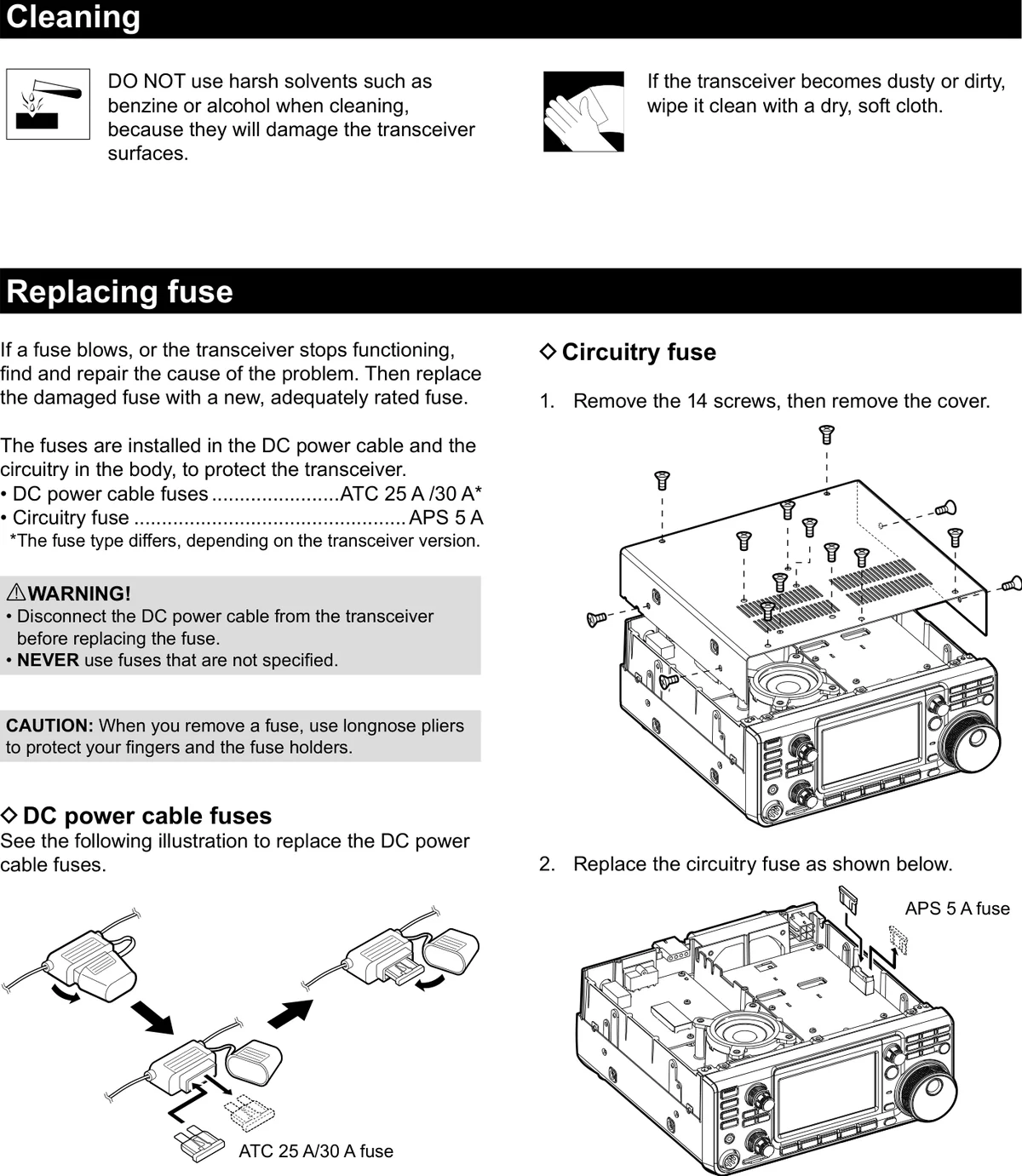
DO NOT use harsh solvents such as benzine or alcohol 清洁时请勿使用汽油、酒精等强溶剂,否则会损坏收发信 when cleaning, because they will damage the transceiver 机的表面。 surfaces.
If the transceiver becomes dusty or dirty, wipe it clean with 如果收发信机积尘或变脏,请用干燥、柔软的布擦拭干 a dry, soft cloth. 净。
图 14-1 清洁注意事项、更换保险丝与保险丝位置示意图 Cleaning precautions, fuse replacement and fuse locations
14-2 Replacing fuse · 更换保险丝
If a fuse blows, or the transceiver stops functioning, find 如果保险丝熔断或收发信机停止工作,请找出并排除故障 and repair the cause of the problem. Then replace the 原因,然后换上一只新的、额定值合适的保险丝。 damaged fuse with a new, adequately rated fuse.
The fuses are installed in the DC power cable and the 为保护收发信机,保险丝分别安装在直流电源线上和机内 circuitry in the body, to protect the transceiver. 电路中。
表 14-1 保险丝规格 Fuse ratings
位置 保险丝规格 Location Fuse rating
直流电源线保险丝 ATC 25 A / 30 A* DC power cable fuses
内部电路保险丝 APS 5 A Circuitry fuse
说明 NOTE NOTE
* 保险丝的型号因收发信机版本而异。 * The fuse type differs, depending on the transceiver version.
警告 WARNING WARNING • 更换保险丝之前,必须先从收发信机上断开直流电源线。 • 切勿使用未指定规格的保险丝。 • Disconnect the DC power cable from the transceiver before replacing the fuse. • NEVER use fuses that are not specified.
注意 CAUTION CAUTION 取下保险丝时,请使用长嘴钳,以保护您的手指和保险丝座。 When you remove a fuse, use longnose pliers to protect your fingers and the fuse holders.
直流电源线保险丝 DC power cable fuses
See the following illustration to replace the DC power 更换直流电源线保险丝的方法请参见下图。 cable fuses.
内部电路保险丝 Circuitry fuse
1. 1 Remove the 14 screws, then remove the cover. 1. 1 取下 14 颗螺钉,然后拆下盖板。 2. 2 Replace the circuitry fuse as shown below. 2. 2 按下图更换内部电路保险丝。 3. 3 Replace the cover and the screws. 3. 3 装回盖板并拧紧螺钉。
14-3 Touch screen calibration function · 触摸屏校准功能
When no screen action occurs, or a different function is 如果触摸屏幕没有任何反应,或者触摸后启动的功能与预 activated after touching the screen, the touched point and 期不同,说明触摸点与检测点可能存在偏差。 the detected point may be different.
In that case, the Touch screen calibration function helps to 此时可使用触摸屏校准功能(Touch screen calibration) correct the touch screen sensing accuracy. 来修正触摸屏的感应精度。
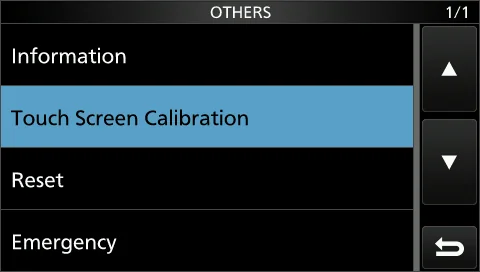
图 14-2 OTHERS 屏幕上的 "Touch Screen Calibration" 项目 "Touch Screen Calibration" item on the OTHERS screen
1. 1 Open the OTHERS screen. 1. 1 打开 OTHERS 屏幕。 MENU » SET > Others MENU » SET > Others 2. 2 Touch "Touch Screen Calibration." 2. 2 触摸 "Touch Screen Calibration"。 • A dot appears on the screen. • 屏幕上会出现一个圆点。 3. 3 Touch the dot that appears on the screen. 3. 3 触摸屏幕上出现的圆点。 • A new dot appears in another position. • 另一个位置会出现新的圆点。 4. 4 Repeat step 3. 4. 4 重复步骤 3。
说明 NOTE NOTE
校准完成后,收发信机会返回 OTHERS 屏幕。 When the calibration is complete, the transceiver returns to the OTHERS screen.
提示 TIP TIP 当触摸屏不准确、以致无法进入 OTHERS 屏幕时,请按下列步骤修正触摸屏的感应精度。 When the touch screen is not accurate, and you cannot access the OTHERS screen, do the following steps to correct the touch screen sensing accuracy.
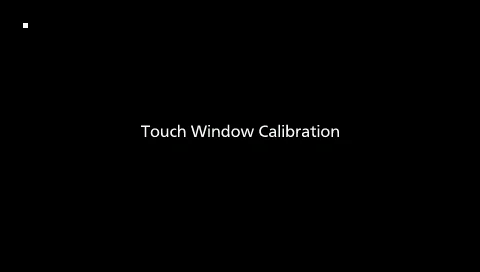
1. 1 Turn OFF the transceiver. 1. 1 关闭收发信机。 2. 2 While holding down MENU and EXIT , push 2. 2 按住 MENU 和 EXIT 的同时按 POWER ,显示 POWER to display the "Touch Window Calibration" "Touch Window Calibration" 屏 幕 , 然 后 松 开 screen, and then release MENU and EXIT . MENU 和 EXIT 。 3. 3 Touch the dot that appears on the screen. 3. 3 触摸屏幕上出现的圆点。 • A new dot appears in another position. • 另一个位置会出现新的圆点。 4. 4 Repeat step 3. 4. 4 重复步骤 3。 • When the calibration is complete, the transceiver • 校准完成后,收发信机会自动重新启动。 automatically restarts. 5. 5 Touch the frequency readout or a key on the touch 5. 5 触摸频率显示或触摸屏上的某个按键,确认触摸屏
screen to confirm that the touch screen is working 工作正常。 correctly.
图 14-3 "Touch Window Calibration" 校准屏幕 "Touch Window Calibration" screen
火腿经验 HAM TIP HAM TIP 触摸屏漂移(点 A 却触发 B)就做校准:MENU » SET > Function > Touch Screen Calibration,用指尖或触控笔慢慢点准 十字中心,别急着重按。本书所用版本的原厂手册把该项目列在 MENU » SET > Others 下,不同固件版本的菜单归属可能不 同,以本机实际显示为准。 If the touch screen drifts (you touch A but B is activated), run the calibration at MENU » SET > Function > Touch Screen Calibration, and touch the centre of the cross slowly with a fingertip or a stylus instead of tapping hurriedly. The manual for the version used in this book lists the item under MENU » SET > Others; the menu location may differ between firmware versions, so follow what your own radio actually shows.
14-4 Resetting · 复位
Occasionally, erroneous information may be displayed. This 收发信机偶尔会显示错误信息,原因可能是静电或其他因 may be caused by static electricity or by other factors. 素。
If this problem occurs, turn OFF the transceiver. After 遇到这种情况时,请关闭收发信机,等待几秒后再开机。 waiting a few seconds, turn ON the transceiver. If the 如果问题仍然存在,请执行右侧所述的 Partial reset(部 problem still exists, perform a Partial reset as described to 分复位)。 the right.
If the problem still exists after a Partial reset, perform an All 如果执行 Partial reset 后问题仍然存在,请执行右侧所述 reset as described to the right. 的 All reset(全部复位)。
提示 NOTE NOTE All reset 会清除全部数据,并把各项设置恢复为出厂默认值。在执行 All reset 之前,请把存储通道内容、设置状态等保存到 SD 卡上。(见 8-4 节) An All reset clears all data and returns all settings to their factory defaults. Save memory channel content, setting status, and so on, onto an SD card before the All reset. (p. 8-4)
执行部分复位之后 After performing the partial reset
A Partial reset resets operating settings to their default Partial reset 会把操作设置恢复到默认值(VFO 频率、 values (VFO frequency, VFO settings, menu contents) VFO 设置、菜单内容),但不会清除以下项目: without clearing the items listed below:
• Memory channel contents (Section 9) • 存储通道内容(第 9 章) • MY Call (p. 13-5) • MY Call(本机呼号)(见 13-5 节) • Memory Keyer (p. 4-19) • Memory Keyer(存储电键)(见 4-19 节) • RTTY memory (p. 4-24) • RTTY memory(RTTY 存储)(见 4-24 节)
• User Band Edge (p. 3-7) • User Band Edge(用户波段边缘)(见 3-7 节) • REF Adjust (p. 13-4) • REF Adjust(基准调整)(见 13-4 节) • Fixed Edges (p. 5-7) • Fixed Edges(固定边界)(见 5-7 节) • PRESET memory content (p. 13-6) • PRESET memory content ( PRESET 存 储 内 容 ) ( 见 13-6 节)
执行全部复位之后 After performing the All reset
All reset clears all data and returns all settings to their All reset 会清除全部数据,并把各项设置恢复为出厂默认 factory defaults. 值。
Memory channel contents, filter setting and so on will all 存储通道内容、滤波器设置等都会被清除,因此除非您已 be cleared, so you will need to rewrite your operating 有备份,否则必须重新输入各项操作设置。 settings, unless you have a backup.
无法进入 SET 模式时 When you cannot enter the Set mode
If a touch screen operation error or an unexpected 如果触摸屏出现操作错误或发生意外操作,导致无法进入 operation occurs, you cannot enter the Set mode. In that SET 模式,此时请按下述方法执行 All reset: case, perform the All reset as described below:
1. 1 Turn OFF the transceiver. 1. 1 关闭收发信机。 2. 2 While holding down CLEAR and V/M , push 2. 2 按住 CLEAR 和 V/M 的同时按 POWER 。 POWER .
部分复位 Partial reset
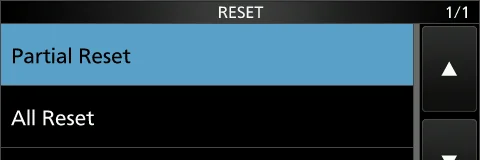
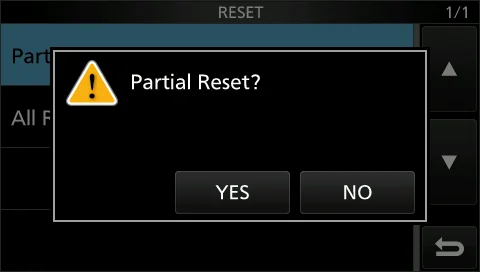
1. 1 Open the RESET screen. 1. 1 打开 RESET 屏幕。 MENU » SET > Others > Reset MENU » SET > Others > Reset 2. 2 Touch "Partial reset." 2. 2 触摸 "Partial reset"。 • The confirmation screen is displayed. • 显示确认屏幕。 3. 3 Touch [Yes]. 3. 3 触摸 [Yes]。
说明 NOTE NOTE
复位完成后,将显示默认的 VFO 模式屏幕。 After the resetting, the default VFO mode screen is displayed.
图 14-4 RESET 屏幕(选中 "Partial Reset") RESET screen ("Partial Reset" is selected)
图 14-5 "Partial Reset?" 确认对话框 "Partial Reset?" confirmation dialog
全部复位 All reset
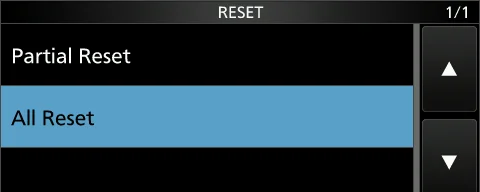
1. 1 Open the RESET screen. 1. 1 打开 RESET 屏幕。 MENU » SET > Others > Reset MENU » SET > Others > Reset 2. 2 Touch "All reset." 2. 2 触摸 "All reset"。 • The confirmation screen is displayed. • 显示确认屏幕。 3. 3 Touch [NEXT]. 3. 3 触摸 [NEXT]。 4. 4 After carefully reading the displayed message, 4. 4 仔 细 阅 读 显 示 的 信 息 后 , 触 摸 [YES] 执 行 All touch [YES] to perform the All reset. reset。
说明 NOTE NOTE
复位完成后,将显示默认的 VFO 模式屏幕。 After the resetting, the default VFO mode screen is displayed.
提示 TIP TIP 如果连接外部电源时收发信机会自动开机、因而无法执行 All reset,请在按住 CLEAR 和 V/M 的同时重新连接外部电源。
If the transceiver is automatically turned ON and cannot perform All reset when connected to an external power supply, reconnect the transceiver to the external power supply while holding down CLEAR and V/M .
图 14-6 RESET 屏幕(选中 "All Reset") RESET screen ("All Reset" is selected)
警告 WARNING WARNING All reset 会清除全部数据,并把包括 VFO 频率、存储器内容、滤波器设置在内的所有设置恢复为出厂默认值,且无法撤销。 执行之前请务必把设置数据保存到 SD 卡(见 8-4 节);如果没有备份,存储通道、MY Call、Memory Keyer、RTTY memory、User Band Edge、PRESET memory 等内容都必须重新输入。另请把两种复位分清:日常小故障先做 Partial reset,只有在 Partial reset 仍无效时才做 All reset。 An All reset clears all data and returns every setting, including VFO frequencies, memory contents and filter settings, to the factory defaults, and this cannot be undone. Always save your setting data onto an SD card before performing it (see p. 8-4). Without a backup you will have to re-enter your memory channels, MY Call, Memory Keyer, RTTY memory, User Band Edge and PRESET memory. Also do not confuse the two resets: for an ordinary minor fault perform a Partial reset first, and use the All reset only when the Partial reset does not help.
火腿经验 HAM TIP HAM TIP All reset 前先做「设置备份三件套」:SD 卡存设置数据、屏幕截图存证、笔记本记下 CI-V 地址(默认 94 / E0)。需要恢复 时把 SD 卡插回机器,按 MENU » SET > Others > Load Setting Data 载入即可,比一个一个重输省事得多。 Before an All reset, make the "three-part settings backup": save the setting data to an SD card, keep screenshots as evidence, and note the CI-V address (default 94 / E0) in a notebook. To restore, insert the SD card and load it with MENU » SET > Others > Load Setting Data instead of typing everything in again.
14-5 Troubleshooting · 故障排查
The following chart is designed to help you correct 下面的排查表用于帮助您排除并非设备故障所引起的各种 problems which are not equipment malfunctions. 问题。
If you are unable to locate the cause of a problem, or solve 如果您无法找出问题原因,或无法通过本表解决,请联系 it through the use of this chart, contact your nearest Icom 您附近的 Icom 经销商或维修服务中心。 Dealer or Service Center.
表 14-2 故障排查表(14-5 页) Troubleshooting chart (p. 14-5)
现象 可能原因 处理方法 参考 PROBLEM POSSIBLE CAUSE SOLUTION REF.
按下 POWER 电源打不开。 电源线连接不正确。 重新正确连接直流电源线。 p. 2- Power does not come on Power cable is improperly Reconnect the DC power cable correctly. 4 when POWER is pushed. connected.
外部电源处于关机状态。 开启外部电源。 p. 2- The external power supply is turned Turn ON the external power supply. 4 OFF.
直流电源线保险丝或内部电路保险丝 找出并排除故障原因,然后换上一只新的保险丝。 p. 已熔断。 Find and repair the cause of the problem and then 14-2 The DC power cable fuses or replace the damaged fuse with a new one. circuitry fuse are blown.
扬声器中听不到声音。 音量过低。 将 AF RF/SQL(内环)顺时针旋转,获得合适的收听 p. 3- No sound is heard from the Audio level is too low. 音量。 2 speaker. Rotate AF RF/SQL (inner) clockwise to obtain a suitable listening level.
静噪已关闭(处于静噪状态)。 将 AF RF/SQL(外环)旋转到 12 点位置,解除静 p. 3- The squelch is closed. 噪。 10 Rotate AF RF/SQL (outer) to the 12 o'clock position to open the squelch.
FM 模 式 下 Tone squelch 处 于 关闭 Tone squelch。 p. 4- ON。 Turn OFF the Tone squelch. 30 The tone squelch is ON in the FM mode.
外接扬声器或耳机已连接到 拔下耳机或外接扬声器。 p. 2- [PHONES] 插孔。 Disconnect the head-phone or external speaker. 2 An external speaker or headphones are connected to [PHONES] jack.
外接扬声器线缆断线。 检查并修复外接扬声器线缆。 – The external speaker cable is cut. Check the external speaker cable and repair it.
灵敏度低,只能收到较强的信 衰减器已启用。 在 FUNCTION 屏幕上关闭衰减器。 p. 4- 号。 The attenuator is activated. Turn OFF the attenuator in the FUNCTION screen. 3 Sensitivity is too low, and only strong signals can be heard. 静噪已关闭(处于静噪状态)。 将 AF RF/SQL(外环)旋转到 12 点位置,解除静 p. 3- The squelch is closed. 噪。 10 Rotate AF RF/SQL (outer) to 12 o'clock position to open the squelch.
天线损坏,或同轴电缆接头短路、断 排除故障后重新连接到天线接口。 p. 2- 线。 Repair the problem and then reconnect to the 3 The antenna is defective or the antenna connector. coaxial cable connector is shorted or cut.
所用天线不适合当前选定的波段。 连接适合工作频率的天线。 p. 2- 长按 TUNER 调谐天线。 Connect an antenna suitable for the operating 3 You are using an antenna not frequency. p. suitable for the band you have 11-2 selected.
现象 可能原因 处理方法 参考 PROBLEM POSSIBLE CAUSE SOLUTION REF.
Hold down TUNER to tune the antenna.
没有输出功率,或输出功率过 工作频率不在业余频段内。 把频率设置到业余频段内。 p. 3- 小。 The operating frequency is outside a Set the frequency to a ham band. 4 No power output or the ham band. output power is too low. 调制输入信号电平设置过低。 在多功能菜单中调整话筒增益。 p. 3- The modulation input signal level is Adjust the microphone gain in the Multi-function 11 set too low. menu.
话筒损坏,或 [MIC] 插孔短路。 试着在 FM、CW 或 RTTY 模式发射,检查问题出在 p. 3- The microphone is bad, or the [MIC] 话筒还是收发信机。 3 connector is shorted. Try to transmit in the FM, CW, or RTTY mode to check whether the microphone or the transceiver has a problem.
天线驻波比大于 3:1。 调整天线,使驻波比小于 3:1。 p. The antenna SWR is more than 3:1. Adjust the antenna for an SWR of less than 3:1. 11-2
天线未正确调谐。 长按 TUNER 1 秒调谐天线。 p. The antenna is not properly tuned. Hold down TUNER for 1 second to tune the 11-2 antenna.
发射功率(TX power)设置过低。 在多功能菜单中调整 RF POWER。 p. 3- TX power is set too low. Adjust the RF POWER in the Multi-function menu. 11
表 14-3 故障排查表(14-6 页,续) Troubleshooting chart (p. 14-6, continued)
现象 可能原因 处理方法 参考 PROBLEM POSSIBLE CAUSE SOLUTION REF.
接收过程中收发信机自动转为发 VOX 功能处于 ON。 按 VOX/BK-IN 关闭 VOX 功能。 p. 射。 The VOX function is ON. Push VOX/BK-IN to turn OFF the VOX function. 4- The transceiver automatically 10 switches to transmit while receiving. VOX 增益设置过高。 调整 VOX 增益。 p. The VOX gain is set too high. Adjust the VOX gain. 4- 10
收发看似正常,却无法与对方电台 Split 功 能 已 启 用 ( 收 发 频 率 不 按 SPLIT 关闭该功能。 p. 联络。 同)。 Push SPLIT to turn OFF the function. 4- Cannot contact with another The Split function is activated. 13 station even if receiving and (The transmit and receive transmitting seem successful. frequencies are different.)
RIT 功能或 ∂TX 功能处于 ON,且 按 RIT 或 ∂TX 关闭相应功能。 p. 接收频率或发射频率被设置成不同 Push RIT or ∂TX to turn OFF the function. 4-3 值。 p. The RIT function or the ∂TX 4- function is ON and a different 11 receive or transmit frequency is set.
SSB 模式下接收到的音频不清或 选错了边带。 在 USB 与 LSB 之间切换。 p. 失真。 The incorrect sideband is selected. Toggle between USB and LSB. 3-3 Received audio in the SSB mode is unclear or distorted. PBT 功能已启用。 长按 TWIN PBT CLR 清除设置。 p. The PBT function is activated. Hold down TWIN PBT CLR to clear the settings. 4-5
SSB 模 式 下 发 射 信 号 不 清 或 失 收发信机的 MIC 增益过高。 调整 MIC 增益电平,使仪表读数在 ALC 刻度的 p. 真。 The transceiver MIC gain is too 30% 至 50% 之间摆动。 3- Transmit signal is unclear or high. Adjust the MIC gain level so that the meter reading 11 distorted in the SSB mode. swings between 30 and 50% of the ALC scale. 桌面话筒的 MIC 增益过高。 The MIC gain of the desktop microphone is too high.
旋转 MAIN DIAL 时显示频率不 Dial Lock 功能已启用。 长按 SPEECH 关闭 Dial Lock 功能。 p. 变化。 The Dial Lock function is activated. Hold down SPEECH to turn the Dial Lock 3- The displayed frequency does not function OFF. 10 properly change by rotating MAIN DIAL .
编程扫描不启动。 扫描边缘存储通道 P1 与 P2 中设 在扫描边缘存储通道 P1 与 P2 中设置不同的频率。 p. Programmed scan does not start. 置了相同频率。 Set different frequencies in scan edge memory 10- The same frequencies have been channels P1 and P2. 3 set in scan edge memory channels P1 and P2.
存储扫描不启动。 只设置了 0 个或 1 个存储通道。 至少设置 2 个存储通道。 p. Memory scan does not start. 0 or only 1 memory channel is set. Set at least 2 memory channels. 9-3
选择存储扫描不启动。 只有 0 个或 1 个存储通道被指定 至少指定 2 个存储通道作为扫描用的选择存储通 – Select memory scan does not 为选择存储通道。 道。 start.
现象 可能原因 处理方法 参考 PROBLEM POSSIBLE CAUSE SOLUTION REF.
0 or only 1 memory channel is Designate at least 2 memory channels as Select designated as a Select channel. channels for the scan.
所选存储通道的内容没有改变。 所选存储通道的内容已更改,但未 需要保存更改后的设置时,在 VFO/MEMORY 屏幕 p. The contents of a selected 被保存。 上长按 [MW] 1 秒,将其写入该存储通道。 9-3 memory channel is not changed. The contents of the selected When you want to save the changed settings, memory channel were changed, touch [MW] for 1 second to write them into the but they are not saved. memory channel in the VFO/MEMORY screen.
按 SPEECH 后听不到语音。 语音电平过低。 在 Speech 设置中调整语音电平。 p. Cannot hear the speech after The speech level is too low. Adjust the speech level in the Speech setting. 12- pushing SPEECH . 6
天线驻波比过高。 天线未正确调谐。 调整天线驻波比。天线驻波比应小于 3。 p. The antenna SWR is too high. The antenna is not properly tuned. Adjust the antenna SWR. The antenna SWR should 13- be less than 3. 2
同轴电缆不适用。 使用特性阻抗为 50 Ω 的同轴电缆。 p. The coaxial cable is not suitable. Use a coaxial cable whose characteristic impedance 17- is 50 Ω. 2
显示 "OVF"。 接收到的信号过强。 将 AF RF/SQL(外环)逆时针旋转。 p. "OVF" is displayed. Excessively strong signal is Rotate AF RF/SQL (outer) counterclockwise. 3- received. 10
开启衰减器。 p. Turn ON the attenuator. 4-3
触摸屏工作不正常。 触摸点与检测点可能存在偏差。 校准触摸屏。 p. The touch screen is not working The touched point and the Calibrate the touch screen. 14- correctly. detected point may be different. 3