接收与发射Receiving and Transmitting
本章介绍 IC-7300 的接收与发射控制功能。接收部分包括前置放大器与衰减器、RIT 接收增量调谐、AGC 自动增益控制、Twin PBT 通带调谐、IF 滤波器的选择与形状设置、IP+ 功能、噪声消除器(NB)、噪声抑制(NR)与陷波器;发射部分包括 VOX 声控发射、∂TX 发射增量调谐、监听功能、语音压缩器、异频操作与 SPLIT LOCK、发射滤波器宽度,以及 CW 操作的基础设置。
This chapter describes the IC-7300's receiving and transmitting control functions. The receiver section covers the Preamplifiers and Attenuator, RIT, AGC, Twin PBT, IF filter selection and shape, the IP Plus function, the Noise Blanker, Noise Reduction and the Notch filter. The transmitter section covers VOX, ∂TX, the Monitor function, the Speech Compressor, Split frequency operation with SPLIT LOCK, the transmit filter width, and the basic CW operation settings.
4-2便捷的接收与发射功能Convenient for receiving and transmitting
便于接收的功能Convenient for receiving
所有工作模式All operating modes
前置放大器与衰减器(见 4-3 节)
接收微弱信号时,可使用其中一个前置放大器;接收强信号时,可使用衰减器防止失真。
Preamplifiers and Attenuator (p. 4-3)
Use one of the Preamplifiers when receiving weak signals and use the Attenuator to prevent distortion when receiving strong signals.
Automatically attenuates beat tones, tuning signals, and so on.
- In the SSB or AM mode: Use the Auto notch or Manual notch.
- In the CW or RTTY mode: Use the Manual notch.
- In the FM mode: Use the Auto notch.
RX HPF/LPF(接收音频高通/低通滤波器)(见 12-3 节)
以 100 Hz 步进设置接收音频的高通滤波器与低通滤波器截止频率。
MENU » SET > Tone Control/TBW > RX
RX HPF/LPF (p. 12-3)
Sets the receive audio high-pass filter and low-pass filter cutoff frequency in 100 Hz steps.
MENU » SET > Tone Control/TBW > RX
SSB、CW、RTTY 和 AM 模式SSB, CW, RTTY, and AM modes
噪声消除器(见 4-8 节)
噪声消除器(NB)可消除脉冲型噪声。
Noise Blanker (p. 4-8)
The Noise Blanker eliminates pulse-type noise.
噪声抑制(见 4-9 节)
噪声抑制(NR)功能可降低随机噪声成分,并增强淹没在噪声中的所需信号。随机噪声抑制由 DSP(数字信号处理器)完成。
Noise Reduction (p. 4-9)
The Noise Reduction function reduces random noise components and enhances desired signals that are buried in noise. The DSP (Digital Signal Processor) does the random noise reduction.
AGC(见 4-4 节)
AGC(自动增益控制)控制接收机增益,即使接收信号强度大幅变化,也能产生恒定的音频输出电平。
AGC (p. 4-4)
The AGC (Auto Gain Control) controls the receiver gain to produce a constant audio output level, even when the received signal strength greatly varies.
Twin PBT(见 4-5 节)
为抑制干扰,Twin PBT(通带调谐)通过将 IF 频率轻微移至 IF 滤波器通带之外,以电子方式收窄 IF 通带宽度。
Twin PBT (p. 4-5)
To reject interference, the Twin PBT (Passband Tuning) electronically narrows the IF passband width by shifting the IF frequency slightly outside of the IF filter passband.
SSB、AM 和 FM 模式SSB, AM, and FM modes
接收音频音调控制(见 12-3 节)
可调节接收音频的低音与高音。
MENU » SET > Tone Control/TBW > RX
Receive Audio Tone Control (p. 12-3)
You can adjust the received audio bass and treble.
MENU » SET > Tone Control/TBW > RX
SSB-D、CW 和 RTTY 模式SSB-D, CW, and RTTY modes
1/4 调谐功能(见 3-5 节)
旋钮转速降至正常速度的 1/4,以便进行更精细的调谐。
1/4 function (p. 3-5)
The dial speed is reduced to 1/4 of the normal speed, for finer tuning control.
CW 模式CW mode
自动调谐(见 4-16 节)
收发信机在 ±500 Hz 范围内自动调谐到所需信号。
Auto Tuning (p. 4-16)
The transceiver automatically tunes the desired signal within the ±500 Hz range.
便于发射的功能Convenient for transmitting
SSB、AM 和 FM 模式SSB, AM, and FM modes
VOX 声控发射功能(见 4-10 节)
VOX(声控发射)功能通过话音在发射与接收之间切换,实现免手动操作。
VOX function (p. 4-10)
The VOX (Voice-Operated Transmission) function switches between transmitting and receiving with your voice. This function provides hands-free operation.
发射监听(见 4-11 节)
监听(Monitor)功能可监听发射出去的音频。
Transmit Monitor (p. 4-11)
The Monitor function enables you to monitor your transmitted audio.
发射音频音调控制(见 12-3 节)
可调节发射音频的低音与高音。
MENU » SET > Tone Control/TBW > TX
Audio Tone Control (p. 12-3)
You can adjust the transmit audio bass and treble.
MENU » SET > Tone Control/TBW > TX
SSB 模式SSB mode
语音压缩器(见 4-12 节)
语音压缩器可提高平均射频输出功率,从而提升信号强度与话音可懂度。
Speech compressor (p. 4-12)
The speech compressor increases average RF output power, improving signal strength and readability.
发射滤波器宽度(见 4-14 节)
可选择 WIDE(宽)、MID(中)、NAR(窄)三种压缩带宽。
MENU » SET > Tone Control/TBW > TX
Transmitter Filter Width (p. 4-14)
You can select WIDE, MID, and NAR compression bandwidths.
MENU » SET > Tone Control/TBW > TX
CW 模式CW mode
插入(Break-in)功能(见 4-15 节)
使用插入功能,可在拍发电键时自动切换收发信机的发射与接收状态。IC-7300 支持全插入(Full Break-in)与半插入(Semi Break-in)两种模式。
Break-in function (p. 4-15)
You can use the Break-in function to automatically switch the transceiver between transmit and receive when keying. The IC-7300 is capable of Full Break-in and Semi Break-in mode.
4-3前置放大器、衰减器与 RIT 功能Preamplifiers, Attenuator and RIT function
前置放大器Preamplifiers
前置放大器放大接收机前端的接收信号,以改善信噪比与灵敏度。接收微弱信号时应使用前置放大器。
The preamps amplify received signals in the receiver front end to improve the signal-to-noise ratio and sensitivity. A preamp is used when receiving weak signals.
提示 TIPTIP
每个波段均会记忆前置放大器的设置。
Each band memorizes the Preamplifier setting.
1按 P.AMP/ATT 键(P.AMP)。
1Push P.AMP/ATT (P.AMP).
2每按一次,在 "P.AMP1"、"P.AMP2" 与 OFF(无图标)之间切换。
2Each push changes between "P.AMP1," "P.AMP2," and OFF (no icon).
前置放大器开启时显示。(示例:P.AMP1)
Displayed when the preamp is ON. (Example: P.AMP1)
P.AMP1
宽动态范围前置放大器,对 HF 低波段最为有效。
P.AMP1
Wide dynamic range preamplifier. It is most effective for the HF low bands.
P.AMP2
高增益前置放大器,对 50 MHz 波段最为有效。
P.AMP2
High-gain preamplifier. It is most effective for the 50 MHz bands.
提示 TIPTIP
注意:接收强信号时使用前置放大器可能会使信号失真。此时请关闭前置放大器。
NOTE: When you use the preamp while receiving strong signals, the signal may be distorted. In such a case, turn OFF the preamp.
衰减器Attenuator
当所需信号频率附近存在极强的信号,或您所在位置附近有广播电台等极强的电场时,衰减器可防止所需信号失真。
The Attenuator prevents a desired signal from becoming distorted when a very strong signal is near the frequency, or when a very strong electric field, such as from a broadcasting station, is near your location.
提示 TIPTIP
每个波段均会记忆衰减器的设置。
Each band memorizes the Attenuator setting.
1按住 P.AMP/ATT 键(ATT)1 秒,开启衰减器。
1Hold down P.AMP/ATT (ATT) for 1 second to turn ON the Attenuator.
2按 P.AMP/ATT 键可关闭衰减器(无图标)。
2Pushing P.AMP/ATT turns OFF the Attenuator (no icon).
衰减器开启时显示
Displayed when the Attenuator is ON
RIT 功能RIT function
RIT(接收增量调谐)功能可补偿其他台站的频率偏差。该功能可在不改变发射频率的前提下,将接收频率最多移位 ±9.99。
The RIT (Receive Increment Tuning) function compensates for differences in frequencies of other stations. The function shifts the receive frequency up to ±9.99 without shifting the transmit frequency.
说明 NOTENOTE
译注:原厂手册此句未标注单位。参照本章 ∂TX 的 "±9.99 kHz" 表述及屏幕 RIT 显示值(如 0.00、0.20),该移位量以 kHz 计。
Translator's note: the original manual does not state the unit in this sentence. Based on the ∂TX entry in this chapter ("±9.99 kHz") and the on-screen RIT values (e.g. 0.00, 0.20), the shift amount is in kHz.
1按 RIT 键。
• RIT 功能开启。
• 使用细调(Fine Tuning)功能时(见 3-4 节),RIT 频率以 4 位数显示,而非 3 位数。
• 再次按 RIT 键可关闭 RIT 功能。
1Push RIT.
• The RIT function turns ON.
• While using the Fine Tuning function (p. 3-4), the RIT frequency is displayed in 4 digits, instead of 3.
• Pushing RIT again turns OFF the RIT function.
2设置 RIT 频率,使其与接收台站的频率一致。
• 按住 CLEAR 键 1 秒,可将 RIT 频率复位为 "0.00"。
• 按住 RIT 键 1 秒,可将频率移位量叠加到工作频率上。
2Set the RIT frequency to match the receiving station's frequency.
• You can reset the RIT frequency to "0.00" by holding down CLEAR for 1 second.
• You can add the frequency shift to the operating frequency by holding down RIT for 1 second.
3通话结束后,按 RIT 键关闭 RIT 功能。
3After communicating, push RIT to turn the RIT function OFF.
RIT 频率(3 位数)
RIT frequency (3 digits)
设置 RIT 频率。
旋转
Set RIT frequency.
Rotate
RIT 监听功能RIT monitor function
RIT 功能开启时,按住 XFC 键即可直接监听工作频率。
When the RIT function is ON, you can directly monitor the operating frequency by holding down XFC.
提示 TIPTIP
监听期间,RIT 功能暂时关闭;噪声抑制、陷波器与 Twin PBT 的设置也暂时失效。
While monitoring, the RIT function is temporarily OFF. While monitoring, the settings for the Noise Reduction, Notch filter and Twin PBT are temporarily OFF.
按住 XFC 键期间。
While holding down XFC.
4-4AGC 功能控制AGC function control
AGC(自动增益控制)控制接收机增益,即使接收信号强度大幅变化,也能产生恒定的音频输出电平。
The AGC (Automatic Gain Control) controls receiver gain to produce a constant audio output level, even when the received signal strength varies greatly.
选择 AGC 时间常数预设值Selecting the AGC time constant preset value
除 FM 模式外,本收发信机为所有模式预设了 3 套 AGC 设置,时间常数分别为 FAST(快)、MID(中)和 SLOW(慢)。
The transceiver has 3 preset AGC settings for all modes except the FM mode. The time constants are FAST, MID and SLOW.
1选择工作模式(示例:SSB)。
1Select the operating mode. (Example: SSB)
2按 FUNCTION 键。
• 打开 FUNCTION 屏幕。
2Push FUNCTION.
• Opens the FUNCTION screen.
3触摸 [AGC],选择所需的 FAST、MID 或 SLOW 时间常数。
• FM 模式固定为 FAST 时间常数。
3Touch [AGC] to select the desired FAST, MID, or SLOW time constant.
• For the FM mode, the FAST time constant is fixed.
4按 EXIT 键关闭 FUNCTION 屏幕。
4To close the FUNCTION screen, push EXIT.
FUNCTION 屏幕(SSB 模式)
FUNCTION screen (SSB mode)
设置 AGC 时间常数Setting the AGC time constant
可将预设的 AGC 时间常数设置为所需的值。
You can set the preset AGC time constant to a desired value.
1选择工作模式(示例:SSB)。
1Select the operating mode. (Example: SSB)
2按 FUNCTION 键。
• 打开 FUNCTION 屏幕。
2Push FUNCTION.
• Opens the FUNCTION screen.
3触摸 [AGC] 保持 1 秒。
• 打开 AGC (SSB) 屏幕。
3Touch [AGC] for 1 second.
• Opens the AGC (SSB) screen.
4触摸 FAST、MID 或 SLOW 中的任意一个,选择所需的 AGC 时间常数(示例:MID)。
4Touch either FAST, MID, or SLOW to select the desired AGC time constant. (Example: MID)
5旋转 MAIN DIAL 设置时间常数。
• 可调的时间常数如下表所示。
5Rotate MAIN DIAL to set the time constant.
• The adjustable time constants are described in the table below.
6按 EXIT 键关闭 AGC (SSB) 屏幕。
6To close the AGC (SSB) screen, push EXIT.
FUNCTION 屏幕(SSB 模式)
FUNCTION screen (SSB mode)
AGC (SSB) 屏幕(SSB 模式)
AGC (SSB) screen (SSB mode)
| 模式Mode | 默认值Default | 可调时间常数Adjustable time constant |
|---|---|---|
| SSB | 0.3 (FAST) 2.0 (MID) 6.0 (SLOW) | OFF, 0.1, 0.2, 0.3, 0.5, 0.8, 1.2, 1.6, 2.0, 2.5, 3.0, 4.0, 5.0 or 6.0 |
| CW/RTTY | 0.1 (FAST) 0.5 (MID) 1.2 (SLOW) | OFF, 0.1, 0.2, 0.3, 0.5, 0.8, 1.2, 1.6, 2.0, 2.5, 3.0, 4.0, 5.0 or 6.0 |
| AM | 3.0 (FAST) 5.0 (MID) 7.0 (SLOW) | OFF, 0.3, 0.5, 0.8, 1.2, 1.6, 2.0, 2.5, 3.0, 4.0, 5.0, 6.0, 7.0 or 8.0 |
| FM | 0.1 (FAST) | Fixed |
触摸该键 1 秒,即可恢复默认设置。
You can reset to the default setting by touching this key for 1 second.
提示 TIPTIP
注意:接收微弱信号时若瞬间收到一个强信号,AGC 功能会迅速降低接收机增益;当该强信号消失后,由于 AGC 的作用,收发信机可能无法重新收到那个微弱信号。此时请选择 FAST,或触摸 [AGC] 1 秒打开 AGC 屏幕,再将时间常数设置为 OFF。
NOTE: When you are receiving weak signals, and a strong signal is momentarily received, the AGC function quickly reduces the receiver gain. When that signal disappears, the transceiver may not receive the weak signal because of the AGC action. In that case, select FAST, or touch [AGC] for 1 second to open the AGC screen, and then select OFF the time constant setting.
4-5使用 Twin PBTUsing the Twin PBT
SSB、CW、RTTY 和 AM 模式
SSB, CW, RTTY and AM modes
一般而言,Twin PBT(通带调谐)通过将 IF 频率轻微移至 IF 滤波器通带之外,以电子方式收窄 IF 通带宽度,从而抑制干扰。IC-7300 的 PBT 功能使用 DSP 实现。
In general, the Twin PBT (Passband Tuning) electronically narrows the IF passband width by shifting the IF frequency to slightly outside of the IF filter passband, to reject interference. The IC-7300 uses DSP for the PBT function.
将 TWIN PBT CLR 的内环(PBT1)与外环(PBT2)朝彼此相反的方向旋转,即可收窄 IF 通带宽度。
You can narrow the IF passband width by rotating both TWIN PBT CLR inner (PBT1) and outer (PBT2) to the opposite direction from each other.
提示 TIPTIP
可借助频谱显示(Spectrum Scope,第 5 章)查看附近的信号。
You can see the nearby signal using the Spectrum Scope (Section 5).
1将 TWIN PBT CLR 的内环(PBT1)与外环(PBT2)朝彼此相反的方向旋转。
1Rotate TWIN PBT CLR inner (PBT1) and outer (PBT2) to the opposite direction from each other.
2触摸滤波器图标 1 秒,显示当前的通带宽度与移位频率。
• 打开 FILTER 屏幕。
2Touch the Filter icon for 1 second to display the current passband width and shift frequency.
• Opens the FILTER screen.
3按 EXIT 键关闭 FILTER 屏幕。
3To close the FILTER screen, push EXIT.
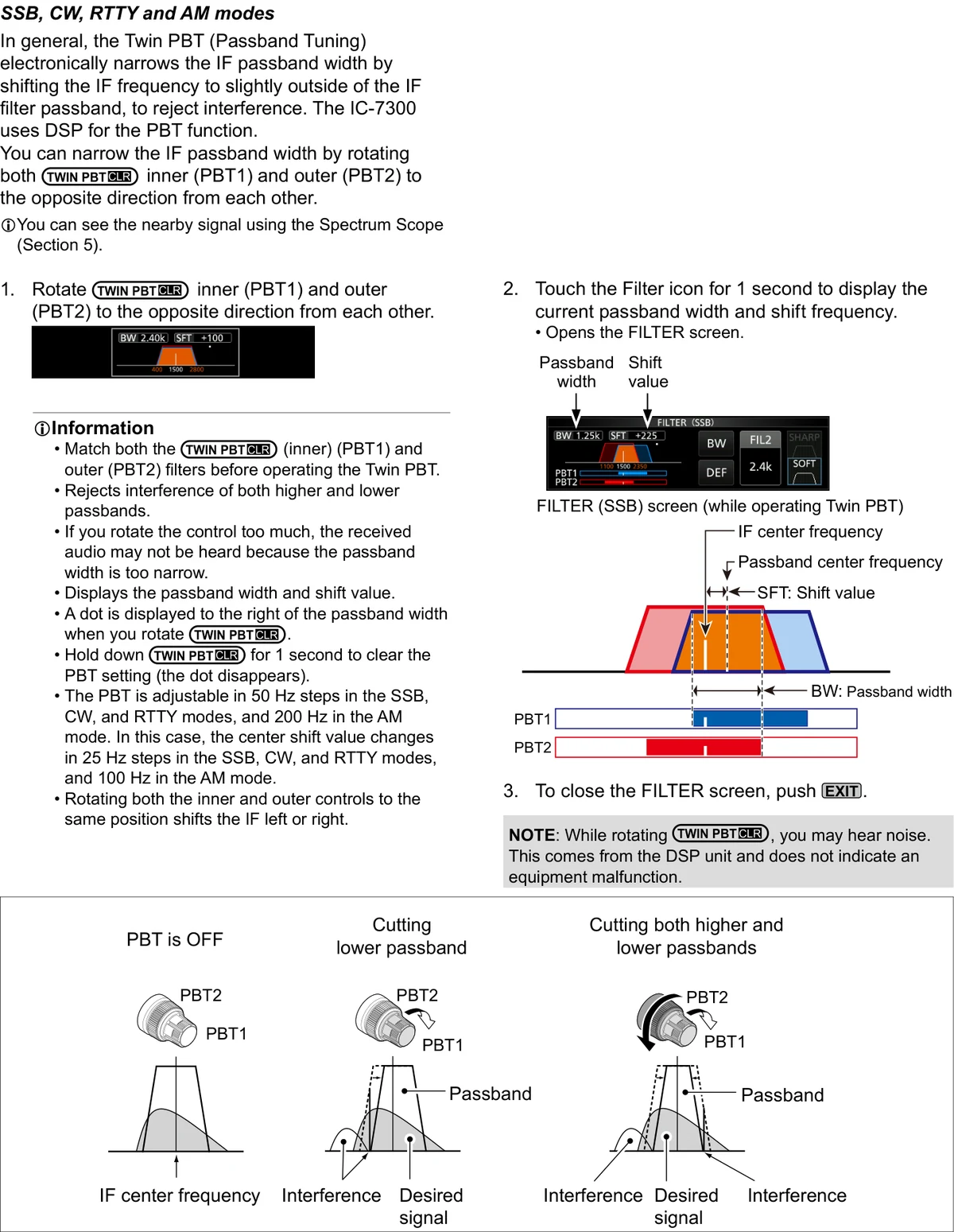
通带宽度
Passband width
移位值
Shift value
操作 Twin PBT 时的 FILTER (SSB) 屏幕
FILTER (SSB) screen (while operating Twin PBT)
提示 TIPTIP
注意:旋转 TWIN PBT CLR 时可能会听到噪声,这是 DSP 单元产生的,并非设备故障。
NOTE: While rotating TWIN PBT CLR, you may hear noise. This comes from the DSP unit and does not indicate an equipment malfunction.
补充信息Information
说明 INFORMATIONINFORMATION
操作 Twin PBT 之前,请先使 TWIN PBT CLR 内环(PBT1)与外环(PBT2)的滤波器相匹配。Twin PBT 可同时抑制通带高端与低端的干扰。若控件旋转过度,会因通带宽度过窄而听不到接收音频。
Match both the TWIN PBT CLR (inner) (PBT1) and outer (PBT2) filters before operating the Twin PBT. Rejects interference of both higher and lower passbands. If you rotate the control too much, the received audio may not be heard because the passband width is too narrow.
说明 INFORMATIONINFORMATION
屏幕显示通带宽度与移位值。旋转 TWIN PBT CLR 时,通带宽度右侧会显示一个圆点。按住 TWIN PBT CLR 1 秒可清除 PBT 设置(圆点随之消失)。
Displays the passband width and shift value. A dot is displayed to the right of the passband width when you rotate TWIN PBT CLR. Hold down TWIN PBT CLR for 1 second to clear the PBT setting (the dot disappears).
说明 INFORMATIONINFORMATION
SSB、CW 和 RTTY 模式下,PBT 以 50 Hz 步进调整,AM 模式为 200 Hz;此时中心移位值在 SSB、CW 和 RTTY 模式下以 25 Hz 步进变化,AM 模式为 100 Hz。将内外环旋至同一位置,可使 IF 向左或向右移动。
The PBT is adjustable in 50 Hz steps in the SSB, CW, and RTTY modes, and 200 Hz in the AM mode. In this case, the center shift value changes in 25 Hz steps in the SSB, CW, and RTTY modes, and 100 Hz in the AM mode. Rotating both the inner and outer controls to the same position shifts the IF left or right.
4-6选择 IF 滤波器Selecting the IF filter
本收发信机为每种模式提供 3 种 IF(中频)滤波器通带宽度,可在 FILTER 屏幕上选择。可将 IF 滤波器设置为宽(FIL 1)、中(FIL 2)或窄(FIL 3)。
The transceiver has 3 IF filter passband widths for each mode, and you can select them on the FILTER screen. You can set the IF filter to wide (FIL 1), mid (FIL 2), or narrow (FIL 3).
1选择工作模式(示例:USB)。
1Select the operating mode. (Example: USB)
2触摸滤波器图标 1 秒。
• 打开 FILTER (SSB) 屏幕。
2Touch the filter icon for 1 second.
• Opens the FILTER (SSB) screen.
3多次触摸滤波器图标,选择 FIL 1(宽)、FIL 2(中)或 FIL 3(窄)。
3Touch the filter icon more times to select FIL 1 (wide), FIL 2 (mid) or FIL 3 (narrow).
4触摸 [BW]。
• 选择通带宽度模式。
• 更改通带宽度时,Twin PBT 的设置值将复位到中心位置。
4Touch [BW].
• Selects the passband width mode.
• When you change the passband width, the Twin PBT setting value is reset to the center position.
5旋转 MAIN DIAL 调整通带宽度。
• FM 或 FM-D 模式下无法更改通带宽度。
5Rotate MAIN DIAL to adjust the passband width.
• You cannot change the passband width in the FM or FM-D mode.
6触摸 [BW]。
• 取消通带宽度模式。
6Touch [BW].
• Cancels the passband width mode.
7对 FM 和 FM-D 以外的其他模式,重复步骤 2 ~ 6 设置通带宽度。
7Repeat steps 2 to 6 to set the passband width for other modes except for the FM and FM-D.
8按 EXIT 键关闭 FILTER 屏幕。
8To close the FILTER screen, push EXIT.
选择 FIL 2 时的 FILTER (SSB) 屏幕
FILTER (SSB) screen (when FIL 2 is selected)
通带宽度模式
Passband width mode
触摸 [DEF] 1 秒可恢复默认值。
Touch [DEF] for 1 second to reset to default.
SSB 或 CW 模式下选择小于 500 Hz 的带宽时显示。
Displayed when a band width less than 500 Hz is selected in the SSB or CW mode.
提示 TIPTIP
提示:在 FM 模式下将 IF 滤波器设为 FIL2 或 FIL3 时,收发信机将以 FM 窄带模式发射。
TIP: When you set the IF filter to FIL2 or FIL3 in the FM mode, the transceiver will transmit in the FM narrow mode.
| 模式Mode | IF 滤波器IF filter | 可选范围(步进)Selectable range (steps) |
|---|---|---|
| SSB | FIL 1 (3.0 kHz) FIL 2 (2.4 kHz) FIL 3 (1.8 kHz) | 50 Hz to 500 Hz (50 Hz) 600 Hz to 3.6 kHz (100 Hz) |
| SSB-D | FIL 1 (3.0 kHz) FIL 2 (1.2 kHz) FIL 3 (500 Hz) | 50 Hz to 500 Hz (50 Hz) 600 Hz to 3.6 kHz (100 Hz) |
| CW | FIL 1 (1.2 kHz) FIL 2 (500 Hz) FIL 3 (250 Hz) | 50 Hz to 500 Hz (50 Hz) 600 Hz to 3.6 kHz (100 Hz) |
| RTTY | FIL 1 (2.4 kHz) FIL 2 (500 Hz) FIL 3 (250 Hz) | 50 Hz to 500 Hz (50 Hz) 600 Hz to 2.7 kHz (100 Hz) |
| AM AM-D | FIL 1 (9.0 kHz) FIL 2 (6.0 kHz) FIL 3 (3.0 kHz) | 200 Hz to 10.0 kHz (200 Hz) |
| FM FM-D | FIL 1 (15 kHz) FIL 2 (10 kHz) FIL 3 (7.0 kHz) | Fixed |
选择 IF 滤波器形状Selecting the IF filter shape
可为各工作模式独立设置 DSP 滤波器形状为柔和(soft)或锐利(sharp)。
You can independently set the DSP filter shape for operating modes to soft or sharp.
1将工作模式设为 SSB、SSB-D 或 CW(示例:USB)。
1Set the operating mode to SSB, SSB-D, or CW. (Example: USB)
2触摸滤波器图标 1 秒。
• 打开 FILTER 屏幕。
2Touch the filter icon for 1 second.
• Opens the FILTER screen.
3多次触摸滤波器图标,选择 FIL1(宽)、FIL2(中)或 FIL3(窄)。
3Touch the filter icon several times to select FIL1 (wide), FIL2 (mid), or FIL3 (narrow).
4触摸 [SHARP] 或 [SOFT]。
4Touch [SHARP] or [SOFT].
5按 EXIT 键关闭 FILTER 屏幕。
5To close the FILTER screen, push EXIT.
SHARP(锐利)
该选择强调滤波器的通带宽度。滤波器具有近乎理想的形状因数,通带外的信号被极度滤除,从而获得更佳的音质。
SHARP
This selection is to emphasize the passband width of the filter. The filter has an almost ideal shape factor. Signals of the out of passband are extremely filtered out and it gives you better audio quality.
SOFT(柔和)
滤波器的肩部呈圆滑状,类似于模拟滤波器。这可降低滤波器通带内高频与低频部分的噪声成分,提高目标信号的信噪比(S/N)。这些特性在例如 50 MHz 波段捕捉极微弱信号时尤为有效。该选择在保持形状因数的同时,仍具有出色的带通锐利度。
SOFT
The filter shoulders are roundly formed as in analog filters. This decreases noise components in the high and low frequencies of the filter passband and increases the S/N of the target signal. These characteristics play an effective role in picking up very weak signals in the 50 MHz band, for example. The shape factor is kept, and the sharpness of the bandpass is excellent.
选择 [SOFT] 时
When [SOFT] is selected
4-7IP+ 功能IP Plus function
IP+(IP Plus,三阶截点优化)功能通过发挥直接采样系统的性能,改善互调失真(IMD)品质。
The IP Plus function improves the Intermodulation Distortion (IMD) quality by exerting the direct sampling system performance.
该功能在接收强输入信号时,针对失真对模/数转换器(ADC)进行优化;同时在尽可能减小接收灵敏度损失的前提下,提升三阶截点(IP3)。
This function optimizes the Analog/Digital Converter (ADC) against the distortion when you receive a strong input signal. It also improves the Third-order Intercept Point (IP3) while minimizing the reduction of the receive sensitivity.
1按 FUNCTION 键。
• 显示 FUNCTION 屏幕。
1Push FUNCTION.
• The FUNCTION screen is displayed.
2触摸 [IP+]。
• 触摸 [IP+] 可开启或关闭 IP+ 功能。
• 选择 ON 优先保证 IP 品质,选择 OFF 优先保证接收灵敏度。
2Touch [IP+].
• Touch [IP+] to turn the IP Plus function ON or OFF.
• Select ON to prioritize the IP quality, and select OFF to prioritize the receive sensitivity.
3按 EXIT 键关闭 FUNCTION 屏幕。
3To close the FUNCTION screen, push EXIT.
显示
Displayed
选择 ON 时显示 "IP+"。
"IP+" is displayed when ON is selected.
火腿经验 HAM TIPHAM TIP
在强信号附近搜寻弱信号时打开 IP+,它会牺牲一部分接收动态范围来提升三阶截点;若本身处于大信号环境中,反而建议将其关闭。
Turn ON IP+ when you are hunting for weak signals near strong ones — it trades a little receive dynamic range for a higher third-order intercept point. In a heavy signal environment, leaving it OFF is usually the better choice.
4-8噪声消除器Noise Blanker
噪声消除器(NB)可消除脉冲型噪声,例如汽车点火产生的噪声。
The Noise blanker eliminates pulse-type noise, such as the noise from car ignitions.
FM 模式下无法使用噪声消除器。
The Noise blanker cannot be used in the FM mode.
按 NB 键开启或关闭噪声消除器。
Push NB to turn the Noise Blanker ON or OFF.
显示
Displayed
提示 TIPTIP
注意:使用噪声消除器时,若接收信号过强或噪声并非脉冲型,接收信号可能出现失真。此时请关闭噪声消除器,或调浅 NB 菜单中的 DEPTH,详见下文说明。
NOTE: When using the Noise Blanker, received signals may be distorted if they are excessively strong or the noise is other than a pulse type. In that case, turn OFF the Noise Blanker, or shallow the DEPTH on the NB menu. See the description below for details.
调整 NB 电平和时间Adjusting the NB level and time
为应对各种类型的噪声,可在 NB 菜单中调整衰减电平与噪声宽度。
To deal with various type of noise, you can adjust the attenuation level and noise width in the NB menu.
1按住 NB 键 1 秒。
• 开启噪声消除器并打开 NB 菜单。
1Hold down NB for 1 second.
• Turns ON the Noise Blanker and opens the NB menu.
2触摸要调整的项目(示例:DEPTH)。
2Touch the adjusting item. (Example: DEPTH)
3调整电平(示例:8)。
旋转
按压
3Adjust the level. (Example: 8)
Rotate
Push
| 项目Item | 默认值Default | 说明Description |
|---|---|---|
| LEVEL | 50% | 调整噪声消除器的启发电平,范围 0 ~ 100%。Adjust the level where the Noise Blanker activates between 0 and 100%. |
| DEPTH | 8 | 调整噪声衰减电平(深度),范围 1 ~ 10。Adjust the noise attenuation level to between 1 and 10. |
| WIDTH | 50 | 调整消隐持续时间,范围 1 ~ 100。Adjust the blanking duration time to between 1 and 100. |
噪声消除器关闭:脉冲型噪声与接收信号并存。
Noise Blanker OFF: Pulse-type noise and receive signal.
噪声消除器开启(DEPTH 不足):脉冲型噪声残留。
Noise Blanker ON (Not enough DEPTH): Pulse-type noise remains.
噪声消除器开启(WIDTH 设置过长):接收信号与脉冲型噪声一起被消除。
Noise Blanker ON (WIDTH set too long): Receive signal is eliminated along with pulse-type noise.
噪声消除器开启:脉冲型噪声被消除。
Noise Blanker ON: Pulse-type noise eliminated.
4-9噪声抑制与陷波器Noise Reduction and Notch Filter
噪声抑制Noise Reduction
噪声抑制(NR)功能可降低随机噪声成分,并增强淹没在噪声中的所需信号。该功能使用 DSP 电路实现。
The Noise Reduction function reduces random noise components and enhances desired signals that are buried in noise. The Noise Reduction function uses the DSP circuit.
按 NR 键开启或关闭噪声抑制功能。
Push NR to turn the Noise Reduction function ON or OFF.
显示
Displayed
调整噪声抑制电平Adjusting the Noise Reduction level
调整噪声抑制电平,使噪声被降低且接收信号不失真。
Adjust the Noise Reduction level to where noise is reduced and the received signal is not distorted.
1按住 NR 键 1 秒。
• 开启噪声抑制功能并打开 NR 菜单。
1Hold down NR for 1 second.
• Turns ON the Noise Reduction function and opens the NR menu.
2将噪声抑制电平调整到 0 ~ 15 之间。
• 调至较高电平可增强抑制程度,调至较低电平可减弱抑制程度。
旋转
按压
2Adjust the Noise Reduction level to between 0 and 15.
• Adjust to a higher level to increase the reduction level, and a lower level to decrease it.
Rotate
Push
噪声抑制关闭(NR 电平 0):噪声成分与所需信号(CW)并存。
Noise Reduction OFF (NR level 0): Noise components and the desired signal (CW).
噪声抑制开启(NR 电平 4)。
Noise Reduction ON (NR level 4).
陷波器Notch Filter
IC-7300 具有自动陷波(Auto Notch)与手动陷波(Manual Notch)两种功能。
The IC-7300 has Auto Notch and Manual Notch functions.
自动陷波(Auto Notch):用于 SSB、AM 和 FM 模式。
Auto Notch: Used in the SSB, AM, and FM modes.
手动陷波(Manual Notch):用于 SSB、CW、RTTY 和 AM 模式。
Manual Notch: Used in the SSB, CW, RTTY, and AM modes.
自动陷波功能Auto Notch function
自动陷波可自动滤除差拍音、调谐信号等。
Auto Notch automatically filters out beat tones, tuning signals and so on.
按 NOTCH 键,直至显示 "AN(自动陷波)"。
Push NOTCH until "AN (Auto Notch)" is displayed.
提示 TIPTIP
每按一次 NOTCH 键,在 "AN(自动陷波)"、"MN(手动陷波)" 与 OFF 之间切换。
Pushing NOTCH changes between "AN (Auto Notch)," "MN (Manual Notch)" and OFF.
显示
Displayed
手动陷波功能Manual Notch function
手动陷波通过在 NOTCH 菜单中调整频率来滤除差拍音、调谐信号等。
The Manual Notch filters out beat tones, tuning signals and so on by adjusting a frequency in the NOTCH menu.
1按住 NOTCH 键 1 秒,显示 NOTCH 菜单。
• 自动选择手动陷波,并显示 "MN"。
• 按 [WIDTH] 可将手动陷波滤波器宽度设置为 "WIDE"、"MID" 或 "NAR"。
1Hold down NOTCH for 1 second to display the NOTCH menu.
• The Manual Notch is automatically selected and "MN" is displayed.
• Pushing [WIDTH] sets the Manual Notch filter width to "WIDE," "MID," or "NAR."
2缓慢调整 POSITION,以手动衰减该频率。
旋转
按压
2Slowly adjust the POSITION to manually attenuate the frequency.
Rotate
Push
提示 TIPTIP
注意:调整过程中可能会听到噪声,这是 DSP 单元产生的,并非设备故障。
NOTE: While adjusting, noise may be heard. This comes from the DSP unit and does not indicate an equipment malfunction.
4-10VOX 声控发射功能VOX function
开启 VOX 功能Turning ON the VOX function
1将工作模式设为 SSB、AM 或 FM(示例:USB)。
1Set the operating mode to SSB, AM, or FM. (Example: USB)
2按 VOX/BK-IN 键开启 VOX 功能。
• 再次按 VOX/BK-IN 键可关闭 VOX 功能。
2Push VOX/BK-IN to turn ON the VOX function.
• Pushing VOX/BK-IN again turns OFF the VOX function.
显示
Displayed
VOX(声控发射)功能通过话音在发射与接收之间切换,实现免手动操作。
The VOX (Voice-Operated Transmission) function switches between transmit and receive with your voice. This function enables a hands-free operation.
调整 VOX 功能Adjusting the VOX function
- VOX GAIN
- ANTI VOX
- DELAY
- VOICE DELAY
- VOX GAIN
- ANTI VOX
- DELAY
- VOICE DELAY
1按住 VOX/BK-IN 键 1 秒。
• 打开 VOX 菜单。
1Hold down VOX/BK-IN for 1 second.
• Opens the VOX menu.
2触摸要调整的项目(示例:ANTI VOX)。
2Touch the adjusting item. (Example: ANTI VOX)
3调整所选项目。
• 请调整到扬声器或其他设备的声音不会使收发信机切换到发射状态的程度。
• 触摸 VOICE DELAY 可选择 "SHORT"、"MID"、"LONG" 或 "OFF"。
旋转
按压
3Adjust the selected item.
• Adjust to the point where the transceiver does not switch to transmit due to the sound from the speaker or other devices.
• Touching VOICE DELAY selects "SHORT," "MID," "LONG," or "OFF."
Rotate
Push
| 项目Item | 默认值Default | 说明Description |
|---|---|---|
| VOX GAIN | 50% | 调整 VOX 操作的收发切换门限电平,范围 0% ~ 100%。数值越高,VOX 对话音越敏感。Adjust the transmit/receive switching threshold level to between 0% and 100% for VOX operation. Higher values make the VOX function more sensitive to your voice. |
| ANTI VOX | 50% | 调整 ANTI VOX 电平,范围 0% ~ 100%,可防止扬声器或其他声音误触发 VOX。数值越高,VOX 越不敏感。Adjust the ANTI VOX level to between 0% and 100% to prevent unwanted VOX activation from the speaker or other sounds. Higher values make the VOX function less sensitive. |
| DELAY | 0.2s | 调整 DELAY(0 ~ 2.0 秒),为正常话音停顿设置一个便于返回接收的间隔。Adjust the DELAY to between 0 and 2.0 seconds, for a convenient interval for normal pauses in speech before returning to receive. |
| VOICE DELAY | OFF | 设置 VOICE DELAY,防止切换到发射时第一个词被切掉。可选择 "SHORT"、"MID"、"LONG" 或 OFF。Set the VOICE DELAY to prevent cutting off your first word or words when switching to transmit. Select "SHORT," "MID," "LONG," or OFF. |
4-11∂TX 功能与监听功能∂TX function and Monitor function
∂TX 功能∂TX function
∂TX 功能可在不改变接收频率的前提下,将发射频率最多移位 ±9.99 kHz。
The ∂TX function shifts the transmit frequency up to ±9.99 kHz without shifting the receive frequency.
1按 ∂TX 键。
• ∂TX 功能开启。
• 按 ∂TX 键可开启或关闭 ∂TX 功能。
• 使用细调(Fine Tuning)功能时(见 3-4 节),∂TX 频率以 4 位数显示,而非 3 位数。
1Push ∂TX.
• The ∂TX function turns ON.
• Pushing ∂TX turns the ∂TX function ON or OFF.
• While using the Fine Tuning function (p. 3-4), the ∂TX frequency is displayed in 4 digits, instead of 3.
2设置 ∂TX 频率,使其与接收台站的频率一致。
• 若要将 ∂TX 频率复位为 "0.00",请按住 CLEAR 键 1 秒。
• 按住 ∂TX 键 1 秒,可将频率移位量叠加到工作频率上。
2Set the ∂TX frequency to match the receiving station's frequency.
• To reset the ∂TX frequency to "0.00," hold down CLEAR for 1 second.
• You can add the frequency shift to the operating frequency by holding down ∂TX for 1 second.
3通话结束后,按 ∂TX 键关闭 ∂TX 功能。
3After communicating, push ∂TX to turn the ∂TX function OFF.
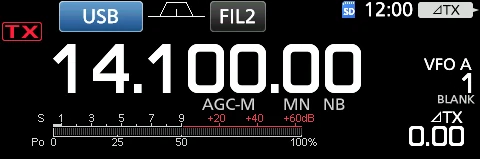
∂TX 频率
∂TX frequency
设置 ∂TX 频率。
旋转
Set ∂TX frequency.
Rotate
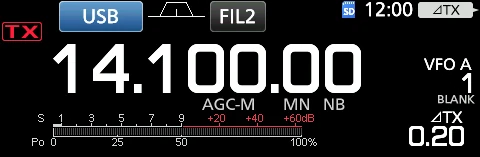
∂TX 监听功能∂TX monitor function
∂TX 功能开启时,按住 XFC 键即可直接监听工作频率。
When the ∂TX function is ON, you can directly monitor the operating frequency by holding down XFC.
按住 XFC 键期间。
While holding down XFC.
监听功能Monitor function
监听(Monitor)功能可监听自己发射的音频。在调整发射音频参数时,可用它检查话音特性。
The Monitor function enables you to monitor your transmit audio. Use this function to check the voice characteristics while adjusting transmit audio parameters.
提示 TIPTIP
无论监听功能如何设置,都能听到 CW 侧音。
You can hear the CW sidetone regardless of the Monitor function setting.
1选择要监听的模式(示例:USB)。
1Select the mode that you want to monitor. (Example: USB)
2按 FUNCTION 键。
• 打开 FUNCTION 屏幕。
2Push FUNCTION.
• Opens the FUNCTION screen.
3触摸 [MONI] 开启监听功能。
• 触摸 [MONI] 可开启或关闭监听功能。
3Touch [MONI] to turn ON the Monitor function.
• Touching [MONI] turns the Monitor function ON or OFF.
4触摸 [MONI] 保持 1 秒。
4Touch [MONI] for 1 second.
5以正常的音量说话,同时将 MONITOR 调整到 0% ~ 100% 之间音频最清晰的位置。
旋转
按压
5Adjust MONITOR to the clearest audio output between 0% and 100%, while speaking at your normal voice level.
Rotate
Push
![图 4-4 FUNCTION 屏幕(USB 模式):触摸 [MONI] 开启监听功能](https://staging.bg7bag.com/wp-content/uploads/2026/10/fig19_dtx_2.webp)
FUNCTION 屏幕(USB 模式)
FUNCTION screen (USB mode)
提示 TIPTIP
注意:使用 VOICE DELAY(见 4-10 节)时,请关闭监听功能,否则发射的音频会产生回音。
NOTE: When using the VOICE DELAY (p. 4-10), turn OFF the Monitor function. Otherwise, the transmitted audio will echo.
4-12设置语音压缩器Setting the Speech Compressor
SSB 模式
SSB mode
语音压缩器可提高平均射频输出功率,提升接收台站处的话音可懂度。该功能压缩发射机的音频输入,以提高平均音频输出电平。
The Speech Compressor increases the average RF output power, improving readability at the receiving station. This function compresses the transmitter audio input to increase the average audio output level.
提示 TIPTIP
该功能在远距离通信或电波传播条件不佳时尤为有效。
The function is effective for long-distance communication, or when propagation conditions are poor.
1选择 SSB 模式(示例:USB)。
1Select the SSB mode. (Example: USB)
2按 FUNCTION 键。
• 打开 FUNCTION 屏幕。
2Push FUNCTION.
• Opens the FUNCTION screen.
3确认语音压缩器处于 OFF 状态。
• 若语音压缩器为 ON,请触摸 [COMP] 将其关闭。
3Be sure that the Speech Compressor is OFF.
• If the Speech Compressor is ON, touch [COMP] to turn it OFF.
4按 EXIT 键关闭 FUNCTION 屏幕。
4Push EXIT to close the FUNCTION screen.
5触摸多功能仪表,显示 ALC 表。
• 触摸多功能仪表可在 Po、SWR、ALC、COMP、VD 或 ID 之间设置仪表。
5Touch the Multi-function meter to display the ALC meter.
• Touching the Multi-function meter sets the meter to Po, SWR, ALC, COMP, VD or ID.
6调整 MIC GAIN(话筒增益,见 3-11 节),使 ALC 表读数位于 ALC 区的 30% ~ 50% 范围内。
6Adjust the MIC GAIN (p. 3-11) to where the ALC meter reads within the 30 to 50% range of the ALC zone.
7再次触摸多功能仪表,显示 COMP 表。
7Touch the Multi-function meter again to display the COMP meter.
8按 FUNCTION 键。
• 打开 FUNCTION 屏幕。
8Push FUNCTION.
• Opens the FUNCTION screen.
9触摸 [COMP] 将其开启。
9Touch [COMP] to turn it ON.
10触摸 [COMP] 保持 1 秒。
10Touch [COMP] for 1 second.
11以正常的音量对着话筒说话,同时调整语音压缩器电平,使 COMP 表读数位于 COMP 区(10 ~ 20 dB 范围)内。
• 当 COMP 表峰值超出 COMP 区时,发射的话音可能出现失真。
旋转
11While speaking into the microphone at your normal voice level, adjust the Speech Compressor level to where the COMP meter reads within the COMP zone (10 to 20 dB range).
• When the COMP meter peaks exceed the COMP zone, your transmitted voice may be distorted.
Rotate
COMP 区
COMP zone
语音压缩器开启
Speech Compressor is ON
ALC 表
ALC meter
火腿经验 HAM TIPHAM TIP
MIC GAIN 与 COMP 要配合 ALC 表调节:正常说话时让 ALC 表刚进入 ALC 区即可,推太高会导致过载;FM 模式下应把 MIC GAIN 调到 ALC 起表之前。
Adjust MIC GAIN and COMP while watching the ALC meter: at a normal speaking level the ALC meter should just enter the ALC zone — pushing it further causes overload. In the FM mode, set MIC GAIN so that the ALC meter does not deflect at all.
4-13异频操作Split frequency operation
异频操作(Split frequency operation)可在同一波段或不同波段上以不同的频率发射和接收。
Split frequency operation enables you to transmit and receive on different frequencies in the same or different bands.
- 使用 Quick Split(快速异频)功能
- 将接收与发射频率分别设于 VFO A 和 VFO B
- Use the Quick Split function
- Use the receive and transmit frequencies set to VFO A and VFO B.
对方台站 / 本台
Another station / My station
本台:接收频率——USB 模式 21.29000 MHz(VFO A);发射频率——USB 模式 21.31000 MHz(VFO B)。
My station: Receive frequency — USB mode 21.29000 MHz (VFO A); Transmit frequency — USB mode 21.31000 MHz (VFO B).
对方台站:发射频率(21.29000 MHz)/ 接收频率(21.31000 MHz)。
Another station: Transmit frequency (21.29000 MHz) / Receive frequency (21.31000 MHz).
使用 Quick Split 功能Using the Quick Split function
Quick Split 功能可自动将两个 VFO 的频率和模式均衡为当前显示的 VFO,并激活异频(Split)功能。
The Quick Split function enables you to automatically equalize the frequency and mode of VFOs to the displayed VFO, and activate the Split function.
1设置 VFO A 的接收频率和工作模式(示例:USB 模式 21.29000 MHz)。
1Set VFO A's receive frequency and operating mode. (Example: 21.29000 MHz in the USB mode)
2按住 SPLIT 键 1 秒。
• Quick Split 功能开启,VFO A 的设置被复制到 VFO B。
• VFO B 频率显示在主屏幕的右下角。
2Hold down SPLIT for 1 second.
• The Quick Split function is turned ON and the VFO A settings are set to VFO B.
• The VFO B frequency is displayed in the bottom right corner of the main screen.
3按住 XFC 键的同时,设置发射与接收之间的工作频率偏移。
3While holding down XFC, set the operating frequency offset between transmit and receive.
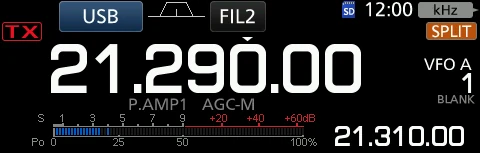
显示
Displayed
显示 VFO B 频率
VFO B frequency is displayed
按住 XFC 键期间显示发射与接收之间的偏移
The offset between transmit and receive while holding down XFC.
VFO B
VFO B
使用分设于 VFO A 与 VFO B 的接收和发射频率Using the receive and transmit frequencies set to VFO A and VFO B
1设置 VFO A 的接收频率和工作模式(示例:USB 模式 21.29000 MHz)。
1Set VFO A's receive frequency and operating mode. (Example: 21.29000 MHz in the USB mode)
2按 A/B 键选择 VFO B,然后设置接收频率和工作模式(示例:USB 模式 21.31000 MHz)。
2Push A/B to select VFO B, and then set the receive frequency and the operating mode. (Example: 21.31000 MHz in the USB mode)
3按 SPLIT 键开启异频功能。
• 按 SPLIT 键可开启或关闭异频功能。
3Push SPLIT to turn ON the Split function.
• Pushing SPLIT turns the Split function ON or OFF.
4按 A/B 键返回 VFO A。
• 异频操作准备就绪。
4Push A/B to return to VFO A.
• The Split frequency operation is ready.
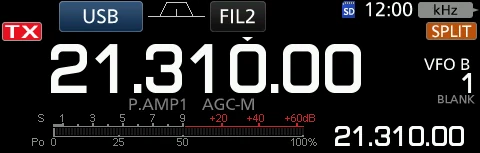
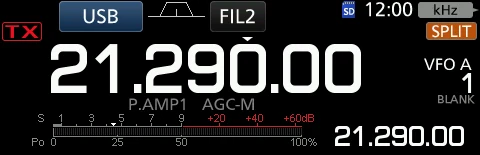
显示
Displayed
显示 VFO A 频率
VFO A frequency is displayed
4-14异频锁定、发射滤波器宽度与 CW 操作Split Lock function, transmit filter width and Operating CW
异频锁定功能Split Lock function
SPLIT LOCK(异频锁定)功能便于只更改发射频率而不更改接收频率。
The Split Lock function is convenient for changing only the transmit frequency but not changing the receive frequency.
1开启 SPLIT LOCK 功能。MENU » SET > Function > SPLIT > SPLIT LOCK
1Turn ON the Split Lock function. MENU » SET > Function > SPLIT > SPLIT LOCK
2开启异频(Split)功能。
2Turn ON the Split function.
3按住 SPEECH 键 1 秒,开启旋钮锁定(Dial Lock)功能。
3Hold down SPEECH for 1 second to turn ON the Dial Lock function.
4按住 XFC 键的同时,设置发射频率。
4While holding down XFC, set the transmit frequency.
旋钮锁定(Dial Lock)开启时显示。
Displayed when Dial Lock is ON.
火腿经验 HAM TIPHAM TIP
异频通联(SPLIT)启用后,记得打开 SPLIT LOCK,防止主旋钮误改发射频率;长按 A/B 键可把 A 边的频率与模式复制到 B 边。
After enabling Split operation (SPLIT), remember to turn ON SPLIT LOCK so that you cannot accidentally change the transmit frequency with the main dial. Hold down A/B to copy VFO A's frequency and mode to VFO B.
设置发射滤波器宽度Setting the transmit filter width
可设置 SSB 和 SSB-D 模式的发射滤波器宽度。仅 SSB 模式可选择 WIDE(宽)、MID(中)或 NAR(窄)。
The transmit filter width for the SSB and SSB-D mode can be set. Only for the SSB mode, WIDE (wide), MID (middle), or NAR (narrow) can be selected.
提示 TIPTIP
该滤波器可在语音压缩器功能开启或关闭的状态下独立设置。
The filter can be independently set on the speech compressor function is ON or OFF.
若要更改 SSB 模式下的滤波器宽度:
To change the filter width in the SSB mode:
1将工作模式设为 USB 或 LSB 模式。
1Set the operating mode to USB or LSB mode.
2按 FUNCTION 键。
• 打开 FUNCTION 屏幕。
2Push FUNCTION.
• Opens the FUNCTION screen.
3触摸 [TBW]。
• 触摸 [TBW] 可将滤波器宽度设置为 WIDE、MID 或 NAR。
3Touch [TBW].
• Touching [TBW] sets the filter width to WIDE, MID, or NAR.
FUNCTION 屏幕(SSB 模式)
FUNCTION screen (SSB mode)
- SSB(WIDE):100 Hz ~ 2900 Hz
- SSB(MID):300 Hz ~ 2700 Hz
- SSB(NAR):500 Hz ~ 2500 Hz
- SSB-D:300 Hz ~ 2700 Hz
- SSB (WIDE): 100 Hz to 2900 Hz
- SSB (MID): 300 Hz to 2700 Hz
- SSB (NAR): 500 Hz to 2500 Hz
- SSB-D: 300 Hz to 2700 Hz
提示 TIPTIP
可在以下设置中更改滤波器宽度值(见 12-3 节)。MENU » SET > Tone Control/TBW > TX > SSB > TBW (WIDE);MENU » SET > Tone Control/TBW > TX > SSB > TBW (MID);MENU » SET > Tone Control/TBW > TX > SSB > TBW (NAR);MENU » SET > Tone Control/TBW > TX > SSB-D > TBW
You can change the filter width values in the following settings. (p. 12-3) MENU » SET > Tone Control/TBW > TX > SSB > TBW (WIDE) / MENU » SET > Tone Control/TBW > TX > SSB > TBW (MID) / MENU » SET > Tone Control/TBW > TX > SSB > TBW (NAR) / MENU » SET > Tone Control/TBW > TX > SSB-D > TBW
CW 操作Operating CW
设置 CW 音调Setting the CW pitch control
可在不改变工作频率的情况下,将接收的 CW 音频音调与 CW 侧音设置为符合个人喜好。
You can set the received CW audio pitch and the CW side tone to suit your preference without changing the operating frequency.
1选择 CW 模式。
1Select the CW mode.
2显示多功能菜单。
2Display the Multi-function menu.
3触摸 [CW PITCH]。
3Touch [CW PITCH].
4将 CW 音调设置在 300 ~ 900 Hz 之间。
按压
旋转
按压
4Set the CW pitch to between 300 and 900 Hz.
Push
Rotate
Push
4-15CW 操作(续)Operating CW (Continued)
设置键速Setting the key speed
可设置内置电子电键器的键速。
You can set the key speed of the internal electric keyer.
1选择 CW 模式。
1Select the CW mode.
2显示多功能菜单。
2Display the Multi-function menu.
3触摸 [KEY SPEED]。
3Touch [KEY SPEED].
4将键速设置在 6 ~ 48 WPM(Words Per Minute,每分钟字数)之间。
旋转
按压
按压
4Set the key speed to between 6 and 48 Words Per Minute (WPM).
Rotate
Push
Push
关于 Break-in 功能About the Break-in function
在 CW 模式下使用插入(Break-in)功能,可在拍发电键时自动切换发射与接收。IC-7300 支持半插入(Semi Break-in)与全插入(Full Break-in)两种模式。
Use the Break-in function in the CW mode to automatically switch between transmit and receive when keying. The IC-7300 is capable of Semi Break-in and Full break-in modes.
半插入模式
在半插入模式下,按下电键时收发信机发射,停止拍发后经过预设时间自动返回接收。
Semi Break-in mode
In the Semi Break-in mode, the transceiver transmits when keying, and then automatically returns to receive after a preset time after you stop keying.
1选择 CW 模式。
1Select the CW mode.
2按 VOX/BK-IN 键,显示 "BKIN"。
• 每按一次 VOX/BK-IN 键,在 "BKIN(半插入)"、"F-BKIN(全插入)" 与 OFF(无显示)之间选择。
2Push VOX/BK-IN to display "BKIN."
• Pushing VOX/BK-IN selects "BKIN (Semi Break-in)," "F-BKIN (Full Break-in)," or OFF (no indication).
3若要调整插入延迟时间,请按住 VOX/BK-IN 键 1 秒。
• 打开 BKIN 菜单。
3To adjust the Break-in delay time, hold down VOX/BK-IN for 1 second.
• Opens the BKIN menu.
4设置到拍发过程中收发信机不返回接收的状态。
• 使用自动键(paddle)时,可按 MULTI 键显示多功能菜单,边操作自动键边调整 KEY SPEED。
4Set to where the transceiver does not return to receive while keying.
• When you are using a paddle, push MULTI to display the Multi-function menu, and then adjust the KEY SPEED while operating the paddle.
5按 EXIT 键关闭 BKIN 菜单。
旋转
5To close the BKIN menu, push EXIT.
Rotate
提示 TIPTIP
提示:键型默认设置为 "Paddle"(自动键)。可在 CW-KEY SET 屏幕上选择电键器类型(见 4-21 节)。
TIP: The key type is set to "Paddle" by default. You can select the keyer type on the CW-KEY SET screen. (p. 4-21)
接收与发射(续)Receiving and Transmitting (continued)
4-16CW 操作Operating CW
CW 自动调谐功能CW Auto Tuning function
使用 Auto Tuning 功能即可对接收到的 CW 信号进行调谐。按 AUTO TUNE 键即可自动完成调谐。本功能仅在 CW 模式下有效。
You can tune in a CW signal you are receiving using the Auto Tuning function. You can automatically tune by pushing AUTO TUNE. This function is active in only the CW mode.
使用 RIT 时,RIT 频率将由本功能自动调谐。
While using the RIT, the RIT frequency is automatically tuned by this function.
调谐时显示。
Displayed while tuning.
说明 NOTENOTE
接收微弱信号或存在干扰的信号时,Auto Tuning 功能可能会将接收机调谐到非期望的信号上,也可能无法启动调谐。此时会发出警告提示音。
When receiving a weak signal, or receiving a signal with interference, the Auto Tuning function may tune the receiver to an undesired signal, or may not start to tune. In such case, a warning beep sounds.
关于 CW 反转模式About the CW Reverse mode
CW-R(CW 反转)模式将接收的差频振荡器(BFO)反转,以接收 CW 信号。
The CW-R (CW Reverse) mode reverses the received Beat Frequency Oscillator (BFO) to receive CW signals.
当干扰信号靠近有用信号、且希望用 CW-R 模式减小干扰时,可使用本模式。
Use when interfering signals are near the desired signal and you want to use the CW-R to reduce interference.
图示:CW 模式(LSB 侧)与 CW-R 模式(USB 侧),示出 BFO、干扰信号与有用信号的相对位置。
Illustration: CW mode (LSB side) and CW-R mode (USB side), showing the BFO, the interference and the desired signal.
提示 TIP:反转载波点TIP: Reversing the carrier point
CW 模式的载波点默认为 LSB。可在 OTHERS 设置屏幕的 "CW Normal Side" 项目中将其更改为 USB。(见 12-6 节)MENU » SET > Function > CW Normal Side
The carrier point of the CW mode is LSB by default. You can change it to USB in the "CW Normal Side" item of the OTHERS set screen. (p. 12-6) MENU » SET > Function > CW Normal Side
当该设置设为 "USB" 时,CW 与 CW-R 模式将互换。
When this setting is set to "USB," the CW and CW-R modes are reversed.
关于插入功能About the Break-in function
全插入模式Full Break-in mode
在全插入模式下,按下电键时收发信机自动发射,松开电键后立即返回接收。
In the Full Break-in mode, the transceiver automatically transmits while keying down, and then immediately returns to receive after keying up.
1选择 CW 模式。
1Select the CW mode.
2按 VOX/BK-IN 键,直至显示 "F-BKIN"。
2Push VOX/BK-IN until "F-BKIN" is displayed.
3使用手动键或自动键拍发。
3Using a straight key or paddle.
- 每按一次 VOX/BK-IN 键,将在 "BKIN(半插入)"、"F-BKIN(全插入)" 与 OFF(无显示)之间切换。
- 在全插入模式下,停止拍发后收发信机即返回接收,无需预设的插入延时时间。松开电键的同时便处于接收状态。
- Pushing VOX/BK-IN selects "BKIN (Semi Break-in)," "F-BKIN (Full Break-in)," or OFF (no indication).
- In the Full break-in mode, the transceiver automatically returns to receive without a preset break-in delay time after you stop keying. The transceiver receives while keying up.
火腿经验 HAM TIPHAM TIP
CW 全插入(QSK)听自己:把 MONI 打开;半插入适合慢速人工拍发,全插入适合比赛。
To hear yourself between dots and dashes with full break-in (QSK), turn MONI ON; semi break-in suits slow hand keying, while full break-in is the choice for contesting.
4-17CW 操作Operating CW
电子电键功能Electronic Keyer function
可设置电子电键的存储电键功能、自动键极性等项目。
You can set the Memory Keyer function settings, paddle polarity settings, and so on of the Electronic Keyer.
1在 CW 模式下打开 KEYER 屏幕。MENU » KEYER
1Open the KEYER screen in the CW mode. MENU » KEYER
2触摸 [EDIT/SET]。(打开 EDIT/SET 屏幕。)
2Touch [EDIT/SET]. (Opens the EDIT/SET screen.)
3选择要设置的项目。
3Select the desired item to set.
4要关闭 KEYER 屏幕,请按 EXIT 数次。
4To close the KEYER screen, push EXIT several times.
说明 NOTENOTE
仅在 CW 模式下,才能在 MENU 屏幕上选择 [KEYER]。
You can select [KEYER] on the MENU screen only in the CW mode.
- EDIT — Keyer memory edit menu (p. 4-19): You can edit the Keyer memories.
- 001 SET — Contest number menu (p. 4-20): You can set the number style, count up trigger, and present number.
- CW-KEY SET — Key set menu (p. 4-21): You can set the memory keyer repeat time, dot/dash ratio, paddle polarity, key type, and so on.
- EXIT — closes the EDIT/SET screen.
监听 CW 侧音Monitoring the CW side tone
当收发信机处于待机状态且插入功能关闭时,无需实际发射即可监听 CW 侧音。
When the transceiver is in standby and the Break-In function is OFF, you can listen to the CW side tone without actually transmitting.
- 借此可凭音频音调,将自己的发射频率精确对准对方台站。
- 亦可使用 CW 侧音练习 CW 拍发(请确认插入功能已关闭,见 4-15 节)。
- 可在 "Side Tone Level" 中调节 CW 侧音电平。MENU » KEYER > EDIT/SET > CW-KEY SET > Side Tone Level
- This enables you to match your transmit frequency exactly to another station's by matching the audio tone.
- You can also use the CW side tone (make sure the Break-in function is OFF (p. 4-15)) to practice CW sending.
- You can adjust the CW side tone level in "Side Tone Level." MENU » KEYER > EDIT/SET > CW-KEY SET > Side Tone Level
EDIT/SET 屏幕——旋转 / 按压。
EDIT/SET screen — Rotate / Push.
4-18CW 操作Operating CW
使用存储电键(KEYER)发送Sending from the Memory keyer (KEYER)
使用存储电键功能可发送预设的字符内容。
You can send preset characters using the Memory keyer function.
1在 CW 模式下打开 KEYER 屏幕。MENU » KEYER
1Open the KEYER screen in the CW mode. MENU » KEYER
2按 TRANSMIT 键。(TX 状态指示灯亮红灯。)
2Push TRANSMIT. (The TX status indicator lights red.)
3在 [M1] ~ [M4] 中触摸所需的存储电键。(所触摸电键的内容即被发送。)
3Touch a desired memory keyer between [M1] and [M4]. (The touched keyer contents are sent.)
4要停止发送,请按 EXIT 键。
4To stop sending, push EXIT.
说明 NOTENOTE
若需自动切换发射与接收,请开启插入功能。(见 4-15 节)
If you want to automatically switch between transmit and receive, turn the Break-in function ON. (p. 4-15)
发送中的 KEYER 屏幕(示例:发送 M1):显示 "Sending contents"(发送内容)。
KEYER screen while sending (Example: sending M1): "Sending contents" is displayed.
发送中的 KEYER 屏幕(示例:重复发送 M1):显示 "Present number counter"(当前号码计数器)与 "Count up trigger"(计数递增触发)图标。
KEYER screen while sending (Example: Repeatedly sending M1): the "Present number counter" and the "Count up trigger" icon are displayed.
| 按键Key | 操作Action |
|---|---|
| M1~M8 | 触摸:发送存储电键的内容。 触摸 1 秒:显示重复图标,并重复发送存储电键的内容。 • 可在 CW-KEY SET 菜单的 "Keyer Repeat Time" 中更改重复间隔设置。(见 4-21 节)Touch: Sends the Memory keyer contents. Touch for 1 second: The repeat icon is displayed and the Memory keyer contents are repeatedly sent. • You can change the repeat interval setting in "Keyer Repeat Time" in the CW-KEY SET menu. (p. 4-21) |
| -1 | 将比赛号计数器减 1(001)。 • 可在 KEYER 001 菜单的 "Present Number" 中更改或复位该号码。(见 4-20 节)Reduces the contest number counter by 1 (001). • You can change or reset the number in "Present Number" in the KEYER 001 menu. (p. 4-20) |
| EDIT/SET | 触摸以显示 EDIT/SET 屏幕。Touch to display the EDIT/SET screen. |
计数递增触发(count up trigger)可在每次完整发出比赛号(序列号)交换后,使序列号自动加 1。(默认:M2)
The count up trigger enables the serial number to be automatically increased after each complete serial number exchange is sent. (Default: M2)
被设为计数递增触发的存储电键上会显示计数递增触发图标。
The count up trigger icon is displayed on the Memory keyer set to the count up trigger.
可在 KEYER 001 菜单中更改计数递增触发的设置。(默认:M2)(见 4-20 节)
You can change the count up trigger setting in the KEYER 001 menu. (Default: M2) (p. 4-20)
| 存储电键Memory keyer | 内容Contents |
|---|---|
| M1 | CQ TEST CQ TEST DE ICOM ICOM TEST |
| M2 | UR 5NN 001 BK |
| M3 | CFM TU |
| M4 | QRZ? |
- "001" 为 CW 比赛号。
- 若需将计数递增触发设到其他电键,请删除存储电键 M2 中的 "*"(星号)。详见「存储电键编辑菜单(EDIT)」(见 4-19 节)。
- "001" is the CW contest number.
- If you want to set the Count up trigger to different keyer, delete "*" (asterisk) from the Memory keyer M2. See "Keyer memory edit menu (EDIT)" (p. 4-19) for details.
提示 TIPTIP
使用外接键盘时,无需打开 KEYER 屏幕即可发送预设内容。详见 18-3 节。
When you are using an external keypad, you can send the preset contents without opening the KEYER screen. See page 18-3 for details.
4-19CW 操作Operating CW
存储电键编辑菜单(EDIT)Keyer memory edit menu (EDIT)
在 EDIT 菜单中编辑存储电键的内容。
Edit the Memory keyer contents in the EDIT menu.
最多可使用共 8 个存储电键(M1 ~ M8),每个存储器最多可输入 70 个字符。
You can use up to a total of 8 Memory keyers (M1 to M8), and you can enter up to 70 characters in each memory.
- 1在 CW 模式下打开 KEYER MEMORY 屏幕。MENU » KEYER > EDIT/SET > EDIT
- 2触摸 "CFM TU" 保持 1 秒。
- 3触摸 "Edit"。
- 4反复触摸 [CLR],直至清除预设内容。
- 5输入 "QSL TU DE JA3YUA TEST",然后触摸 [ENT] 保存。
- 6要关闭 KEYER 屏幕,请按 EXIT 数次。
- 1Open the KEYER MEMORY screen in the CW mode. MENU » KEYER > EDIT/SET > EDIT
- 2Touch "CFM TU" for 1 second.
- 3Touch "Edit."
- 4Touch [CLR] until the preset contents are cleared.
- 5Enter "QSL TU DE JA3YUA TEST," and then touch [ENT] to save.
- 6To close the KEYER screen, push EXIT several times.
- 字母:ABCDEFGHIJKLMNOPQRSTUVWXYZ
- 符号:/ ? ^ . , @ *
- 数字:1234567890
- Alphabets: ABCDEFGHIJKLMNOPQRSTUVWXYZ
- Symbols: / ? ^ . , @ *
- Numbers: 1234567890
- 输入 "^" 可发送无字符间隔的字符串。将 "^" 置于文本串之前(如 ^AR),则 "ar" 将无间隔地发送。
- 输入 "*"(星号)可插入 CW 比赛号,该号码会自动加 1。每次仅可在 1 个存储电键中使用此功能。默认在存储电键 M2 中使用 "*"。
- Enter "^" to send a string of characters with no intercharacter space. Put "^" before a text string such as ^AR, and the string "ar" is sent with no space.
- Enter "*" (asterisk) to insert the CW contest number. The number automatically advances by 1. You can use this for only 1 Memory keyer at a time. "*" is used in Memory keyer M2 by default.
4-20CW 操作Operating CW
比赛号菜单(001 SET)Contest number menu (001 SET)
可设置编号样式、计数递增触发与预设号码。
You can set the number style, count up trigger and preset number.
1在 CW 模式下打开 KEYER 001 菜单。MENU » KEYER > EDIT/SET > 001 SET
1Open the KEYER 001 menu in the CW mode. MENU » KEYER > EDIT/SET > 001 SET
2选择设置项目。(示例:Number Style)
2Select the setting item. (Example: Number Style)
3选择所需的设置选项。
3Select the desired setting option.
4要关闭 "Number Style" 屏幕,请按 EXIT 数次。
4To close the "Number Style" screen, push EXIT several times.
旋转 / 按压
Rotate / Push
提示 TIP:如何恢复默认设置TIP: How to reset to the default setting
触摸项目或其选项 1 秒会显示 Quick 菜单,然后触摸 "Default" 即可恢复默认设置。
Touching the item or its option for 1 second displays the Quick menu, and then touch "Default" to reset to the default setting.
| 设置项Item | 选项与说明Options and description |
|---|---|
| Number Style | 设置比赛(序列)号码所用的编号方式——普通号码或短莫尔斯号码。 • 可选:Normal、190→ANO、190→ANT、90→NO 或 90→NT。默认:NormalSet the numbering system used for contest (serial) numbers — normal or short morse numbers. • Select Normal, 190→ANO, 190→ANT, 90→NO or 90→NT. (Default: Normal) |
| Count Up Trigger | 选择 8 个存储器中的哪一个用于存放比赛序列号交换内容。 • 可在 M1 ~ M8 之间选择。默认:NormalSelect which of the 8 memories will contain the contest serial number exchange. • Select between M1 and M8. (Default: Normal) |
| Present Number | 设置计数递增触发的当前号码。 • 可设置为 001 ~ 9999。默认:001Set the current number for the Count Up Trigger. • Set to between 001 and 9999. (Default: 001) |
4-21CW 操作Operating CW
电键设置菜单(CW-KEY SET)Keyer set menu (CW-KEY SET)
在本菜单中,可设置存储电键重复时间、划权重、自动键规格、电键类型等项目。
In this menu, you can set the memory keyer repeat time, dash weight, paddle specifications, key type, and so on.
- 1在 CW 模式下打开 CW-KEY SET 菜单。MENU » KEYER > EDIT/SET > CW-KEY SET
- 2选择设置项目。(示例:Side Tone Level)
- 3调节 Side Tone Level。(示例:80%)
- 4要关闭 KEYER 屏幕,请按 EXIT 数次。
- 1Open the CW-KEY SET menu in the CW mode. MENU » KEYER > EDIT/SET > CW-KEY SET
- 2Select the setting item. (Example: Side Tone Level)
- 3Adjust the Side Tone Level. (Example: 80%)
- 4To close the KEYER screen, push EXIT several times.
旋转 / 按压
Rotate / Push
提示 TIP:如何恢复默认设置TIP: How to reset to the default setting
触摸项目或其选项 1 秒会显示 Quick 菜单,然后触摸 "Default" 即可恢复默认设置。
Touching the item or its option for 1 second displays the Quick menu, and then touch "Default" to reset to the default setting.
| 设置项Item | 选项与说明Options and description |
|---|---|
| Side Tone Level | 调节 CW 侧音输出电平。 • 可调范围为 0 ~ 100%。默认:50%Adjust the CW side tone output level. • Adjust to between 0 and 100%. (Default: 50%) |
| Side Tone Level Limit | 开启或关闭 CW 侧音电平限制。当 AF RF/SQL(内环)转过侧音电平以上时,此功能将禁用 CW 侧音。默认:ONTurn the CW side tone level limit ON or OFF. This disables the CW side tone when you rotate AF RF/SQL (inner) above the side tone level. (Default: ON) |
| Keyer Repeat time | 设置存储电键各次发送之间的间隔时间。 • 可设置为 1 ~ 60 秒。默认:2secSet the time between Memory keyer transmissions. • Set to between 1 and 60 seconds. (Default: 2sec) |
| Dot/Dash Ratio | 设置点划比。 • 可以 0.1 的步进在 1:1:2.8 ~ 1:1:4.5 之间设置。默认:1:1:3.0Set the dot/dash ratio. • Set to between 1:1:2.8 to 1:1:4.5 in 0.1 steps. (Default: 1:1:3.0) |
| Rise Time | 设置发射 CW 包络的上升时间。 • 可设置为 2、4、6 或 8 毫秒。默认:4msSet the rise time of the transmitted CW envelope. • Set to 2, 4, 6 or 8 milliseconds. (Default: 4ms) |
| Paddle Polarity | 将自动键的点划极性设为 Normal 或 Reverse。 • Normal:右 = 划,左 = 点。 • Reverse:右 = 点,左 = 划。默认:NormalSet the paddle dot-dash polarity to Normal or Reverse. • Normal: Right = dash, Left = dot. • Reverse: Right = dot, Left = dash. (Default: Normal) |
| Key Type | 设置后面板 [KEY] 接口的电键类型。 • 可设为 Straight、Bug 或 Paddle。默认:PaddleSet the key type for the [KEY] connector on the rear panel. • Set to Straight, Bug or Paddle. (Default: Paddle) |
| MIC Up/Down Keyer | 将话筒 [UP]/[DN] 键用作 CW 电键。 • ON:将 [UP]/[DN] 键用作 CW 电键。 • OFF:不将 [UP]/[DN] 键用作 CW 电键。默认:OFFSet the microphone [UP]/[DN] keys to use as a CW key. • ON: Use the [UP]/[DN] keys as a CW key. • OFF: Do not use the [UP]/[DN] keys as a CW key. (Default: OFF) |
说明 NOTENOTE
[UP]/[DN] 键不支持「双键并击(squeeze key)」功能。选择 "ON" 时,无法使用 [UP]/[DN] 键更改频率和存储通道。
The [UP]/[DN] keys do not work as a "squeeze key." When "ON" is selected, you cannot change the frequency and the Memory channels using the [UP]/[DN] keys.
键控权重示例:莫尔斯电码 "W"——图中以单位长度示出点、划码元,设置范围为 1:1:2.8 ~ 4.5,默认为 1:1:3。下方包络图示出按键动作、发射输出功率("Set TX output power" 电平)、上升时间、TX 与 RX 时段、字符间隔及时间轴。
Keying weight example: Morse code "W" — the code elements (dot and dash) are shown with unit lengths, the setting range is 1:1:2.8 ~ 4.5 and the Default is 1:1:3. The envelope illustration below shows the key action, the TX output power (the "Set TX output power" level), the rise time, the TX and RX periods, the space, and the time axis.
4-22RTTY(FSK)操作Operating RTTY (FSK)
借助内置 RTTY 解码器与 RTTY TX 存储器中设置的内容,无需外接设备即可进行基本的 RTTY 操作。
With the built-in RTTY decoder and the contents set in the RTTY TX memory, you can operate the basic RTTY operation without using an external device.
说明 NOTENOTE
若使用 PSK 软件,请参阅该软件的说明书。
If you are using PSK software, refer to the software manual.
1选择 RTTY 模式。
1Select the RTTY mode.
2打开 RTTY DECODE 屏幕。MENU » DECODE
2Open the RTTY DECODE screen. MENU » DECODE
3旋转 MAIN DIAL 调谐到所需信号。
3Rotate MAIN DIAL to tune the desired signal.
4发送 RTTY 存储器。(TX 状态指示灯亮红灯,Po 表摆动。)
4Transmit the RTTY memory. (The TX status indicator lights red and the Po meter swings.)
说明 NOTENOTE
仅在 RTTY 模式下,才能在 MENU 屏幕上选择 [DECODE]。
You can select [DECODE] on the MENU screen only while in the RTTY mode.
火腿经验 HAM TIPHAM TIP
RTTY 玩 FSK 需接 [DATA] 口(直频键控),AFSK 走声卡;FSK 方式更干净,不受声卡采样率影响。
To run RTTY in FSK (direct frequency keying), connect through the [DATA] jack; AFSK runs through the sound card. FSK is cleaner and is not affected by the sound card's sampling rate.
RTTY DECODE 屏幕:FFT 频谱与调谐指示。
RTTY DECODE screen: the FFT scope and the Tuning indicator.
显示正在发送的内容(示例:发送 RT1 的 TX 存储器)。相关指示灯亮红灯。
Contents being transmitted are displayed. (Example: transmitting the RT1's TX memory) The indicators light red.
关于 RTTY 反转模式About the RTTY reverse mode
若接收到 RTTY 信号但无法正确解码,请尝试使用 RTTY-R(反转)模式。
If you are receiving an RTTY signal but cannot decode correctly, try in the RTTY-R (reverse) mode.
在 MODE 屏幕上触摸 [RTTY],即可选择 RTTY-R 模式。
Select the RTTY-R mode by touching [RTTY] on the MODE screen.
触摸 [RTTY] 可在 RTTY 模式与 RTTY-R 模式之间切换。
Touching [RTTY] toggles between the RTTY mode and the RTTY-R mode.
图示:RTTY 模式(Normal)与 RTTY-R 模式下 BFO、170 Hz(空号)与 2125 Hz(传号)的相对位置。
Illustration: the BFO, 170 Hz (space) and 2125 Hz (mark) positions in the RTTY mode (Normal) and in the RTTY-R mode.
双峰滤波器Twin Peak Filter
双峰滤波器(TPF)通过提升传号与空号频率来改变音频频响,以改善 RTTY 信号的接收效果,或便于在电脑上解码外部 AF 输出。
The Twin Peak Filter (TPF) changes the audio frequency response by boosting the mark and space frequencies for better reception of RTTY signals, or for decoding the external AF output on a PC.
1在 RTTY 模式下,显示多功能菜单。
1While in the RTTY mode, display the Multi-function menu.
2触摸 [TPF]。
2Touch [TPF].
3要关闭多功能菜单,请按 EXIT 键。
3To close the Multi-function menu, push EXIT.
触摸 [TPF] 可开启或关闭该功能。
Touching [TPF] turns the function ON or OFF.
TPF 开启时点亮。
Lights while the TPF is ON.
说明 NOTENOTE
使用双峰滤波器时,接收音频输出可能增大。这并非故障。
When you are using the Twin Peak Filter, the received audio output may increase. This is not a malfunction.
- 应调至波形对称,并确保波峰与 FFT 频谱中的传号(2125 Hz)及频移(170 Hz)频率线对齐。
- 接收到信号时,S 表显示接收信号强度。
- 若无法正确解码,请尝试使用 RTTY-R 模式。
- 调至调谐指示中同时显示 "◄" 与 "►" 的位置。
- Aim for a symmetrical wave form, and be sure the peak points align with the mark (2125 Hz) and shift (170 Hz) frequency lines in the FFT scope.
- The S-meter displays the received signal strength, when a signal is received.
- If you cannot decode correctly, try in the RTTY-R mode.
- Tune to where both "◄" and "►" are displayed in the tuning indicator.
4-23RTTY(FSK)操作Operating RTTY (FSK)
RTTY DECODE 屏幕的功能Functions on the RTTY DECODE screen
在 RTTY 模式下打开 RTTY DECODE 屏幕。MENU » DECODE 调谐到 RTTY 信号时,将显示解码出的字符。
Open the RTTY DECODE screen in the RTTY mode. MENU » DECODE When tuned to an RTTY signal, the decoded characters are displayed.
RTTY DECODE 屏幕:普通屏幕与扩展屏幕。
Normal screen and Expanded screen (RTTY DECODE screen).
提示 TIPTIP
触摸 [EXPD/SET] 可在普通屏幕与扩展屏幕之间切换。
Touching [EXPD/SET] toggles between the Normal screen and Expanded screen.
| 按键Key | 操作Action |
|---|---|
| <1> | 选择功能菜单。Selects the function menu. |
| <2> | 选择功能菜单。Selects the function menu. |
| HOLD | 开启或关闭 Hold 功能。 • 显示 "HOLD",RTTY DECODE 屏幕停止刷新。Turns the Hold function ON or OFF. • "HOLD" is displayed, and the RTTY DECODE screen stops. |
| CLR | 触摸 1 秒清除显示的字符。 • Hold 功能开启时,此操作将清除字符并取消 Hold 功能。Touch for 1 second to clear the displayed characters. • While the Hold function is ON, this clears the characters and cancels the Hold function. |
| TX MEM | 打开 RTTY MEMORY 屏幕。Opens the RTTY MEMORY screen. |
| LOG | 打开 RTTY DECODE LOG 屏幕。 • 开始/停止记录日志,选择文件类型或时间戳。Opens the RTTY DECODE LOG screen. • Starts/Stops logging, selects the file type or the time stamp. |
| LOG VIEW | 打开 RTTY DECODE LOG VIEW 屏幕。 • 可查看已保存的 RTTY 日志文件。Opens the RTTY DECODE LOG VIEW screen. • You can check the saved RTTY log files. |
| ADJ | 打开 THRESHOLD 屏幕。 • 可设置门限电平。Opens the THRESHOLD screen. • You can set the threshold level. |
| EXPD/SET | 触摸:选择扩展屏幕或普通屏幕。 触摸 1 秒:打开 RTTY DECODE SET 屏幕。Touch: Selects the Expanded or Normal screen. Touch for 1 second: Opens the RTTY DECODE SET screen. |
设置解码器门限电平Setting the decoder threshold level
调节 RTTY 解码器门限电平,可防止在未收到 RTTY 信号时把噪声解成字符。
Adjusting the RTTY decoder threshold level prevents characters been decoded from noise, even though you have not received an RTTY signal.
1打开 RTTY DECODE 屏幕。MENU » DECODE
1Open the RTTY DECODE screen. MENU » DECODE
2触摸 [<1>]。(显示功能菜单 <2>。)
2Touch [<1>]. (The function menu <2> is displayed.)
3触摸 [ADJ]。(显示 THRESHOLD 设置屏幕。)
3Touch [ADJ]. (The THRESHOLD setting screen is displayed.)
4对照 RTTY DECODE 屏幕,旋转 MAIN DIAL 调节门限电平,直至噪声不会显示为字符。
4Checking the RTTY DECODE, rotate MAIN DIAL to adjust the threshold level to where the characters are not displayed from noise.
5要关闭 THRESHOLD 设置屏幕,请触摸 [ADJ]。
5To close the THRESHOLD setting screen, touch [ADJ].
- 若门限电平调得过高,将无法接收微弱信号。
- 触摸 [DEF] 1 秒可恢复默认设置。
- If the threshold level adjusted is too high, you cannot receive weak signals.
- Touch [DEF] for 1 second to reset to the default setting.
4-24RTTY(FSK)操作Operating RTTY (FSK)
发送 RTTY 存储器内容Transmitting an RTTY memory content
可发送 RTTY MEMORY 屏幕上预设的字符。
You can transmit the preset characters on the RTTY MEMORY screen.
说明 NOTENOTE
在 RTTY MEMORY 屏幕上触摸 [EDIT] 即可编辑字符。
You can edit the characters by touching [EDIT] on the RTTY MEMORY screen.
1在 RTTY 模式下打开 RTTY DECODE 屏幕。MENU » DECODE
1Open the RTTY DECODE screen in the RTTY mode. MENU » DECODE
2触摸 [TX MEM]。(打开 RTTY MEMORY 屏幕。)
2Touch [TX MEM]. (Opens the RTTY MEMORY screen.)
3在 [RT1] ~ [RT8] 中触摸所需的 RTTY 存储器进行发送。(示例:RT1)
3Touch the desired RTTY memory between [RT1] and [RT8] to transmit. (Example: RT1)
说明 NOTENOTE
要取消发射并返回 RTTY DECODE 屏幕,请按 EXIT 键。
To cancel the transmission and to return to the RTTY DECODE screen, push EXIT.
RTTY MEMORY 屏幕:显示正在发送的内容(示例:RT1)。相关指示灯亮红灯。
RTTY MEMORY screen: the transmitting contents are displayed. (Example: RT1) The indicators light red.
| 存储器Memory | 默认预设字符Preset characters by default |
|---|---|
| RT1 | ↵ DE ICOM ICOM K ↵ |
| RT2 | ↵ DE ICOM ICOM ICOM K ↵ |
| RT3 | ↵ QSL UR 599-599 BK ↵ |
| RT4 | ↵ QSL DE ICOM ICOM UR 599-599 BK ↵ |
| RT5 | ↵ 73 GL SK ↵ |
| RT6 | ↵ CQ CQ CQ DE ICOM ICOM ICOM K ↵ |
| RT7 | ↵ MY TRANSCEIVER IS IC-7300 & ANTENNA IS A 3-ELEMENT TRIBAND YAGI. ↵ |
| RT8 | ↵ MY RTTY EQUIPMENT IS INTERNAL FSK UNIT & DEMODULATOR OF THE IC-7300. ↵ |
提示 TIPTIP
在 [MIC] 插孔接入外接键盘时,可用该外接键盘发送 RTTY 存储器。详见 18-3 节。
When an external keypad is connected to the [MIC] jack, you can transmit the RTTY memories using the external keypad. See page 18-3 for details.
TX 状态指示灯亮红灯,Po 表摆动。
The TX status indicator lights red and the Po meter swings.
4-25RTTY(FSK)操作Operating RTTY (FSK)
编辑 RTTY 存储器Editing an RTTY memory
可编辑 RTTY 存储器中的字符。可保存并发送 8 个常用 RTTY 报文的存储器。
You can edit the characters in the RTTY memories. You can save and transmit 8 RTTY memories for often-used RTTY messages.
每个 RTTY 存储器最多可容纳 70 个字符。
Each RTTY memory contains up to 70 characters.
1打开 RTTY MEMORY 屏幕。MENU » DECODE > TX MEM > EDIT
1Open the RTTY MEMORY screen. MENU » DECODE > TX MEM > EDIT
2触摸该存储器保持 1 秒。(示例:RT3)
2Touch the memory for 1 second. (Example: RT3)
3触摸 "Edit"。
3Touch "Edit."
4反复触摸 [CLR],直至清除字符。
4Touch [CLR] until the characters are cleared.
5输入所需的字符,然后触摸 [ENT] 保存。
5Enter the desired characters, and then touch [ENT] to save.
6要关闭 RTTY DECODE 屏幕,请按 EXIT 数次。
6To close the RTTY DECODE screen, push EXIT several times.
RTTY MEMORY 屏幕 / QUICK MENU 屏幕。
RTTY MEMORY screen / QUICK MENU screen.
4-26RTTY(FSK)操作Operating RTTY (FSK)
开启 RTTY 日志Turning ON the RTTY log
开启 RTTY 日志,即可将自己的 RTTY 发射与接收操作记录保存到 SD 卡(用户自备)中。
Turn ON the RTTY log to save your TX and RX RTTY operating record onto an SD card (user supplied).
2在 RTTY 模式下打开 RTTY DECODE LOG 屏幕。MENU » DECODE > <1> > LOG
2Open the RTTY DECODE LOG screen in the RTTY mode. MENU » DECODE > <1> > LOG
3选择 "Decode Log"。
3Select "Decode Log."
4选择 "ON"。
4Select "ON."
5按 EXIT 键。(RTTY 日志开启时,RTTY DECODE 屏幕上显示 "●"。)
5Push EXIT. ("●" is displayed on the RTTY DECODE screen when the RTTY log is ON.)
6要关闭 RTTY 日志,请在步骤 4 中选择 "OFF"。
6To turn OFF the RTTY log, select "OFF" in step 4.
旋转 / 按压
Rotate / Push
提示 TIP:如何恢复默认设置TIP: How to reset to the default setting
触摸项目或其选项 1 秒会显示 Quick 菜单,然后触摸 "Default" 即可恢复默认设置。
Touching the item or its option for 1 second displays the Quick menu, and then touch "Default" to reset to the default setting.
查看 RTTY 日志内容Viewing the RTTY log contents
可查看 RTTY 日志的内容。
You can check the RTTY log contents.
2在 RTTY 模式下打开 RTTY DECODE LOG VIEW 屏幕。MENU » DECODE > <1> > LOG VIEW
2Open the RTTY DECODE LOG VIEW screen in the RTTY mode. MENU » DECODE > <1> > LOG VIEW
3选择要查看的日志文件。
3Select the desired log file to view.
4要关闭 RTTY DECODE 屏幕,请按 EXIT 数次。
4To close the RTTY DECODE screen, push EXIT several times.
旋转 / 按压
Rotate / Push
说明 NOTENOTE
带 "●" 的文件正在记录日志,无法查看其内容。
The file with "●" is logging. You cannot check this log's contents.
RTTY DECODE LOG VIEW 屏幕。以文本格式保存的日志示例。
RTTY DECODE LOG VIEW screen. Example of a log saved in the text format.
4-27RTTY(FSK)操作Operating RTTY (FSK)
关于 RTTY 解码日志设置模式About the RTTY decode log set mode
本模式用于设置日志文件类型、时间戳及其他 RTTY 设置。
This mode is for the log file type, time stamp setting, and other RTTY settings.
1在 RTTY 模式下打开 RTTY DECODE LOG 屏幕。MENU » DECODE > <2> > LOG
1Open the RTTY DECODE LOG screen in the RTTY mode. MENU » DECODE > <2> > LOG
2选择 "Log Set"。
2Select "Log Set."
3选择所需的项目。(示例:File Type)
3Select the desired item. (Example: File Type)
4选择所需的设置、项目或数值。(示例:HTML)
4Select the desired setting, item or value. (Example: HTML)
5要关闭 RTTY DECODE 屏幕,请按 EXIT 数次。
5To close the RTTY DECODE screen, push EXIT several times.
旋转 / 按压
Rotate / Push
提示 TIP:如何恢复默认设置TIP: How to reset to the default setting
触摸项目或其选项 1 秒会显示 Quick 菜单,然后触摸 "Default" 即可恢复默认设置。
Touching the item or its option for 1 second displays the Quick menu, and then touch "Default" to reset to the default setting.
| 设置项Item | 选项与说明Options and description |
|---|---|
| File Type | 选择保存到 SD 卡上的日志文件类型:Text 或 HTML。 • 记录日志过程中无法更改文件类型。默认:TextSelect the file type to save a log onto an SD card to Text or HTML. • You cannot change the file type while logging. (Default: Text) |
| Time Stamp | 选择是否在日志中添加时间戳(日期、发射时间与接收时间)。 • ON:在日志中添加时间戳。 • OFF:不添加时间戳。默认:ONSelect whether or not to add the time stamp (date, transmission time and reception time) in the log. • ON: Adds the time stamp in the log. • OFF: Does not add the time stamp. (Default: ON) |
| Time Stamp (Time) | 选择以本地时间还是 UTC 时间保存日志。默认:LocalSelect whether to save the log with the local time or with the UTC time. (Default: Local) |
| Time Stamp (Frequency) | 选择是否在日志中添加频率。 • ON:添加频率。 • OFF:不添加频率。默认:ONSelect whether or not to add the frequency in the log. • ON: Adds the frequency. • OFF: Does not add the frequency. (Default: ON) |
4-28RTTY(FSK)操作Operating RTTY (FSK)
关于 RTTY 解码设置模式About the RTTY decode set mode
本设置模式用于 FFT 频谱设置、USOS 功能等。
This set mode is for the FFT scope setting, USOS function, and so on.
1在 RTTY 模式下打开 RTTY DECODE 屏幕。MENU » DECODE
1Open the RTTY DECODE screen in the RTTY mode. MENU » DECODE
2触摸 [EXPD/SET] 保持 1 秒。(打开 RTTY DECODE SET 屏幕。)
2Touch [EXPD/SET] for 1 second. (Opens the RTTY DECODE SET screen.)
3选择要设置的项目。(示例:FFT Scope Averaging)
3Select the desired item to set. (Example: FFT Scope Averaging)
4选择所需的选项或设置值。(示例:2)
4Select the desired option or setting. (Example: 2)
5要关闭 RTTY DECODE 屏幕,请按 EXIT 数次。
5To close the RTTY DECODE screen, push EXIT several times.
旋转 / 按压
Rotate / Push
提示 TIP:如何恢复默认设置TIP: How to reset to the default setting
触摸项目或其选项 1 秒会显示 Quick 菜单,然后触摸 "Default" 即可恢复默认设置。
Touching the item or its option for 1 second displays the Quick menu, and then touch "Default" to reset to the default setting.
| 设置项Item | 选项与说明Options and description |
|---|---|
| FFT Scope Averaging | 将 FFT 频谱波形平均功能设为 2 ~ 4 或 OFF。 • 调谐时请使用默认值或更小的 FFT 频谱波形数值。默认:OFFSet the FFT scope waveform averaging function to between 2 and 4 or to OFF. • Use the default or smaller FFT scope waveform number for tuning. (Default: OFF) |
| FFT Scope Waveform Color | 设置 FFT 频谱波形的颜色。 • 触摸并选择 R(红)、G(绿)或 B(蓝)刻度,然后旋转 MULTI 将比例调节至 0 ~ 255。 • 颜色显示在 RGB 刻度上方的框中。默认:R: 51, G: 153, B: 255Set the color of the FFT scope waveform. • Touch and select the R (Red), G (Green) or B (Blue) scale, and then rotate MULTI to adjust the ratio to between 0 and 255. • The color is displayed in the box above the RGB scale. (Default: R: 51, G: 153, B: 255) |
| Decode USOS | 设置接收到「空格」后是否按字母码解码。 • USOS 即 UnShift On Space 功能。 • ON:按字母码解码。 • OFF:按字符码解码。默认:ONTurn the letter code decoding capability ON or OFF after receiving a "space." • USOS stands for UnShift On Space function. • ON: Decodes as a letter code. • OFF: Decodes as a character code. (Default: ON) |
| Decode New Line Code | 选择内置 RTTY 解码器的换行码。 • CR 即回车(Carriage Return),LF 即换行(Line Feed)。 • CR,LF,CR+LF:遇任一代码均换行。 • CR+LF:仅遇 CR+LF 码才换行。默认:CR, LF, CR+LFSelect the internal RTTY decoder new line code. • CR stands for Carriage Return, and LF stands for Line Feed. • CR,LF,CR+LF: Makes a new line with any codes. • CR+LF: Makes a new line with only CR+LF code. (Default: CR, LF, CR+LF) |
| TX USOS | 即使接收方不需要,也显式插入 FIGS 字符。 • ON:插入 FIGS。 • OFF:不插入 FIGS。默认:ONExplicitly inserts the FIGS character, even though it is not required by the receiving station. • ON: Inserts FIGS. • OFF: Does not insert FIGS. (Default: ON) |
| Font Color (Receive) | 设置接收字符的文本字体颜色。 • 触摸并选择 R(红)、G(绿)或 B(蓝)刻度,然后旋转 MULTI 将比例调节至 0 ~ 255。 • 颜色显示在 RGB 刻度上方的框中。默认:R: 128, G: 255, B: 128Set the text font color for received characters. • Touch and select the R (Red), G (Green) or B (Blue) scale, and then rotate MULTI to adjust the ratio to between 0 and 255. • The color is displayed in the box above the RGB scale. (Default: R: 128, G: 255, B: 128) |
| Font Color (Transmit) | 设置发射字符的文本颜色。 • 触摸并选择 R(红)、G(绿)或 B(蓝)刻度,然后旋转 MULTI 将比例调节至 0 ~ 255。 • 颜色显示在 RGB 刻度上方的框中。默认:R: 255, G: 106, B: 106Set the text color for transmitted characters. • Touch and select the R (Red), G (Green) or B (Blue) scale, and then rotate MULTI to adjust the ratio to between 0 and 255. • The color is displayed in the box above the RGB scale. (Default: R: 255, G: 106, B: 106) |
RTTY DECODE 屏幕 / RTTY DECODE SET 屏幕。
RTTY DECODE screen / RTTY DECODE SET screen.
4-29FM 中继操作FM repeater operation
中继台接收您电台的信号,并以不同的频率同时转发,从而提供更大的通信范围。使用中继台时,发射频率相对接收频率偏移一定的频差。可使用异频(split)功能接入中继台。
A repeater receives your radio's signals and simultaneously retransmits them on a different frequency to provide a greater communication range. When using a repeater, the transmit frequency shifts from the receive frequency by an offset amount. You can access a repeater using the split function.
1选择所需的工作波段。(见 3-3 节)(示例:28 MHz 波段)
1Select the desired operating band. (p. 3-3) (Example: 28 MHz band)
2旋转 MAIN DIAL 设置工作频率。(示例:29.650.00 MHz)
2Rotate MAIN DIAL to set the operating frequency. (Example: 29.650.00 MHz)
3选择 FM 模式。
3Select the FM mode.
4按住 SPLIT 键 1 秒。(开启异频功能;开启亚音功能并显示 "TONE";显示发射频率。)
4Hold down SPLIT for 1 second. (Turns the Split function ON. Turns the Tone function ON and "TONE" is displayed. Displays the transmit frequency.)
说明 NOTENOTE
可设置 HF 波段的频率偏移。(见 12-5 节)MENU » SET > Function > SPLIT > FM SPLIT Offset (HF)
You can set the frequency offset for the HF band. (p. 12-5) MENU » SET > Function > SPLIT > FM SPLIT Offset (HF)
说明 NOTENOTE
可设置 50 MHz 波段的频率偏移。(见 12-5 节)MENU » SET > Function > SPLIT > FM SPLIT Offset (50M)
You can set the frequency offset for the 50 MHz band. (p. 12-5) MENU » SET > Function > SPLIT > FM SPLIT Offset (50M)
屏幕显示 "Repeater Tone ON"(中继亚音开启)、"Transmit frequency"(发射频率)与 "Split function ON"(异频功能开启)。
"Repeater Tone ON," "Transmit frequency" and "Split function ON" are displayed.
设置中继亚音频率Setting the repeater tone frequency
某些中继台需要亚音才能接入。亚音会叠加在您的信号上,必须预先设置。请按以下步骤设置亚音频率。
Some repeaters require a subaudible tone to be accessed. Subaudible tones are superimposed on your signal, and must be set in advance. Do the following steps to set the tone frequency.
1选择 FM 模式。
1Select the FM mode.
2按 FUNCTION 键。(打开 FUNCTION 屏幕。)
2Push FUNCTION. (Opens the FUNCTION screen.)
3触摸 [TONE] 保持 1 秒。(打开 TONE FREQUENCY 屏幕。)
3Touch [TONE] for 1 second. (Opens the TONE FREQUENCY screen.)
4旋转 MAIN DIAL 选择所需的亚音频率。
4Rotate MAIN DIAL to select the desired subaudible tone frequency.
FUNCTION 屏幕(FM 模式)/ TONE FREQUENCY 屏幕——触摸 1 秒可恢复默认设置。
FUNCTION screen (FM mode) / TONE FREQUENCY screen — touch for 1 second to reset to the default.
| 亚音频率(Hz)Tone frequency (Hz) | 亚音频率(Hz)Tone frequency (Hz) | 亚音频率(Hz)Tone frequency (Hz) | 亚音频率(Hz)Tone frequency (Hz) | 亚音频率(Hz)Tone frequency (Hz) |
|---|---|---|---|---|
| 67.0 | 88.5 | 114.8 | 151.4 | 177.3 |
| 69.3 | 91.5 | 118.8 | 156.7 | 179.9 |
| 71.9 | 94.8 | 123.0 | 159.8 | 183.5 |
| 74.4 | 97.4 | 127.3 | 162.2 | 186.2 |
| 77.0 | 100.0 | 131.8 | 165.5 | 189.9 |
| 79.7 | 103.5 | 136.5 | 167.9 | 192.8 |
| 82.5 | 107.2 | 141.3 | 171.3 | 196.6 |
| 85.4 | 110.9 | 146.2 | 173.8 | 199.5 |
| 203.5 | 206.5 | 210.7 | 218.1 | 225.7 |
| 229.1 | 233.6 | 241.8 | 250.3 | 254.1 |
确认中继亚音频率Checking the repeater tone frequency
通过接收中继台的输入频率并进行亚音扫描,即可确认亚音频率。为接收输入信号,收发信机使用亚音扫描功能检测亚音频率。
You can check the tone frequency by receiving the repeater's input frequency and tone scanning. To receive the input signals, the transceiver detects the subaudible tone frequency using the tone scan function.
1触摸 [T-SCAN]。(扫描开始,接收到与中继台相匹配的亚音频率时停止。)
1Touch [T-SCAN]. (The scan starts, and then stops when the matching tone frequency as the repeater is received.)
2要关闭 TONE FREQUENCY 屏幕,请按 EXIT 键。
2To close the TONE FREQUENCY screen, push EXIT.
扫描时闪烁。
Blinks while scanning.
火腿经验 HAM TIPHAM TIP
FM 中继先 Tone Scan 找亚音:收到中继后按 Tone Scan,电台自动识别 88.5Hz 等亚音并写入 TSQL。
For an FM repeater, run Tone Scan first to find the tone: after receiving the repeater, start Tone Scan and the radio automatically identifies the tone (e.g. 88.5 Hz) and writes it into TSQL.
4-30FM 中继操作FM repeater operation
确认中继输入信号Checking the repeater input signal
通过收听中继输入频率,可确认能否直接接收到对方台站的发射信号。
You can check whether you can directly receive another station's transmit signal or not, by listening to the repeater input frequency.
接收过程中,按住 XFC 即可收听中继输入频率。
While receiving, hold down XFC to listen the repeater input frequency.
图示:按住 XFC 期间收听中继输入频率,松开后返回原状态。图中标注:异频功能开启、对方台站的发射频率、频率偏移。
Illustration: while holding down XFC the repeater input frequency is monitored, and releasing XFC returns the display. Labels: Split function ON, another station's transmit frequency, frequency offset.
亚音静噪操作Tone squelch operation
在 FM 模式下,仅当接收到的信号中含有相匹配的亚音时,亚音静噪才会打开。借此可以静默守听使用相同亚音的其他台站的呼叫。
The Tone squelch opens only when you receive a signal that includes a matching subaudible tone in the FM mode. You can silently wait for calls from other stations using the same tone.
发射时,亚音频率会叠加在您自己的信号上。
When you transmit, the tone frequency is superimposed on your own signal.
1选择所需的工作波段。(示例:28 MHz)
1Select the desired operating band. (Example: 28 MHz)
2选择 FM 模式。
2Select the FM mode.
3旋转 MAIN DIAL 设置工作频率。(示例:29.550.00 MHz)
3Rotate MAIN DIAL to set the operating frequency. (Example: 29.550.00 MHz)
4按 FUNCTION 键。(打开 FUNCTION 屏幕。)
4Push FUNCTION. (Opens the FUNCTION screen.)
5反复触摸 [TONE],选择亚音静噪模式。(显示 "TSQL"。)
5Touch [TONE] several times to select the Tone squelch mode. ("TSQL" is displayed.)
6再次触摸 [TONE] 保持 1 秒。(打开 TONE FREQUENCY 屏幕。)
6Touch [TONE] again for 1 second. (Opens the TONE FREQUENCY screen.)
7旋转 MAIN DIAL 设置亚音频率。
7Rotate MAIN DIAL to set the tone frequency.
触摸 [TONE] 可选择 "TONE"、"TSQL" 或 OFF。
Touching [TONE] selects "TONE," "TSQL" or OFF.
FUNCTION 屏幕(FM 模式)/ TONE FREQUENCY 屏幕——触摸 1 秒可恢复默认设置。
FUNCTION screen (FM mode) / TONE FREQUENCY screen — touch for 1 second to reset to the default.
| 亚音频率(Hz)Tone frequency (Hz) | 亚音频率(Hz)Tone frequency (Hz) | 亚音频率(Hz)Tone frequency (Hz) | 亚音频率(Hz)Tone frequency (Hz) | 亚音频率(Hz)Tone frequency (Hz) |
|---|---|---|---|---|
| 67.0 | 88.5 | 114.8 | 151.4 | 177.3 |
| 69.3 | 91.5 | 118.8 | 156.7 | 179.9 |
| 71.9 | 94.8 | 123.0 | 159.8 | 183.5 |
| 74.4 | 97.4 | 127.3 | 162.2 | 186.2 |
| 77.0 | 100.0 | 131.8 | 165.5 | 189.9 |
| 79.7 | 103.5 | 136.5 | 167.9 | 192.8 |
| 82.5 | 107.2 | 141.3 | 171.3 | 196.6 |
| 85.4 | 110.9 | 146.2 | 173.8 | 199.5 |
| 203.5 | 206.5 | 210.7 | 218.1 | 225.7 |
| 229.1 | 233.6 | 241.8 | 250.3 | 254.1 |
确认对方台站的亚音频率Checking another station's tone frequency
在对方台站发射期间进行亚音扫描,即可确认其亚音频率。
You can check another station's tone frequency by tone scanning while the station is transmitting.
1触摸 [T-SCAN]。(扫描开始,接收到与对方台站相匹配的亚音频率时停止。)
1Touch [T-SCAN]. (The scan starts, and then stops when the matching tone frequency as another station is received.)
2要关闭 TONE FREQUENCY 屏幕,请按 EXIT 键。
2To close the TONE FREQUENCY screen, push EXIT.
扫描时闪烁。
Blinks while scanning.
4-31数据模式操作Data mode operation
可使用 AFSK(音频频移键控)进行数据模式操作。
You can operate the data mode using AFSK (Audio Frequency Shift Keying).
说明 NOTENOTE
在电脑上使用应用软件以 AFSK 模式操作 RTTY、PSK31、SSTV、JT65 或 FT8 时,请参阅该软件的说明书。
When operating RTTY in the AFSK mode, PSK31, SSTV, JT65, or FT8 with a PC application software, refer to the software's instruction manual.
1将电脑或其他设备连接到收发信机。
1Connect a PC or other device to the transceiver.
2选择工作波段。(示例:51 MHz)
2Select the operating band. (Example: 51 MHz)
3将数据工作模式设为 LSB-D、USB-D、AM-D 或 FM-D。(示例:FM-D)
3Set the data operating mode to LSB-D, USB-D, AM-D or FM-D. (Example: FM-D)
4通信详情请参阅应用软件的说明。
4Refer to the application software for communication details.
说明 NOTENOTE
连接详情详见「FSK 与 AFSK 连接」(见 2-5 节)。
See "FSK and AFSK connections" (p. 2-5) for connection details.
说明 NOTENOTE
以 SSB 数据模式操作时,请将设备的输出电平调节到 ALC 区以内。
When operating in the SSB data mode, adjust the device's output level within the ALC zone.
提示 TIPTIP
以 SSB 数据模式进行 AFSK 操作时,会显示载波点。请参见下图的音频对(tone-pair)示例。
The carrier point is displayed when operating AFSK in the SSB data mode. See the illustration below for a tone-pair example.
音频对示例:相对于载波点(显示频率)的 170 Hz、2125 Hz 与 2295 Hz;传号(Mark)与空号(Space)。
Tone-pair example: 170 Hz, 2125 Hz and 2295 Hz relative to the carrier point (displayed frequency); Mark and Space.
数据模式(示例:FM-D)。
Data mode (Example: FM-D).
火腿经验 HAM TIPHAM TIP
玩数字模式(JT-65/FT8/PSK31)必须选 DATA 模式(USB-D/FM-D 等),否则话筒音频会串进去、DATA MOD 也没路由;再用 ACC [DATA] 口或 USB 声卡接电台。
For digital modes (JT-65/FT8/PSK31) you must select a DATA mode (USB-D, FM-D, etc.); otherwise microphone audio leaks in and DATA MOD is not routed. Then connect the radio through the ACC [DATA] jack or the USB sound card.